The connector shape and sustained write speed decide most of the experience. Buyers who move large files should prioritize heat control and a metal shell. Buyers who carry a drive daily should prioritize a compact body and a key loop. The main tradeoff is size against sustained speed: small drives throttle sooner under long transfers.
Start With the Port You Actually Have
A USB C plug is not a guarantee. Check whether your laptop, tablet, or phone uses a full size USB C port or a recessed one. Cases with thick edges can stop a drive from seating completely, which causes the device to disconnect mid transfer.
Some drives add a USB A connector on the other end. That works well for moving files between an older computer and a newer phone, but the extra hinge or cap adds length. If you only own USB C devices, a single connector drive stays shorter and lighter.
Look at the listing photo from the side. A drive with a wide shoulder around the plug may not fit a phone with a case. A drive with a narrow neck clears most cases and docks.
Sustained Write Speed Beats the Number on the Box
Marketing often highlights peak read speed, which matters less for real use. A drive that reads fast but writes slowly will take a long time to copy a folder of RAW photos or a video project. Check the listing for a sustained write figure, often given as a lower number than the read figure.
Drives with a metal shell handle long transfers better than plastic ones. Metal pulls heat away from the controller and flash memory. A plastic drive may start fast and then drop to a crawl after a minute or two of continuous writing.
For occasional documents, write speed hardly matters. For video editing or weekly photo offloads, it decides whether the drive is a tool or a frustration.
| Design type | Heat handling | Typical use | Carry style |
|---|---|---|---|
| Mini stick | Poor, throttles quickly | Documents, small files | Key ring or coin pocket |
| Swivel stick | Fair, partial metal | Mixed daily use | Lanyard or bag pocket |
| Full size stick | Good, large metal shell | Video, photo dumps | Laptop bag or desk |
| Dual connector | Varies by shell | Phone to computer moves | Pocket or key ring |
Match the design type to your largest regular transfer. A mini stick is fine for a few PDFs but wrong for a 20 GB video folder.
Capacity Is a Ceiling, Not a Real World Number
A 256 GB drive never holds 256 GB of files. Formatting and file system overhead reduce usable space. Leave at least ten percent free on a flash drive to avoid slow writes and file corruption.
Students backing up documents and slides rarely need more than 64 GB. Photographers and video editors should start at 256 GB and consider 512 GB or 1 TB if they shoot in bursts.
Check the file system listed. Drives formatted as FAT32 cannot hold a single file larger than 4 GB. For video, look for exFAT or a drive you can reformat yourself.
The Phone Backup Habit Changes the Shape You Need
A USB C drive can plug directly into many Android phones and some iPads. That makes it a fast way to offload photos without cloud storage or cables. The drive must be light enough to hang off the port without stressing it.
A short, stubby drive works best for phone use. A long stick acts as a lever and can damage the port if bumped. Look for a drive that sits flush or nearly flush with the phone edge.
If your phone uses a case with a small port opening, the drive neck must be narrow. Thick rubber or metal shoulders will not fit. Check the product photos against your case before buying.
Heat Is the Hidden Limit on Every Transfer
Flash memory slows down as it heats up. A drive that feels hot after five minutes is throttling, which means the remaining files transfer slower. This is normal, but the design decides how much it slows.
A metal shell spreads heat across a larger surface. A plastic shell insulates the heat inside. If you regularly move files larger than a few gigabytes, choose a drive with visible metal on the outside.
Avoid leaving a drive plugged in for hours when not in use. Heat builds even at idle, and repeated heat cycles shorten the life of the flash memory.
A Key Ring or a Lanyard Decides Whether You Keep It
Most lost flash drives are left in a bag or a borrowed computer. A drive with a key ring hole or a lanyard loop is harder to lose. Check that the hole is large enough for your key ring or a small carabiner.
Some drives have a cap that covers the connector. The cap protects the plug but is easy to lose. A retractable or swivel design keeps the connector covered without a separate part.
If you carry the drive in a pocket with coins or keys, a metal connector can scratch other items. A sliding cover or a recessed plug solves that.
When a Portable SSD Makes More Sense
A USB C flash drive is not the right tool for every job. If you move hundreds of gigabytes each week, a portable SSD will finish the same transfer in a fraction of the time and last longer under heavy writes.
A portable SSD in a bag that gets knocked around handles drops and vibration better than most flash drives. For video editing directly from the drive, an SSD is the safer choice.
If you only need to hand a file to a colleague or print a document, a flash drive is smaller and cheaper. But for backup of a whole computer, look at an external hard drive for backups, gaming, and rough travel instead.
Read the Listing for These Three Details
First, check the connector standard. USB C is a shape, not a speed. A drive may use USB 3.2 Gen 1, Gen 2, or USB4, and the real world speed differs by a lot. The listing should name the standard, not just say 'USB C'.
Second, check the write speed under load. If the listing only gives a read speed, assume the write speed is slower. For video, a sustained write figure of at least 100 MB/s is a reasonable floor, but verify on the listing.
Third, check the physical dimensions. A drive that looks small in a photo may be longer than your finger. Compare the listed length to a drive you already own.
The Formatting Mistake That Erases Your Files
Many USB C flash drives arrive formatted as FAT32. That works everywhere but cannot store a file over 4 GB. A video project or a disk image will fail to copy.
Reformat the drive to exFAT for files larger than 4 GB while keeping compatibility with Windows, Mac, and most phones. Reformatting erases everything on the drive, so do it before you add files.
For photographers who offload after a shoot, a drive that arrives as exFAT saves a step. SD card readers for photographers who offload after a shoot face the same file size limit, so check the format on both.
USB C Flash Drive Questions Before You Buy
Is USB C faster than USB A?
The connector shape does not set the speed. USB C and USB A can carry the same USB 3.2 or USB4 standard. A USB C drive may be slow if it uses an older standard. Check the generation number, not just the plug shape.
Which USB C flash drive works with an iPhone?
IPhones with a USB C port can read some flash drives, but the drive must be formatted as exFAT or APFS. The Files app must recognize the drive. A drive with a narrow connector neck fits iPhones with a case. Check the listing for iPhone compatibility.
What is the real capacity of a 128 GB drive?
After formatting, a 128 GB drive typically shows around 115 to 119 GB of usable space. The file system uses some space for its own structure. Keep at least ten percent free to avoid slow writes.
Should I buy a USB C flash drive or a portable SSD?
For files under a few gigabytes and occasional use, a flash drive is cheaper and smaller. For video editing, weekly large backups, or files over 50 GB, a portable SSD is faster and lasts longer under heavy writes.
How do I choose a USB C flash drive for video editing?
Look for a sustained write speed of at least 100 MB/s, a metal shell, and a capacity of 256 GB or more. Reformat to exFAT so files over 4 GB are allowed. Avoid mini sticks, which throttle quickly during long renders.
Which USB C Flash Drive Fits Your Work
A student or office worker who moves documents and slides should get a compact swivel stick with 64 GB to 128 GB and a key ring hole. It stays small, costs little, and handles short transfers without throttling. A photographer or video editor who offloads large folders should instead get a full size metal stick with 256 GB or more and a verified sustained write speed. The larger metal shell keeps the transfer fast to the end.
Real usb c flash drive listings, so you can check the points in this guide against actual products. These are affiliate links: as an Amazon Associate we earn from qualifying purchases, at no extra cost to you.
 LEXAR Lexar D40E 256GB Dual USB 3.2 Gen 1 Type-C Jump…
View on Amazon ↗
 SANDISK SANDISK 256GB Ultra Slider, USB-C Flash Drive, Up to 400MB/s…
View on Amazon ↗
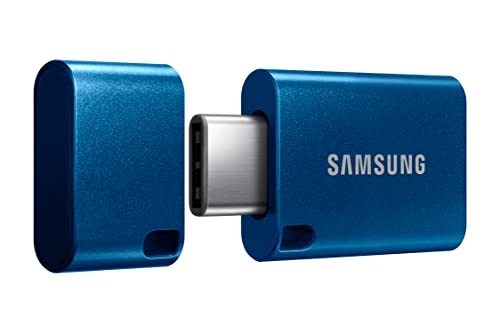 SAMSUNG Samsung Type-C USB Flash Drive 256GB, USB 3.2 Gen 1,…
View on Amazon ↗
Listing names and images come from Amazon and are rechecked against the live listings; last checked Nov 8, 2026. No prices shown; the current price is on the listing.
Scope and limits. This guide covers the USB C flash drive category as a whole, not individual models. It is written from general knowledge of flash memory, connectors, and heat behavior; no product documents, reviews, or in person tests were used, so verify any dimension or speed figure on the listing before buying.