Start with how your hand rests. A large center ball suits desktop use and heavy scrolling, while a thumb ball suits smaller hands and tighter spaces. Decide whether you need extra buttons for macros or a simple layout. Then check the sensor and the bearing system, since that decides how smoothly the ball spins over time.
Hand Position Decides the Whole Feel
Trackballs split into two families by where the ball sits. A thumb ball sits under your thumb, so your fingers stay on the buttons. A center ball sits under your index and middle fingers, so you roll it with your fingertips and click with your thumb or ring finger.
Thumb balls suit smaller hands and people who grip a mouse tightly. The motion comes from the thumb, which reduces wrist movement. Center balls suit larger hands and people who want fine cursor control, because two or three fingers can share the rolling work.
Your desk height matters too. A center ball forces your forearm to rest higher, which can help if you sit low. A thumb ball keeps your hand flatter, which helps if your desk is high.
Ball Size and Bearings Set the Smoothness
The ball itself is usually plastic, sometimes with a coating. A larger ball gives more leverage, so small finger movements produce bigger cursor moves. A smaller ball needs more precise finger control but takes up less room.
The bearings under the ball decide how it feels. Static bearings are small synthetic rubies or ceramic points that the ball rests on. They are cheap and quiet, but they collect skin oil and dust quickly, making the ball feel sticky. Roller bearings are tiny wheels that support the ball. They stay smooth longer but cost more.
Check the listing for the bearing type. If it is not stated, assume static bearings. You can improve static bearings by cleaning the ball and the socket regularly, but the sticky feeling returns.
Button Layout Is a Hidden Spec
Trackballs come with two to eight buttons. Two button models keep your hand relaxed, but you lose shortcuts. Four to five button models cover most work: left, right, back, forward, and sometimes a middle click.
More buttons help programmers and spreadsheet users who map copy, paste, and undo. But every extra button adds a place for dust and a chance to click by accident. Look for a model where the extra buttons sit under your unused fingers, not under the fingers you use to roll the ball.
A scroll wheel or scroll ring is almost universal. A ring around the ball is easier to reach than a wheel between buttons, but it adds a moving part that can collect crumbs.
Programmable Software Changes What You Can Do
Most trackballs let you remap buttons through a driver or a browser based configurator. The software is often more important than the hardware. Check whether the configurator lets you set per application profiles, since a button for copy in a text editor might need to be paste in a terminal.
Some models store settings on the device, so the mapping follows the trackball between computers. Others store settings in the cloud or on the local machine only. If you switch between a work laptop and a home desktop, device stored settings matter.
A few trackballs work without any software, using default button assignments. That is fine for basic use, but it means you cannot change the scroll direction or add a chorded shortcut.
Wireless, Wired, and the Battery Question
Wired trackballs never need charging and have no input lag, but the cable adds clutter and can pull on the device. Wireless models use either a USB receiver or Bluetooth. A receiver usually gives a more stable connection, while Bluetooth saves a port and works with tablets.
Battery life varies widely. Some models use AA or AAA batteries that last months. Others have built in lithium ion batteries that need charging every few weeks. Check whether a rechargeable model works while charging, since some do not.
For travel, a trackball with a built in battery and Bluetooth is the most convenient. For a desk that never moves, a wired model removes one thing to think about.
Desk Space and the Trackball Footprint
A trackball does not need room to move, but it still needs a stable spot. A large center ball model can be as wide as a small paperback. A thumb ball model is often narrower, but it may be taller.
Some trackballs have a wedge shape that tilts your hand to a more neutral angle. That tilt can reduce forearm twist, but it also raises the device, so check your keyboard height. If your keyboard is low and the trackball is high, you create a new bend at the wrist.
On a small desk or a keyboard tray, a compact thumb ball is usually the safest fit. On a wide desk with a monitor arm, a large center ball gives your hand a place to rest.
Cleaning Is a Weekly Habit, Not a Chore
The ball collects oil and dead skin from your fingers. Every week or two, pop the ball out, wipe it with a dry cloth, and blow or brush the socket. A sticky ball is almost always a dirty ball, not a broken one.
Some trackballs have a hole underneath that lets you push the ball out with a finger. Others require a small tool or a firm tap. Check the listing for the removal method. A model that lets you pop the ball out without turning the device over is faster to clean.
Do not use water or solvent on the ball. A dry microfiber cloth is enough. If the socket has visible buildup, a soft brush or a can of compressed air works.
Common Buying Mistakes
One mistake is choosing a ball position based on a photo instead of your hand size. A thumb ball looks compact, but if your thumb is short, reaching the far side of the ball strains the joint. A center ball looks natural, but if your hand is small, your fingers may not reach the buttons without stretching.
Another mistake is ignoring the bearing type. A cheap trackball with static bearings feels smooth in the store and sticky after two weeks of use. If the listing does not mention bearings, the model probably uses static bearings.
Buying extra buttons you will not use is a third mistake. Eight buttons sound useful, but if the software is awkward, you will use two of them and pay for six. Match the button count to the shortcuts you actually use today.
Who Should Skip a Trackball
If you play quick shooters or MOBAs where you need to flick the cursor across a large monitor, a trackball will feel slow. A high DPI gaming mouse with a light body is a better fit for that.
If you switch between many computers and cannot install software, a trackball is still usable, but you lose the remapping features. A simple wired mouse with a standard layout may be less frustrating.
If your wrist pain comes from clicking, not from moving the mouse, a trackball may not help. The fix there is usually a lighter click switch or a vertical mouse. Look at other ergonomic mouse options for that.
What to Check on a Listing
Start with the ball diameter and the device width. The listing may not state the width, so use the product photos with a hand for scale. A ball under 34 mm is small. A ball over 50 mm is large.
Next, look for the bearing type. If the word "bearing" does not appear, ask the seller. Static bearings are not a dealbreaker, but you should know what you are buying.
Finally, check the button count and the software name. If the listing shows a screenshot of the configurator, look for per application profiles. If the software is not shown, check the manufacturer's support page before buying.
| Ball position | Best for | Cleanup effort | Button access | Desk footprint |
|---|---|---|---|---|
| Thumb ball | Small hands, tight spaces | Low, ball pops out easily | Fingers stay on buttons | Compact |
| Finger ball, small | Mixed hand sizes, general work | Medium, more parts around ball | Thumb and ring finger | Medium |
| Finger ball, large | Large hands, long sessions | High, heavy ball and wide socket | Thumb, ring, and pinky | Large |
The table shows the main tradeoff. A thumb ball is easiest to clean and fits a small desk, but it gives you fewer finger options for fine control. A large finger ball gives the most control but demands the most space and the most cleaning.
Trackball Questions People Actually Ask
Is a trackball mouse good for carpal tunnel?
It can be, because it removes the wrist and forearm movement that a regular mouse needs. A trackball keeps your wrist stationary while your fingers roll the ball. The key is to choose a ball position that matches your hand size, since a thumb ball that forces your thumb to stretch can create a new strain. A center ball often works better for carpal tunnel because it spreads the work across two or three fingers.
Which trackball mouse is best for programmers?
Programmers benefit from a trackball with at least four buttons and software that supports per application profiles. That lets you map copy, paste, and build commands to the ball side buttons without moving your hand to the keyboard. A center ball is usually easier for long coding sessions because it gives finer cursor control for selecting text and moving between panes.
What is the difference between a thumb ball and a finger ball?
A thumb ball sits under your thumb, so you roll it with your thumb while your fingers stay on the buttons. A finger ball sits under your index and middle fingers, so you roll it with your fingertips and click with your thumb or ring finger. Thumb balls are more compact and easier to clean. Finger balls give more precise control and suit larger hands.
How do I clean a trackball mouse?
Pop the ball out, wipe it with a dry microfiber cloth, and remove dust from the socket with a soft brush or compressed air. Do this weekly or whenever the ball feels sticky. Avoid water and solvents. If the ball sticks again within a day, the bearings are probably static and need more frequent cleaning.
Is a trackball mouse worth it for gaming?
For turn based games, strategy games, and casual play, yes. For fast competitive shooters, no. A trackball cannot match the flick speed of a light gaming mouse. If you play both, keep a regular mouse for games and use the trackball for work.
The Trackball to Pick for Your Hand
A programmer with medium to large hands who works at a fixed desk gets the most from a center ball model with four or five buttons and per application software. Choose a thumb ball instead if your desk is small, your hands are small, or you travel with the device. The thumb ball trades some fine control for a compact shape and easier cleaning, which matters more on the road.
Real trackball mouse listings, so you can check the points in this guide against actual products. These are affiliate links: as an Amazon Associate we earn from qualifying purchases, at no extra cost to you.
 KENSINGTON Kensington Orbit Trackball Mouse with Scroll Ring (K75327WW), Black-Grey
View on Amazon ↗
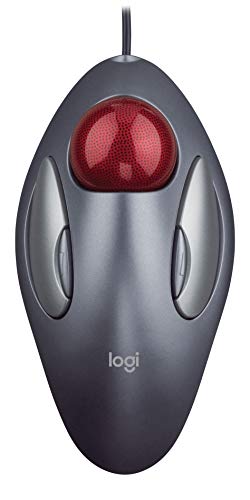 LOGITECH Logitech Trackman Marble Trackball Mouse – Wired USB Ergonomic Mouse…
View on Amazon ↗
 NULEA Nulea Wireless Trackball Mouse Ergonomic 55mm Large Ball Ambidextrous |…
View on Amazon ↗
Listing names and images come from Amazon and are rechecked against the live listings; last checked Nov 8, 2026. No prices shown; the current price is on the listing.
How to read this guide. This guide covers the trackball mouse category as a whole, not specific models. It is written from general knowledge of how these devices work, without reading individual product documents or reviews. Check any dimension or bearing claim on the listing before you buy.