Small to medium hands get a snug fit from the Logitech Lift, while the ProtoArc EM11 NL also targets that size with a rechargeable battery. Medium to large hands fit the UGREEN model, and the TECKNET offers the highest DPI range with quiet left and right clicks. The Anker trades Bluetooth for a simple USB receiver and a low price, and the Uineer adds RGB lighting and a side scroll wheel. The main tradeoff is hand size versus connectivity and power options.
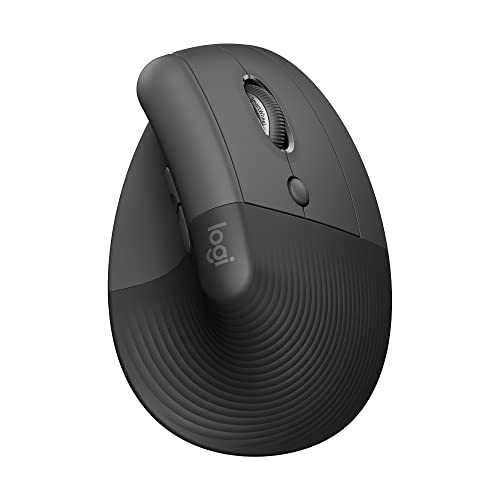
Logitech Lift Vertical Ergonomic Mouse
Best for: Small to medium right hands wanting a quiet, ergo certified mouse
- Designed for small to medium right hands with a snug thumb rest and textured grip.
- Connects via Bluetooth or the included Logi Bolt USB A receiver, with up to two years battery life.
- Whisper quiet clicks and a SmartWheel for smooth scrolling, plus four customizable buttons.
Keep in mind: Plastic parts include certified post consumer recycled plastic, which may affect texture preferences.
Check price on Amazon ↗
UGREEN Ergonomic Wireless Mouse
Best for: Medium to large hands needing dual wireless and high DPI
- Built for medium to large hands with a vertical handshake position to reduce wrist strain.
- Quiet clicks and a 5 button layout for efficient navigation and browsing.
- Adjustable DPI up to 4000 and PTFE glide feet for smooth, quiet tracking.
Keep in mind: Not suitable for small hands, so check the hand size guide in the product images.
Check price on Amazon ↗
TECKNET Ergonomic Mouse
Best for: Users wanting six DPI levels and multidevice switching
- Six adjustable DPI levels from 800 to 4800 for precise control on different surfaces.
- Bluetooth and 2.4GHz modes allow switching among three devices, with the receiver stored in the bottom.
- Quiet left and right clicks for use in libraries or shared spaces.
Keep in mind: Side buttons are not compatible with macOS, so Mac users lose those functions.
Check price on Amazon ↗
ProtoArc EM11 NL Wireless Mouse
Best for: Small to medium hands preferring a rechargeable battery
- Fits hand lengths under 7.5 inches and reduces wrist strain with a 58 degree vertical design.
- Connects to up to three devices via Bluetooth or 2.4G USB A, with a built in 500mAh rechargeable battery.
- Quiet left and right clicks, though the scroll wheel and side buttons are not silent.
Keep in mind: All buttons are not programmable, and forward/back buttons are not compatible with Mac OS.
Check price on Amazon ↗
Anker 2.4G Wireless Ergonomic Mouse
Best for: Buyers wanting a simple USB receiver mouse without Bluetooth
- Uses a 2.4GHz USB receiver only, with no Bluetooth, for plug and play simplicity.
- 800/1200/1600 DPI optical tracking for smooth precision on diverse surfaces.
- Power saving mode after 8 minutes of inactivity; wakes with a right or left click.
Keep in mind: Key click sounds are unavoidable, so it is not a quiet mouse.
Check price on Amazon ↗
Uineer Ergonomic Wireless Vertical Mouse
Best for: Users wanting RGB lighting and a side scroll wheel
- Weighs 105 grams and has a side scroll wheel for horizontal navigation and 7 color LED lights.
- Tri mode connectivity with Bluetooth 5.0, 4.0, and 2.4G, plus switching among three devices.
- Built in 500mAh rechargeable battery lasts weeks on a full charge and fully recharges in about 2 hours.
Keep in mind: First time vertical mouse users may need 1 to 2 weeks to adapt, according to the listing.
Check price on Amazon ↗Product names and images come from the Amazon listings and are rechecked against them (last checked Nov 8, 2026). The highlights restate each listing's own bullet points as published on Nov 8, 2026. Prices change often, so we do not show them. These are affiliate links: as an Amazon Associate we earn from qualifying purchases, at no extra cost to you.
How the Shortlist Was Put Together
These six mice come from real Amazon listings in the Computers & Accessories department. Only the details stated in each listing are used here. No units were handled by us, and no claims about feel or performance go beyond what the manufacturer wrote.
The shortlist spans different hand sizes, connection types, and power sources. Some mice target small to medium hands, like the Logitech Lift and ProtoArc EM11 NL, while the UGREEN is meant for medium to large hands. Connectivity ranges from Bluetooth and 2.4GHz dual modes to USB receiver only. Power options include replaceable batteries and built in rechargeable batteries.
This spread of designs and sizes lets you compare the stated attributes side by side. The table below lists the attributes each listing actually states, so you can see where one model has a feature another lacks. Use the selection guide on vertical mouse ergonomics for more background on wrist angle.
Who Should Skip These Picks
If you are left handed, none of these mice are designed for you. Every listing specifies right handed use only. A left handed user would need a different design entirely, such as a left hand vertical mouse or an ambidextrous model.
If you need programmable buttons on every control, check the listing carefully. The ProtoArc EM11 NL states all buttons are not programmable. The Logitech Lift has four of six buttons customizable, but the others do not mention full programmability.
If you want a mouse that works with a USB-C receiver, the ProtoArc EM11 NL is not a fit. Its listing says a USB-C receiver is not included and the Type-C cable is for charging only. Look for a model that specifically states USB-C receiver support.
If you need silent operation across all buttons, most of these mice are only quiet on the left and right clicks. The Anker listing says key click sounds are unavoidable. Check the listing text for which buttons are actually silent.
What to Confirm Before Buying
Hand size is the first thing to check. The UGREEN listing warns it is not suitable for small hands and directs buyers to a hand size guide in the product images. The ProtoArc EM11 NL is for hand lengths under 7.5 inches. Measure your hand and compare it to the listing's guidance.
Connection type matters for your devices. Some mice use Bluetooth and a 2.4GHz USB receiver, while the Anker uses only a USB receiver with no Bluetooth. If you have a device without a USB A port, Bluetooth only or dual mode mice are necessary.
Power source is another stated difference. The Logitech Lift uses one or two AA batteries depending on the version, the Anker and TECKNET need two AAA batteries, and the ProtoArc EM11 NL and Uineer have built in rechargeable batteries. Check what is included, as batteries are often not included.
Button compatibility with macOS is a common catch. The TECKNET listing says side buttons are not compatible with macOS. The ProtoArc EM11 NL says forward and back buttons are not compatible with Mac OS. If you use a Mac, confirm which buttons will work.
Comparison of Stated Attributes
The table below compares the attributes that the listings actually state. Where a listing does not mention a feature, the table says Not listed. This lets you see at a glance which mice cover your needs.
Hand size guidance is stated for only some models. The Logitech Lift and ProtoArc EM11 NL are for small to medium hands, the UGREEN for medium to large hands, and the others do not specify a hand size in the listing text.
DPI levels vary widely. The TECKNET offers six levels up to 4800, the UGREEN offers four up to 4000, the Uineer offers four up to 3200, the ProtoArc EM11 NL offers three up to 2400, the Anker offers three up to 1600, and the Logitech Lift does not state a DPI number.
Quiet clicking is stated for the Logitech Lift, UGREEN, TECKNET, ProtoArc EM11 NL, and Uineer, though often only for left and right buttons. The Anker listing says key click sounds are unavoidable. Check the exact wording in each listing for which buttons are quiet.
| Model | Hand Size | Connectivity | DPI Levels | Power | Quiet Clicks |
|---|---|---|---|---|---|
| Logitech Lift | Small to medium right hands | Bluetooth or Logi Bolt USB A | Not listed | Up to 2 years battery life (battery type not stated) | Whisper quiet clicks |
| Anker | Not listed | 2.4GHz USB receiver only | 800/1200/1600 | 2 AAA batteries (not included) | Key click sounds unavoidable |
| UGREEN | Medium to large hands | Bluetooth and 2.4G | 1000/1600/2000/4000 | 1 AA battery | Quiet click buttons |
| TECKNET | Not listed | Bluetooth 5.0/3.0 and 2.4GHz USB A | 800/1200/1600/2400/3200/4800 | 2 AAA batteries (not included) | Left and right clicks silent |
| ProtoArc EM11 NL | Hand lengths under 7.5 inches | Bluetooth and 2.4G USB A | 1000/1600/2400 | Built in 500mAh rechargeable | Left and right clicks silent |
| Uineer | Not listed | Bluetooth 5.0, 4.0, and 2.4G | 800/1600/2400/3200 | Built in 500mAh rechargeable | Left and right buttons silent |
Which Design Fits Your Setup
If your desk has limited USB ports, a Bluetooth mouse frees up that port. The Logitech Lift, UGREEN, TECKNET, ProtoArc EM11 NL, and Uineer all offer Bluetooth. The Anker does not, so it is best for a simple USB receiver setup.
If you switch among multiple computers, look for multidevice switching. The UGREEN, TECKNET, ProtoArc EM11 NL, and Uineer each support up to three devices. The Logitech Lift and Anker do not state multidevice switching in their listings.
For a clutter free desk, a rechargeable mouse avoids battery swaps. The ProtoArc EM11 NL and Uineer have built in batteries with USB-C charging. The others use replaceable batteries, which may be easier for travel where charging is inconvenient.
For travel, size and weight matter. The Uineer weighs 105 grams, and the Anker lists product dimensions of 120 by 62.8 by 74.8 mm and a weight of 3.4 oz. Other listings do not state weight or dimensions, so check the product page if portability is a priority.
Questions Buyers Ask About Vertical Wireless Mice
Do I need a vertical mouse instead of a regular mouse?
Vertical mice place your hand in a handshake position, which the listings say reduces wrist rotation and strain. If you have wrist discomfort with a flat mouse, a vertical design may help. The selection guide linked above explains the ergonomic reasoning in more detail.
Can I use these mice with a Mac?
Most listings state compatibility with macOS, but some buttons may not work. The TECKNET says side buttons are not compatible with macOS, and the ProtoArc EM11 NL says forward and back buttons are not compatible. Check the listing for your model before buying.
How do I know if a vertical mouse will fit my hand?
Some listings give hand size guidance. The Logitech Lift and ProtoArc EM11 NL are for small to medium hands, and the UGREEN is for medium to large hands. Measure your hand length and compare it to the listing's size guide or stated measurements.
Which Ergonomic Wireless Mouse Should You Get?
A buyer with small to medium hands who wants a quiet, ergo certified mouse and long battery life should get the Logitech Lift. Its listing states a fit for small to medium right hands, whisper quiet clicks, and up to two years of battery life. A buyer who needs to switch among three devices and wants a high DPI range should get the TECKNET. Its six DPI levels up to 4800 and Bluetooth plus 2.4GHz modes cover precise work and multidevice setups.
What this guide is. The picks were chosen from the listing details only, comparing stated hand sizes, connectivity, DPI, power, and quiet click claims to cover a spread of designs and sizes. No units were handled, and any feature not stated in a listing is marked as Not listed rather than assumed.