Start with your hand size and how you hold a mouse, because those decide the shape. Then check the sensor quality and connection type for your desk. A palm grip and a large hand need a tall, wide body. A claw or fingertip grip does better with a shorter, narrower shell. The main tradeoff is comfort against portability: a bigger ergonomic shape supports your wrist but weighs more and takes more bag space.
Start With Your Hand, Not the Marketing
Measure from the base of your palm to the tip of your middle finger. Under 17 cm is a small hand, 17 to 19 cm is medium, and over 19 cm is large. Compare that number to the mouse length in the listing, which is often given in millimeters.
Mice that are too long force your palm to overextend. Too short and your fingers curl tightly over the buttons. A good fit lets your fingers rest with a slight curve and your wrist stay straight.
Grip changes the size you need. A palm grip rests your whole hand on the mouse, so it wants length and height. A claw grip arches your fingers, so a shorter body works. A fingertip grip only touches the mouse with your fingertips, so a small, light shell is best.
For carpal tunnel or tendon pain, a vertical or angled mouse keeps your forearm in a handshake position. That reduces pressure on the median nerve compared to a flat mouse that twists your wrist toward the desk.
The Three Design Types and What They Trade
Vertical mice turn your hand about 50 to 60 degrees from the desk. They reduce forearm pronation, which is the twist that aggravates wrist pain. The tradeoff is that they are tall and can feel unstable for fast, precise clicks.
Trackball mice keep your hand still while your thumb or fingers roll a ball. They help with shoulder and elbow pain because you do not move your arm. They take time to learn and are not ideal for twitchy gaming.
Contoured standard mice look like a regular mouse but with a deeper thumb groove and a higher left side for right handed users. They offer moderate support without the learning curve of a vertical or trackball. They still keep your wrist flatter than a handshake position.
For open plan offices, a quiet click switch matters. Many ergonomic mice have silent or low noise buttons, which your coworkers will appreciate. Check the listing for sound ratings or descriptions like 'silent click'.
Read the Listing Like a Checklist
Check the sensor type. An optical sensor works on most desks but can skip on glass. A laser sensor tracks on more surfaces, including glass, but can feel jittery at high speeds. For general office use, an optical sensor with a DPI range of 800 to 1600 is plenty.
Look at the connection. A 2.4 GHz USB receiver gives a stable connection with little lag, but it uses a USB port and can be lost. Bluetooth connects directly to your laptop without a dongle, but can have more latency and occasional dropouts. For gaming, a wired or 2.4 GHz connection is better than Bluetooth.
Check the battery type. Built in rechargeable batteries save money long term but add weight and need a cable. AA or AAA batteries are easy to replace and let you carry spares for travel, but they add ongoing cost.
For programmers or anyone who works long hours, look for programmable buttons. Extra buttons near the thumb can be mapped to copy, paste, or other shortcuts. Make sure the software works with your operating system, especially for Linux.
Weight matters more than you think. A lighter mouse reduces fatigue over a full day. A heavier mouse can feel more stable for precise work. For travel, a mouse under 100 grams is easier to pack and use on a cramped tray table.
| Design type | Wrist angle | Learning curve | Best for | Watch out for |
|---|---|---|---|---|
| Vertical mouse | Near handshake | A few days | Carpal tunnel, long office hours | Bulky, less precise for fast clicks |
| Trackball mouse | Neutral, no arm move | One to two weeks | Shoulder pain, small desks | Thumb fatigue, not for gaming |
| Contoured standard | Slight tilt | Immediate | General office, mixed use | Still flatter than vertical |
| Compact travel | Flat | Immediate | Bags, cafes, presentations | Little wrist support |
A contoured standard mouse is the easiest switch for most people. A vertical mouse gives the most relief for wrist pain. A trackball is best when moving your arm hurts more than your wrist.
Mistakes That Turn a Comfort Buy Into a Return
Buying by brand reputation instead of hand size. A mouse that wins awards for large hands can cause cramps for a small hand. Dimensions are the first filter.
Ignoring the grip style. A palm grip user who buys a compact travel mouse will feel their fingers drag on the desk. A claw grip user who buys a tall vertical mouse will struggle to click precisely.
Choosing Bluetooth for a desktop with a clear USB port. The 2.4 GHz dongle is more stable and has lower latency. Bluetooth is for laptops and tablets where a dongle is inconvenient.
Forgetting about the scroll wheel. A notched wheel is better for spreadsheets and code because it moves line by line. A free spinning wheel is faster for long documents but can overshoot. Check if the wheel has a toggle for both modes.
Overlooking the left handed problem. Most ergonomic mice are right handed only. If you are left handed, look for a symmetrical or ambidextrous shape, or a trackball with a centered ball.
Assuming a higher DPI is always better. Above 3000 DPI, most people lower the cursor speed in software. A DPI range of 800 to 2400 covers nearly all office and programming work.
Long Term Costs You Do Not See on the Box
Battery replacement is the main ongoing cost. A mouse that uses two AA batteries every three months adds up over years. A built in battery has a lifespan of roughly 300 to 500 charge cycles before capacity drops.
Mouse feet wear down, especially on rough desk surfaces. Replacement feet are cheap and easy to install, but check that the model uses a standard shape you can find.
Software support matters for programmable buttons. Some brands stop updating their software after a few years, which can break button mapping on a new operating system. Look for a mouse that stores button settings in onboard memory.
A wrist rest is a separate purchase for many flat mice. Vertical and contoured mice often have built in palm support, which saves you that cost. For travel, a compact mouse with a small wrist rest can still fit in a laptop sleeve.
Who Should Skip an Ergonomic Mouse
Competitive gamers should look at gaming mice with high polling rates and low click latency. Ergonomic shapes often trade speed for comfort, and a vertical mouse is a disadvantage in fast twitch games.
People who work on glass desks without a mouse pad should check the sensor surface compatibility. Most optical sensors skip on clear glass, and even laser sensors can struggle on reflective surfaces.
If you already use a drawing tablet or a trackpad for everything, an ergonomic mouse adds clutter. A vertical mouse is not a fix for poor posture at your chair or desk height.
For travel every week, a compact standard mouse or a trackball with a small footprint may be better than a bulky vertical mouse. Check the dimensions against your bag's front pocket before buying.
Quiet Clicks for Open Plan Offices
Open plan offices amplify every click. A mouse with silent switches can reduce the noise by half or more compared to a standard click. The difference is mechanical, not electronic: a rubber dampener inside the switch absorbs the impact.
Look for words like 'silent', 'quiet', or 'low noise' in the listing. Some mice have a noise rating in decibels, but those numbers are hard to compare across brands. A better test is to watch a video of the click sound before buying.
A trackball mouse is naturally quiet because the ball rolls instead of clicking. But the scroll wheel and buttons still make noise. Check if those are also dampened.
For programmers who type and click all day, a quiet mouse reduces the annoyance for nearby coworkers. It is a small change that improves the whole room.
Travel Mice That Do Not Sacrifice Your Wrist
A travel mouse needs to fit in a bag pocket and survive being tossed around. Look for a compact shell under 10 cm long and a weight under 100 grams.
Some travel mice have a folding or flat design that packs thin but opens into a more ergonomic shape. These are a good middle ground for a week long trip.
A trackball travel mouse has no need for a flat surface, so it works on a plane tray or a couch armrest. That is a real advantage for working in tight spaces.
For carpal tunnel sufferers who travel, a small vertical mouse exists but is rare. Check the height and width carefully, because a mini vertical mouse may still be too tall for a slim bag.
Ergonomic Mouse Questions Buyers Actually Ask
Is an ergonomic mouse worth it for carpal tunnel?
Yes, for most people with wrist pain. A vertical mouse reduces the forearm twist that compresses the median nerve. It is not a cure, and you should still take breaks and check your desk height. But a handshake style grip often relieves symptoms within a few weeks of daily use.
Which ergonomic mouse is best for small hands?
Look for a mouse under 11 cm long and under 7 cm wide. A contoured standard mouse with a low profile often fits better than a tall vertical mouse. Check that the thumb rest is not too far forward, because that is the most common fit problem for small hands.
What is the difference between 2.4 GHz and Bluetooth for a mouse?
A 2.4 GHz mouse uses a small USB receiver and has lower latency, usually under 1 ms. Bluetooth connects directly to your device without a dongle but can have 10 to 20 ms of lag and occasional dropouts. For office work either is fine, but for gaming or precise editing use 2.4 GHz.
Can I use an ergonomic mouse for gaming?
For casual or strategy games, yes. For competitive shooters, no. Ergonomic mice, especially vertical and trackball models, have slower click response and less precise sensor tracking than gaming mice. A contoured standard mouse with a high polling rate is the closest compromise.
How do I compare ergonomic mouse sizes online?
Find the exact dimensions in the listing, usually in millimeters. Measure your hand from palm base to middle fingertip. Match that to the mouse length. Also check the grip width, which is the distance across the top where your thumb and ring finger rest. A width too narrow or too wide causes strain.
Which Ergonomic Mouse Fits Your Hand
A person who works eight hours a day at a desk and feels wrist or forearm pain should start with a vertical mouse in their hand size. It gives the most relief for the least learning time. A traveler who works from cafes and planes should instead pick a compact trackball or a folding travel mouse, because a vertical mouse is too bulky for a slim bag and a tray table.
Real ergonomic wireless mouse listings, so you can check the points in this guide against actual products. These are affiliate links: as an Amazon Associate we earn from qualifying purchases, at no extra cost to you.
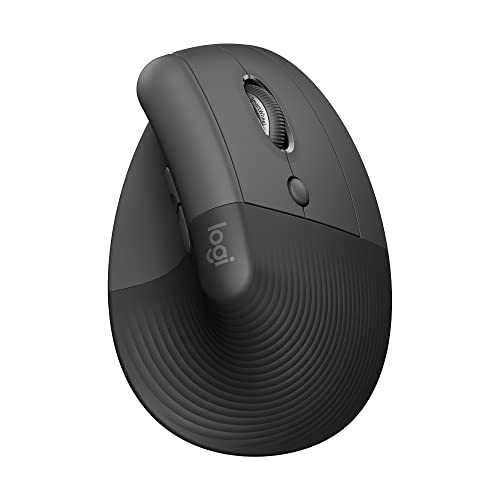 LOGITECH Logitech Lift Vertical Ergonomic Wireless Mouse - Graphite | Connect…
View on Amazon ↗
 ANKER Anker 2.4G Wireless Ergonomic Mouse, Right Hand Vertical Mouse USB…
View on Amazon ↗
 PROTOARC ProtoArc EM11 NL Wireless Ergonomic Vertical Mouse, Rechargeable, Black |…
View on Amazon ↗
Listing names and images come from Amazon and are rechecked against the live listings; last checked Nov 8, 2026. No prices shown; the current price is on the listing.
Scope and limits. Use this guide as a checklist to hold against any listing you open. It is written from general knowledge of ergonomic mouse design, not from testing individual models, so verify every dimension and feature on the product page before you buy.