The SanDisk Professional 5TB G Drive ArmorATD suits buyers who want a large, rugged USB-C drive for Mac or PC backups. The Seagate Portable 5TB is a straightforward high capacity pick for anyone needing simple plug and play storage. The ADATA HD710 Pro 2TB is the choice for buyers who need shockproof, waterproof, and dustproof protection. The PMHKM 500GB and UnionSine 500GB are compact options for console game storage and everyday file transfers. The WD 2TB Elements is a lightweight, no fuss drive for Windows users. The main tradeoff is between capacity, durability, and physical size.

SanDisk Professional 5TB G Drive ArmorATD
Best for: Mac users who need a large, rugged drive with USB-C
- USB-C 5Gbps connection for quick file backup and storage.
- Anodized aluminum enclosure and easy grip bumper for strength and impact protection.
- 5TB capacity and read speeds up to 130MB/s for large file transfers.
Keep in mind: Works with macOS out of the box; Windows requires reformat.
Check price on Amazon ↗
Seagate Portable 5TB External Hard Drive
Best for: Buyers who want simple high capacity storage for PC or Mac
- 5TB capacity for storing and accessing content on the go.
- Plug and play with included 18 inch USB 3.0 cable.
- Works with Windows or Mac computers; automatic recognition on connection.
Keep in mind: Listing notes available storage capacity may vary.
Check price on Amazon ↗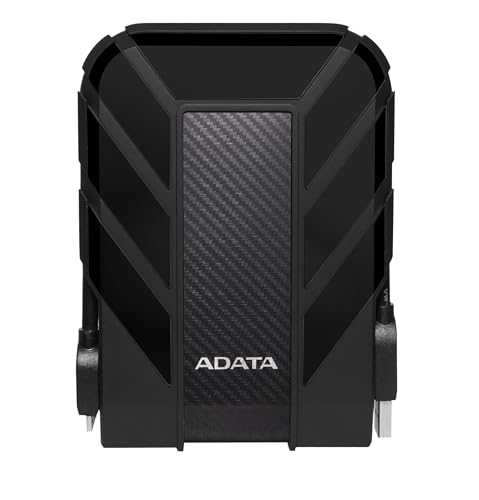
ADATA HD710 Pro 2TB External Hard Drive
Best for: Gamers, students, and professionals who need a tough, travel ready drive
- Triple layered construction with IP68 waterproof and IP6X dustproof design.
- Military grade shock resistance (MIL STD 810G 516.6).
- 2TB capacity with USB 3.1 interface; compatible with Mac, PC, and Linux.
Keep in mind: Rugged design adds bulk compared to slim portable drives.
Check price on Amazon ↗
PMHKM 500GB External Hard Drive
Best for: Console gamers who want to offload last gen games and free up space
- 500GB capacity expands console storage for PS4 and Xbox One games.
- Reinforced silicone outer casing protects against bumps and drops.
- USB 3.0 interface with up to 5Gbps transfer speed; weighs only 0.3lb.
Keep in mind: PS5 and Xbox Series X/S games cannot be run or stored directly from this drive.
Check price on Amazon ↗
UnionSine 500GB Ultra Slim Portable External Hard Drive
Best for: Buyers who want a pocket sized, quiet drive for everyday file transfers
- Ultrathin design with antislip grip and heat dissipating stripes.
- JMicron 578 solution for noise free operation.
- Theoretical read speeds up to 125MB/s and write speeds up to 103MB/s.
Keep in mind: 500GB capacity is smaller than many desktop backup drives.
Check price on Amazon ↗
WD 2TB Elements Portable External Hard Drive
Best for: Windows users who want a lightweight, plug and play drive for documents and media
- 2TB capacity in a small, lightweight enclosure.
- Plug and play expandability with no software to install.
- SuperSpeed USB 3.2 Gen 1 (5Gbps) interface.
Keep in mind: Listing focuses on Windows compatibility; Mac support not specified.
Check price on Amazon ↗Product names and images come from the Amazon listings and are rechecked against them (last checked Nov 8, 2026). The highlights restate each listing's own bullet points as published on Nov 8, 2026. Prices change often, so we do not show them. These are affiliate links: as an Amazon Associate we earn from qualifying purchases, at no extra cost to you.
Capacity and File Storage
The listed capacities range from 500GB to 5TB, so the right pick depends on how much data you plan to store. The Seagate Portable 5TB and SanDisk Professional 5TB G Drive ArmorATD offer the most space for large backups, photo libraries, or game collections. The WD 2TB Elements and ADATA HD710 Pro 2TB sit in the middle, while the PMHKM 500GB and UnionSine 500GB are best for smaller file sets or as secondary drives.
For buyers who keep years of photos, videos, and documents, a 5TB drive means fewer worries about running out of space. The Seagate drive is simple and large, while the SanDisk Professional adds ruggedness at the same capacity. Both are heavier than smaller drives, but that is the tradeoff for capacity.
If you mainly need to move files between computers or offload a few console games, a 500GB or 2TB drive is lighter and often cheaper. The PMHKM 500GB specifically mentions expanding console storage for last gen games, which is a practical use for a smaller drive. The UnionSine 500GB is even slimmer and fits in a pocket.
One detail to note: the Seagate listing says available storage capacity may vary, which is common for all hard drives because of formatting and system files. The exact usable space will be slightly less than the advertised number on every drive.
- 5TB options: Seagate Portable, SanDisk Professional G Drive ArmorATD
- 2TB options: WD Elements, ADATA HD710 Pro
- 500GB options: PMHKM, UnionSine
| Drive | Advertised Capacity | Interface | Durability | Listed Compatibility |
|---|---|---|---|---|
| Seagate Portable 5TB | 5TB | USB 3.0 | Not listed as rugged | Windows, Mac, PS4, Xbox |
| WD 2TB Elements | 2TB | USB 3.2 Gen 1 / USB 3.0 | Not listed as rugged | Windows, PC & Mac |
| PMHKM 500GB | 500GB | USB 3.0 and USB-C | Silicone casing, shock protection | Windows, Mac, Linux, PS4, PS5, Xbox One, Xbox Series X/S |
| UnionSine 500GB | 500GB | USB 3.0 and USB 2.0 | Aluminum antiinterference layer | PC, Mac, Laptop, PS4, Xbox One, Xbox 360 |
| ADATA HD710 Pro 2TB | 2TB | USB 3.1 | IP68 waterproof, IP6X dustproof, MIL STD 810G shockproof | Mac, PC, Linux |
| SanDisk Professional 5TB G Drive ArmorATD | 5TB | USB-C, USB 3.2 Gen 1 | Anodized aluminum, easy grip bumper | MacOS, Windows via reformat |
Interface and Connection
Every drive on this list uses a USB connection, but the exact port and speed vary. The SanDisk Professional G Drive ArmorATD is the only one with a USB-C connector, which is convenient for newer laptops. It also offers USB 3.2 Gen 1 speeds, the same 5Gbps standard as the WD 2TB Elements and PMHKM 500GB. The PMHKM drive includes both USB 3.0 and USB-C options, though the listing does not say if a USB-C cable is included.
The Seagate Portable 5TB and UnionSine 500GB use standard USB 3.0, which is backward compatible with USB 2.0 ports. The ADATA HD710 Pro 2TB uses USB 3.1, which also supports fast transfers. For most buyers, any of these interfaces will be fast enough for backups and file transfers, but if you have a USB-C-only laptop, the SanDisk Professional or PMHKM drives are more convenient.
The PMHKM listing notes that its USB 3.0 interface supports transfer speeds up to 5Gbps, which is the same theoretical maximum as the other USB 3.0 and 3.2 Gen 1 drives. The UnionSine listing gives specific read and write speeds of up to 125MB/s and 103MB/s, which is useful for estimating real world performance. The SanDisk Professional listing states read speeds up to 130MB/s.
No drive on this list requires special software for basic use. The Seagate, WD, UnionSine, and PMHKM listings all mention plug and play or automatic recognition. The SanDisk Professional note about reformatting for Windows is the only extra step, and it only applies to Windows users.
- USB-C: SanDisk Professional G Drive ArmorATD, PMHKM 500GB
- USB 3.0: Seagate Portable 5TB, UnionSine 500GB, PMHKM 500GB
- USB 3.2 Gen 1: WD 2TB Elements, SanDisk Professional G Drive ArmorATD
- USB 3.1: ADATA HD710 Pro 2TB
Durability and Physical Design
If you carry your drive in a bag, on a job site, or on outdoor trips, durability matters. The ADATA HD710 Pro 2TB is the most explicitly rugged, with IP68 waterproof, IP6X dustproof, and military grade shock resistance. That makes it a good fit for students, field workers, or anyone who treats their gear roughly. The SanDisk Professional G Drive ArmorATD also has a premium anodized aluminum enclosure and an easy grip bumper, which provides solid protection without the full IP rating.
The PMHKM 500GB has a reinforced silicone outer casing that buffers impacts from bumps and short drops, according to the listing. It is also very light at 0.3lb. The UnionSine 500GB has an aluminum antiinterference layer that helps with heat dissipation and data protection, plus a striped antislip design. The Seagate Portable 5TB and WD 2TB Elements do not mention rugged features, so they are best kept in a padded case or stationary spot.
Size and weight differ a lot. The UnionSine is ultrathin and pocket sized, which is great for daily carry. The PMHKM is also lightweight and compact. The Seagate and SanDisk Professional drives are larger because of their 5TB capacity. The ADATA HD710 Pro is bulkier than standard portable drives because of its triple layered construction.
For buyers who need a drive that can survive a drop or splash, the ADATA or SanDisk Professional are the safer choices. For desk use or occasional travel in a laptop bag, any of the slimmer drives will work.
- Most rugged: ADATA HD710 Pro (IP68, IP6X, MIL STD 810G)
- Aluminum enclosure with bumper: SanDisk Professional G Drive ArmorATD
- Silicone casing: PMHKM 500GB
- Slim and light: UnionSine 500GB, WD 2TB Elements
Compatibility and Use Cases
All drives work with Windows and Mac in some form, but the details vary. The SanDisk Professional is ready for macOS out of the box and requires reformatting for Windows. The WD 2TB Elements is listed as for Windows, but the title also mentions PC & Mac, so it likely works with both after formatting. The Seagate, PMHKM, UnionSine, and ADATA drives all list Windows and Mac compatibility, and several also list Linux or game consoles.
For console gaming, the PMHKM 500GB is the most explicit. It can store and play PS4 and Xbox One games directly, freeing up internal console space. It also notes that PS5 and Xbox Series X/S games cannot be run or stored directly from the external drive, but you can offload older games to make room. The Seagate and UnionSine listings also mention PS4 and Xbox compatibility, but without the same level of detail.
For Mac users, the SanDisk Professional is the smoothest plug and play option. The ADATA HD710 Pro lists Mac, PC, and Linux compatibility, which is useful for mixed environments. The PMHKM also lists Linux. The WD Elements is focused on Windows, so Mac users should check the listing or reformat.
If you need a drive for backups, any of these will work. The Seagate and WD drives are straightforward for that purpose. If you need a drive for travel or rough conditions, the ADATA or SanDisk Professional are better. If you want a drive for console game storage, the PMHKM is the most specific choice.
- MacOS ready: SanDisk Professional G Drive ArmorATD
- Windows focused: WD 2TB Elements
- Console game storage: PMHKM 500GB, Seagate Portable 5TB, UnionSine 500GB
- Linux listed: ADATA HD710 Pro, PMHKM 500GB
Before You Buy: What to Confirm
Check the exact interface and cable included. Some drives come with USB-C to USB-C cables, others with USB A to USB-C or USB A to MicroB. The SanDisk Professional listing specifies USB-C but not the cable type. The Seagate listing includes an 18 inch USB 3.0 cable. The others do not always state what is in the box, so verify before ordering if you need a specific cable.
Confirm the usable capacity. Every hard drive formats to less than the advertised number. The Seagate listing explicitly says available storage capacity may vary. If you need a certain amount of space for a backup, leave a buffer.
Look at the warranty and support. The UnionSine listing mentions a three year manufacturer's warranty and free technical support. The Seagate listing includes a 1 year Rescue Service. The other listings do not state warranty terms, so check the product page if that matters to you.
If you plan to use the drive with a game console, read the compatibility notes carefully. The PMHKM listing is clear about PS5 and Xbox Series X/S limitations. Other drives may have similar restrictions that are not mentioned. For Mac users, the SanDisk Professional requires reformatting for Windows, but works out of the box with macOS.
- Check included cable type and length
- Confirm usable capacity after formatting
- Note warranty and support terms
- Read console compatibility notes for new gen systems
How We Chose These Drives
We started with the listing data for six external hard drives and compared the stated features: capacity, interface, durability, compatibility, and included accessories. We looked for a spread of designs and sizes, from slim 500GB pocket drives to rugged 5TB travel drives, so different buyers can find a match.
No units were handled by us. All information comes from the listing text provided by the manufacturer or seller. We did not add any specs, materials, or compatibility claims that were not in the listings.
The shortlist includes drives with different strengths: high capacity, ruggedness, console gaming support, and ultraportability. This lets you choose based on what matters most to you.
For more detail on how drive interfaces affect backups, see the selection guide linked below.
- Compared only listing stated features
- Included 500GB, 2TB, and 5TB capacities
- Covered USB A and USB-C interfaces
- Included rugged and slim designs
Questions Buyers Ask About Portable Hard Drives
Do I need a rugged drive if I only use it at home?
If the drive stays on a desk and is never moved, a standard portable drive like the Seagate or WD Elements is fine. Rugged drives like the ADATA HD710 Pro or SanDisk Professional add weight and cost, but they protect against drops, dust, and water if you travel or work in rough conditions.
Can I use these drives with my PS5 or Xbox Series X?
The PMHKM listing states that PS5 and Xbox Series X/S games cannot be run or stored directly from the external hard drive. However, you can use the drive to store and play PS4 or Xbox One games, which frees up internal console space for newer titles. Check the specific drive listing for exact compatibility.
What is the difference between USB 3.0 and USB 3.2 Gen 1?
USB 3.2 Gen 1 is the same speed as USB 3.0, both offering up to 5Gbps. The naming changed over time, but the performance is identical. USB 3.1 also supports faster speeds in some cases, but for these hard drives, the real world transfer rates are limited by the drive mechanism, not the USB standard.
Which External Hard Drive Should You Get?
A Mac user who wants a large, tough drive for backups and travel should get the SanDisk Professional 5TB G Drive ArmorATD. It has USB-C, a 5TB capacity, and an aluminum enclosure with a bumper. A console gamer who wants to offload PS4 or Xbox One games and free up internal space should pick the PMHKM 500GB. Its silicone casing and 0.3lb weight make it easy to carry, and the listing clearly explains the console limitations. For everyone else, the Seagate Portable 5TB is the simplest high capacity choice.
Scope and limits. The picks were chosen by comparing the listing details: capacity, interface, durability, compatibility, and included accessories. We looked for a spread of designs and sizes, from slim 500GB drives to rugged 5TB models. No units were handled by us; all information comes from the listing text only.