Start with your room and play style. A 2.4 GHz USB dongle gives the lowest latency for competitive play, while Bluetooth suits casual couch sessions. Then check the ear cushion shape: oval or D shaped cups usually fit glasses and larger ears better than round ones. Finally, decide if you need a boom microphone or if a built in mic is enough.
Connection Type Sets the Floor
A wireless gaming headset uses one of three links to your console or PC. A 2.4 GHz USB dongle creates a dedicated signal that keeps audio and voice in sync with the action. This matters most in shooters, fighting games, or any title where a half second delay feels like a loss. Bluetooth is more universal, since it pairs with phones, tablets, and some consoles without taking a USB port. The trade: Bluetooth can add noticeable lag unless the headset and source both support a low latency codec.
Some headsets offer both connections. Check the listing for a physical switch or a companion app that toggles between dongle and Bluetooth. A dual connection lets you take a call on your phone while game audio continues, but it often shortens battery life. For a living room setup, the dongle usually wins. For travel or handheld play, Bluetooth is the simpler pick.
What the Ear Cushion Shape Actually Changes
The shape of the ear cushion, not the headband, usually decides whether a headset stays comfortable past hour two. Round cushions are the oldest design and work fine for smaller ears, but they can press on the edge of larger ears or the arms of glasses. Oval cushions give more vertical room, which helps if your ears stick out or you wear thick frames. D shaped cushions copy the natural curve of the ear, leaving a little extra space behind the jaw.
Check the listing for the inner cushion dimensions, not just the outer cup size. A number like 60 by 40 millimeters tells you more than 'large ear cups'. Memory foam inside the cushion also matters: it holds its shape longer than plain foam and returns to form between sessions. If the listing says nothing about cushion shape or inner size, assume a round cushion and plan for a possible return.
Microphone Style Changes How You Sound
A boom microphone sits on a flexible arm near your mouth. It captures your voice clearly and rejects some background noise, which helps in a busy living room. A built in or hidden microphone sits inside the ear cup and picks up sound from farther away. That means more room echo and keyboard clicks in your voice chat.
For family gaming or couch coop, a detachable boom mic is the most flexible choice. You can remove it for solo play or use it for clear callouts. If you mostly play alone or use the headset for movies, a built in mic is fine. Check whether the mic mutes by flipping it up, pressing a button, or using an app. A physical mute is easier to find in the dark.
Battery Life and Charging Habits
Wireless headsets need power, and the real question is how often you want to plug in. Budget models often run 15 to 20 hours on a charge. Mid range and premium headsets can reach 30 to 40 hours or more. Check whether the listing states battery life with lighting enabled or disabled, since RGB effects can cut runtime by a third.
Look for a USB-C charging port. It matches cables you already own and often charges faster than older micro USB. Some headsets include a charging dock or a quick charge feature, such as 15 minutes for a few hours of play. If you game in long sessions, a headset with a low battery warning tone or app notification prevents a mid match shutdown.
Weight and Clamping Force
A heavy headset or one that squeezes too hard becomes painful before the battery dies. Most wireless gaming headsets weigh between 250 and 350 grams. Lighter models feel better for long flights or couch sessions, but they may use smaller drivers or less padding. Heavier models can feel premium and block more outside noise, yet they tire your neck after a few hours.
Clamping force is the sideways pressure the headband puts on your head. It is rarely listed, so compare the headband material and adjustment range instead. A steel or aluminum band usually holds its tension longer than plastic. A wider, padded band spreads pressure across more of your skull. If you wear glasses, look for cushions with a soft foam density and a notch or channel for the temple arms.
Reading a Listing Before You Buy
Start with the connection type and the platform compatibility. Some headsets work on PC and PlayStation but not Xbox, or they need a separate dongle for each console. Check the box contents: a dongle, a charging cable, and a detachable mic are the basics. If the listing shows a 3.5 millimeter cable, the headset can also run wired, which is useful when the battery dies.
Then look at the driver size. A 40 millimeter or 50 millimeter driver does not guarantee better sound, but it hints at how much low end the headset can produce. Frequency response numbers like 20 Hz to 20 kHz are not useful without a measurement of how flat or colored the sound is. Skip that spec and instead check whether the listing mentions a companion app with an equalizer, sidetone, or mic monitoring.
Finally, verify the return policy. Ear cushion comfort is personal, and a headset that feels fine in a store can hurt after an hour at home. A listing that allows opened box returns gives you a safety net. If the seller does not answer questions about cushion dimensions or battery life, treat that as a red flag.
| Cushion Shape | Fit for Glasses | Pressure Points | Suits |
|---|---|---|---|
| Oval | Good | Top of ear | Most users, long sessions |
| D shaped | Best | Jaw and temple | Glasses wearers, larger ears |
| Round | Fair | Ear edges | Smaller ears, short sessions |
Who Should Skip a Wireless Headset
A wired headset is the better choice if you play competitive games on a desktop and never move. It costs less, has no battery to manage, and adds zero latency. A wired headset also works with any device that has a headphone jack, including older consoles and handhelds.
If you need a headset for both gaming and work calls, a wireless model with a boom mic can do double duty, but a dedicated USB or Bluetooth office headset often has better call quality. For travel, a compact pair of wireless earbuds may beat a full size gaming headset for packing space. And if you only play a few hours a week, a budget wired headset saves money for games instead.
The Couch and Flight Test
Couch gamers need a headset that can handle distance and interference. A 2.4 GHz dongle usually reaches 10 meters or more through open air, but walls and other wireless devices can cut that range. Place the dongle on a front USB port or a short extension cable to keep the signal clear of the TV and console body.
For long flights, battery life and passive noise isolation matter more than surround sound. A closed back ear cup blocks more cabin noise than an open back design. Look for a foldable or swiveling ear cup that packs flat in a carry on. A detachable mic is another plus, since you do not want a boom arm poking your seatmate.
Small setups benefit from a headset with a compact dongle or a USB-C receiver that fits a laptop or handheld dock. If you use a handheld gaming console on the couch, check that the headset pairs over Bluetooth without a dongle, since handhelds often lack a full size USB port.
Wireless Headset Questions Before You Buy
How do I know if a wireless gaming headset will fit my glasses?
Look for oval or D shaped ear cushions and a listing that mentions glasses friendly or a soft foam density. Check the inner cushion dimensions, not just the outer cup size. A channel or notch in the cushion for temple arms also helps. If the listing shows a person wearing glasses, that is a good sign but not a guarantee.
What is the difference between 2.4 GHz and Bluetooth for gaming?
A 2.4 GHz USB dongle creates a dedicated signal with lower latency, usually under 30 milliseconds. Bluetooth is more universal but can add 100 milliseconds or more of delay unless both devices support a low latency codec. For competitive play, choose 2.4 GHz. For casual couch play or travel, Bluetooth is often fine.
Can I use a wireless gaming headset with my phone and console at the same time?
Some dual connection headsets allow simultaneous Bluetooth and 2.4 GHz audio. You can hear game audio from the console while taking a call from your phone. Check the listing for simultaneous dual audio or a mix button. This feature often reduces total battery life, so compare runtimes with and without it.
Does a bigger driver mean better sound in a wireless headset?
Not necessarily. A 50 millimeter driver can produce more low end than a 40 millimeter driver, but tuning, ear cup design, and codec support matter more. A well tuned 40 millimeter driver can sound clearer than a boomy 50 millimeter one. Check for an equalizer in the companion app rather than driver size alone.
Is a wireless gaming headset worth it for single player games?
Yes, if you value freedom from cables and play on a couch or in a room where a cord would trail across the floor. You trade battery management and a slightly higher price for that convenience. If you sit at a desk and never move, a wired headset gives the same sound for less money.
Which Wireless Headset Fits Your Setup
A gamer who plays on the couch, wears glasses, and chats with friends should look for a 2.4 GHz headset with D shaped ear cushions, a detachable boom mic, and at least 20 hours of battery life. That combination handles long sessions without pressure points or lag. If you travel often or play on a handheld, skip the dongle and pick a Bluetooth headset with a foldable design, a built in mic, and passive noise isolation. That smaller, simpler setup fits a carry on and pairs with more devices.
Real wireless gaming headset listings, so you can check the points in this guide against actual products. These are affiliate links: as an Amazon Associate we earn from qualifying purchases, at no extra cost to you.
 AOC AOC 2.4GHz Wireless Gaming Headset for PS5, PS4, PC, Switch,…
View on Amazon ↗
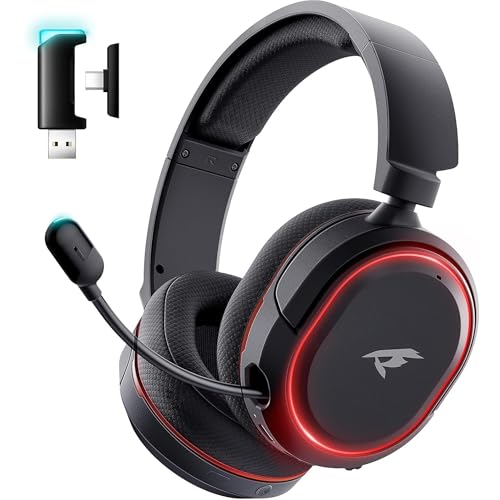 VALORISE Wireless Gaming Headset for PC PS5 PS4 Mac Switch 7.1…
View on Amazon ↗
 STEELSERIES SteelSeries Arctis Nova 5 Wireless Multi-System Gaming Headset - Black…
View on Amazon ↗
Listing names and images come from Amazon and are rechecked against the live listings; last checked Nov 8, 2026. No prices shown; the current price is on the listing.
How to read this guide. Use this guide as a checklist to hold against any product listing. It covers the category in general, not individual models, so verify cushion dimensions, battery life, and platform compatibility before you order.