Look first at capacity in milliamp hours, then at how the pack seats in the controller and charges. Higher capacity means longer sessions between charges, but it only helps if the pack sits flush and charges reliably. Buyers who play daily want a pack with a high cycle life and a low self discharge rate. Occasional players can accept less capacity if they charge before each session. The main tradeoff is between raw capacity and how securely the pack fits the battery bay.
Two Numbers That Predict How Long a Pack Stays Useful
Capacity, listed in milliamp hours, tells you how much charge the pack stores. A higher number means longer play between charges. Compare this number across packs for the same controller model, not against other devices.
Charge cycles tell you how many full drain and recharge rounds the pack handles before capacity drops. A pack rated for 500 cycles keeps most of its runtime far longer than one rated for 300. Check the listing for a cycle rating; many cheap packs omit it.
Self discharge matters for players who leave a spare pack in a drawer. Nickel metal hydride cells lose charge faster when idle than lithium ion cells. If you charge a pack and use it days later, look for a low self discharge claim.
The Fit Check That Prevents a Mid Game Drop
A rechargeable pack replaces the AA battery door on the controller. The pack must seat flush against the contacts and lock into the bay without force. A loose pack can lose connection when you set the controller down or squeeze the grips.
Compare the pack dimensions to the controller's battery bay, or look for a listing that names the exact controller model. Packs sold as universal often have a small lip or extra plastic that prevents the battery door from closing.
Weight changes how the controller feels. A heavier pack shifts the balance toward the rear. Most players adjust within a session, but if you already find the controller heavy, a lighter pack may feel better over a long night.
- Check that the pack is listed for your exact controller model and generation.
- Look at product photos for a flush fit against the battery contacts.
- Confirm the pack uses the same charging port or dock as your current setup.
Charging Styles Decide Your Desk Setup
Some packs charge through a USB-C port on the pack itself, so you can plug the controller into a cable while you play. Others charge only in a dock that holds the controller upright. Choose the style that matches where you play.
A dock keeps a spare pack ready and reduces wear on the controller's port, but it takes desk space. A cable charges while you play, which is useful for long sessions, but it leaves a wire attached to the controller.
Packs that charge through the controller's existing port often work with the same cable you use for the console. If you already own a long USB-C cable, this can be the simplest option.
| Charging style | Desk space | Play while charging | Suits |
|---|---|---|---|
| USB-C port on pack | Minimal | Yes, with cable | Solo players who sit close to a console |
| Dedicated dock | Extra dock footprint | No, pack must sit in dock | Families who swap controllers often |
| Dock plus spare pack | Largest | Yes, by swapping packs | Tournament nights and long sessions |
Marketing Claims That Do Not Change Your Experience
A pack labeled 'high speed charging' may fill faster, but the controller draws the same current during play. Faster charging does not extend runtime; it only shortens the wait between charges.
LED indicators on the pack or dock show charge status. They are convenient but do not improve the cell itself. A pack with no indicator still works fine if you track charge by the console's onscreen battery bar.
Claims like 'military grade' or 'pro gamer approved' appear on many listings. They describe the casing or branding, not the cell's capacity or cycle life. Judge the pack by the two numbers and the fit, not the adjectives.
Who Should Skip a Rechargeable Pack
Players who use a controller only for an hour a week may prefer standard AA batteries. A pair of alkaline batteries lasts for months at that rate, and there is no pack to keep charged. Rechargeable packs pay off when you play daily or nearly daily.
Players who already own a charging dock for AA batteries can keep using rechargeable AA cells. That setup works across many devices, not just the Xbox controller. A dedicated pack adds a second charging system to the desk.
If you travel often and cannot guarantee access to a USB port or dock, carrying spare AA batteries is simpler. A rechargeable pack needs a charge source, and a dead pack on a flight is useless.
- Rare players: standard AA batteries last long enough and need no charging routine.
- Multidevice households: rechargeable AA cells work in remotes, toys, and other controllers.
- Frequent travelers: a spare pack of AA batteries is lighter than a dock and never needs a wall outlet.
The Mistake That Kills a Pack in a Month
Leaving a pack on the charger after it reaches full capacity shortens its life. Many budget packs lack a proper cutoff circuit, so the cell keeps receiving a trickle charge and heats up. Heat is the fastest way to degrade a lithium ion or nickel metal hydride cell.
Storing a pack fully drained for weeks also hurts it. A pack left at zero charge can fall below the voltage threshold the charger needs to detect it. If you will not use the controller for a while, charge the pack to about half before storing.
Mixing an old pack with a new one in a dock is another issue. The dock may charge both at the same rate, overcharging the old pack or undercharging the new one. Charge packs individually when their ages differ.
How to Read a Listing Before You Buy
Start with the capacity and cycle count. If the listing does not state both, ask the seller. A pack without a cycle rating is often a low cost cell that will lose capacity after a few months.
Look for the exact controller model in the title or compatibility list. A pack for an Xbox Series X controller may not fit an Xbox One controller, even if both use the same battery bay shape. The door and contacts differ across generations.
Check the charging method in the product photos. If the pack has a USB-C port, you can charge with a cable. If it only shows a dock, you need that dock. Some listings show a dock but sell the pack alone, so read the included items carefully.
Ask the seller about the warranty or replacement policy. A pack that fails in the first month should be replaceable. A seller that offers no warranty is signaling the pack may not last.
Shared Living Rooms and Tournament Nights Change the Math
In a shared living room, a dock with two packs keeps a controller ready for anyone. One pack charges while the other is in use, so a second player never waits for a charge. This setup costs more but removes friction.
For tournament nights, a spare pack that charges in a dock is the fastest way to swap. You can swap a dead pack for a charged one in seconds without unplugging the controller. Cable charging works too, but it ties the player to the console.
Kids gaming often means controllers are dropped or left on. A pack with a secure fit and a low profile is less likely to pop out when the controller hits the floor. Look for a pack that sits flush and has no protruding parts to catch on the battery door.
Xbox Rechargeable Battery Questions, Answered Directly
How long do Xbox rechargeable batteries last per charge?
A pack with 1,200 to 1,400 milliamp hours usually runs a controller for 20 to 30 hours of active play. A higher capacity pack can reach 40 hours. Brightness of the controller LED and vibration use affect runtime. A pack that is a year old may hold only 70 to 80 percent of its original capacity.
Can I charge an Xbox rechargeable battery while playing?
Yes, if the pack has a USB-C port on the pack itself. Plug a cable into the pack and the controller keeps working while it charges. Packs that charge only in a dock cannot charge during play, because the controller must sit in the dock. Check the product photos for a port on the pack.
Which is better, a rechargeable pack or AA rechargeable batteries?
A pack is convenient because it sits inside the controller and charges through a dock or cable. AA rechargeable batteries work in many devices and can be swapped instantly. For a daily Xbox player, a pack is simpler. For a household with many battery powered devices, AA rechargeable cells are more flexible.
Is it worth buying a high capacity Xbox battery pack?
High capacity helps if you play for many hours each day and dislike charging often. The tradeoff is often a slightly larger or heavier pack. If you play for an hour or two a day, a standard capacity pack is cheaper and may last just as long in practice because you charge it more often.
What does a charge cycle rating mean for an Xbox battery?
A charge cycle is one full discharge and recharge. A pack rated for 500 cycles keeps most of its capacity for about 500 full charges. After that, runtime per charge drops noticeably. If the listing does not state a cycle rating, assume the pack uses a lower cost cell that may degrade faster.
The Right Xbox Rechargeable Pack for Your Play Style
A daily player who sits at a desk or couch with a USB-C cable nearby gets the most from a pack with a built in USB-C port and a capacity around 1,400 milliamp hours. This charges while you play and avoids a dock. For a tournament night or a family room where controllers pass between hands, choose a dock with two packs instead. The dock keeps a spare charged at all times, and swapping a pack takes seconds. A pack that only charges in a dock is the wrong choice for a traveler who cannot bring the dock.
Real xbox rechargeable battery listings, so you can check the points in this guide against actual products. These are affiliate links: as an Amazon Associate we earn from qualifying purchases, at no extra cost to you.
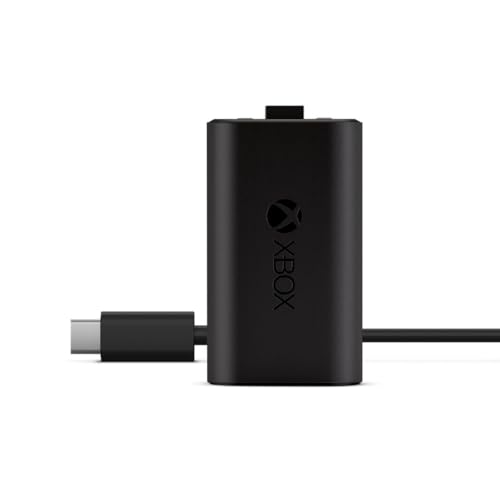 XBOX Xbox Rechargeable Battery + USB-C® Cable
View on Amazon ↗
 JAVRUNWOF Rechargeable Controller Battery Pack for Xbox,2x4800mWh(2000mAh) Batteries Pack with USB-C…
View on Amazon ↗
 GKHERD GKHERD Rechargeable Controller Battery Pack for Xbox One/Xbox Series X|S,…
View on Amazon ↗
Listing names and images come from Amazon and are rechecked against the live listings; last checked Nov 8, 2026. No prices shown; the current price is on the listing.
What this guide is. This guide covers how Xbox rechargeable battery packs work in general, from capacity and charge cycles to fit and charging styles. It cannot tell you whether a specific listing's dimensions or cycle rating are accurate, so check those numbers on the product page before you buy.