Match the console to where you will actually play. Screen size, battery stamina, and the game library matter more than raw power. Couch and travel players often need different things: a compact model for a bag, or a larger screen for long sessions at home. The main tradeoff is comfort versus portability.
Where You Will Actually Play
Couch gaming and long flights pull a handheld in opposite directions. On a couch you can plug in, rest the device on a cushion, and use a larger screen without much strain. On a flight you need something light enough to hold for hours and small enough to fit a seat back pocket.
Think about your most common session. If most play happens at home, a heavier model with a big display is fine. If you travel often, a compact body and long battery matter more than screen inches.
Small setups also change the math. If you do not have a dedicated TV spot or share one screen, a handheld can become your primary console. That makes the game library more important than it would be for someone who only plays in short gaps.
Design Types and Their Tradeoffs
Handhelds split into a few broad design approaches. Each changes comfort, game access, and where you can play.
Dedicated handhelds run their own curated game library. They usually have the best battery life and the simplest setup, but you are limited to that platform's store.
PC based handhelds run a desktop operating system and can play games from multiple stores. They are flexible but heavier, hotter, and often need more tinkering with settings.
Cloud only handhelds stream games from a remote server. They can be light and cheap, but they depend on a strong, stable internet connection. Offline play is limited or absent.
| Design type | Game access | Battery stamina | Setup effort | Suits |
|---|---|---|---|---|
| Dedicated handheld | One curated library | Often the longest | Low, pick up and play | Casual and family gaming |
| PC based handheld | Multiple stores and launchers | Shorter under load | High, settings and updates | Players who want a full PC library |
| Cloud only handheld | Streamed from a server | Moderate but tied to Wi-Fi | Low, app based | Home use with fast internet |
A dedicated handheld is usually the safest first buy. A PC based handheld rewards patience but punishes a buyer who expects a console experience. A cloud only device is a second device for a specific home setup, not a travel workhorse.
Screen Size and Type Decide Comfort
Screen size affects how long you can play before eye strain or hand fatigue. A smaller screen, often around 5 to 7 inches, keeps the device light and pocketable. A larger screen, often 7 to 8.5 inches, is easier to read but makes the device heavier and wider.
Panel type matters too. A bright, high contrast screen helps in a sunny window seat or a living room with overhead lights. A dim or low contrast panel washes out in bright rooms, which is a common frustration for couch players.
Check the listing for brightness and panel type if you plan to play near windows or on planes. A matte or antiglare finish helps more than a higher resolution in those spots.
Battery Stamina Sets the Session
Battery life is the biggest hidden spec. A handheld that lasts 3 hours under a demanding game will die halfway through a long flight. A model that lasts 6 to 10 hours in lighter games can cover a full travel day.
Look for a listed battery capacity in watt hours or milliamp hours, and check the estimated play time for the type of game you actually play. Demanding 3D games drain a battery much faster than 2D or indie titles.
Fast charging is useful but not a substitute for capacity. A USB-C port is now standard, but charging speed varies. If you travel, a power bank that supports the same fast charging standard is a practical add on.
The Game Library Is the Real Spec
A handheld is only as good as the games you can play on it. Before comparing screens and chips, make a short list of five games you want to play now. Check which handheld can run them.
Dedicated handhelds have exclusive titles you cannot get elsewhere. PC based handhelds open up a huge back catalog but may struggle with the newest games. Cloud only handhelds depend on server availability and your subscription.
Family gaming adds a wrinkle. If multiple people share the device, look for easy user switching, parental controls, and a library of local multiplayer or party games. A single player focused library will frustrate a family that wants to pass the device around.
Controls and Ergonomics You Cannot See in a Photo
Grip shape, button travel, and stick placement decide whether a handheld feels good after 30 minutes. A spec sheet will not tell you this. Look for a contoured back, triggers that sit under your index fingers without stretching, and sticks that do not force your thumbs inward.
Weight distribution matters as much as total weight. A device that is heavy at the top will tire your wrists faster than a balanced one. Check the listing for weight and look for a centered or bottom heavy design.
Some handhelds have detachable or replaceable controls. That is useful for family use or if you tend to wear out sticks. Others have built in controls that cannot be fixed easily, which is a hidden long term cost.
Long Term Costs and Consumables
The purchase price is only the start. Games, storage, and accessories add up. A dedicated handheld locks you into one store's pricing. A PC based handheld lets you shop multiple stores and sales, which can save money over time.
Storage is a frequent surprise. Many handhelds come with 64 to 512 gigabytes, but modern games can be 50 to 100 gigabytes each. A microSD card slot is essential if you buy digital games. Check the maximum supported card size before you buy.
Replacement parts are another cost. Sticks, batteries, and screens wear out. Some handhelds have user replaceable parts and widely available spares. Others require a service center, which can be expensive and slow.
Mistakes That Lead to a Dusty Handheld
Buying for specs instead of the game library is the most common mistake. A powerful handheld with nothing you want to play is a paperweight.
Ignoring battery life is second. A buyer who plans to travel but picks a model with a 3 hour battery will carry a charger everywhere and still run out mid flight.
Overlooking weight and grip is third. A heavy, flat device feels fine in a store demo and terrible after an hour on a couch. Comfort is the spec you can only judge by holding it, so read the dimensions and weight carefully.
Buying a cloud only handheld without testing home Wi-Fi is another trap. If your connection drops or your data cap is low, the device becomes a brick outside the house.
How to Read a Listing Before You Buy
Check the game library first. Does the listing name the store or platform? If not, ask the seller. A handheld without a clear library is a risk.
Check the battery capacity and estimated play time. If the listing only says 'long battery life', ask for a number. A watt hour rating is more useful than a vague promise.
Check the screen size, panel type, and brightness. If the listing omits brightness, assume it is average. For bright rooms or outdoor play, look for a listed nit value or antiglare finish.
Check the weight and grip shape. A listing that hides the weight is hiding something. Look for a contoured back and trigger shape in the photos.
Check storage and expansion. Does it have a microSD slot? What is the maximum card size? If you buy digital games, this is a must have, not a nice to have.
Ask the seller about offline play if you are considering a cloud or streaming handheld. Some devices require a constant connection, which eliminates airplane use entirely.
Handheld Console Questions Buyers Ask Before Buying
What is the difference between a dedicated handheld and a PC based handheld?
A dedicated handheld runs a closed operating system and only plays games from its own store. Setup is simple and battery life is usually longer. A PC based handheld runs a desktop operating system and can play games from multiple stores, but it needs more configuration and often runs hotter with shorter battery life.
How much battery life do I need for a long flight?
Look for at least 6 hours of play time in the type of game you actually play. Demanding 3D games drain a battery much faster than 2D or indie titles, so check the estimated play time for your genre. A power bank that supports the same fast charging standard can extend a shorter battery, but it adds weight and cables.
Can a handheld gaming console replace a home console?
Yes, if you mostly play solo or do not have a dedicated TV spot. A handheld with a docking feature can connect to a TV, but the docked experience is usually less powerful than a full home console. If you want the latest games at the highest settings, a home console or PC is still the better fit.
Is a cloud only handheld worth it?
Only if you have fast, stable Wi-Fi at home and do not plan to play on planes or in areas with poor coverage. Cloud handhelds are light and often cheaper, but they cannot play offline. Test your home connection before buying, and check your data cap if you stream over cellular.
Which handheld gaming console is best for family gaming?
A dedicated handheld with a strong local multiplayer library, easy user switching, and parental controls is usually the best fit. Look for games that support pass and play or multiple profiles. A PC based handheld is harder to share because of account management and launcher complexity.
Which Handheld Console Fits Your Couch and Travel Bag
A couch player who wants a pick up and play device with a strong exclusive library and long battery life should start with a dedicated handheld. A traveler who wants a huge game library and is willing to manage settings and updates should look at a PC based handheld instead. For a household with fast Wi-Fi and no interest in offline play, a cloud only handheld can be a lighter second device.
Real handheld gaming console listings, so you can check the points in this guide against actual products. These are affiliate links: as an Amazon Associate we earn from qualifying purchases, at no extra cost to you.
 MIGOFEE R36MAX 2 Retro Handheld Console, 4.5" IPS HD Portable Gaming…
View on Amazon ↗
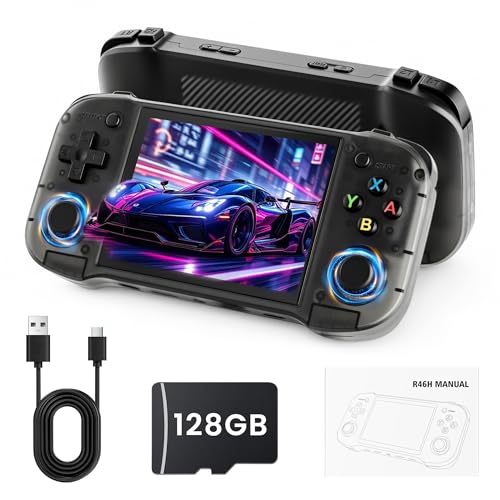 SUNNYMARK R46H Retro Handheld Game Console, Portable Gaming Console with 20,000+…
View on Amazon ↗
 RETROID POCKET Retroid Pocket 5 Retro Handheld Game Console, 8+128G, 5.5-inch touchscreen…
View on Amazon ↗
Listing names and images come from Amazon and are rechecked against the live listings; last checked Nov 8, 2026. No prices shown; the current price is on the listing.
How to read this guide. Use this guide as a checklist to hold against any handheld console listing, not as a verdict on a specific model. It is written from general knowledge of the product category, and you should verify any dimension or battery figure on the listing before buying.