The two deciding factors are signal type and camera placement. A dedicated monitor skips Wi-Fi and keeps working during an internet outage, while a Wi-Fi unit lets you check from your phone anywhere. Small rooms favor a wide angle lens and a camera that mounts high or sits on a shelf. The main tradeoff is range versus privacy: dedicated monitors stay local, Wi-Fi models add app access but depend on your network.
Signal Type Sets the Limits
A dedicated monitor uses a radio signal between the camera and a parent unit. It works without a router and keeps running if the internet drops. Range is limited to the house and yard, but the video stays on a closed loop. This matters for parents who want a screen that turns on instantly without an app.
A Wi-Fi monitor sends video through your home network. You can check the feed from a phone or tablet, even from another city. That flexibility costs two things: the camera stops if the router fails, and the feed passes through a cloud service. Check whether the listing promises encrypted video and two factor authentication.
Some monitors offer both: a parent unit for the nursery and an app for when you are away. This hybrid adds cost and setup. Before paying for it, ask whether you will actually open an app when a dedicated screen already sits on the nightstand.
Camera Placement Decides What You See
A small bedroom leaves little space for a camera. A wide angle lens, often 110 degrees or more, shows more of the crib from a corner. A pan and tilt motor lets you adjust the view from the parent unit, which helps when the baby rolls out of frame.
Wall mounted cameras save shelf space but need a drill and a clear sight line. Shelf cameras are easier to move but can be knocked over. Check the listing for a mounting plate or a flat base. A camera that can only sit on a table may end up too low to see into the crib.
Night vision is not one setting. Infrared LEDs let you see in the dark, but some cameras show a grainy gray image while others stay sharper. Check the number of LEDs or the stated night range. A camera that switches to night mode too early can wash out a soft nursery lamp.
Power Source Changes the Routine
Most cameras plug into a wall outlet. That is fine for a fixed spot, but the cord becomes a hazard near a crib. A cord longer than the distance to the outlet invites a toddler to pull it. Some cameras run on rechargeable batteries, which frees placement but adds a charging routine.
The parent unit matters too. A unit that lasts only a few hours on battery forces you back to the charger during a long nap. Check the stated battery life and whether the screen dims to save power. A unit that needs a cord all night defeats the point of a portable monitor.
For travel, a battery powered camera and parent unit pack smaller. But a hotel room has unknown outlets and Wi-Fi. A dedicated monitor works without the hotel network, while a Wi-Fi camera may not connect. Think about where you will actually use it before choosing a power setup.
| Signal | Power | Range | Privacy | Best for |
|---|---|---|---|---|
| Dedicated | Plug in or battery | House and yard | Closed loop | Nursery only |
| Wi-Fi | Plug in typical | Anywhere with internet | Cloud dependent | Phone check ins |
| Hybrid | Plug in camera, battery parent unit | House plus remote | Both modes | Parents who want both |
A dedicated monitor often has lower latency, meaning the picture moves in real time. Wi-Fi feeds can lag a second or two, which feels longer when you hear a cry. Test the delay in the store or check the listing for latency claims.
Screen and Sound for Night Checks
The parent unit screen size changes how easy it is to see movement. A two inch screen is fine for a quick check, but a five inch screen shows more detail without leaning in. Bigger screens drain battery faster, so check the stated battery life at full brightness.
Audio quality matters as much as video. A monitor with a sensitive microphone picks up breathing and rustling, while a cheap one only catches loud cries. Look for a listing that mentions noise filtering or a mute button with a visual sound indicator. A unit that beeps for every sound will wake you.
Two way talk lets you soothe from another room. Check whether the speaker is loud enough to be heard over a white noise machine. Some units distort at high volume. A monitor that only plays your voice through a tiny speaker may not help a crying baby.
For Small Bedrooms and Apartments
In a small room, the camera sits close to the crib. A wide angle lens prevents a tunnel view of one corner. A pan and tilt feature is less necessary when the room is small, but a fixed camera must be aimed exactly right. Check the vertical tilt range before mounting.
Apartment walls are thin, and a monitor signal can bleed into a neighbor's unit. Dedicated monitors often let you switch channels to avoid interference. A Wi-Fi camera uses your router, so it is less likely to cross into another apartment, but it shares bandwidth with every device in your home.
For a newborn, you want a monitor that shows breathing motion. A high resolution camera, often 1080p, makes subtle chest movement visible. A low resolution feed can blur that into stillness. Check the resolution and the frame rate, not just the marketing term "HD".
Travel and Overnight Stays
A travel monitor must set up in minutes. A dedicated unit with a parent unit and camera that pair automatically works in a hotel without Wi-Fi. A Wi-Fi camera needs the hotel network and may require a login page, which many cameras cannot handle.
Battery life becomes critical away from home. A parent unit that lasts 10 hours covers an overnight stay without a charger. A camera that runs on AA batteries is easier to replace than a built in battery that dies mid trip.
Check the size and weight. A monitor that packs into a diaper bag without a separate case saves space. A camera with a folding stand or a clip mount works on a hotel dresser or a crib rail. Some cameras are too bulky for a carry on.
Care and Long Term Costs
A video monitor needs little maintenance, but the lens collects dust. A soft cloth cleans it without scratching. Avoid spray cleaners that can fog the plastic. A camera mounted high stays cleaner than one at crib level.
Batteries wear out. A parent unit with a replaceable battery costs less to fix than one with a sealed battery. Check whether the listing mentions a replaceable battery or a service option. A unit that lasts two years before the battery dies may cost more than a cheaper one you replace.
Some Wi-Fi monitors require a subscription for cloud recording or motion alerts. A dedicated monitor has no monthly fee. Read the listing for the words "subscription", "cloud storage", or "premium features" before buying. A low price can hide a recurring cost.
Reading the Listing Before You Buy
First, check the signal type. The listing should say "dedicated", "Wi-Fi", or both. If it only says "smart", ask the seller whether it works without the internet.
Second, check the camera specs: resolution, night vision range, and lens angle. A listing that omits the lens angle often hides a narrow view. A 90 degree lens in a small room shows only the crib, not the floor beside it.
Third, check the parent unit battery life and whether it is replaceable. A listing that says "long battery life" without a number is a warning. Ask for the exact hours at medium brightness.
Fourth, check the mounting options. A camera with only a flat base cannot wall mount without extra hardware. A listing with a bracket or a keyhole slot is more flexible.
Finally, check the warranty and return window. A monitor that fails in the first month should be replaceable. A seller that offers only a 14 day return may not stand behind the product.
Video Baby Monitor Questions Before You Buy
Is a video baby monitor worth it for a newborn?
For most new parents, yes. A video feed shows whether a cry is a full wake up or just a sleep cycle, so you avoid walking in and fully waking the baby. A dedicated monitor also works without Wi-Fi, which helps during a router restart. The value depends on your home: in a small apartment where you hear everything, an audio only monitor may be enough.
Which video baby monitor works without Wi-Fi?
Look for a dedicated monitor, also called a non Wi-Fi or radio monitor. It uses a direct signal between the camera and the parent unit, often on 2.4 GHz or DECT. These monitors do not need a router, an app, or an internet connection. Check the listing for the words "dedicated", "non Wi-Fi", or "no app required".
What is the difference between a dedicated and a Wi-Fi baby monitor?
A dedicated monitor sends video directly to a parent unit on a private radio signal. It works without internet and has lower latency, but you cannot check it from outside the house. A Wi-Fi monitor sends video through your router to a phone app, so you can view it anywhere, but it stops if the internet fails and may require a subscription for extra features.
Should I buy a baby monitor with a pan and tilt camera?
Only if your baby moves a lot or the camera must sit in a corner. A pan and tilt motor lets you adjust the view remotely, but it adds cost and another moving part that can fail. In a small room with a wide angle lens, a fixed camera aimed at the crib is often enough. Check the vertical tilt range before buying.
How do I compare video baby monitors for a small bedroom?
Compare the lens angle, the mounting options, and the night vision range. A wide angle lens, often 110 degrees or more, shows more of a small room. A camera that can wall mount or sit on a high shelf frees floor space. Check that the night vision reaches at least 10 feet, since a small room still needs a clear dark image.
Which Video Baby Monitor Fits Your Nursery
For a first time parent in a small bedroom, a dedicated monitor with a wide angle lens and a wall mount option fits best. It keeps working without Wi-Fi, shows the whole crib, and has no subscription. If you travel often or need to check from work, choose a hybrid monitor with a parent unit and a phone app instead.
Real video baby monitor listings, so you can check the points in this guide against actual products. These are affiliate links: as an Amazon Associate we earn from qualifying purchases, at no extra cost to you.
 HELLOBABY HelloBaby No WiFi Baby Monitor Camera and Audio HB6550, 5"…
View on Amazon ↗
 INFANT OPTICS Infant Optics DXR-8 PRO - Patented Active Noise Reduction (ANR),…
View on Amazon ↗
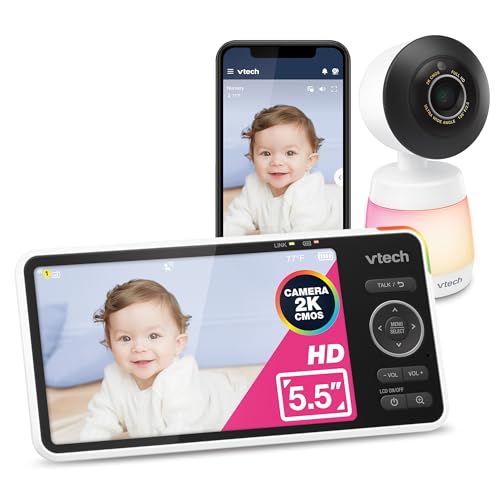 VTECH VTech Smart WiFi Video Baby Monitor, 5.5" HD Display: Smart…
View on Amazon ↗
Listing names and images come from Amazon and are rechecked against the live listings; last checked Nov 8, 2026. No prices shown; the current price is on the listing.
How to read this guide. This guide covers the video baby monitor category in general, not any specific model. It is written from common category knowledge and does not use product documents, owner reviews, or in person testing. Check the exact dimensions, lens angle, and battery life on the listing before buying.