The blade style and cutting length decide most of your result. Guillotine trimmers cut thick stacks cleanly but take up space. Rotary trimmers handle long sheets and delicate paper with less tearing. Choose by your main material: cardstock stacks favor guillotine, while long scrapbook pages and photos favor rotary. A sliding trimmer is the budget middle ground for light use.
Blade Styles Set Your Ceiling
A paper trimmer is only as good as the edge it leaves. Guillotine blades swing down on a hinge and cut a stack in one motion. That gives you square corners on cardstock, chipboard, or a whole pad of construction paper. The downside is weight and a larger footprint, plus a blade that needs occasional sharpening or replacement.
Rotary trimmers run a round blade along a rail, often with a self sharpening housing. They excel on long sheets, photos, and thin papers because the rolling cut tears less than a chopping blade. The cutting mat under the blade is a consumable: once it gets grooves, cuts start to fray.
Sliding trimmers use a fixed angled blade that you push along a track. They are the lightest and least expensive, fine for occasional card making or a child's first tool. Accuracy drops as the blade dulls, and the track can wobble on thick stacks. Check that the blade is replaceable before buying.
Cutting Length Must Match Your Widest Sheet
Paper trimmers come in common lengths, often 12, 15, or 18 inches. A 12 inch trimmer handles letter size paper and most cardstock, but a 12 by 12 scrapbook page needs a 12 inch cut with no margin for error. If you trim legal size documents, 14 inch sheets, or large construction paper, step up to 15 or 18 inches.
Length also affects stability. A longer trimmer has a wider base, which resists tipping when you bear down on a guillotine. Measure your largest material before you shop, then add an inch for comfort. A trimmer that is too short forces you to make two cuts and leaves a visible seam.
For classroom projects, a 12 inch sliding trimmer often fits a student desk. For t shirt vinyl or iron on projects, a rotary trimmer with a 15 inch bed lets you cut long strips without shifting the material.
Paper Capacity Changes the Workflow
Guillotine trimmers list a sheet capacity, often 10 to 20 sheets of standard copy paper. That matters for classrooms, small craft businesses, or anyone cutting multiple identical shapes. Cutting a stack once beats cutting one sheet ten times, and the stack keeps all pieces identical.
Rotary and sliding trimmers are single sheet tools, or at most two or three thin sheets. If you cut one photo at a time, that is no problem. If you cut 30 bookmarks for a craft fair, a guillotine saves an hour.
Capacity claims on listings usually refer to 20 pound copy paper. Thicker cardstock or photo paper cuts fewer sheets per pass. Ask the seller for a stack height in millimeters if you plan to cut chipboard or laminated sheets.
The Base and Grid Prevent Wasted Paper
A printed grid with inch or centimeter marks is the feature you will use most. It lets you line up a photo or card blank without a separate ruler. Look for a grid that runs the full length of the bed and has clear markings from both edges.
A non slip base keeps the trimmer from sliding across your desk mid cut. Rubber feet or a foam underside do the job. Some trimmers have an extendable arm that flips out to support long sheets, which matters for 12 inch scrapbook paper.
A built in paper clamp or hold down bar matters on guillotine trimmers. It keeps the stack from shifting as the blade comes down. Without a solid clamp, the top sheet can creep and give you a crooked edge.
Replacement Blades and Mats Are the Hidden Cost
Every blade dulls. A guillotine blade can sometimes be sharpened, but many are replaceable cartridges. A rotary blade typically lasts for dozens of cuts, then needs a new cartridge. A sliding trimmer blade is often the cheapest to replace, if the manufacturer sells it separately.
Check that replacement blades are listed for the model you are considering. A trimmer with no available blades becomes a paperweight after a few months of heavy use. Rotary trimmers also need a replacement cutting mat, which is a separate part that wears with every pass.
For a small craft business, plan on replacing a rotary blade every few months. For a classroom, a guillotine blade may last a full year. Budget for these parts the way you budget for ink or glue.
Reading a Listing Before You Buy
Start with the blade type and cutting length. If those are not in the first two lines, the listing is hiding something. Then check the maximum paper thickness or stack height in millimeters. A trimmer that only cuts copy paper will struggle with 110 pound cardstock.
Look for the words 'replaceable blade' and 'replacement mat'. If neither appears, assume you are buying a disposable tool. Check the base material: a metal base is sturdier than plastic, but heavier. A plastic base can flex under a guillotine blade and throw off the cut.
Ask the seller two questions: what is the stack height for 80 pound cardstock, and are replacement blades sold on this page. A seller who cannot answer the first question has not tested the product. A seller who does not sell blades is telling you the trimmer has a short life.
Who Should Skip a Paper Trimmer
A paper trimmer is a straight line tool. If you cut curves, intricate shapes, or vinyl lettering, you need a die cutter or a craft knife with a cutting mat. A trimmer cannot follow a stencil.
If you only cut a few sheets a month, a metal ruler and a sharp utility knife do the same job for less money and less storage. The trimmer earns its place when you cut the same size repeatedly or need square corners fast.
For fabric, a paper trimmer is the wrong tool. Rotary cutters made for fabric have a different blade angle and a self healing mat designed for multiple layers. Using a paper trimmer on fabric dulls the blade and leaves ragged edges.
Mistakes That Ruin the First Project
Buying a trimmer that is shorter than your widest sheet is the most common error. Measure your scrapbook paper, card blanks, and photo paper before you order. A 12 inch trimmer cannot cut a 12 inch sheet in one pass because you need room to line up the edge.
Ignoring the blade replacement policy is a close second. A trimmer with a fixed blade is cheaper up front, but it becomes a straight edge with a dull knife after a few months. Check the blade part number before you buy.
Pressing too hard on a rotary trimmer can skip the blade or tear thin paper. Let the rolling blade do the work. On a guillotine, slamming the arm down bounces the stack and leaves a curved edge. A slow, firm stroke cuts cleaner.
Design Types Compared
| Blade style | Best for | Cut quality | Upkeep |
|---|---|---|---|
| Guillotine | Thick stacks, classrooms | Squarest corners | Blade sharpening or replacement |
| Rotary | Long sheets, photos | Cleanest on delicate paper | Blade and mat replacement |
| Sliding | Occasional light cuts | Good when sharp | Frequent blade changes |
| Stack cutter | High volume card batches | Consistent but rough | Heavy blade maintenance |
Stack cutters are a guillotine variant built for hundreds of sheets per day. They are overkill for a home craft desk, but a small print shop or busy classroom may justify the cost and weight.
Paper Trimmer Questions, Answered Straight
What is a rotary paper trimmer good for?
A rotary trimmer is the best choice for long sheets, photos, and thin or delicate paper. The rolling blade cuts with less tearing than a chopping guillotine blade. It also handles 12 inch scrapbook paper in one pass if the bed is long enough. The tradeoff is a cutting mat that wears out and needs replacing.
How do I choose a paper trimmer for card making?
For card making, match the trimmer length to your cardstock size and check the blade type. A 12 inch guillotine or rotary trimmer works for standard card blanks. If you cut many layers or chipboard accents, a guillotine with a high sheet capacity saves time. A sliding trimmer is fine for occasional cards, but expect to replace the blade more often.
Is a guillotine paper trimmer safer than a rotary trimmer?
Both have risks. A guillotine has an exposed chopping blade, but most include a blade guard and a finger guard bar. A rotary blade is enclosed in a housing, but the blade edge is still exposed along the rail. For classroom use, look for a guillotine with a locking blade guard and teach students to keep fingers behind the guard line.
Can I cut vinyl or iron on material with a paper trimmer?
You can cut heat transfer vinyl and iron on material with a rotary or guillotine trimmer if the material is backed with a carrier sheet. The trimmer cuts straight lines through the vinyl and carrier. Do not use a sliding trimmer on thick vinyl, as the blade can skip. For intricate vinyl shapes, a die cutter or craft knife is the better tool.
Which paper trimmer is best for a classroom?
A guillotine trimmer with a high sheet capacity, often 10 to 20 sheets, is the standard classroom choice. It cuts a stack of construction paper in one motion, which keeps a class moving. Look for a metal base for stability and a blade guard that locks. A 12 inch length fits most student projects, but 15 inches handles larger sheets.
Which Paper Trimmer Fits Your Desk
A card maker cutting standard 8.5 by 11 cardstock in batches will get the most use from a 12 inch guillotine trimmer with a replaceable blade. It squares corners and stacks multiple sheets. A scrapbooker working with long 12 by 12 pages and delicate photos should choose a 15 inch rotary trimmer instead, accepting the mat replacement as the cost of clean edges.
Real paper trimmer listings, so you can check the points in this guide against actual products. These are affiliate links: as an Amazon Associate we earn from qualifying purchases, at no extra cost to you.
 ECRAFT Ecraft 12" Guillotine Paper Cutter:Paper Trimmer Accurate Cutting with Safety…
View on Amazon ↗
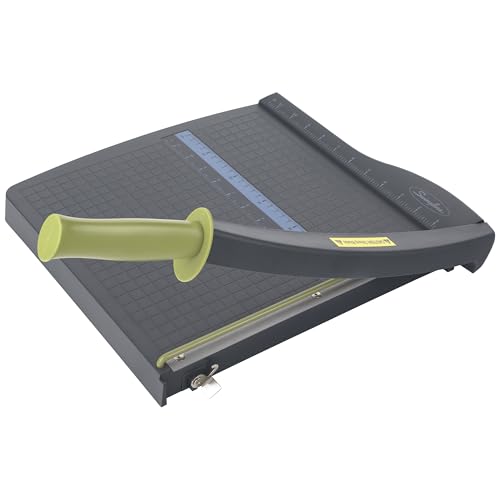 SWINGLINE Swingline Paper Cutter, Guillotine Trimmer, 12" Cut Length, 10 Sheet…
View on Amazon ↗
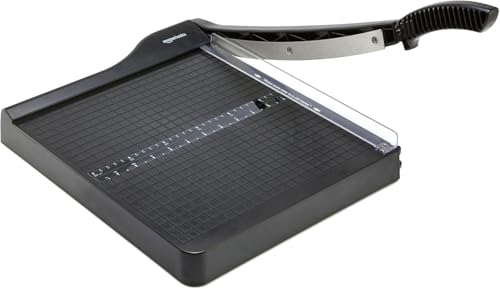 AMAZON BASICS Amazon Basics Paper Trimmer Cutter for Office and Crafts, Heavy-Duty,…
View on Amazon ↗
Listing names and images come from Amazon and are rechecked against the live listings; last checked Nov 8, 2026. No prices shown; the current price is on the listing.
Scope and limits. This guide is written from general knowledge of how paper trimmers work and what their parts do, not from testing any individual model. It cannot tell you how a specific listing performs, so verify the cutting length and blade replacement policy on the product page before you buy.