Key count, key action, and control layout decide most of your experience. A 25 key board fits a small desk but limits two hand playing; 49 keys balances space and range for most beginners. Synth action keys are light and quiet for small bedrooms, while weighted keys feel closer to a piano but add bulk and cost. Match the controls to your software, not the other way around.
Key Count Sets the Footprint
A midi keyboard is one of the few instruments where the smallest version still makes real music. Key count is the first physical constraint in a small bedroom or apartment corner. A 25 key board often fits on a desk next to a laptop, while an 88 key model may need its own stand.
Think about what you play, not what looks impressive. Bass lines, leads, and simple chords work on 25 keys. Two hand piano parts and fuller arrangements usually want 49 or 61 keys. Many adult beginners start on 49 keys because it fits a standard desk and still allows both hands.
Measure the actual space before you buy. A 49 key board is often around 32 to 33 inches wide, but some models add side panels or pitch wheels that push that wider. Check the listing dimensions and leave a few inches for the USB cable and your mouse hand.
Key Action Changes Noise and Comfort
Synth action keys use a spring under each key. They are light, fast, and quiet, which matters in a thin walled apartment or late night practice. Weighted keys use hammers or graded resistance to feel like an acoustic piano, but they add weight, cost, and mechanical noise.
For small bedrooms, synth action is often the safer default. The quieter keybed means you can practice after work without worrying about the neighbor. Semi weighted keys add a little resistance without the bulk, a middle ground for players who want some finger feedback.
Adult beginners who plan to perform on an acoustic piano may still prefer weighted keys. The tradeoff is real: a weighted 88 key board can weigh 25 pounds or more and will not sit on a small desk. If piano feel is the goal, accept the space cost before you buy.
Controls Only Matter if the Software Uses Them
Knobs, faders, and drum pads look useful in product photos, but they are only as good as your software mapping. A knob that sends a midi signal your DAW ignores is just decoration. Before you pay for extra controls, check which parameters you actually adjust while playing.
A simple transport control for play, stop, and record helps home studio work. A row of eight knobs helps if you map them to filter cutoff or reverb wet dry. Drum pads help beat makers but add width and cost for someone learning piano basics.
Some boards include automatic mapping for popular DAWs, which saves setup time. If your software is not supported, you will spend an afternoon assigning controls or ignore them entirely. For a first board, fewer controls with a clear mapping is often more useful than a crowded panel.
Connections and Power Shape the Setup
USB-C is now common and works with a single cable to a computer or tablet. Some boards still use USB B, which is fine but means one more cable type to keep. Check whether the board is class compliant, which means it works without installing drivers on most computers and mobile devices.
A few midi keyboards include a 5 pin midi out for connecting to hardware synths or older gear. Most beginners do not need this, but a church musician running a hardware module might. If you only use software, a USB connection is enough.
Power draw varies by model. Many modern boards run entirely from the USB connection, which keeps a small desk clean. Some larger boards with displays or many LEDs may need an external power supply, so check the listing before assuming one cable is enough.
The Mistake of Buying for a Studio You Do Not Have
A common error is buying a board with features for a workflow you do not use yet. Pads, faders, and aftertouch all add cost and size. If you are an adult beginner learning notes and basic chords, a simple 49 key synth action board will get more use than a crowded controller.
Another mistake is choosing key count by price alone. A cheap 61 key board with a poor keybed feels worse than a smaller board with better action. Play a few keys if you can, or compare the key action descriptions carefully. The feel is what you touch every day.
For church musicians, the setup matters more than the board alone. If you play with a laptop and worship software, a compact board with a sturdy USB connection works. If the church uses a hardware piano or organ module, you may need 5 pin midi out. Ask what the sound source is before you buy.
What to Check in the Listing
Start with the dimensions and weight. A board listed as 49 keys can still vary by a few inches in width and an inch in height. Measure your desk depth, because a board with a high rear panel may not leave room for your laptop screen.
Look for the key action words in the description. Synth action, semi weighted, and weighted mean different things, and some brands use their own terms. If the listing does not name the action clearly, ask the seller before buying.
Check the included accessories. A USB cable, a sustain pedal input, and software bundles vary by model. A sustain pedal is useful for piano style playing, but many boards do not include one. The software bundle can add value if you do not already own a DAW.
Ask the seller about class compliance and power if the listing is unclear. A class compliant board works with most tablets and computers without drivers. If you plan to use an iPad or a church laptop, confirm this before you order.
| Key count | Desk footprint | Playing range | Best fit |
|---|---|---|---|
| 25 keys | Fits next to a laptop | Leads and bass lines | Tight bedroom desks |
| 49 keys | Fits most desks | Two hand chords | Adult beginners |
| 61 keys | Needs a wider surface | Fuller arrangements | Home studios |
| 88 keys | Often needs a stand | Full piano range | Piano learners with space |
The table shows the practical split, but your own desk size matters most. A 49 key board is the default for many small bedrooms because it balances range and footprint. If your desk is under 32 inches wide, a 25 key board may be the only comfortable option.
Small Bedrooms and Quiet Practice
Noise travels in small apartments, and key action is the main source. Synth action keys are the quietest option and feel fine for most software instruments. Weighted keys produce a thump that can carry through floors, especially in late night practice.
Headphone use changes the noise equation. Since a midi keyboard makes no sound on its own, you will listen through headphones or speakers. The keyboard itself is quiet with synth action, so the main sound leak is from your headphones if they are open back.
A compact board also helps with cable clutter. A single USB cable to your computer or tablet keeps the setup clean. Avoid boards that need a separate power brick unless you have a dedicated music corner with a power strip nearby.
Long Term Costs Are Mostly Software
A midi keyboard itself is a one time purchase with no strings, reeds, or pads to replace. The long term costs come from software: a DAW, virtual instruments, and sometimes a subscription. Many boards include a basic software bundle, but you may outgrow it.
Check what the included software actually is. A lite version of a DAW often limits track count or plugin use. A full piano or synth plugin adds immediate value. If you already own software, the bundle matters less.
A sustain pedal is the one common add on. It costs little but changes how piano parts feel. Some boards include a basic pedal input but no pedal, so budget for one if you play sustained chords or classical pieces.
When a Different Keyboard Makes More Sense
A midi keyboard makes no sound by itself. If you want to sit down and play without a computer, a digital piano or an arranger keyboard with built in speakers is a better fit. A midi keyboard is for controlling software or hardware sound modules.
For music lessons, the teacher's setup matters. Some teachers use a piano and expect weighted keys at home. Others teach on a DAW and a midi keyboard is perfect. Ask the teacher before you buy, because the wrong action can make lessons frustrating.
If you already have a full size piano or keyboard with midi out, you may not need a separate midi keyboard at all. A used digital piano with a USB connection can control the same software. A midi keyboard is the choice when you need a compact controller, not when you need a standalone instrument.
Our guide to beginner keyboard checks walks through the same decision for keyboards with built in sounds, and the bedroom keyboard stand page covers space saving setups.
Midi Keyboard Questions for First Time Buyers
Is a midi keyboard good for a beginner?
Yes, if you have a computer or tablet to run the sounds. A midi keyboard is often cheaper than a digital piano and takes less space. The key action matters: synth action is light and quiet, while weighted keys feel more like a piano. For a first instrument with software, a 49 key synth action board is a common starting point.
Which midi keyboard is best for a small bedroom?
A 25 or 49 key board with synth action usually fits best. Measure your desk width first, because a 49 key board is often around 32 to 33 inches wide. Synth action keys are quieter than weighted keys, which helps in a shared apartment. Look for a class compliant USB connection so it works with a laptop or tablet without extra drivers.
What is the difference between 25, 49, and 61 keys?
Key count changes both footprint and playing range. A 25 key board fits next to a laptop but limits two hand playing. A 49 key board fits most desks and allows simple chords and melodies together. A 61 key board needs a wider surface but gives room for fuller arrangements and two hand parts without octave shifting.
Do I need weighted keys on a midi keyboard?
Only if you want the feel of an acoustic piano or plan to perform on one. Weighted keys add resistance and weight, and they are louder and more expensive. Synth action keys are lighter and quieter, which suits small bedrooms and software instruments. Semi weighted is a middle ground with light resistance.
Should I buy a midi keyboard or a digital piano?
A digital piano has built in sounds and often weighted keys, so you can play without a computer. A midi keyboard controls software or hardware sounds and makes no sound alone. If you want a compact controller for a DAW, choose a midi keyboard. If you want to sit down and play immediately, a digital piano or arranger keyboard fits better.
Which Midi Keyboard Fits a Small Bedroom Best
For an adult beginner in a small bedroom or apartment, a 49 key synth action board with USB-C power is the safest starting point. It fits most desks, plays two hand parts, and stays quiet for late practice. If your desk is under 32 inches wide or you only play bass lines and leads, a 25 key board saves space and still controls the same software. If you are committed to piano feel and have room for a stand, a weighted 88 key board is the different pick.
Real midi keyboard listings, so you can check the points in this guide against actual products. These are affiliate links: as an Amazon Associate we earn from qualifying purchases, at no extra cost to you.
 M AUDIO M-AUDIO Keystation 49 MK3 USB MIDI Controller | Synth-Action 49-Key…
View on Amazon ↗
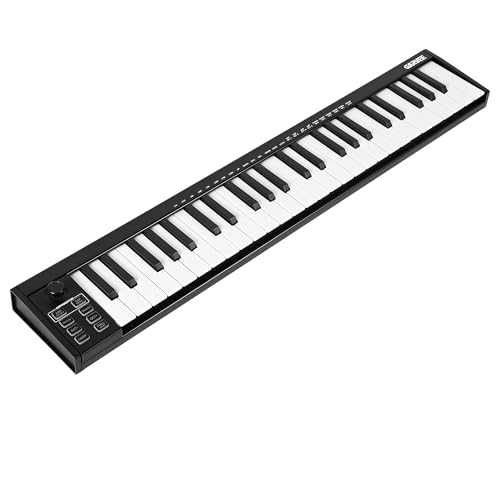 FANCIHABOR 49-Key MIDI Keyboard Controller with USB, DAW Integration, 8 Drum…
View on Amazon ↗
 GARVEE 49 Key USB MIDI Keyboard Controller with OLED Display, 8…
View on Amazon ↗
Listing names and images come from Amazon and are rechecked against the live listings; last checked Nov 8, 2026. No prices shown; the current price is on the listing.
How to read this guide. This guide is written from general knowledge of midi keyboard design and how key count, action, and controls affect a small space setup. It covers the product category, not individual models, so check the listing dimensions and key action before you buy.