Full size keys with touch response matter far more than the number of sounds for a beginner. If lessons are the goal, skip mini keys and get 61 or 88 full size keys with a sustain pedal input. If space is tight, a 61 key model works, but expect to replace it within a couple of years of serious practice. The main tradeoff is between compact size and a realistic piano feel.
Start With the Keys, Not the Sounds
Most beginner keyboard listings lead with the number of voices, rhythms, and demo songs. Those are cheap to add and rarely help someone learn to play. The physical keys decide how well practice transfers to a real piano or a higher level keyboard later.
Full size keys are the same width as acoustic piano keys. Mini keys are narrower, which feels fine for small hands at first but trains fingers to the wrong spacing. If the goal is any kind of formal lesson, full size keys are the safer starting point.
Touch response, sometimes called velocity sensitivity, means the keyboard measures how hard you press and plays louder or softer. Without it, every note sounds the same volume, which flattens dynamics and makes early pieces sound mechanical. Check the listing for this phrase rather than assuming it is included.
Polyphony Decides When Notes Disappear
Polyphony is the number of notes the keyboard can sound at once. A beginner might think two hands play only ten notes at a time, but a sustain pedal or a layered sound can eat through that count quickly.
Many budget keyboards have 32 note polyphony. That can cut off the tail of a held chord when the right hand plays a melody over it. 64 note polyphony is a more comfortable floor for anyone using a sustain pedal or practicing pieces with overlapping notes.
For a first keyboard used mainly for single line melodies and simple chords, 32 note polyphony can work. For lessons that move into classical or pop arrangements within a year, 64 notes avoids a frustrating ceiling.
A Small Bedroom Changes the Math
The same keyboard that works in a living room can crowd a small bedroom or a dorm desk. Measure the space before comparing listings. A 61 key keyboard is typically around 36 to 40 inches wide. An 88 key model is usually 50 to 55 inches wide.
Depth matters too. A keyboard with built in speakers and a music rest can be 12 to 16 inches deep. Add a stand and a bench, and the footprint grows. A wall mounted or folding stand can save floor space, but the keyboard itself still needs a stable surface.
Headphone use is the quiet practice answer. Almost every beginner keyboard has a headphone jack, but check whether it is a standard 1/4 inch or a 3.5 mm jack. A 1/4 inch jack needs an adapter for typical earbuds, which is a small but avoidable annoyance.
Lesson Habits Need a Sustain Pedal
A sustain pedal changes how chords and melodies connect. Many beginner keyboards include a cheap square pedal in the box, but it often slides across the floor and lacks the feel of a piano style pedal. Check whether the keyboard has a dedicated sustain pedal input.
Some ultra compact keyboards use a proprietary pedal connector instead of a standard 1/4 inch jack. That limits replacement options later. A standard jack lets you swap in a better pedal as technique improves.
If the keyboard will be used for music lessons, a pedal input is not optional. Ask the seller whether the pedal is included and what connector it uses before buying.
Sound Quality vs. Sound Quantity
A listing that promises 400 voices sounds impressive, but a beginner will use perhaps five of them. The main piano sound matters most, because that is what gets practiced every day.
Compare the speaker size and wattage if the keyboard will be played without headphones. Two 2.5 watt speakers are fine for a bedroom but thin in a living room. For home studio use, line outputs matter more than built in speakers, since the keyboard will run through an interface or monitors.
Church musicians and adult beginners often need a few solid sounds: acoustic piano, electric piano, strings, and an organ patch. A keyboard with 20 good sounds beats one with 200 thin ones for that use.
Which Design Type Fits the Room and the Goal
| Design type | Key feel | Space needed | Best for |
|---|---|---|---|
| Mini key keyboard | Soft, narrow keys | Smallest footprint | Very young kids or travel |
| 61 full size keys | Light synth action | Fits most desks | Lessons and small bedrooms |
| 76 full size keys | Light to semi weighted | Wider, needs a stand | Players who want more range |
| 88 weighted keys | Hammer action, piano like | Full piano width | Serious practice, home studios |
The table shows why a 61 key model is the default for adult beginners and lesson takers: it balances range, footprint, and cost. An 88 key weighted keyboard is the better long term pick for someone who already reads music or has played piano before.
A mini key keyboard is not a smaller version of a real piano. It is a different instrument with a different feel. Treat it as a toy or travel companion, not a lesson instrument.
What to Check in a Listing Before You Buy
Start with the three factors at the top of this guide: key size, touch response, and polyphony. If the listing does not state all three, that is a warning sign. Ask the seller directly.
Next, check the included accessories. A music rest is standard, but a stand, bench, and sustain pedal may or may not be in the box. Some bundles include all three. Others include a flimsy stand that wobbles under normal playing.
Look for the power supply. Many keyboards run on batteries or an AC adapter, but the adapter is sometimes sold separately. A keyboard that arrives without a way to plug it in is a common beginner frustration.
For home studio use, check the outputs. A USB port handles MIDI to a computer. A 1/4 inch line output handles audio to an interface or mixer. A headphone jack alone limits recording options.
Mistakes That Come Back in Six Months
The biggest mistake is buying for the current week instead of the next two years. A 32 key mini keyboard feels fine on day one but becomes a paperweight once lessons introduce two hand playing.
Another mistake is skipping touch response to save money. A beginner who practices without dynamics builds a habit that takes months to correct later. The cost difference between a touch sensitive and non touch sensitive model is usually small.
Overbuying is also possible. A full 88 key weighted keyboard with hundreds of sounds is overkill for a young child trying a first lesson. The extra weight and width make it hard to move and harder to sell if interest fades.
Check the return window and warranty. A keyboard that develops a dead key or a noisy output after a month needs a clear path back to the seller. If the listing is vague about returns, ask before buying.
Beginner Keyboard Questions Worth Asking
How many keys should a beginner electronic keyboard have?
61 full size keys is the practical starting point for most beginners. It covers the range needed for early lessons and fits on a desk or small stand. A 49 key keyboard can work for very young children, but it runs out of room quickly. Move to 88 keys only when the player is committed to piano style practice.
Is touch response necessary on a beginner keyboard?
Yes, if the goal is to learn piano or take lessons. Touch response lets volume follow finger pressure, which is how dynamics work on an acoustic piano. A keyboard without it plays every note at the same volume, which encourages a flat, mechanical touch that is hard to unlearn.
What is the difference between 61 and 88 keys?
An 88 key keyboard covers the full range of an acoustic piano, from the lowest A to the highest C. A 61 key keyboard covers five octaves, which is enough for most beginner and intermediate music but not for advanced classical pieces. The 88 key version is also wider, heavier, and usually more expensive.
Can I use a beginner keyboard for home recording?
Yes, if it has a USB MIDI connection. That lets the keyboard send note data to recording software on a computer or tablet. For audio recording, you need a line output or you can record the headphone signal with an adapter. Check the outputs before buying if recording is a goal.
Does a beginner keyboard need weighted keys?
Not at first. Weighted keys mimic the resistance of an acoustic piano, which builds finger strength, but a light synth action is fine for the first year or two of lessons. If the player is an adult who already plays piano or plans to perform on acoustic pianos, weighted keys are worth the extra cost.
The Keyboard to Put in the Cart First
An adult beginner taking lessons in an apartment should start with a 61 key model that has full size keys, touch response, and at least 64 note polyphony. That combination fits a small bedroom and covers two years of practice. A different pick fits a church musician or someone who already reads music: an 88 key weighted keyboard with a good piano sound and line outputs. The extra width and weight are worth it when the player will perform or record.
Real beginner electronic keyboard listings, so you can check the points in this guide against actual products. These are affiliate links: as an Amazon Associate we earn from qualifying purchases, at no extra cost to you.
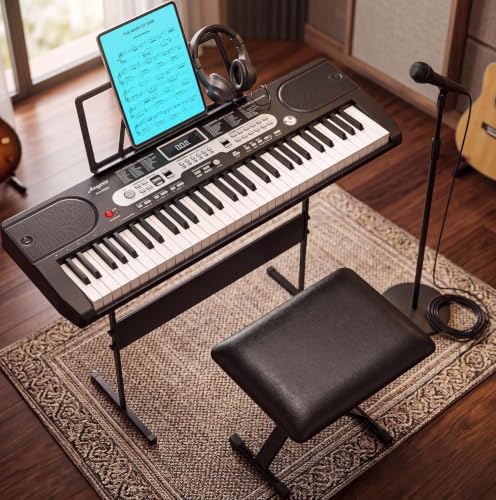 PEACEFULHUES Electric Keyboard Piano 61 Key for Beginners Adults, Portable Electronic…
View on Amazon ↗
 UGRFW 61 key keyboard Piano,Portable Electronic Digital Piano,Built In Dual Speakers,External…
View on Amazon ↗
 HRICANE Hricane Keyboard Piano Lighted Keys for Beginner Adults Teens Kids,…
View on Amazon ↗
Listing names and images come from Amazon and are rechecked against the live listings; last checked Nov 8, 2026. No prices shown; the current price is on the listing.
About this guide. This guide covers the beginner electronic keyboard category as a whole, not any individual model. It is written from general knowledge of how these instruments work and what their features do. Check the key dimensions, polyphony count, and included accessories on the listing before you buy.