Your choice depends on how many wired devices you need and how you want to control connections. TP Link TL SG105 and NETGEAR GS305 both add five gigabit ports in a fanless metal case, while UGREEN offers similar expansion in a compact plastic design. VCELINK is different: it is a two port selector that switches one cable between two devices without power. If you need to add several devices, pick a five port switch. If you need to isolate networks or toggle between two, VCELINK fits.
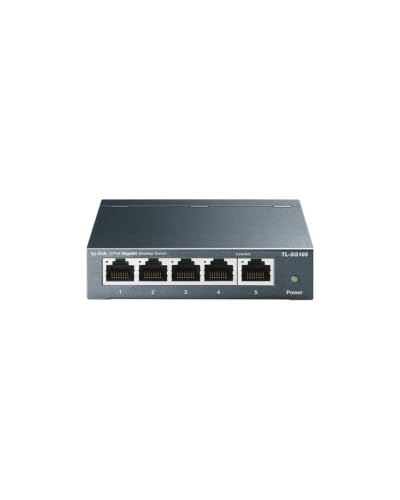
TP Link TL SG105 5 Port Gigabit Switch
Best for: Adding five gigabit ports to a home or office network quietly.
- Five 10/100/1000 Mbps ports auto negotiate speed and MDI/MDIX, so cables and devices connect without extra setup.
- Fanless metal housing runs silently and can sit on a desk or mount on a wall.
- Port based QoS and IGMP snooping prioritize voice or video traffic for smoother streaming and calls.
Keep in mind: Unmanaged design means no VLAN or advanced controls, so it is a straightforward plug and play unit.
Check price on Amazon ↗
NETGEAR GS305 5 Port Gigabit Switch
Best for: A simple five port gigabit expansion in a compact metal case.
- Five auto negotiating gigabit ports work with existing Cat5e or Cat6 cables, so no rewiring is needed.
- Fanless design ensures silent operation, and IEEE 802.3az reduces power draw when ports are idle.
- Compact metal body supports desktop or wall mount placement in small spaces.
Keep in mind: Made for use in the U.S. And Canada only, so check regional compatibility if you are elsewhere.
Check price on Amazon ↗
UGREEN 5 Port Gigabit Ethernet Switch
Best for: Expanding a network across laptops, routers, and NAS devices with a compact plastic switch.
- Five RJ45 ports support 10/100/1000 Mbps speeds and auto MDI/MDIX, easing cable connection.
- Fanless design and LED indicators keep operation quiet and give port status at a glance.
- Wall mounting holes and a compact body save desk space in homes, offices, or schools.
Keep in mind: POE is not supported, so connected devices need their own power source.
Check price on Amazon ↗
VCELINK 1000Mbps Passive Ethernet Selector
Best for: Toggling one Ethernet connection between two devices without adding a powered switch.
- Purely mechanical 2 in 1 out or 1 in 2 out switching needs no power and provides physical isolation.
- Supports up to 1000 Mbps and is compatible with PoE devices, so it can pass power to a connected device.
- Compact body with position indicators is easy to carry and solves cable shortage or port shortage issues.
Keep in mind: Only one port can be active at a time, so you cannot use both devices simultaneously.
Check price on Amazon ↗Product names and images come from the Amazon listings and are rechecked against them (last checked Nov 8, 2026). The highlights restate each listing's own bullet points as published on Nov 8, 2026. Prices change often, so we do not show them. These are affiliate links: as an Amazon Associate we earn from qualifying purchases, at no extra cost to you.
Port Count and How You Expand
The first thing to confirm on any switch listing is how many ports it provides and whether that matches the number of wired devices you plan to connect. TP Link TL SG105, NETGEAR GS305, and UGREEN each offer five RJ45 ports. That means you can connect one uplink to your router and still have four ports for computers, game consoles, printers, or NAS devices.
VCELINK takes a different approach. Its listing describes a two port selector that works in either a 2 in 1 out or 1 in 2 out configuration. This is useful when you have two networks or two devices but only one cable run. It does not expand the number of simultaneous connections; it switches between them.
If you need to connect more than four devices at once, a five port switch is the practical choice. If your problem is sharing one wall jack or one router port between two devices at different times, VCELINK solves that without needing a power outlet.
Speed and Cable Compatibility
All four listings state gigabit speeds. TP Link TL SG105, NETGEAR GS305, and UGREEN list 10/100/1000 Mbps auto negotiation on each port. That means they will match the speed of the connected device and cable, whether you are using older Cat5e or newer Cat6 wiring.
VCELINK also lists up to 1000 Mbps transmission, but it is a passive selector. Speed depends on the cable and connected devices, and the switch itself does not regenerate signals. Its listing notes nickel plated brass parts to reduce interference and provide stable connections.
For most home or small office use, any of these will handle gigabit internet and local file transfers. If you have a mix of older and newer devices, the auto negotiating ports on the five port switches remove guesswork.
| Product | Ports | Speed | Power | Mounting | PoE Support |
|---|---|---|---|---|---|
| TP Link TL SG105 | 5 x RJ45 | 10/100/1000 Mbps | External power | Desktop or wall | Not listed |
| NETGEAR GS305 | 5 x RJ45 | 1.0 Gbps | External power | Desktop or wall | Not listed |
| UGREEN 5 Port | 5 x RJ45 | 10/100/1000 Mbps | External power | Desktop or wall | Not supported |
| VCELINK Selector | 2 x RJ45 (one active) | Up to 1000 Mbps | None (passive) | Not listed | Supported |
Power, PoE, and Passive Operation
Most ethernet switches need a power adapter. TP Link TL SG105, NETGEAR GS305, and UGREEN are active switches that require external power. They use energy efficient standards to reduce consumption when ports are idle, and all three have fanless designs for silent operation.
VCELINK is the exception. Its listing calls it a passive selector with purely mechanical switching and no power needed. That makes it useful in spots without a nearby outlet, like a media cabinet or a garage. It also lists PoE support, meaning it can pass power through to a PoE device, though it does not inject power itself.
UGREEN explicitly states POE is not supported. The other two five port switches do not list PoE support, so assume they do not provide it. If you need to power an access point or IP camera through the switch, VCELINK may pass that through, but a PoE injector or PoE switch would be a separate purchase.
Mounting and Placement
Placement matters in tight network closets or behind desks. TP Link TL SG105 and NETGEAR GS305 both list desktop or wall mount options with metal cases. The metal housing adds durability and helps dissipate heat, even though they are fanless.
UGREEN lists a compact body with wall mounting holes and indicator lights. It is the only one of the three five port switches described as plastic in its listing, which keeps it light and easy to place on a desk or hang on a wall.
VCELINK's compact body is designed for portability. Its listing says it can be carried around to solve cable or switch interface shortages, which suggests it is small enough for a laptop bag or tool kit. Mounting is not listed for VCELINK.
Who Should Skip These Picks
If you need more than five ports or need to power multiple PoE devices, these five port switches will not be enough. A larger managed or PoE switch would be a better fit. The VCELINK selector is not an expansion switch at all, so skip it if you need simultaneous connections.
You should also skip these if you need managed features like VLANs, link aggregation, or port mirroring. All three five port switches are unmanaged, and VCELINK is a mechanical selector. Managed switches give you control over traffic, but they cost more and require configuration.
For a simple, quiet way to add wired ports, the five port options work well. For a no power way to switch between two networks or devices, VCELINK is unique. Choose based on whether you need expansion or isolation. See the selection guide for more on wired network setup.
Questions Buyers Ask Before Choosing
Do I need a managed or unmanaged switch?
For most homes and small offices, an unmanaged switch like the TP Link, NETGEAR, or UGREEN is enough. They work out of the box. If you need VLANs, traffic monitoring, or port controls, choose a managed switch instead.
Can I use the VCELINK selector to connect two devices at the same time?
No. The VCELINK listing states that only one port can be active at a time. It switches between two connections but does not allow both devices to access the network simultaneously.
Will these switches work with my existing cables?
The five port switches list compatibility with Cat5e and Cat6 cables, and auto negotiation adjusts to the cable and device speed. VCELINK supports up to 1000 Mbps but speed depends on your cable quality and length.
Which Switch Fits Your Setup
A home office user who wants to connect a desktop, printer, NAS, and smart TV to one router port will get the most straightforward setup from TP Link TL SG105. Its five auto negotiating ports, fanless metal case, and QoS for voice and video cover typical mixed use needs. For a different situation, a security camera installer who must toggle one cable between an NVR and a laptop will prefer VCELINK. Its passive, power free switching and PoE pass through solve a specific two device problem without adding another powered switch.
What this guide is. This shortlist was chosen by comparing the stated port counts, speeds, power needs, and mounting options across four real ethernet switch listings. The spread covers five port active switches and a two port passive selector, with no units handled by us. The comparison relies only on listing text, so check each listing for updated details before buying.