Port count and speed class decide most of the result. Count every wired device plus one spare port, then pick gigabit unless you move very large files. Unmanaged switches work for most homes; managed switches only help if you need VLANs or traffic limits. The main tradeoff is simplicity against control.
Count Every Wired Device Before You Look at Speed
Start with the number of things you will plug in with a cable, not the number of rooms. A desktop PC, a console, a smart TV, a network attached storage box, an access point, and a printer already add up to six ports. Add one spare for a guest device or a future gadget, and an eight port switch starts to look small.
A switch is not a router. It does not hand out IP addresses or connect you to the internet by itself. It sits behind your router and gives you more wired ports. If you only need to connect two devices in one room, a five port model is enough. If you are wiring a garden office plus the main house, plan for the longest cable run as well as the port count.
Wall mounting matters more than it appears on a listing. A switch with mounting holes can sit behind a desk or in a network cabinet. A desktop only model takes up shelf space and gathers dust. Check the listing photos for bracket holes and the orientation of the ports before you assume it will fit where you want it.
Speed Class: Gigabit Is the Floor, MultiGig Is a Niche
Gigabit ethernet, which moves data at 1,000 megabits per second, is the baseline for almost every modern wired device. A gigabit switch will not slow down a 4K stream, a video call, or an online game. The bottleneck is almost never the switch; it is the internet connection or the Wi-Fi link.
Multigig switches, often marked 2.5G or 10G, only earn their price when you move very large files inside your own network on a regular basis. Video editors pulling raw footage from a NAS, or two computers syncing big folders, can use the extra headroom. A 2.5G port also needs a 2.5G network card or adapter on the other end, or it falls back to gigabit.
Check the speed rating on every port, not just the headline. Some switches mix a couple of fast uplink ports with slower ports for the rest. If your NAS and your main PC are both on the fast ports, that works. If not, the fast ports are wasted.
| Switch class | Port speed | Management | PoE | Suits |
|---|---|---|---|---|
| Unmanaged desktop | Gigabit | None | No | Simple home setups |
| Unmanaged PoE | Gigabit | None | Yes | Cameras and access points |
| Smart managed | Gigabit or 2.5G | App or web | Sometimes | Home office with VLAN needs |
| Fully managed | Gigabit to 10G | CLI and SNMP | Sometimes | Racks and advanced users |
A smart managed switch splits the difference. It gives you a simple app to set up a guest network or a VLAN, without the command line of a fully managed unit. Most homes do not need either, but a home office that separates work and personal devices can benefit.
Power Over Ethernet Changes Where You Can Put Devices
PoE sends electricity through the ethernet cable, so a security camera or a ceiling mounted access point does not need a nearby outlet. If you are adding cameras around a large home or a garden office, a PoE switch removes a lot of extension cord mess. The tradeoff is heat and cost: PoE switches run warmer and cost more than the same port count without PoE.
PoE comes in different power budgets. A switch might have eight PoE ports but only enough total power for four cameras. Check the total PoE budget in watts, then add up the power draw of each device you plan to connect. A camera might draw 6 to 12 watts, while an access point often draws 10 to 20 watts.
You do not need PoE for a desktop PC, a console, or a TV. Those devices have their own power supplies. PoE only matters for devices designed to receive power over the cable, typically cameras, access points, and some VoIP phones.
Managed vs Unmanaged: Most Homes Should Skip the Settings
An unmanaged switch is a dumb box that just moves data. You plug it in and it works. There is no login, no firmware to update, and nothing to misconfigure. For a living room, a bedroom, or a small home office, that is usually the right answer.
A managed switch lets you create VLANs, limit bandwidth per port, and monitor traffic. That control matters in a home with many IoT devices, a separate work network, or a tenant who shares the connection. It also adds a layer of setup and a possible point of failure if you change a setting you do not understand.
Smart managed switches are the middle ground. They offer a phone app with a few toggles instead of a full network engineer interface. If you want a guest network on a separate VLAN but do not want to learn command line syntax, this class fits.
Reading a Listing: What to Check Before You Pay
Look for the switching capacity, usually listed in gigabits per second. It tells you whether all ports can run at full speed at the same time. A cheap switch might have eight gigabit ports but only a 10 gigabit per second backplane, which is enough for typical home use but not for all eight ports at maximum load. For home use, that is rarely a problem, but the number should be listed.
Check the power supply type. Some small switches use a wall wart, others use an internal supply with a standard power cord. Internal supplies are easier to mount and less likely to get knocked loose. Also check whether the switch is fanless. A fanless switch is silent, which matters in a bedroom or living room. A fan cooled switch belongs in a closet or a rack.
If the listing does not state the switching capacity, the PoE budget, or the mounting holes, ask the seller before you order. Those three details are harder to verify from photos alone.
Mistakes That Send the Switch Back
Buying too few ports is the most common mistake. A five port switch fills up faster than expected once you add a printer, a streaming box, and a spare cable for a laptop. Buy at least one more port than you currently need, and two more if you plan to add a NAS or a second access point.
Confusing a switch with a router is another. A switch will not replace your router, and it will not create a Wi-Fi network. If you need more Wi-Fi coverage, you want an access point or a mesh system, not a switch.
Ignoring the cable type causes slow links. A gigabit switch needs Cat 5e or better cable. Old Cat 5 cable can cap the link at 100 megabits. If you are reusing cables from a drawer, check the printing on the jacket before you blame the switch.
Who Should Skip a Switch Entirely
If every device in your home connects over Wi-Fi and nothing needs a cable, a switch adds ports you will not use. A mesh Wi-Fi system or a better router may solve your problem more directly. A switch only helps when you have multiple wired devices in one spot.
If you need to extend wired internet to a garden office or a distant room and running a cable is not possible, a powerline adapter or a point to point wireless bridge may be the alternative. A switch cannot create a connection where no cable exists.
If you only need one extra port, a small unmanaged switch is cheaper than most other options. But if you need many ports across several rooms, a single large switch in a central spot with long cable runs may be cleaner than several small switches daisy chained together.
Long Term Costs Hide in Power and Cooling
A switch runs 24 hours a day, so its idle power draw adds up over a year. Small unmanaged switches often draw 3 to 8 watts. PoE switches draw more even with nothing connected, because the power supply stays active. Check the idle power rating if your electricity rates are high.
Heat shortens the life of the capacitors inside. A fanless switch in a closed cabinet runs hotter than the same switch on an open shelf. Leave a few inches of air around the vents, and do not stack another hot device directly on top.
There are no consumables to replace, but the power adapter is the part most likely to fail first. If the switch uses an external adapter, keep a spare or confirm the voltage and barrel size so you can buy a generic replacement if needed.
Gaming and Remote Work: Where a Switch Helps and Where It Does Not
A wired connection through a switch removes Wi-Fi interference and lowers latency for online games. The switch itself adds less than a millisecond of delay, which is irrelevant for gaming. The bigger win is that a cable does not suffer from thick walls or neighboring networks the way Wi-Fi does.
For remote work, a switch lets you wire a laptop dock, a VoIP phone, and a printer in a home office. If your work requires a separate network for security, a managed switch with a VLAN can isolate work devices from family devices. Most remote workers do not need that, but it is a real feature if your employer requires it.
A switch does not improve your internet speed. If your connection is slow, a switch will not make it faster. It only ensures that devices on your local network talk to each other at full speed and that wired devices do not fight for Wi-Fi airtime.
Ethernet Switch Questions Before You Add to Cart
Is an ethernet switch the same as a router?
No. A router connects your home network to the internet and assigns IP addresses. A switch only adds more wired ports to an existing network. You plug the switch into a router, then plug devices into the switch.
Which ethernet switch do I need for a home office?
An eight port gigabit unmanaged switch covers most home offices. If you need to separate work and personal devices, a smart managed switch with VLAN support is worth the extra cost. Add PoE only if you plan to power a camera or access point through the switch.
What is the difference between a gigabit and a 2.5G switch?
A gigabit port moves data at 1,000 megabits per second. A 2.5G port moves data at 2,500 megabits per second. The faster speed only matters if both ends support it and you regularly move very large files, such as raw video, between devices on your local network.
Should I buy a managed switch for my home?
Most homes do not need one. An unmanaged switch works without setup. A managed switch is useful if you want VLANs, bandwidth limits, or traffic monitoring, or if you run a home lab or a network with many IoT devices.
How many ports should an ethernet switch have?
Count every wired device you have now, then add at least one spare port. If you plan to add a NAS or a second access point, add two spares. Five and eight port switches are common for single rooms; sixteen or more suit a whole house.
The Switch That Fits Most Wired Homes
A home with a few wired devices in one room and no cameras or access points to power should start with an eight port gigabit unmanaged switch. It covers a PC, console, TV, and printer with room to grow. If you plan to add security cameras or a ceiling access point, get the same size switch with PoE instead.
Real ethernet switch listings, so you can check the points in this guide against actual products. These are affiliate links: as an Amazon Associate we earn from qualifying purchases, at no extra cost to you.
 TP LINK TP-Link 8 Port Gigabit Ethernet Network Switch - Ethernet Splitter…
View on Amazon ↗
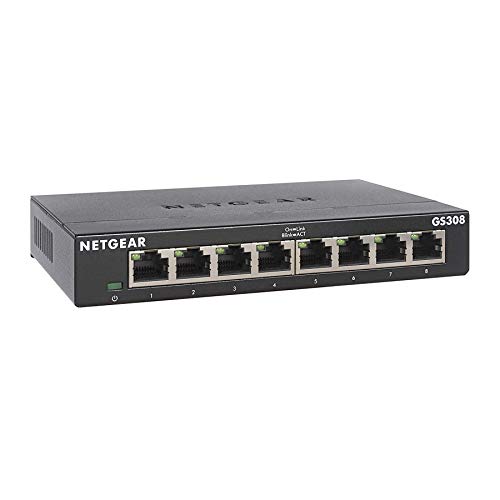 NETGEAR NETGEAR 8-Port Gigabit Ethernet Unmanaged Network Switch (GS308) | Home…
View on Amazon ↗
 UGREEN UGREEN Ethernet Switch, 5 Port Gigabit Plug & Play Ethernet…
View on Amazon ↗
Listing names and images come from Amazon and are rechecked against the live listings; last checked Nov 8, 2026. No prices shown; the current price is on the listing.
Scope and limits. This guide covers the ethernet switch category from general knowledge of how these devices work, not from in person use or individual product documents. No reviews or tests were used, and any physical dimension or power figure should be checked on the listing before ordering.