Focus on cuff size, ease of use, and memory storage. A cuff that fits the upper arm correctly gives the most reliable readings for most older adults. Wrist monitors are more portable but less forgiving of arm position. Skip complex app features unless someone will actually use them. The main tradeoff is between simplicity and detailed tracking.
Cuff Size Is the First Filter
Most inaccurate home readings come from a cuff that does not fit the upper arm. A cuff that is too small squeezes too hard and reads high. A cuff that is too large reads low. Measure the arm midway between shoulder and elbow, then compare that circumference to the cuff range on the listing.
Standard cuffs often fit arms around 9 to 17 inches. Older adults with thinner or larger arms may need a small or extra large cuff. Some monitors list a wide range cuff that covers many sizes. Check the actual range in the listing, not just the word 'adjustable'.
Upper Arm Versus Wrist Versus Finger
Upper arm monitors are the standard for home use. The cuff sits at heart level naturally when the arm rests on a table. Wrist monitors are smaller and lighter, which helps for travel or painful upper arms. But they require holding the wrist exactly at heart height. A small tilt changes the reading.
Finger monitors are not reliable for medical decisions. Skip them. If an older adult has trouble wrapping a cuff alone, a wrist monitor with a position guide can work, but it needs practice. Caregivers usually do better with an upper arm model.
| Placement | Accuracy risk | Ease for seniors | Best for |
|---|---|---|---|
| Upper arm | Lowest when seated | Easy with one hand | Daily home checks |
| Wrist | Higher if arm drops | Very easy to put on | Travel, sore arms |
| Finger | Not trustworthy | Easiest | Not recommended |
One Button Beats a Touchscreen
Older adults often stop using a monitor that requires scrolling menus or pairing a phone. Look for a large start button and a display with big numbers. A backlit screen helps in dim rooms. If two people share the monitor, two user buttons keep their histories separate.
Voice readout can help someone with low vision, but it annoys others. Check whether the voice can be turned off. Irregular heartbeat detection is common, but it flags many harmless variations. Treat it as a prompt to check with a doctor, not a diagnosis.
Memory and Trends Without an App
A monitor that stores 30 to 60 readings lets a caregiver review the week without writing things down. Some models store two users or more. App syncing is useful only if someone will open the app and share the data. Many buyers pay for Bluetooth and never use it.
For a caregiver managing a parent, a simple memory button may be enough. Write readings in a notebook or use the monitor's average function. Averaging three readings taken a minute apart is more useful than a single spot check. The monitor should do this automatically or make it easy to do by hand.
Power and Long Term Costs
Battery powered monitors are portable and cheap to run. Rechargeable ones avoid buying batteries but need charging discipline. An AC adapter is handy for a bedside table, but the cord can trip someone. Most monitors run on four AA batteries that last for months with daily use.
Cuffs wear out faster than the monitor body. Check whether replacement cuffs are sold separately and whether they fit the same connector. A torn cuff or a stiff air hose changes readings. Some brands make cuffs easy to swap; others force you to replace the whole unit.
Reading the Listing Before You Buy
Look for three numbers in the specifications: cuff circumference range, stored reading capacity, and whether the monitor is clinically validated. Validation means an independent lab checked it against a standard. The listing may say 'validated' or name a protocol. If it does not, ask the seller.
Check whether the cuff is preformed or wraps freely. A preformed cuff is easier to put on one handed. Check the display size and whether it shows systolic, diastolic, and pulse at once. If buying for two people, confirm the user memory split. Ask the seller if replacement cuffs are available before you need one.
Mistakes That Turn Good Hardware Into Bad Numbers
The most common mistake is taking a reading after walking, talking, or drinking coffee. Sit quietly for five minutes first. Feet flat, back supported, arm resting on a table at heart level. The cuff goes on bare skin, not over a sleeve. Rolling up a tight sleeve can act like a tourniquet.
Taking one reading and reacting to it is another error. Blood pressure moves all day. Take two or three readings a minute apart and average them. Do this at the same time each day. A monitor cannot fix poor technique, but a good one makes the technique easier to repeat.
When a Different Tool Makes More Sense
Someone with a very irregular heartbeat, such as atrial fibrillation, may get inconsistent readings from any home monitor. A manual cuff and stethoscope in a trained hand works better. If arm movement or arthritis makes cuff placement painful, a wrist monitor is a compromise, not a fix. Ask a doctor first.
If the person will not use the monitor without help, a simple model with one button and a large display beats a feature rich one. If no one will look at the stored data, skip the memory and buy the cheapest validated upper arm monitor you can find. A home health monitoring setup should match the user's daily routine.
Caregiver Routines and Small Households
A caregiver checking two people needs a monitor with at least two user profiles. Look for a quick switch between users, not a menu buried three screens deep. Some monitors mark readings with a time and date stamp automatically. That matters when a doctor asks when a high reading happened.
Small households often store the monitor in a drawer and use it once a week. Batteries are fine there. Frequent travel calls for a compact case and a wrist or slim upper arm model. Check the case is included; many listings show one but sell it separately. A bathroom scale with a large display can sit beside the monitor as part of a morning routine.
Digital Blood Pressure Monitor Questions Before You Buy
Is a digital blood pressure monitor accurate?
A clinically validated upper arm monitor used correctly is accurate enough for home tracking. Sit still for five minutes, keep the arm at heart level, and use a cuff that fits. Wrist monitors can be accurate but need strict arm position. Finger monitors are not reliable.
What size cuff do I need for a digital blood pressure monitor?
Measure around the bare upper arm halfway between the shoulder and elbow. Compare that number to the cuff range in the listing. Most standard cuffs fit 9 to 17 inches. Outside that range, buy a small or extra large cuff. A wrong size cuff gives consistently wrong readings.
Which is better, a wrist or arm blood pressure monitor?
For most older adults and home use, an upper arm monitor is better because it sits at heart level naturally. A wrist monitor is lighter and easier to put on, but the wrist must be held exactly at heart height. Choose wrist only if upper arm cuffs are painful or for travel.
How often should I replace the cuff on a blood pressure monitor?
Replace the cuff when it shows cracks, the fabric frays, or the air hose stiffens. A worn cuff leaks air and changes readings. Most cuffs last one to two years with daily use. Check that the manufacturer sells a replacement cuff that fits your monitor's connector.
Can a digital blood pressure monitor detect irregular heartbeat?
Many monitors flag an irregular pulse during a reading. That flag is not a diagnosis. It can be triggered by movement, talking, or a harmless extra beat. If the flag appears often, bring the monitor to a doctor and show the stored readings.
Which Home Blood Pressure Monitor to Pick
Someone checking a parent's blood pressure each morning should buy a validated upper arm monitor with a cuff that fits, a large one button display, and memory for two users. Skip the app unless the caregiver already tracks health data on a phone. For a senior who travels often or has painful upper arms, a wrist monitor with a position guide is the better compromise, but practice the arm position together first.
Real digital blood pressure monitor listings, so you can check the points in this guide against actual products. These are affiliate links: as an Amazon Associate we earn from qualifying purchases, at no extra cost to you.
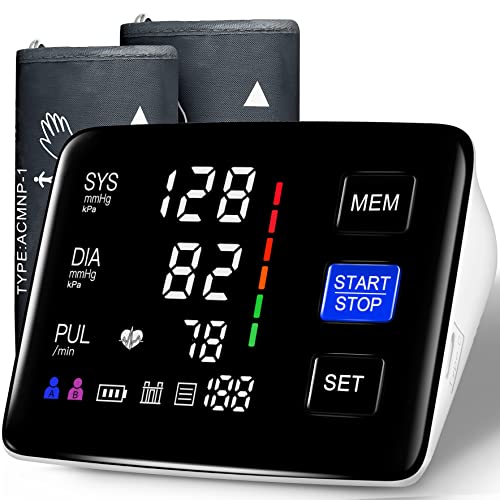 LIVAROCI Blood Pressure Monitor, 9-17'' & 13-21'' Extra Large Blood Pressure…
View on Amazon ↗
 URION Blood Pressure Monitor Upper Arm with Large Cuff | 1000…
View on Amazon ↗
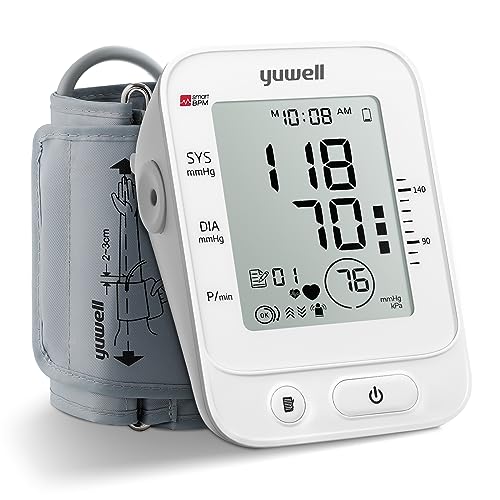 YUWELL yuwell Blood Pressure Monitor, Large Upper Arm Blood Pressure Cuff,…
View on Amazon ↗
Listing names and images come from Amazon and are rechecked against the live listings; last checked Nov 8, 2026. No prices shown; the current price is on the listing.
How to read this guide. This guide explains the general differences between cuff types, features, and techniques for digital blood pressure monitors. It does not evaluate any individual model, so check the cuff range, validation claim, and display size on the listing before buying.