Start with pressure style and cutting width. Manual machines suit occasional card makers and scrapbookers who want simple upkeep, while digital machines save time on repeated or detailed cuts for small craft businesses. The main tradeoff is speed and precision against cost and learning time.
Pressure Type Sets the Skill Floor
Die cutting machines fall into two pressure families. A manual roller squeezes a die and material between plates as you turn a crank. A digital machine drives a blade or tool head across the material, often following a file from software.
Manual pressure rewards patience. You can feel when a sandwich of plates is too tight or too loose, and adjustments are physical, a shim here or a spare plate there. Digital pressure rewards consistency. The machine repeats the same cut depth and path every time, which helps with long runs of identical shapes.
For a card maker who cuts a few shapes per session, a manual roller is often enough. For a small shop that ships dozens of vinyl or heat transfer decals a week, digital repeatability usually saves more time than it costs.
Cutting Width Decides Which Projects Fit
The opening where material enters limits the size of a single pass. Narrow machines, often around 6 inches wide, handle standard card fronts, scrapbook accents, and small labels. Wider machines, commonly 12 inches or more, accept full sheet vinyl, larger fabric panels, and shirt sized designs without splicing.
A narrow deck can still cut a long border because you feed material through in stages, but a wide design requires a wide opening. If you plan to make t shirt transfers larger than a hand, check the throat width before anything else.
Classroom projects and scrapbook beginners rarely need more than a narrow opening. Small craft businesses that sell tote bags, onesies, or wall decals should compare wide format machines, even if the upfront cost is higher.
Material Range Is Where Listings Get Vague
Every listing names materials it can cut, but the useful question is which materials it cuts cleanly at the pressure you will actually use. Paper, cardstock, and thin vinyl are common. Felt, chipboard, leather, and fabric require more force and often special plates or blades.
A machine that claims to cut fabric may still struggle with multiple layers or dense felt. Compare the stated maximum thickness and the recommended blade or plate for each material. If a listing only shows paper projects, assume paper is its comfort zone.
For money die cutting, which usually means cutting shapes from thin sheets of metal or embossing metal blanks, most craft machines are not suitable. That task needs a dedicated metal cutting or embossing press with far more pressure than a typical die cutter.
Consumables Quietly Set the Long Term Cost
The machine is only part of the cost. Manual machines wear out cutting plates, which need replacing as they warp or crack. Digital machines use sticky mats that lose tack, blades that dull, and sometimes proprietary tool housings.
Compare what must be replaced and how often. A manual roller may need new plates every few months under heavy use. A digital cutter may need a new blade after several dozen hours of cutting. Check whether the machine accepts generic mats and blades or locks you into one brand.
Budget tier machines often have the lowest initial price but the most frequent consumable swaps. Mid range and premium machines may use longer lasting plates or self sharpening blades, which can reduce the total cost over a year of regular crafting.
A Listing Check Before You Click
Open the listing and look for three numbers: maximum cutting width, maximum material thickness, and included plates or mats. If any of those is missing, ask the seller before buying.
Next, check the project photos. If every sample is a paper shape, do not assume the machine will cut chipboard or fabric. Ask what blade, plate, or pressure setting the seller recommends for the specific material you plan to use.
For digital machines, ask whether the software is a one time purchase or a subscription, and whether the machine works without an internet connection. Some require cloud accounts for every cut, which matters in a classroom with limited Wi-Fi or a craft fair with no signal.
Mistakes That Send Machines Back
One common mistake is buying the widest machine available when most projects are card sized. A wide deck takes more table space and costs more, but it does not improve a 5 inch card front.
Another is assuming all dies work in all machines. Some dies are thin metal and need a manual roller. Others are designed for a specific digital brand and will not fit a competitor. Check the die compatibility before buying a machine for a die collection you already own.
A third mistake is ignoring the noise and table footprint. Manual machines are quiet but need clamping space. Digital machines hum and move, and some models are loud enough to be annoying in a shared craft room or an apartment at night.
Who Should Skip a Dedicated Die Cutter
If you only cut a handful of shapes a year, a sharp craft knife, a paper trimmer, or a cutting mat with a ruler may be enough. Die cutters earn their space when you repeat shapes often or need many identical pieces.
If you work mostly with fabric, compare a die cutter against a rotary cutter and self healing mat. Some fabric shapes are faster to cut by hand than to set up in a machine. If you need metal shapes, a die cutter is the wrong tool entirely.
For classrooms, consider whether one machine shared among many students will create a bottleneck. A set of punches or pre cut shapes may serve a group better than a single die cutter that one child uses at a time.
The Card and Scrapbook Fit
Card making and scrapbooking reward small, repeatable shapes: flowers, tags, letters, frames. A narrow manual machine handles most of these without software or power, which keeps setup simple for beginners.
Look for a machine with a clear plate system and a low learning curve. If you plan to cut intricate lace style cards, digital machines open more detail, but they add a screen and file management to a hobby that some people want to keep analog.
For scrapbook beginners, start with a manual roller and a few basic dies. It is easier to learn pressure and plate stacking on a simple machine than to troubleshoot software on day one.
The Small Business and Shirt Fit
Small craft businesses that sell decals, shirt transfers, or packaging labels usually benefit from a digital machine with a wide cutting area. The repeatability matters more than the learning curve, and the wider deck reduces waste on large designs.
Compare machines by how they handle long cuts. Some digital cutters track material poorly on long runs, which ruins a batch of heat transfer vinyl. Look for a machine with a strong feed system or a reputation for straight cuts on 12 inch rolls.
For t shirt projects, check the maximum cut width against common shirt sizes. A 9 inch wide design fits most adult shirts, but a 12 inch design needs a 12 inch machine. Also confirm the machine can cut heat transfer vinyl without tearing the carrier sheet.
For other material choices, see cutting mats for quilters and fabric projects if you plan to combine die cutting with rotary work.
Plate Systems and Learning Curves Compared
Manual machines use a stack of plates. You place the die on one plate, add material, cover with another plate, and roll the sandwich through. The learning curve is mostly about pressure: too little and the cut does not go through, too much and the die embosses or cracks the plate.
Digital machines use a sticky mat that holds material while a blade moves over it. The learning curve shifts to software: setting cut lines, choosing pressure, and weeding the result. Neither system is harder overall, but they frustrate different people.
If you hate software updates and file management, choose manual. If you hate physical trial and error, choose digital. The table below compares the main design types by effort, detail, and upkeep.
| Design | Setup effort | Detail level | Upkeep | Suits |
|---|---|---|---|---|
| Manual roller | Low | Moderate | Plates only | Cards, scrapbooks |
| Manual with shims | Moderate | Good | Plates and shims | Mixed materials |
| Digital with mats | Moderate | High | Mats and blades | Decals, small runs |
| Digital with auto feed | High | High | More parts | Shirts, long runs |
Setup effort includes both the first unboxing and the time before each cut. A manual roller needs no software, but you still align the die and build the plate stack every time.
Upkeep is the hidden column. Plates are cheap but warp. Mats lose tack. Blades dull. Check whether the consumables are available locally or only online, because a machine without plates or mats is a paperweight.
Die Cutter Questions Before You Spend
How do I choose between a manual and a digital die cutting machine?
Count your repeat cuts. If you make a few shapes per session and enjoy the physical process, a manual roller is simpler and cheaper to maintain. If you cut dozens of identical decals, tags, or shirt transfers, a digital machine saves time and gives finer detail. Digital adds software and consumables, so choose manual for simple pleasure and digital for production.
What is the widest material a die cutting machine can handle?
Most craft machines fall into two groups. Narrow machines accept material around 6 inches wide, which covers cards and small labels. Wide format machines accept 12 inches or more, which allows full sheet vinyl and large shirt designs. Check the throat width on the listing, because a wide machine cannot cut a design wider than its opening in one pass.
Is a die cutting machine worth it for scrapbooking?
For most scrapbookers, yes, if you use repeated shapes like letters, frames, or flowers. A manual machine with a few basic dies is enough and avoids software. If you only cut one or two shapes per layout, a paper trimmer and punches may be cheaper and faster. The machine earns its space only when you would otherwise cut the same shape by hand many times.
Can I cut fabric with a regular die cutting machine?
Some machines cut fabric, but the result depends on the fabric type and the blade or plate. Thin cotton and felt often work with a fabric blade or a stabilizer. Dense felt, multiple layers, or stretchy knits may jam or tear. Check the listing for a stated fabric thickness limit and ask the seller which blade they recommend before assuming your fabric will work.
Which die cutting machine is best for a small business?
Look for a digital machine with a wide cutting area, reliable tracking on long cuts, and consumables that are easy to buy in bulk. Repeatability matters more than low upfront cost. A manual machine slows down after the tenth identical decal. Compare the cost of replacement mats and blades, because a small business will replace them often.
Where a Die Cutter Earns Its Space
A card maker who cuts a few shapes each week is well served by a narrow manual roller with a simple plate system. It costs less to run and keeps the craft tactile. A small craft business selling shirt transfers or vinyl decals should instead choose a wide format digital machine, even at a higher price, because repeatable cuts and a 12 inch deck save hours every week.
Real die cutting machine listings, so you can check the points in this guide against actual products. These are affiliate links: as an Amazon Associate we earn from qualifying purchases, at no extra cost to you.
 GENRON CRAFT Manual Die Cutting Machine for Card Making, 6in Opening |…
View on Amazon ↗
 FIND SCRAPBLOOMS 6inch Manual Die Cutting Machine Kit, A5 Embossing Machine with…
View on Amazon ↗
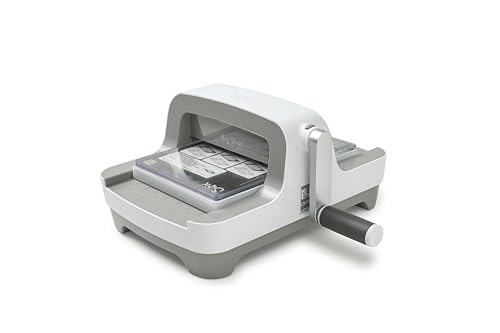 SIZZIX Sizzix Big Shot Machine, 6" Die-Cutting and Embossing Machine, Machine…
View on Amazon ↗
Listing names and images come from Amazon and are rechecked against the live listings; last checked Nov 8, 2026. No prices shown; the current price is on the listing.
What this guide is. Use this guide as a checklist while you read any die cutter listing. It explains the product type in general, without reviewing individual models, so verify the cutting width, plate needs, and material limits on the page before you buy.