Choose DAW software by matching its workflow to your recording and editing habits, not by its bundled sounds or demo songs. Live instrumental recording, MIDI composition, and audio post production each favor different layouts and routing tools. Check upgrade costs and included plugins, because the base price is rarely the last money you spend.
Match the Editing Flow Before the Sound
The biggest split among DAWs is how you build a song. Some center on a grid of clips or loops that you launch and mute in real time. Others center on a timeline where you cut, crossfade, and automate from left to right.
If you record a whole band live, a console style mixer view and fast comping tools will matter more than a clip launcher. If you build beats from short samples, a pattern sequencer and quick pitch shifting will save more time than deep crossfade options.
Compare the main editing window in the listing screenshots. A DAW that hides its mixer behind extra menus will slow down a mix heavy session, while one that hides its piano roll will frustrate a MIDI composer.
Stock Instruments Shape Your First Year
The included synthesizers, drum machines, and sample libraries do more than fill silence. They teach you the sound palette you will reach for during the first months, before you buy third party plugins.
A DAW with strong acoustic drum and piano libraries suits songwriters who need realistic backing tracks. A DAW with deep subtractive synths and a flexible sampler suits electronic producers who design their own sounds.
Check whether the listing names the included instruments by type rather than count. A bundle with forty effects but only one basic synth may still leave you shopping for a lead sound on day one.
The Upgrade Ladder Is the Real Price
Most DAW software arrives in tiers. The entry tier may cap track counts, omit pitch correction, or lock out video import. The top tier may add orchestral libraries you will never open.
Compare the feature table between editions before you buy the cheapest one. A missing comping tool or a track limit can force an upgrade within weeks, which often costs more than starting one tier up.
Some DAWs sell major version upgrades every couple of years. Others include updates for life. A one time price is not the same as a long term price if you plan to stay current.
Recording Audio Versus Composing MIDI
Live audio recording and MIDI composition pull a DAW in different directions. Audio work needs fast comping, flexible routing, and low latency monitoring. MIDI work needs a responsive piano roll, chord tools, and expression editing.
Check which mode the DAW opens by default. If you record a vocal and the first screen shows a blank pattern grid, you will spend extra clicks setting up a linear session every time.
Many DAWs do both well, but each has a native mode. A hybrid workflow is fine, yet the DAW's default project template will quietly push you toward its strongest side.
Two Checks Before You Trust a Demo Track
Demo songs are produced by expert users with the full plugin collection and months of practice. They show what the DAW can sound like, not what your first month will feel like.
First, check the demo song's track count and routing complexity. A sparse arrangement tells you little about how the mixer handles forty tracks with buses and sidechains.
Second, check whether the demo uses stock plugins only. If the listing credits third party reverbs or synths, the sound you hear is not the sound you buy.
A better test is the free trial. Open a blank project, record one audio track, add one MIDI track, and try to route a send to a reverb. That ten minute task reveals more than any polished demo.
When a Dedicated Editor Beats a Full DAW
Not every music task needs a full DAW. If you only trim, convert, or batch process audio files, a dedicated audio editor will be faster and cheaper. This is covered in the audio converter guide for staying useful over time.
If you only play back backing tracks or organize a DJ set, a performance app or sampler will fit better than a timeline editor. A full DAW adds menus and routing options you will never touch.
If you are learning music theory and just need a place to write exercises, a notation program or a simple MIDI scratchpad may serve you better. The theory course guide covers how structured learning differs from self teaching.
The Hidden Cost of Project Lock In
Your DAW choice becomes a habit. Sessions, templates, keyboard shortcuts, and plugin presets all live inside one program. Switching later means relearning muscle memory and rebuilding sessions from scratch.
Check whether the DAW can export stems or AAF files cleanly. If you ever collaborate with someone on another platform, a clean export path will save hours of manual rebuilding.
Also check the plugin format support. If you already own VST effects, a DAW that only runs its own format will orphan your existing collection, or force you to buy wrappers.
The Checklist in the Listing, Not the Marketing
Ignore the phrases 'industry standard' and 'used by professionals'. They describe other people's workflows, not yours. Focus on four concrete items in the listing.
First, the minimum system requirements: CPU generation, RAM, and disk space for the full sound library. A DAW that barely runs on your machine will stutter during playback and recording.
Second, the included plugin formats and whether third party plugins you already own will load. Third, the export options: WAV, MP3, stems, and video bounce. Fourth, the license terms: how many machines, and whether updates are free.
Ask the seller only questions the listing cannot answer: whether a trial is available, how license transfers work if you sell your computer, and what happens to your projects if you stop paying for a subscription tier.
A Cheap DAW That Fights You Costs More
A budget DAW with a cramped mixer and no track freeze will waste hours on workarounds. Hours are money if you record clients or value your writing time.
A premium DAW with a huge orchestral library is also a poor fit if you only record guitar demos. You pay for gigabytes you will never load and menus you will never open.
The right price tier is the one where every feature you use daily sits one click away, and every feature you ignore stays hidden. Check the edition comparison table before buying any tier.
For a household or family use case, a single license may not cover multiple users. The family plan guide explains how shared access differs from a solo plan.
A Quick Comparison of Workflow Types
| Workflow style | Editing feel | Included content focus | Suits |
|---|---|---|---|
| Pattern based | Clip launch and mute | Synths and drum machines | Beat makers and live sets |
| Linear tape style | Timeline and console | Acoustic instruments and effects | Band recording and mixing |
| Hybrid | Both clip and linear views | Balanced synth and acoustic set | Songwriters who do both |
| Modular rack style | Visible signal flow | Deep synthesis and routing tools | Sound designers and experimenters |
The table compares general design approaches, not specific products. Check each listing against your primary daily task: tracking live audio, building patterns, or mixing a finished arrangement.
DAW Questions Worth Asking Before You Install
Can I use DAW software without knowing music theory?
Yes. Most DAWs include scale locking, chord pads, and MIDI effects that keep notes in key. You can build complete tracks by ear or with visual tools. However, a little theory helps you finish ideas faster and communicate with collaborators.
Does more expensive DAW software sound better?
No. The audio engine in modern DAWs is clean enough that the difference comes from your instruments, effects, and mixing decisions. A higher price usually buys more bundled content, deeper editing tools, or a smoother workflow, not a better sound by itself.
Is a subscription DAW worth it over a one time purchase?
It depends on how often the developer releases major features and how long you plan to stay current. A subscription keeps you on the latest version and often includes all sound libraries. A one time purchase can be cheaper over several years if you are happy to freeze your setup.
Which DAW is easiest for recording vocals and guitar?
Look for a DAW with a simple linear timeline, one click track creation, and fast comping tools. A pattern based DAW can record audio, but its loop focus adds extra steps for a traditional verse and chorus song. Check the default project template before you buy.
What is the minimum computer spec for DAW software?
Check the developer's stated minimum, then aim above it. A quad core CPU, 16 GB of RAM, and an SSD are a comfortable starting point for most modern DAWs with moderate track counts. Large sample libraries and many virtual instruments will demand more RAM and disk space.
The DAW That Fits Your Daily Session
A songwriter who records vocals and guitar, then builds a mix with stock effects, should start with a hybrid DAW that opens to a linear timeline and includes solid acoustic instruments. Buy the middle edition, because entry tiers often lock out comping tools you will need on the first vocal take. A beat maker who launches clips and performs live should instead choose a pattern based DAW with a strong sampler, even if it means less precise audio editing for occasional overdubs.
Real daw software listings, so you can check the points in this guide against actual products. These are affiliate links: as an Amazon Associate we earn from qualifying purchases, at no extra cost to you.
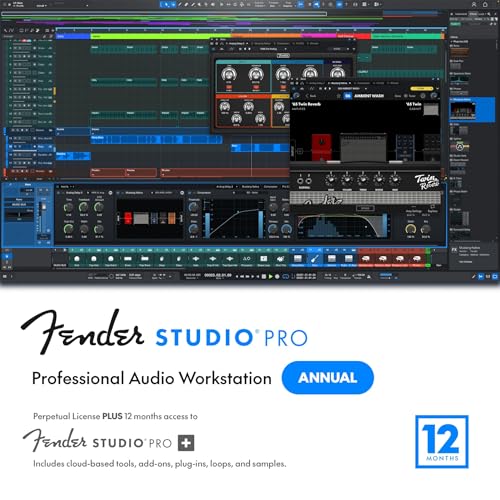 PRESONUS AUDIO ELECTRONICS Fender Studio Pro 8 — Full Music Production Software, Digital…
View on Amazon ↗
 MOTU Digital Performer 11 Audio Workstation Software (boxed full version)
View on Amazon ↗
 NCH SOFTWARE DeskFX Free Audio Effects & Audio Enhancer Software [PC Download]
View on Amazon ↗
Listing names and images come from Amazon and are rechecked against the live listings; last checked Nov 8, 2026. No prices shown; the current price is on the listing.
About this guide. This guide covers DAW software as a category, not individual products, and is written from general knowledge of how these programs work. No product documents, reviews, or in person testing were used, so check any listed dimension or feature on the product page before purchasing.