Three factors decide most audio converter choices: the formats you actually use, whether you need one file or hundreds converted at once, and how much control you want over the output. Hardware boxes suit digitizing tapes and vinyl, while software and online tools cover digital files. The main tradeoff is speed and convenience against fine control over quality and metadata.
The Formats You Already Own
Start by listing the file types on your drives, not the formats you might use someday. A converter that handles WAV, MP3, FLAC, AAC, and OGG covers most music libraries, but podcasters often need AIFF or broadcast WAV. Digital collectors may sit on old RealAudio, WMA, or Shorten files that many modern tools dropped.
Check the listing for lossless and lossy support together. Some converters handle MP3 and FLAC but fail on 24 bit WAV or DSD. If your archive includes voice memos, voice recorders, or game audio, look for AMR, M4A, and OGG support. The safest move is to test the trial or free tier with your rarest file before paying.
Hardware converters matter less for format coverage because they capture an analog signal and encode it fresh. Software and online tools vary far more. A converter that only outputs MP3 is useless for a vinyl ripper who wants FLAC. Match the tool to the end format, not just the source.
One File or a Whole Library
Batch handling is the quiet divider between a useful tool and a chore. Musicians and students converting a single project can live without it. Digital collectors moving thousands of files need queue management, folder watching, and predictable file naming.
Look for drag and drop queues, folder recursion, and naming rules that preserve track numbers or album names. A converter that renames everything 'output_001' creates hours of cleanup. Check whether the tool can skip duplicates, overwrite safely, or pause mid queue.
Hardware boxes are almost never batch tools. Each tape or record plays in real time, so you convert one album per sitting. Software with a watch folder can convert new files automatically, which suits podcasters who render episodes in a set format every week.
Output Quality and the Controls That Matter
Bitrate, sample rate, and channel count decide whether a converted file sounds right. A fixed 128 kbps MP3 setting is fine for voice but thin for music. Look for variable bitrate options, 320 kbps ceilings, and 48 kHz support for video soundtracks.
Dithering, normalization, and peak limiting show up on premium tools and matter for home studios. A converter that lets you set the noise floor or apply a fade avoids clipping when you raise quiet recordings. Compare the specification pages: some tools hide these controls behind presets.
Marketing often pushes 'HD audio' or 'studio grade' without explaining the chain. What matters is whether the converter preserves the source sample rate or forces everything to 44.1 kHz. Check the listing for pass through or bit perfect modes if you archive lossless files.
How the Converter Fits Your Setup
Think about where the files start and end. A podcaster with a laptop needs a different tool than a student with a phone full of voice memos. Hardware boxes need cables, power, and a shelf near the tape deck or turntable.
Check operating system support before buying software. Some converters are Windows only, others Mac only, and a few run on Linux. Mobile apps can batch convert on the go but often lack the depth of desktop tools. Online tools work anywhere but upload your files to a server.
For digitizing tapes or vinyl, the hardware box must match your source outputs. Look for RCA line in, a phono preamp if your turntable lacks one, and USB out to the computer. A box with only a 3.5 mm input will not connect to most component stereos.
Reading the Listing Before You Buy
Filter out the adjectives and look for a format list. A listing that says 'all popular formats' without naming them is hiding a gap. Ask the seller which exact codecs and container types are supported, especially for rare files like APE or WavPack.
Check whether the price is a one time purchase or a subscription. Some software tools now charge yearly for updates, while hardware boxes have no recurring fee. Online converters often cap file size or daily conversions on free tiers, so read the limits before you upload a two hour recording.
For hardware, confirm the maximum recording resolution and the file format it saves to. A box that records only MP3 at 128 kbps is fine for voice memos but weak for music archives. Look for a line out or headphone jack if you want to monitor while it captures.
Hardware, Software, and Online: Where Each Fits
Hardware boxes are the only choice for tapes, vinyl, and other analog sources. They convert in real time, so a 90 minute tape takes 90 minutes. They also need no computer skills mid capture, which suits people who want to press play and walk away.
Software converters handle digital files fastest. They can batch process, preserve metadata, and offer the deepest output controls. Students and podcasters who work entirely in digital files rarely need anything else.
Online tools win on convenience for a single file on someone else's machine. They need no install and work from a phone browser. The tradeoff is file size limits, upload time, and losing control over where your audio sits during conversion.
| Design type | Best for | Main limitation | Output control |
|---|---|---|---|
| Hardware box | Tapes, vinyl, live capture | Real time only, no batch | High, with level meters |
| Desktop software | Libraries, batch jobs | Computer required | High, full settings |
| Online tool | One quick file | Size limits, privacy | Low, basic presets |
| Mobile app | Voice memos on the go | Small screen, fewer codecs | Medium, decent presets |
Command line tools like FFmpeg sit outside this table for most buyers. They offer unmatched control and automation but demand comfort with a terminal. A podcaster who scripts their workflow may love it; a student converting one lecture recording will not.
Metadata and File Naming: The Hidden Half
A converted file with no tags is a ghost in your library. Look for converters that read and write ID3 tags, album art, and track numbers. Batch tools should preserve the original metadata unless you tell them otherwise.
File naming rules matter as much as tags. A converter that lets you build names from artist, album, and track number saves an afternoon of renaming. Check whether it can pull metadata from the source filename or from an online database.
Hardware boxes often name files by date and time, which is useless for a music library. Software tools let you set naming templates. If the listing does not mention metadata or naming, expect to fix both by hand.
Mistakes That Turn a Converter Into a Paperweight
Buying for formats you do not own is the biggest one. A converter with 50 codecs is not better than one with 10 if your library is all MP3 and FLAC. Pay for the files you have, not the ones you imagine.
Ignoring output settings is next. Converting a 24 bit WAV to a 96 kbps MP3 destroys the recording, and no converter can bring that back. Set the bitrate and sample rate before the first batch, and test one file before converting a hundred.
For hardware, skipping the cables check causes returns. A box that needs RCA inputs will not work with a turntable that only has a USB out. List your source outputs and match them to the converter's inputs before you buy.
Overlooking the free tier or trial period leads to paying for features you never use. Most software and online tools offer a limited version. Run your rarest file through it first.
Who Should Skip a Dedicated Converter
If every file you own is already in the format your player accepts, you do not need one. Most modern phones, computers, and portable players handle MP3, AAC, and FLAC natively. A converter only earns its place when a format mismatch actually blocks you.
People who only need to trim or normalize a clip, not change its format, should use an audio editor instead. Editors like Audacity convert on export, so a separate converter is redundant for simple cuts. Podcasters who record, edit, and export in one app already have conversion built in.
For analog sources, consider a dedicated USB turntable or tape deck with built in conversion. These combine the capture and digitizing steps into one device, which is simpler than a standalone converter box for a single format archive. See our digital music gear guides for the full picture.
Audio Converter Questions That Decide the Purchase
Is an audio converter worth buying if I only convert files once a year?
Probably not. A free software tool or online converter handles occasional jobs fine. Pay for a converter only when you convert regularly, need batch processing, or require output controls like dithering that free tools hide. Hardware boxes are worth it only if you have tapes or vinyl to digitize.
Which audio converter keeps the best sound quality?
Look for one that lets you set bitrate, sample rate, and channel count manually. Lossless to lossless conversion should be bit perfect. For lossy output, choose variable bitrate or a high ceiling like 320 kbps MP3. Hardware boxes with level meters and a line in capture cleaner analog signal than cheap USB dongles.
How do I compare two audio converters with similar features?
Run the same rare file through both and compare the output. Check whether each preserves metadata, file naming, and folder structure. Look at the workflow: drag and drop, queue management, and pause buttons matter more than a long codec list. Also compare one time price against subscription cost.
Can I convert a tape or vinyl record without a computer?
Yes, with a hardware converter that records directly to a USB drive or SD card. These boxes have RCA inputs and a record button, so you capture in real time without software. Check that the box saves to a format your player accepts, and that it has a phono preamp if your turntable needs one.
What should I look for in an audio converter app for my phone?
Check the format list first, since mobile apps support fewer codecs than desktop tools. Look for a batch queue, a file size limit that fits your recordings, and an option to save to cloud storage. Avoid apps that force a watermark or down sample long files unless you pay.
The Audio Converter Pick for Your Shelf or Desktop
A podcaster with a weekly show and a growing archive should buy desktop software with batch processing, metadata preservation, and FLAC plus MP3 output. It handles the volume and keeps files organized. A vinyl collector digitizing a shelf of records needs a hardware box with RCA inputs and a clean line in instead, since software alone cannot capture analog sound.
Real audio converter listings, so you can check the points in this guide against actual products. These are affiliate links: as an Amazon Associate we earn from qualifying purchases, at no extra cost to you.
 NERO Nero Recode | MP3 & MP4 Converter Software | Audio…
View on Amazon ↗
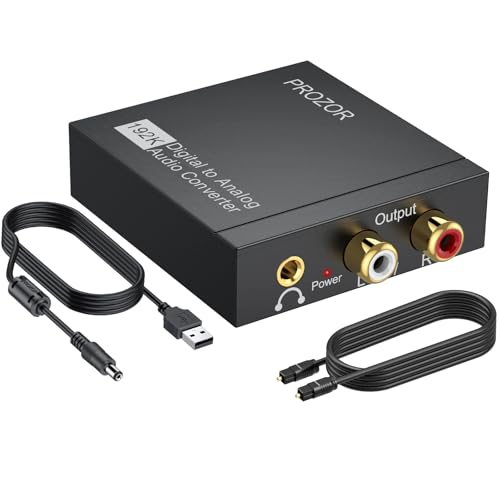 PROZOR PROZOR 192KHz Digital to Analog Audio Converter, DAC Optical to…
View on Amazon ↗
 XPTSFDU XPTSFDU HDMI ARC to RCA Audio Converter 3 in 1…
View on Amazon ↗
Listing names and images come from Amazon and are rechecked against the live listings; last checked Nov 8, 2026. No prices shown; the current price is on the listing.
What this guide is. This guide covers the audio converter category as a whole, not any specific model or brand. It is written from general knowledge of how these tools work and what to check on a product listing, without reading individual product documents, user reviews, or running tests. Verify dimensions, supported formats, and input types on the listing before you buy.