Rysker suits PS5 owners who want automatic fan control and Edge controller charging. OIVO fits gamers who need game disc and accessory storage. CYKOARMOR is for tidy setups with wireless charging. Tokluck is the only horizontal pick for Slim and Pro consoles. Kytok adds auto mode with temperature sensing. Mcbazel is for Xbox Series X owners who want RGB and extra USB ports. The main tradeoff is between automatic temperature response and manual control plus storage.
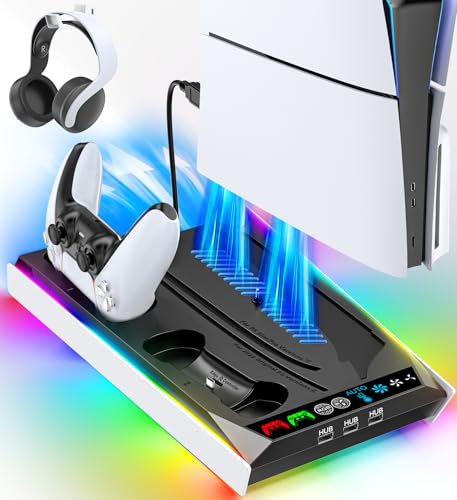
Rysker PS5 Cooling Stand with RGB
Best for: PS5 owners who want auto fan speed and Edge controller charging
- Built in fan has three levels and auto adjustable speed based on console temperature.
- Charges a PS5 original controller in about 3.5 hours and an Edge in 2.5 hours.
- Includes three USB hubs, a media remote slot, and concealed cables for a tidy setup.
Keep in mind: Listing does not state a game disc storage slot.
Check price on Amazon ↗
OIVO PS5 Stand with 14 Game Slots
Best for: Gamers who want a headset holder and game disc storage
- Stores 14 game discs, a headset, a remote, and an external hard drive.
- Three speed fan runs from 3100 to 3500 RPM with a touch switch to turn it off.
- Charges two PS5 controllers in 2.5 hours with red and green LED indicators.
Keep in mind: Fan is manually adjusted, not automatic.
Check price on Amazon ↗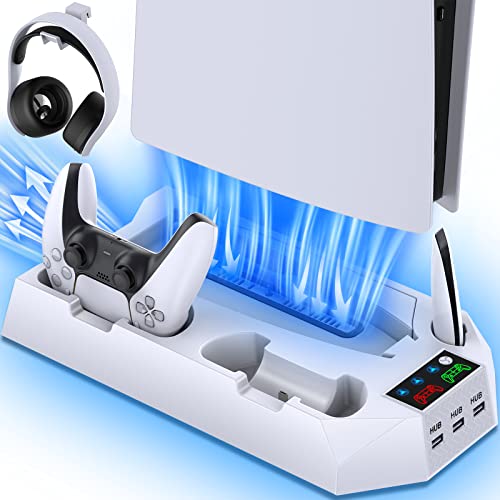
CYKOARMOR PS5 Stand with Wireless Charging
Best for: PS5 owners who want wireless controller charging and a white finish
- Two wireless charging docks fully charge DualSense controllers in under 3 hours.
- Three fan levels with changing lights show the active speed setting.
- Includes three USB hubs, a headset holder, and a media remote slot.
Keep in mind: Controller charging stops at 70% to protect battery life.
Check price on Amazon ↗
Tokluck Horizontal PS5 Slim Pro Stand
Best for: PS5 Slim or Pro owners who prefer a horizontal console position
- Horizontal design fits PS5 Slim and Pro Digital and Disc models only.
- Two built in fans have high, medium, and low settings with a side screen showing speed.
- Charges two DualSense or Edge controllers in 2.5 hours with red and green indicators.
Keep in mind: Not compatible with the original PS5 console.
Check price on Amazon ↗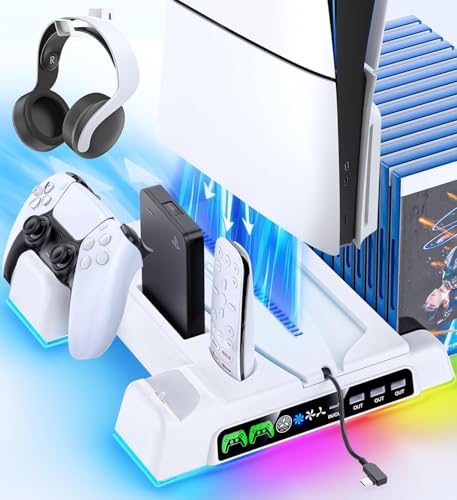
Kytok PS5 Stand with Auto Fan
Best for: PS5 owners who want automatic temperature based fan control
- Auto mode adjusts fan speed based on console temperature: low below 35°C, high above 37°C.
- Dual controller charger fully charges two remotes within 2 hours.
- Includes storage for 14 game cards, a headset, a remote, and a hard drive.
Keep in mind: Controller charging stops at 70% to prevent overcharging.
Check price on Amazon ↗
Mcbazel Xbox Series X Cooling Fan
Best for: Xbox Series X owners who want RGB lighting and extra USB ports
- Vertical cooling fan expels hot air from the console's top and sides.
- Three fan speeds run from 1800 to 2000 RPM with orange, blue, and green indicators.
- Adds one USB 3.0 and two USB 2.0 ports, powered by the console's USB port.
Keep in mind: Cannot be used with rear fans at the same time.
Check price on Amazon ↗Product names and images come from the Amazon listings and are rechecked against them (last checked Nov 8, 2026). The highlights restate each listing's own bullet points as published on Nov 8, 2026. Prices change often, so we do not show them. These are affiliate links: as an Amazon Associate we earn from qualifying purchases, at no extra cost to you.
How the Shortlist Was Put Together
This page compares six real console cooling stand listings side by side. Each pick comes from the product details sellers provide, including fan speeds, charging times, storage slots, and compatibility notes. No units were handled by us, so the information here is limited to what each listing states.
The shortlist includes a spread of designs and sizes: vertical stands for PS5 original, Slim, and Pro, one horizontal stand for Slim and Pro only, and one vertical cooling fan for Xbox Series X. This range lets you see how different footprints and orientations fit your space.
Because we rely only on listing text, some attributes are not stated for every product. Where a listing does not mention a feature, the table shows 'Not listed'. That does not mean the feature is absent, only that the seller did not state it.
Who Should Skip These Picks
If you use a console other than PS5 or Xbox Series X, none of these stands will fit. The listings name specific console families, and Tokluck even excludes the original PS5. Check your console model before deciding.
Buyers who only need a simple vertical stand without cooling or charging may find these products add more than they need. The extra fans and charging docks take up desk space and cost more than a basic bracket.
Anyone who wants a fully passive setup with no moving parts should look at a different design. Every product here has at least one fan, so silent operation is not the focus.
What to Confirm on a Listing Before Buying
Compatibility is the first check. Listings use different names for console versions, like original, Slim, Pro, and digital or disc. Confirm your exact model is named in the listing, not just implied by a product image.
Power source matters. Some stands draw power from the console's USB port, while others can use a wall outlet or USB hub. If you want charging while the console is off, look for a listing that states that option.
Fan control style varies. Some stands offer automatic temperature based speed, others have manual touch controls. The listing should state the RPM range and whether the fan can be turned off.
Comparing Stated Features
The table below lines up the attributes each listing actually states. Fan speed control, controller charging time, storage, and compatibility are the main factors that change between these six products.
| Product | Fan Control | Controller Charging Time | Storage | Compatibility |
|---|---|---|---|---|
| Rysker PS5 Cooling Stand with RGB | 3 levels, auto adjustable | 3.5 hrs original, 2.5 hrs Edge | Media remote slot | PS5, PS5 Slim, PS5 Pro |
| OIVO PS5 Stand with 14 Game Slots | 3 speeds, manual touch | 2.5 hrs | 14 game discs, headset, remote, hard drive | PS5, PS5 Slim, PS5 Pro |
| CYKOARMOR PS5 Stand with Wireless Charging | 3 levels, manual | Under 3 hrs | Headset, media remote | PS5, PS5 Slim, PS5 Pro |
| Tokluck Horizontal PS5 Slim Pro Stand | 3 levels, manual | 2.5 hrs | Not listed | PS5 Slim, PS5 Pro only |
| Kytok PS5 Stand with Auto Fan | Auto and 3 manual speeds | 2 hrs | 14 game cards, headset, remote, hard drive | PS5, PS5 Slim, PS5 Pro |
| Mcbazel Xbox Series X Cooling Fan | 3 speeds, manual | Not listed | Not listed | Xbox Series X |
Choosing by Console and Desk Layout
Vertical stands dominate this shortlist because they match the PS5's default upright position. If you keep your console next to a monitor, a vertical stand with a small footprint can save desk space. The OIVO and Kytok models add storage that keeps games and accessories within reach.
The Tokluck stand is the only horizontal option, which suits a media cabinet or shelf where vertical clearance is limited. Its support rods secure the Slim or Pro console, and the side screen shows the fan speed.
For Xbox Series X owners, the Mcbazel fan adds RGB lighting and USB ports without a separate power adapter. It is a simpler add on than the PS5 stations, which include controller charging and storage.
More on Charging and Cooling
Controller charging times range from 2 hours on the Kytok to 3.5 hours on the Rysker for an original controller. The Rysker and Tokluck both state support for Edge controllers, while other listings only mention standard DualSense controllers.
Cooling fan speeds vary: the OIVO runs from 3100 to 3500 RPM, while the Mcbazel runs lower at 1800 to 2000 RPM. Lower RPM can mean quieter operation, but the listing does not state decibel levels.
Automatic fan control appears only on the Rysker and Kytok. The Rysker uses a built in sensor to adjust speed, and the Kytok lists specific temperature thresholds. If you prefer to set the fan yourself, the other four stands have manual controls.
- Rysker: auto fan, Edge controller support, RGB lights
- OIVO: 14 game slots, headset holder, manual fan
- CYKOARMOR: wireless charging, white finish, manual fan
- Tokluck: horizontal, Slim and Pro only, side screen
- Kytok: auto fan with thresholds, 2 hour charge, storage
- Mcbazel: Xbox Series X, RGB, extra USB ports
Questions About Console Cooling Stands
Will a PS5 cooling stand fit both the original and Slim models?
Most vertical stands in this shortlist list compatibility with PS5, PS5 Slim, and PS5 Pro. The Tokluck horizontal stand is an exception: it states it does not fit the original PS5. Always check the listing for your exact console version.
Do these stands charge controllers while the console is off?
Some listings state that the stand can be powered by a wall outlet or USB hub, which allows charging when the console is off. The Kytok listing says it keeps controllers charging even when the console is off. The Mcbazel draws power from the Xbox USB port, so it likely only runs when the console is on.
Is an automatic fan better than a manual one?
Automatic fans adjust speed based on console temperature, which can be convenient and may reduce noise at low load. Manual fans give you direct control, but you must remember to change the speed. The Rysker and Kytok offer auto modes, while the others rely on touch controls.
Which Stand Should You Get
If you want a vertical PS5 stand that handles cooling and charging on its own, pick the Rysker PS5 Cooling Stand with RGB. Its auto adjustable fan and Edge controller support cover the main needs without manual tweaks. For a media cabinet where the console must lie flat, the Tokluck Horizontal PS5 Slim Pro Stand is the only choice in this shortlist that fits that orientation, and it still charges two controllers in 2.5 hours.
Scope and limits. The picks were chosen by comparing the details each listing states: fan control, charging times, storage slots, and console compatibility. The shortlist covers vertical and horizontal designs for PS5 and Xbox Series X. No units were handled or used; the page relies only on listing text, so unstated attributes are marked 'Not listed'.