A cooling stand helps only when it lines up with your console's actual vents and moves enough air for your setup. Focus on two factors: fan type and placement. Active fans suit enclosed cabinets or long sessions, while passive stands fit open air and silent rooms. The main tradeoff is cooling power versus noise and desk footprint.
Active Fans Versus Passive Risers
Console cooling stands split into two families. Passive stands are simple risers, often with vented or open frames, that lift the console for better air circulation. They are quiet, draw no power, and cost the least, but they only help if the console already has decent clearance.
Active stands add one or more USB powered fans. They pull hot air away from the console or push cool air toward its intake vents. This matters in enclosed media cabinets, under desks, or during marathon sessions where internal fans alone struggle.
The tradeoff is noise and power. A fan with a high RPM rating can be audible in a quiet living room, and it draws from one of the console's USB ports. Check whether the stand has its own power switch or runs whenever the console is on.
Vent Alignment Is the First Thing to Check
Every console has a specific airflow path. Most draw cool air from one side or the front and exhaust hot air from the rear or top. A cooling stand that covers the intake vents, or blows air against the exhaust flow, can trap heat instead of removing it.
Compare the stand's fan positions with your console's vent layout before buying. A fan placed under a console with no bottom intake does nothing. A rear exhaust fan that lines up with the console's own exhaust can genuinely help push hot air out of a cabinet.
Some stands claim universal compatibility, but console shapes differ. Look for a stand that states which console models it fits, or check the product photos against your own unit. If the listing shows a different console generation than yours, assume it will not line up.
Table: Stand Types at a Glance
| Design type | Cooling power | Noise level | Best for | Watch out for |
|---|---|---|---|---|
| Passive riser | Minimal | Silent | Open shelves, quiet rooms | No help in enclosed spaces |
| Rear exhaust fan | Moderate | Low to moderate | Cabinets, consoles with rear vents | Must align with exhaust |
| Top intake fan | Moderate to high | Moderate | Long sessions, warm rooms | Adds height, may block top vents |
| Multifan dock | High | High | Tournament nights, hot climates | Loudest, largest, power draw |
The table ranks designs by cooling power, but that power only matters if the fans hit the right spots. A well aligned passive stand can beat a poorly aligned multifan dock.
Measure the Space Before the Stand
Cooling stands add height and width. A stand that lifts a console two inches can turn a snug shelf into a no fit. Measure the shelf or desk slot with the console in place, then check the stand's listed dimensions.
For small gaming desks, a stand with a built in controller or game storage tray can save space, but it also widens the footprint. Decide whether extra storage matters more than a slim profile.
For shared living rooms, consider cable routing. A stand with fans needs a USB cable to the console, and that cable has to reach without stretching across a walkway. Some stands include a short built in cable, others need a longer one you supply.
Power Draw and Long Term Costs
Active fans draw power from the console's USB port. Most use well under 5 watts, which is negligible for the console's power supply, but it does occupy a port. If your console has limited USB ports, a passive stand or a stand with a pass through port may be better.
Fan bearings wear out. A stand with a cheap sleeve bearing fan may get louder after a year of heavy use. Look for stands that list a ball bearing or fluid dynamic bearing fan if you plan to run it daily.
Dust is the hidden long term cost. Fans pull in air and dust, and that dust settles on the console's vents. A stand with a removable, washable dust filter adds a small maintenance step but keeps the console cleaner.
Mistakes That Make Heat Worse
The most common mistake is buying a stand without checking the console's airflow direction. A fan blowing into an exhaust vent fights the console's own fan and can raise internal temperatures.
Another mistake is stacking a console on top of another heat source, like an amplifier or a cable box, even with a cooling stand between them. The stand can only move air, not insulate against a heat source below.
Some buyers choose a stand for its extra USB ports or charging dock, then discover the fans are too loud to leave on. If you need charging more than cooling, a separate charging dock and a passive riser may work better.
Who Should Skip a Cooling Stand
If your console sits on an open shelf with at least three inches of clearance on all sides, a cooling stand adds little. Modern consoles manage their own thermals well in open air, and the stand mostly adds clutter.
If you play in a quiet shared space and the console has never overheated, skip the active fans. A simple felt pad or rubber feet to reduce vibration may be all you need.
For travel, a cooling stand is usually dead weight. A slim carrying case and a folded stand for airflow under the console are more practical than a fan unit that needs a USB port and a flat surface.
For Kids and Shared Rooms
Kids' gaming setups often sit on low shelves or in cubbies where heat builds up. A passive stand that lifts the console off carpet or a low shelf can help, and it has no small fan blades to poke or break.
In shared living rooms, noise matters more than cooling. A passive stand or a stand with a fan switch lets you turn off the fans for movie night and on for game night.
Tournament nights are the exception. If you run a console for six or eight hours with a crowd nearby, an active stand with a rear exhaust fan can keep the console from throttling in a hot room. Just route the USB cable out of foot traffic.
Console Cooling Stand Questions, Answered
Do console cooling stands actually work?
They can, but only if the fan lines up with the console's vents. A rear exhaust fan that matches the console's own exhaust can help in enclosed spaces. A random fan under a console with no bottom intake does nothing. Passive stands help by improving clearance, not by moving air.
Which console cooling stand is best for a small desk?
For a small desk, a passive riser with a footprint no larger than the console itself is usually the right call. It adds height for airflow without extra width. If you need active cooling, look for a low profile rear exhaust fan unit that sits behind the console instead of under it.
Is it worth buying a cooling stand for a modern console?
Only if your console actually runs hot or sits in an enclosed cabinet. Modern consoles throttle themselves before damage, so a stand does not extend lifespan in open air. In a cabinet or a hot room, an active stand can reduce fan noise from the console itself by helping it stay cooler.
Should I buy a cooling stand with a built in charger?
Only if you need the charger more than the cooling. A stand that combines fans and charging docks often compromises on both: the fans may be small and the charging dock may block access to the console's own ports. Buy the charger separately unless you have a specific reason to combine them.
What makes a console cooling stand loud?
Fan speed, bearing type, and the number of fans. A single large fan at low RPM is quieter than two small fans at high RPM. Cheap sleeve bearing fans get louder over time. Look for a stand with a fan speed switch or a ball bearing fan if noise matters.
Which Console Cooling Stand Should You Get?
A gamer with a console in an open media shelf and a quiet living room is best served by a passive riser that matches the console's footprint. It costs the least, makes no noise, and prevents the most common heat problem: poor clearance. If your console lives in an enclosed cabinet or you run tournament length sessions in a warm room, switch to a rear exhaust fan stand that aligns with your console's exhaust vents. That one change matters more than any extra fan on top.
Real console cooling stand listings, so you can check the points in this guide against actual products. These are affiliate links: as an Amazon Associate we earn from qualifying purchases, at no extra cost to you.
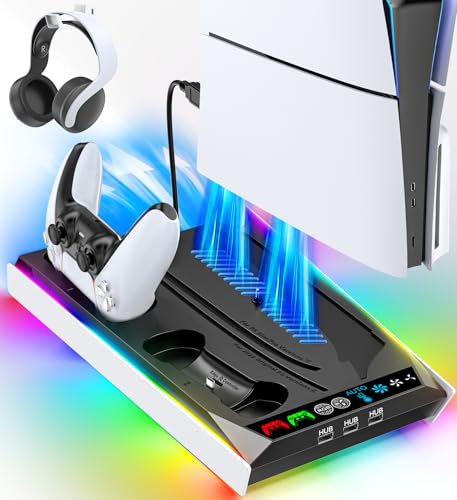 RYSKER PS5/Slim/Pro Stand for Disc & Digital Console, PS5 Cooling &…
View on Amazon ↗
 OIVO PS5/Slim/Pro Stand and Cooling Station with LED Controller Charging Station…
View on Amazon ↗
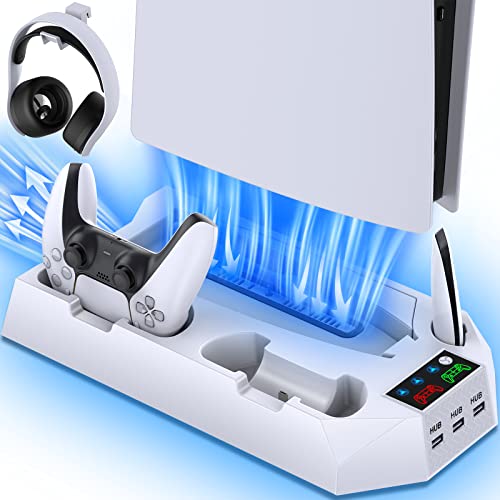 CYKOARMOR PS5/PS5 Slim/PS5 Pro Stand and Cooling Station with Dual Controller…
View on Amazon ↗
Listing names and images come from Amazon and are rechecked against the live listings; last checked Nov 8, 2026. No prices shown; the current price is on the listing.
What this guide is. Use this guide as a checklist to hold against any listing: fan type, vent alignment, footprint, and power draw. It is written from general knowledge of console cooling stand designs, not from individual product documents or tests, so verify dimensions and vent positions on the listing before you buy.