The Yealink UVC34 fits a fixed small meeting room that needs a certified wide angle bar with an automatic privacy shutter. The NUROUM C10 suits a huddle room or home office where a light, portable unit with a speaker matters more than the widest view. The main tradeoff is room coverage versus portability: the UVC34 and WYRESTORM cover 120 degrees, while the C10 and EMEET C980 PRO trade some width for a smaller footprint.

Yealink UVC34 4K Conference Bar
Best for: A fixed huddle room that wants certified Teams and Zoom calls
- The 120 degree field of view captures everyone at a small table without edge distortion.
- An electric privacy shutter closes automatically when a meeting ends, so the lens is covered between calls.
- The 8 microphone array picks up voices up to 5 meters away, which covers most small conference rooms.
Keep in mind: It needs a Windows or macOS computer and a USB A port; check your room's cable run before buying.
Check price on Amazon ↗
WYRESTORM 4K AI Conference Webcam
Best for: A training room where the camera should follow the active speaker
- AI auto framing and presenter tracking keep the speaker in frame without manual camera control.
- The 120 degree wide angle covers the whole small meeting space, so no one is cut off at the edges.
- Dual noise canceling microphones are rated for clear voice pickup up to 5 meters from the camera.
Keep in mind: The listing mentions 5x digital zoom, so check the image quality if you plan to zoom in on a whiteboard.
Check price on Amazon ↗
NUROUM C10 Portable Conference Webcam
Best for: A home office or focus room that moves between desks
- The compact all in one design combines a 1080p camera, four microphones, and a speaker in a 384 gram unit.
- A 90 degree field of view is tailored for individuals and small teams, not a full conference table.
- The folded USB-C cable and included USB A adapter mean no separate power adapter is needed.
Keep in mind: The 90 degree view is narrower than other picks, so count the people you need in frame before choosing it.
Check price on Amazon ↗
EMEET C980 PRO 1080p Webcam
Best for: A desk where you switch between a solo close up and a small team view
- The field of view adjusts from 60 to 98 degrees, so you can frame just yourself or a small group.
- Four microphones and two speakers are built in, so you do not need a separate speakerphone.
- Automatic low light correction reduces graininess in darker rooms, which helps in home offices or cafes.
Keep in mind: The listing warns not to use it with a USB hub because of insufficient current, so plan for a direct port.
Check price on Amazon ↗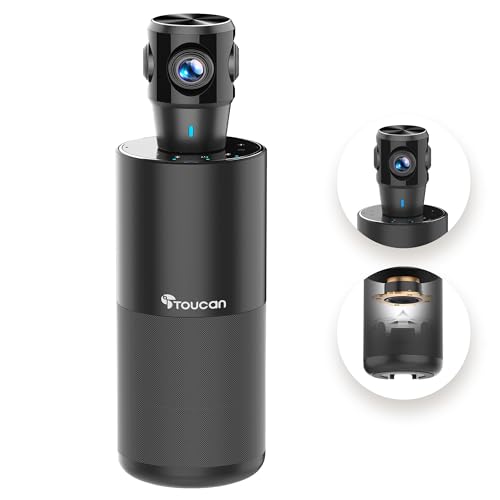
TOUCAN 360 Degree Conference Camera
Best for: A meeting where people sit around the camera instead of facing it
- The 360 degree omni directional shooting shows facial expressions and gestures from any seat around the device.
- Plug and play setup works with Zoom, Microsoft Teams, and Google Voice, so no driver install is mentioned.
- A Type-C to USB A OTG adapter is included, which helps connect to a PC or tablet.
Keep in mind: The listing does not state the resolution or microphone pickup range, so confirm those details on the product page.
Check price on Amazon ↗
UGREEN 2K Webcam with Privacy Cover
Best for: A solo presenter who wants a simple monitor mounted camera with a cover
- The 95 degree field of view is wide enough for a small group or showing objects, but keeps a close up perspective.
- A physical privacy cover blocks the lens when the camera is not in use.
- The 360 degree rotation lets you aim the camera at a whiteboard or a second person without moving the mount.
Keep in mind: The listing notes fixed focus technology with no digital zoom, so keep the camera at least 50 cm from your face.
Check price on Amazon ↗Product names and images come from the Amazon listings and are rechecked against them (last checked Nov 8, 2026). The highlights restate each listing's own bullet points as published on Nov 8, 2026. Prices change often, so we do not show them. These are affiliate links: as an Amazon Associate we earn from qualifying purchases, at no extra cost to you.
How Much of the Room Each Camera Sees
Field of view is the first spec to compare because it decides whether the camera frames one person, a small team, or a full table. The Yealink UVC34 and WYRESTORM both state a 120 degree view, which is wide enough for a small conference room where people sit side by side. The TOUCAN takes a different approach with a 360 degree view, so it works if people sit around the camera rather than in front of it.
If you mostly sit alone at a desk, a narrower view is often more useful. The NUROUM C10 states a 90 degree field of view, and the listing says that is tailored for individuals and small teams. The EMEET C980 PRO lets you adjust the view between 60 and 98 degrees, which gives you control over how much of the background appears in the frame.
The UGREEN sits in the middle with a 95 degree view. That is wide enough for a small group or for showing a physical object, but the listing notes the focus distance should be greater than 50 cm for the clearest image. If you plan to sit very close to the lens, that is a detail to check.
Resolution and Image Quality on Paper
The listings state different maximum resolutions, and that matters if you want a sharper image on a large screen. The Yealink UVC34 and WYRESTORM both list 4K resolution, so they are the picks to consider if you will display the feed on a big monitor or record meetings. The Yealink also mentions an 8MP camera with a 1/2.8 inch CMOS sensor, which is a more detailed spec than most others provide.
The NUROUM C10, EMEET C980 PRO, and TOUCAN all list 1080p resolution. That is enough for most video calls, and the EMEET listing adds that it uses a 2MP CMOS sensor. The TOUCAN listing does not state a resolution in the features, so you would need to confirm that on the product page if sharpness is a priority.
The UGREEN is listed as a 2K webcam, but the listing clarifies that the maximum resolution depends on your computer, monitor, USB port bandwidth, and software. That is a useful reminder that the camera alone does not guarantee a certain image quality.
Microphones and Speaker Coverage
For a conference webcam, audio matters as much as video. The Yealink UVC34 has the largest microphone array here with eight microphones and a stated 5 meter pickup range. The WYRESTORM has dual microphones and also states a 5 meter range, which covers a small meeting table.
The NUROUM C10 and EMEET C980 PRO both use four microphone arrays. The NUROUM states a 10 foot (about 3 meter) voice pickup range, while the EMEET does not give a distance. Both include speakers, so you do not need a separate speakerphone. The TOUCAN mentions four noise reduction microphones and a speaker, but no pickup distance is stated.
The UGREEN has two built in microphones and no speaker, which makes it a simpler choice for a solo presenter who already has computer speakers or headphones. If you need the webcam to act as a speakerphone for a group, the Yealink, WYRESTORM, NUROUM, EMEET, and TOUCAN all include a speaker.
Privacy and Physical Setup
A privacy cover or shutter is a small feature that matters in shared spaces. The Yealink UVC34 has an automatic electric privacy shutter that opens when a call starts and closes when it ends. That is useful if you worry about forgetting to cover the lens. The WYRESTORM includes a physical lens cover, and the UGREEN has a privacy cover that blocks the lens when not in use. The EMEET C980 PRO also comes with a snugly fitting webcam cover.
The NUROUM C10 does not mention a privacy cover in its listing. Instead, it has touch buttons for turning off the camera and muting, and a light ring that shows the status. That can serve a similar purpose, but it is not a physical barrier over the lens.
Mounting options vary. The UGREEN listing says it can be placed on a monitor, laptop, TV, or tripod and rotates 360 degrees. The EMEET listing says the universal clip fits laptops, LCDs, or monitors and can be used with a tripod. The Yealink comes with a 7 meter USB cable, which gives you flexibility in where you place the bar. If you have a specific desk or shelf in mind, check the cable length and mounting style before buying.
Comparing the Stated Features Side by Side
The table below pulls the key attributes that each listing actually states. Where a listing does not state a value, the table says Not listed. Use this to quickly see which models cover the widest area, which have the longest stated microphone range, and which include a privacy cover or speaker.
| Model | Resolution | Field of View | Microphones | Stated Pickup Range | Speaker | Privacy Cover |
|---|---|---|---|---|---|---|
| Yealink UVC34 4K Conference Bar | 4K | 120 degrees | 8 | 5 meters | Yes | Automatic electric shutter |
| WYRESTORM 4K AI Conference Webcam | 4K | 120 degrees | 2 | 5 meters | Not listed | Physical lens cover |
| NUROUM C10 Portable Conference Webcam | 1080p | 90 degrees | 4 | 10 feet (3 meters) | Yes | Not listed |
| EMEET C980 PRO 1080p Webcam | 1080p | 60 to 98 degrees | 4 | Not listed | Yes (2 speakers) | Included cover |
| TOUCAN 360 Degree Conference Camera | Not listed | 360 degrees | 4 | Not listed | Yes | Not listed |
| UGREEN 2K Webcam with Privacy Cover | 2K (depending on system) | 95 degrees | 2 | Not listed | No | Included cover |
What to Check Before You Buy
The listings do not all state the same details, so a few checks will help you avoid surprises. First, confirm the field of view matches your room. A 120 degree camera will capture more of the table, but a 90 degree model may be fine for a solo desk. Second, check the cable type and length. The Yealink uses a USB B to USB A cable, while the NUROUM uses USB-C with an adapter. If your laptop only has USB-C ports, you may need an adapter for the Yealink.
Third, confirm the microphone pickup range if your room is large. Only the Yealink, WYRESTORM, and NUROUM state a distance. If you need audio from across a long table, a listed range helps you decide. Fourth, look at the mounting method. Some clip to a monitor, others sit on a table or tripod. The UGREEN rotates 360 degrees, which is useful for aiming at a whiteboard.
Finally, check the privacy feature. If you work in a shared office, a physical cover or automatic shutter may be worth the extra cost. If you work alone at home, that may matter less. None of these listings state a price, so compare the features you need against your budget on the product page.
Questions Before You Pick a Conference Webcam
Is a 4K conference webcam worth it for a small meeting room?
It depends on how you use the video. If you display the feed on a large screen or record meetings for later, a 4K camera like the Yealink UVC34 or WYRESTORM gives you more detail. If you only use it for standard video calls on a laptop, a 1080p model is usually enough.
Do I need a separate speakerphone if the webcam has a speaker?
Not necessarily. Several of these models, including the NUROUM C10, EMEET C980 PRO, and TOUCAN, include a built in speaker. That can replace a separate speakerphone in a small room. If you already have good speakers or use headphones, the UGREEN, which has no speaker, may still work for you.
How do I know if the camera will work with my computer and meeting software?
Check the listing for compatibility notes. The Yealink is certified for Microsoft Teams and Zoom, and the WYRESTORM mentions Zoom certification. Most others list broad compatibility with Windows, macOS, and common meeting apps. Always confirm your operating system version and port type before buying.
Which Conference Webcam Fits Your Room
If you run a fixed huddle room with a small table and want a certified, wide angle bar that covers itself when meetings end, the Yealink UVC34 is the strongest pick on paper. If you move between a home office and a focus room and want one light unit that handles video, audio, and a speaker without extra cables, the NUROUM C10 fits that situation better. The deciding factor is whether you need 120 degrees of coverage for a group or a portable 90 degree unit for one or two people.
What this guide is. I compared the six listings on the features each one states, including field of view, resolution, microphone count and range, speaker, and privacy cover, and I looked for a spread of designs from wide fixed bars to portable all in one units. I did not handle any units, so this shortlist is based only on the listing text and not on in person use.