Room size and seating layout decide the webcam. A wide field of view and built in speakerphone fit a huddle room where people sit close to the camera. A narrow view with better low light correction fits a single presenter at a desk. The main tradeoff is between covering everyone and keeping faces clear.
Room Size Decides the Field of View
Measure the distance from the camera to the farthest seat. In a room where that distance is under 10 feet, a 90 to 120 degree lens covers a small group without distortion. Beyond that, you need a narrower angle with zoom or a second camera.
A common mistake is buying the widest lens available. In a long conference room, a 120 degree view makes the far end look like a postage stamp. A 60 to 78 degree view with optical zoom keeps the active speaker readable.
Seating Layout Changes What Wide Means
A U shaped table or a cluster of chairs around a laptop needs a wide view. People sit close to the camera and spread out sideways. A wide fixed lens or auto framing works because no one is very far away.
A classroom or training room with rows of chairs is different. The camera sits at the front and the back row may be 20 feet away. Optical zoom or a pan tilt zoom camera aimed at the instructor is more useful than a wide view of the first two rows.
Audio Pickup Is Half the Meeting
A conference webcam with a built in speakerphone works for a small room where everyone sits within 8 feet. The microphone array picks up voices from several directions and the speaker fills the room at a moderate volume.
For a room with more than six people or a long table, a separate speakerphone or ceiling microphone array is more reliable. Check the pickup range in the listing and compare it to the room length, not the table length.
Some cameras have noise suppression that cuts keyboard clicks and HVAC hum. This matters in open offices or rooms near a hallway. Check the listing for a noise reduction feature if the room is not quiet.
Mounting and Cable Runs Are Easy to Forget
A conference webcam usually sits on top of a display, on a tripod, or on a wall mount. Check the clamp or screw thread before buying. A camera that only sits on a monitor is useless in a room where the display is wall mounted high.
USB-C or USB A cable length matters. In a conference room, the camera often connects to a computer in a cabinet or under the table. A 6 foot cable is often too short. Look for a camera that works with a powered USB extension or has a long cable in the box.
Some conference webcams are designed for permanent installation with a bracket and a security screw. Others are portable and move between rooms. Decide which one fits how the room is used before comparing image specs.
Compare the Design Types Before the Specs
| Design type | Best room | Audio approach | Main limitation | Look for |
|---|---|---|---|---|
| Fixed wide angle | Huddle room, 2 to 4 people | Built in speakerphone | Distant faces look small | 120 degree field of view |
| Pan tilt zoom | Medium room, active speaker | Often separate mic | Needs someone to aim it | Remote control or presets |
| Auto framing | Small to medium, changing seats | Built in mic array | Cropping can feel jumpy | Software that tracks faces |
| Optical zoom | Training room, one presenter | Usually line in | Narrow view loses context | 10x optical zoom or more |
Auto framing is not a substitute for optical zoom. It crops the sensor digitally, so the image loses resolution as it zooms. In a room with a 1080p camera, cropping to a single face can drop the effective resolution below 720p.
How to Read a Listing Without Falling for Marketing
Ignore resolution above 1080p for most conference rooms. A 4K sensor only helps if the software crops for auto framing or if the room has very good lighting. On a typical video call, the stream is compressed to 720p or 1080p anyway.
Look for the field of view in degrees, not just the word 'wide'. A 90 degree lens and a 120 degree lens behave very differently in the same room. If the listing does not state the angle, ask the seller before buying.
Check the low light rating in lux. A camera rated for 0.5 lux or lower handles a dim conference room without a grainy image. A camera with only a high lux rating will look noisy when the blinds are closed for a presentation.
Ask the seller about the USB connection type and whether the camera works without installing drivers. A camera that requires proprietary software is a problem in a room where different laptops are used.
Mistakes That Force a Return
Buying a webcam designed for a single desk and putting it in a conference room is the most common mistake. The lens is too narrow, the microphone is too close, and the cable is too short.
Another mistake is mounting the camera on top of a large display. The camera looks down at the participants and the angle makes everyone appear slouched. A tripod or a wall mount at eye level is better.
Forgetting about the audio echo is a third mistake. A speakerphone too close to a microphone creates feedback. Some cameras have echo cancellation, but a separate speakerphone placed away from the camera is often the fix.
Long Term Costs and Care
A conference webcam has no ink or filters to replace, but the lens needs occasional cleaning. Dust on the lens shows up as a soft image. Use a microfiber cloth and avoid touching the glass.
Firmware updates matter for auto framing and noise suppression. Check whether the camera updates through a standard USB connection or requires a visit from IT. In a managed office, a camera that updates silently is easier to live with.
Cables are the part that fails first. A camera with a detachable USB cable is easier to repair than one with a hardwired cable. Keep a spare cable in the conference room drawer.
Conference Webcam Questions Before You Commit
Is a conference webcam worth it for a small meeting room?
Yes, if the room hosts video calls at least a few times a week. A fixed wide angle camera with a built in speakerphone turns a laptop in the middle of the table into a proper meeting endpoint. For a room used once a month, a laptop webcam may be enough.
Which conference webcam works for online teaching?
For a teacher at a desk or whiteboard, a pan tilt zoom camera with optical zoom works best. It can follow the instructor to the board and zoom in on a demo. A fixed wide angle camera works only if the teacher stays close to the desk.
What is the difference between a webcam and a conference webcam?
A conference webcam has a wider field of view, a better microphone array, and often a built in speaker. It is designed for a room with several people. A standard webcam has a narrow lens and a close range microphone meant for one person at a desk.
Can I use a conference webcam with Zoom and Teams?
Most conference webcams are USB video class devices, which means they work with any video call software without extra drivers. Check the listing for UVC or driver free operation. Some advanced features like auto framing may need a small app.
How do I compare two conference webcams with similar specs?
Compare the field of view angle, the microphone pickup range, and the cable length. Those three numbers change how the camera works in your room more than resolution. Also check the mounting type and whether the cable is detachable.
Which Conference Webcam Fits Your Room
A buyer who runs small meetings in a huddle room with two to six people should pick a fixed wide angle camera with a built in speakerphone. It covers the whole table and needs no setup beyond plugging it in. For a trainer or teacher who moves between a desk and a whiteboard, a pan tilt zoom camera with optical zoom is the better pick because it follows the action without losing detail.
Real conference webcam listings, so you can check the points in this guide against actual products. These are affiliate links: as an Amazon Associate we earn from qualifying purchases, at no extra cost to you.
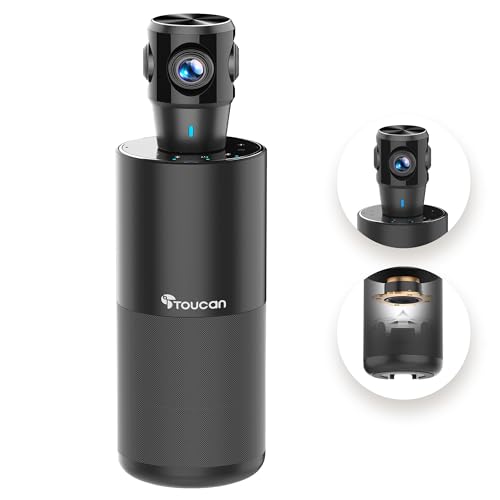 TOUCAN TOUCAN 360-Degree Video Conference Camera, 1080p HD Webcam with 4…
View on Amazon ↗
 NEXIGO Zoom Certified, NexiGo N990 (Gen 2) 4K PTZ Webcam, Video…
View on Amazon ↗
 UGREEN UGREEN Webcam for PC Ultra HD 1080P Computer Webcam with…
View on Amazon ↗
Listing names and images come from Amazon and are rechecked against the live listings; last checked Nov 8, 2026. No prices shown; the current price is on the listing.
About this guide. This guide covers the conference webcam category as a whole and does not recommend individual models. It is written from general knowledge of how these cameras work in different rooms, so verify the field of view and cable length on any listing before you buy.