Start with stability and lift mechanism. A gas spring converter moves smoothly but adds weight and cost; a manual one is cheaper but slower to raise. Measure your desk depth and monitor weight next, because a converter that wobbles or overhangs will annoy you all day. Remote workers on narrow desks should prioritize a compact, stable platform over extra keyboard space.
Stability decides whether you actually stand
A converter that wobbles feels unsafe and makes your monitor shake while you type. Look for a wide base and a lift mechanism that locks at the top. Check the product listing for the maximum monitor weight and the platform dimensions. A heavier base often means less movement, but it also makes the converter harder to move.
Two leg designs dominate. X shaped frames fold flat and cost less, but they can drift side to side under load. Vertical lift columns hold steadier because they move straight up. If you use two monitors or a heavy laptop, compare the stated weight capacity against your actual setup before buying.
You cannot test stability from a listing, but you can check for clues. A wider base plate spreads the load. Rubber pads on the bottom help grip the desk. If the listing shows the converter at full height with a monitor on it, look for any visible bowing or leaning in the photos.
Gas springs lift smoothly, manual lifts save money
Lift mechanism sets the daily experience. Gas spring converters use a cylinder to raise the platform with light pressure. You squeeze a lever and the converter floats up. That matters if you switch positions several times a day, because a stiff lift discourages you from standing at all.
Manual converters use a crank, a lever, or your own arms. A crank gives fine height control and needs little strength, but it takes time. A straight pull design is fastest to set up but hardest to adjust under load. Think about how often you will move between sitting and standing before choosing.
Some converters have a tension adjustment for the gas spring. That lets you tune the lift to the weight of your keyboard and monitor. If the listing mentions adjustable tension, check how easy it is to reach. A knob hidden under the platform is less useful than one on the side.
Desk depth and keyboard tray size
Most converters need more depth than a laptop stand. A typical unit uses 20 to 30 inches of desk depth when fully deployed. On a narrow desk, that leaves little room for your wrists or a notebook. Measure from the front edge of your desk to the wall, then compare that number to the converter's listed depth.
Keyboard trays add another wrinkle. A tray that slides out gives you more ergonomic space, but it also extends the footprint. If your desk faces a wall, make sure the tray will not hit it. Some trays are removable, which helps on especially tight surfaces.
Height range matters less than people think. Most converters rise to around 15 to 20 inches above the desk, which suits users from about 5 feet to 6 feet 4 inches. If you are taller, check the maximum height carefully. If you are shorter, a converter that does not lower enough can force your shoulders up.
A shared office needs a quiet lift
Gas springs hiss softly, but manual cranks click and clatter. In a shared office, that noise draws attention every time you stand. If you work near others, look for a converter described as quiet or smooth. A lever operated lift tends to be quieter than a crank.
Shared desks also mean shared height settings. A converter with a quick release mechanism lets you lower it back for the next person. If you leave it raised, your colleague has to fight the lift. Check whether the converter folds flat when not in use, because that keeps a shared desk tidy.
For small bedrooms, the converter doubles as a storage surface. Look for a model with a flat top that can hold a lamp or a book when lowered. Avoid converters with a fixed keyboard tray that sticks out, since that catches on clothing in a tight room.
Weight capacity protects your screens
A converter rated for 30 pounds will not hold a 40 pound dual monitor arm safely. List your monitor, keyboard, and anything else you put on the platform. Add their weights and keep the total under the converter's limit by a comfortable margin. Overloading makes the lift stiff and can damage the mechanism over time.
Monitor arms complicate the weight math. If you clamp a monitor arm to the converter, the arm's leverage adds stress. Not every converter is built for that. Check the listing for a note about monitor arm compatibility, and if it is missing, assume it is not supported.
Laptops are lighter than monitors, so a converter rated for 20 pounds works for most laptop only setups. But if you add an external keyboard, a riser, and a phone, the total climbs. Weigh your gear or look up the specs before you buy.
Mistakes that lead to returns
Buying by price alone is the fastest way to a wobbly desk. Budget converters often use thinner steel and looser joints. They work fine for a light laptop but shake under a 27 inch monitor. If your screen is heavy, move up a price tier.
Ignoring desk thickness is another common error. Many converters clamp to the desk edge, and the clamp has a maximum thickness. Measure your desk before ordering. A clamp that does not fit means drilling or returning the unit.
Forgetting the cable run is easy to do. When the converter rises, your monitor and keyboard cables need extra slack. A cable organizer under the desk helps, but you still need longer cables than you think. Plan for an extra 12 to 18 inches of slack at standing height.
Who should skip a converter
If you have a very small desk, a converter may not fit at all. A wall mounted shelf or a separate standing desk could work better. Converters also do not solve a chair that is the wrong height. Fix your seating first, because standing on a converter still requires a chair that supports your legs.
People with limited upper body strength may struggle with a manual converter. A gas spring model helps, but even that requires some pressure to lower. If lifting a 20 pound platform is hard for you, an electric standing desk is the safer choice.
Shared offices with strict furniture rules sometimes ban clamp on accessories. Check your office policy before buying. A freestanding converter that sits on the desk without a clamp may be allowed where a clamp is not.
Comparing the main design types
| Design type | Lift effort | Stability | Footprint | Best for |
|---|---|---|---|---|
| Gas spring | Very light | High | Larger | Frequent sit stand changes |
| Manual crank | Moderate | Moderate | Smaller | Occasional standing |
| Stackable riser | Heavy | Low to moderate | Smallest | Budget laptop use |
| X frame manual | Light | Moderate | Compact | Narrow desks |
Gas spring and X frame designs overlap in stability, but gas springs hold steadier at full height. A stackable riser is the cheapest way to try standing, but it offers no height adjustment beyond the stack. If you sit and stand multiple times per day, the gas spring earns its higher price.
For a narrow desk, an X frame manual converter with a compact footprint often fits best. It sacrifices some smoothness but takes up less room. Compare the folded depth as well as the raised depth, since some converters stick out even when lowered.
Long term care and what wears out
Gas springs lose pressure over several years of daily use. The lift becomes sluggish or drifts down. Some units let you replace the spring, but many do not. Check whether the listing mentions replacement parts before you commit.
Moving parts need occasional lubrication. A dry lift squeaks and jerks. Use a silicone spray on the joints and slides every few months. Wipe the platform with a damp cloth, but keep water away from the gas cylinder.
Cable clips and keyboard trays are the first things to break. Look for a converter with metal clips instead of plastic. A plastic tray can crack if you lean on it. If the tray is removable, you can replace it without buying a whole new unit.
Standing desk converter questions, answered
Is a standing desk converter worth it for a small bedroom?
Yes, if you have a desk at least 20 inches deep. A converter adds standing without replacing your furniture, and it folds down flat when you need the desk for other uses. Pick a compact model with a removable keyboard tray so it does not crowd the room.
Which standing desk converter is best for a narrow desk?
Look for a converter with a depth under 22 inches when deployed. X frame manual designs tend to have the smallest footprint. Check the folded depth too, because some models stick out several inches even when lowered. A gas spring model usually needs more room.
What makes a standing desk converter stable?
Stability comes from a wide base, straight lift columns, and a weight capacity above your actual load. X shaped frames wobble more than vertical columns. Rubber feet help grip the desk. Heavier converters generally shake less, but they are harder to move.
Can a standing desk converter hold two monitors?
It depends on the weight capacity and the platform width. Two 24 inch monitors with stands can weigh over 25 pounds together. Check the converter's limit and leave a margin. If you use a monitor arm, verify that the converter is rated for the arm's leverage.
How do I compare standing desk converters without seeing them?
Compare the numbers: weight capacity, platform depth, height range, and base width. Read the lift mechanism description carefully. Gas springs are smoother but cost more. Look for photos of the converter at full height with a monitor, and check for visible leaning.
The right converter for your desk and workday
Someone who works from a small bedroom desk and stands for short bursts each hour should buy a compact X frame manual converter with a weight capacity above their monitor's weight. It costs less, fits tight spaces, and raises fast enough for occasional use. Shift to a gas spring converter instead if you switch positions many times a day and want a one hand lift that stays smooth for years.
Real standing desk converter listings, so you can check the points in this guide against actual products. These are affiliate links: as an Amazon Associate we earn from qualifying purchases, at no extra cost to you.
 TECHORBITS TechOrbits Manual Height Adjustable Standing Desk Converter, 32" Black Top…
View on Amazon ↗
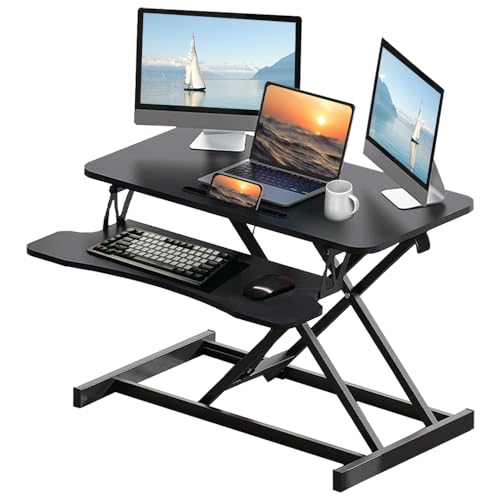 ROYJHNL Royjhnl Standing Desk Converter 32 Inch, Height Adjustable Sit-Stand Workstation,…
View on Amazon ↗
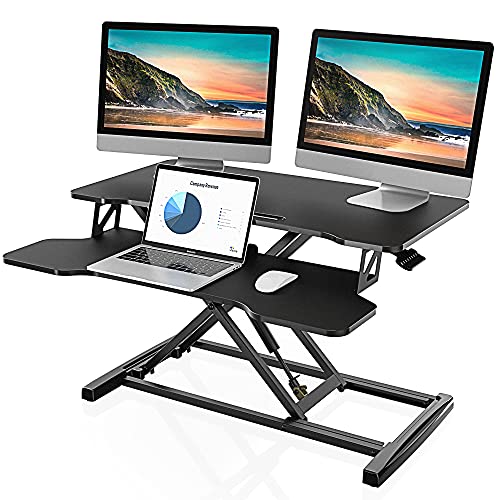 FITUEYES FITUEYES Height Adjustable Standing Desk 32” Wide Sit to Stand…
View on Amazon ↗
Listing names and images come from Amazon and are rechecked against the live listings; last checked Nov 8, 2026. No prices shown; the current price is on the listing.
About this guide. This guide covers standing desk converters as a category, written from general knowledge of how these products work. It does not draw on individual product documents, reviews, or in person use, so verify any dimension or weight limit on the listing before ordering.