Pickup pattern, gain control, and how the mic mounts to your desk decide most results. Cardioid mics reject room noise for solo players; omnidirectional suits round table multiplayer. A physical gain knob and a stable arm or stand matter more than RGB or sample rate. Skip USB entirely if you already own a mixer or XLR interface.
Pickup Pattern Decides Who the Mic Hears
A cardioid pattern listens mostly from the front. That helps a solo streamer who sits directly in front of the mic while a keyboard clacks behind it. A supercardioid narrows that front lobe further, which can reject a noisy PC fan but punishes head movement.
An omnidirectional pattern picks up sound from every side. It suits multiplayer gaming around one desk or a couch coop session, but it also captures chairs, doors, and any conversation across the room. A figure eight pattern, usually found on multipattern mics, records front and back while rejecting the sides, useful for two people facing each other.
Check the listing for the actual polar pattern, not just 'noise cancelling'. Many budget USB gaming mics are fixed cardioid. If you want to switch patterns later, look for a physical dial or switch on the mic body rather than an app setting that resets.
Gain Control Stops Clipping Before It Starts
Gain is how much the mic amplifies your voice before it reaches the computer. Set it too high and loud laughs or shouts clip into a distorted crackle. Set it too low and viewers turn their volume up until they hear your room tone.
A physical gain knob on the mic lets you adjust while looking at your streaming software's level meter. Software only gain control, often hidden in a companion app, slows you down mid game. A mute button with a clear indicator matters almost as much, especially if you cough or take a call.
Compare the knob's range. Some mics only offer three preset steps, which can leave you stuck between too quiet and too hot. A continuous dial gives finer control, but you still need to watch the meter once and leave it alone.
Desk Mounting and Shock Mounts
How the mic attaches to your desk changes what your audience hears. A tripod stand sitting directly on the desk transmits every keystroke and mouse click through the surface into the capsule. A boom arm clamps to the desk edge and positions the mic closer to your mouth, which lets you lower the gain.
A shock mount suspends the mic in elastic bands so desk vibrations do not reach the capsule. Some USB gaming mics include a basic shock mount; others sell it separately. If you have a standing desk or a heavy typing hand, factor that into the cost.
For small desks, a low profile stand may fit better than an arm, but it puts the mic farther from your mouth. Check the arm's clamp range against your desk thickness and whether the arm includes cable management clips.
Connections and Compatibility
USB gaming mics work with PC, Mac, and most modern consoles, but not always all three. A mic that works on a PlayStation may not pass audio to an Xbox without a specific mode. Check the listing for 'console compatible' and which console family it names.
The USB cable type matters less for sound and more for your setup. USB-C is more durable than Micro-USB, but a detachable cable means you can replace a damaged one. A built in headphone jack on the mic lets you monitor your voice with zero latency, which helps you catch clipping before viewers do.
If you plan to plug the mic into a USB hub, check the power draw. Some condenser mics need more current than a passive hub provides and will cut out or hiss.
Features That Matter vs Marketing
Sample rate and bit depth, like 24 bit/96kHz, rarely change a gaming voice chat. The limiting factors are your room, your distance from the mic, and the platform's own audio compression. A high sample rate does not remove a barking dog.
RGB lighting looks good on camera but does not improve audio. A pop filter, whether foam or a mesh screen, genuinely reduces plosive pops from 'p' and 'b' sounds. A mute button beats a software shortcut when your hands are on a controller.
Weight and build quality matter for arm mounting. A heavy all metal mic may sag a cheap boom arm, while a very light plastic mic may pick up cable noise. Check the thread size on the mic and the mount, usually 5/8 inch or 3/8 inch, and whether an adapter is included.
Use Cases: Streams, Desks, and Consoles
Beginner streamers benefit most from a fixed cardioid mic with a physical gain knob and a mute button. That combination handles a noisy room and a first setup without much fiddling. Home recording for voiceovers or acoustic guitar wants a condenser cardioid with a shock mount, but a treated room matters more than the mic's price tier.
Small desks push you toward a compact dynamic mic on a short arm or a low stand. A large diaphragm condenser on a full size arm can crowd a 24 inch desk. Console capture often needs a mic that shows up as a standard USB audio device, so check whether the console's chat settings recognize it.
Multiplayer gaming around one desk is the one case where an omnidirectional or multipattern mic wins. Otherwise a cardioid mic aimed at one player sounds clearer than an omni picking up the whole room.
Reading a Listing Before You Buy
| What to check | Why it matters | What to ask the seller |
|---|---|---|
| Polar pattern | Decides room noise pickup | Is it fixed or switchable? |
| Gain control type | Physical knob vs app only | What is the knob's range or steps? |
| Mount included | Stand, arm, or shock mount | Does it fit a 5/8 inch thread? |
| Console support | PC only vs console chat | Which console models are tested? |
| Cable type | USB-C vs Micro-USB | Is the cable detachable? |
Ask the seller about the polar pattern if the listing says only 'noise cancelling'. That phrase can mean a cardioid capsule or just a foam windscreen. Confirm the return policy for console compatibility, since a mic that works on one console may not work on another.
Mistakes That Leave Your Voice Muddy
Buying by RGB lighting or a 'gaming' label skips the three checks that actually change sound: pattern, gain, and mounting. A bright mic on a bare desk still picks up every keystroke.
Placing the mic too far away forces you to raise the gain, which raises room noise. A boom arm that positions the capsule four to eight inches from your mouth lets you lower the gain and still sound present.
Ignoring the room's echo is common. If you record in a hard, bare room, even a premium mic sounds hollow. A rug, curtains, or a simple acoustic panel behind the monitor helps more than a higher sample rate.
When to Skip a USB Gaming Mic
If you already own an audio interface or a mixer with XLR inputs, a USB gaming mic duplicates what you have. An XLR dynamic mic, like a stage mic, often rejects room noise better for the same money, but it needs that interface.
A headset mic can serve casual multiplayer chat where nobody watches your stream. If you only talk to friends in Discord and never record or broadcast, a USB gaming mic adds desk clutter without much benefit. Console players who only use party chat may find the console's own controller mic or a simple headset simpler.
For a dedicated podcast or voiceover setup, a USB mic can work as a first step, but an XLR mic gives you room to upgrade preamps and processing later. Check the related guides on stream control surfaces and casual streaming setups before you commit.
USB Gaming Mic Questions Before You Buy
Is a USB gaming microphone good enough for streaming?
Yes, for most solo streamers. A cardioid USB mic with a physical gain knob and a boom arm can sound clear and present. The limits show up in very noisy rooms or when you need advanced processing. If you already own an XLR interface, skip USB and use that instead.
Which pickup pattern is best for a USB gaming mic?
Cardioid suits one person sitting in front of the mic. It rejects sound from behind, like a PC fan or keyboard. Omnidirectional suits multiple people around one desk. If you move around while talking, a supercardioid can help, but you must stay in its narrow front lobe.
Should I buy a dynamic or condenser USB gaming mic?
Dynamic mics reject room noise and desk rumble better, but you need to stay close to the capsule. Condenser mics capture more detail and high frequency sparkle, but they also hear more room echo. For an untreated room, a dynamic mic often sounds cleaner.
How do I stop my USB gaming mic from picking up keyboard noise?
Use a cardioid pattern and aim the mic's rear at the keyboard. Mount the mic on a boom arm with a shock mount so vibrations do not travel through the desk. Lower the gain until your voice peaks around -12 dB in your software, and add a noise gate if your streaming app supports one.
Does a USB gaming mic work on PS5 and Xbox?
Many do, but not all. Check the listing for explicit console compatibility and which family. A mic that works on a PS5 may not pass chat audio on an Xbox, and some consoles require the mic to be set as the input device in system settings. Ask the seller before buying for console use.
Which USB Gaming Mic to Pick
A solo streamer at a desk with a mechanical keyboard should pick a cardioid dynamic USB mic with a physical gain knob, a mute button, and a boom arm with a shock mount. That combination rejects desk rumble and room noise better than a condenser on a tripod. If you stream with friends around one desk, switch to a multipattern or omnidirectional condenser mic and accept the extra room sound. For a bare, echoey room, stay with a dynamic mic even if it costs a bit more.
Real usb gaming microphone listings, so you can check the points in this guide against actual products. These are affiliate links: as an Amazon Associate we earn from qualifying purchases, at no extra cost to you.
 FIFINE FIFINE AmpliGame AM8 USB/XLR Dynamic Microphone for Gaming Streaming |…
View on Amazon ↗
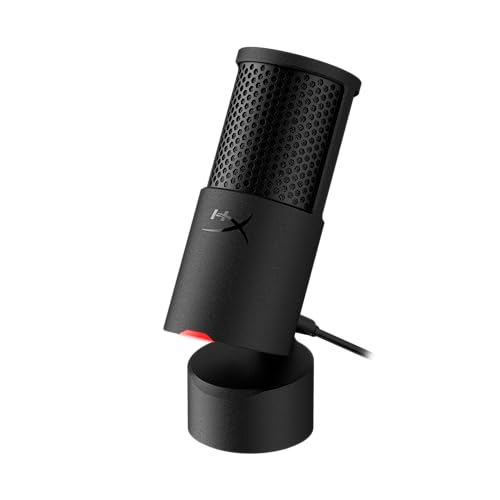 HYPERX HyperX SoloCast 2 USB Condenser Gaming Microphone | 24-bit |…
View on Amazon ↗
 COCONISE Gaming Microphone for PC: USB Mic for Podcasts Videos &…
View on Amazon ↗
Listing names and images come from Amazon and are rechecked against the live listings; last checked Nov 8, 2026. No prices shown; the current price is on the listing.
How to read this guide. Use this guide as a checklist to hold against any listing you open. It comes from general knowledge of the product category, not from tests of individual models, so verify dimensions and console claims on the product page before you buy.