Wall type and TV size decide most of the choice. Renters and drywall walls need no stud or clamp on mounts, while owners with wooden studs get the strongest hold from a fixed or full motion plate. The main tradeoff is stability against adjustability.
Wall Type Sets the Rules
A wooden stud wall accepts almost any mount and gives the strongest grip. Check that the mount's bolt pattern lines up with your stud spacing, often 16 inches on center.
Drywall alone cannot hold a TV safely. A hollow wall anchor rated for the TV's weight works for small sets, but a stud is always better. If no stud sits where you want the TV, a no stud mount spreads the load across a larger plate.
Brick, concrete, and stone need masonry anchors and a hammer drill. These walls hold weight well but make installation slower. Confirm the mount includes or lists compatible masonry hardware.
TV Size and VESA Pattern Come Next
Every flat TV has a VESA pattern, the four bolt holes on its back. Measure the horizontal and vertical distance between those holes in millimeters, like 200x200 or 400x400.
Choose a mount whose VESA range includes your measurement. Check the weight rating too: a mount rated for 100 pounds holds a 55 inch TV but not a heavy 85 inch panel.
Screen size alone is a poor guide. Two 55 inch TVs can differ by 20 pounds. Use the TV's listed weight and VESA pattern as the real match points.
| Mount style | Best wall | Adjustment | TV size range | Renter friendly |
|---|---|---|---|---|
| Fixed plate | Wood stud or masonry | None | Up to 85 in | No, needs drilling |
| Tilt mount | Wood stud | Up and down tilt | Up to 75 in | No, needs drilling |
| Full motion | Wood stud or brick | Swivel, extend, tilt | Up to 65 in | No, needs drilling |
| No stud plate | Drywall only | None or slight tilt | Up to 55 in | Yes, no stud drilling |
| Clamp or pole | Desk, beam, or ceiling | High reach and rotation | Up to 50 in | Often yes, no wall holes |
Full motion arms work best for corner viewing or open rooms, but their joints sag over time. Fixed plates stay flat forever but limit access to ports and glare control.
Rental Rules and No Drill Paths
Many leases ban wall drilling or charge for repairs. A no stud mount spreads weight over a wide drywall area with many anchors, avoiding studs but leaving small holes.
A clamp mount attaches to a desk, shelf, or beam. For rooms with a false wall or no suitable wall, a ceiling mount or rolling cart keeps the TV off the wall entirely.
Ask your landlord or property manager before drilling. Written permission avoids deposit disputes, even if the lease seems silent on holes.
For small apartments, check related guides like other TV and entertainment gear for space saving setups.
Reading a Listing Before You Buy
Start with the VESA range and weight capacity, then check the wall type the mount supports. A listing that omits these is a red flag.
Look for the mount's depth when flat. A slim mount keeps the TV close to the wall for a clean look, while a deep arm adds reach but sticks out further.
Confirm what hardware ships in the box: lag bolts for studs, anchors for drywall, or masonry screws for brick. Missing hardware means an extra trip to the store.
Ask the seller about arm drop after extension. Some arms sag an inch or two under a heavy TV, which shifts your viewing angle.
Mistakes That End in a Crooked TV
Buying by screen size alone is the biggest error. Two same size TVs can have different VESA patterns and weights, so the mount may not fit.
Skipping the wall check is common. Drywall anchors rated for 50 pounds fail with a 40 pound TV because the wall material, not the anchor, gives way.
Ignoring stud location leads to off center mounting. Mark the studs before you buy, not after the box arrives.
Overtightening bolts can crack a TV's back or strip a drywall anchor. Use a torque wrench or hand tighten until snug, then stop.
Cables, Upkeep, and Hidden Costs
A fixed mount hides ports, so plan cable access before you hang the TV. Add a recessed cable plate or leave slack for HDMI and power cords.
Full motion arms need occasional tightening. Check the joint bolts every few months, especially if you move the TV often.
Budget for extra hardware if your wall is unusual. Masonry bits, longer lag bolts, or a stud finder add to the total cost.
No consumables wear out, but a mount's finish can scratch a wall. Felt pads behind the plate prevent marks when you adjust the TV.
Who Should Skip a Wall Mount
A rolling TV cart or stand fits renters with frequent moves or strict no drill leases. It offers height adjustment and hides cables without wall contact.
A ceiling mount suits rooms with no usable wall, like a space with floor to ceiling windows or a projector screen.
Gamers who sit close may prefer a desk clamp arm for a monitor instead of a wall mount, keeping the screen at eye level for long sessions.
For portable setups, a portable projector guide covers dark room viewing without any permanent mount.
TV Wall Mount Questions Before You Hang
Is a TV wall mount safe for drywall?
Only with the right anchors and a TV under the mount's weight limit. A no stud mount spreads the load across many anchors, but a stud is always safer. Check your drywall thickness and the anchor's rating before hanging anything over 30 pounds.
Which TV wall mount works for a 65 inch TV?
Look for a mount with a VESA range that includes your TV's pattern, usually 400x400 or 600x400 for a 65 inch set, and a weight rating above your TV's listed weight. A full motion arm adds flexibility but needs solid studs.
What is the difference between tilt and full motion mounts?
A tilt mount angles up or down to cut glare but stays close to the wall. A full motion mount extends, swivels, and tilts in every direction. Full motion costs more and can sag over time, while tilt holds firmer.
Can I install a TV wall mount without drilling?
Yes, with a clamp mount on a desk, shelf, or beam, or a no stud plate that uses many drywall anchors. These leave small holes but avoid stud drilling. A rolling cart avoids the wall entirely.
How do I know if my wall has studs?
Use a stud finder or knock on the wall to hear a solid thud instead of a hollow echo. Studs usually sit 16 or 24 inches apart. Mark both edges of a stud before drilling to hit the center.
Which TV Wall Mount Fits Your Wall
A renter in a drywall apartment should pick a no stud plate rated for their TV's weight and VESA pattern, keeping holes small and reversible. A homeowner with wooden studs and a 65 inch TV gets the best long term hold from a full motion arm, but only if they accept occasional tightening. For a bedroom with no stud access, a clamp mount on a sturdy dresser works without touching the wall.
Real tv wall mount listings, so you can check the points in this guide against actual products. These are affiliate links: as an Amazon Associate we earn from qualifying purchases, at no extra cost to you.
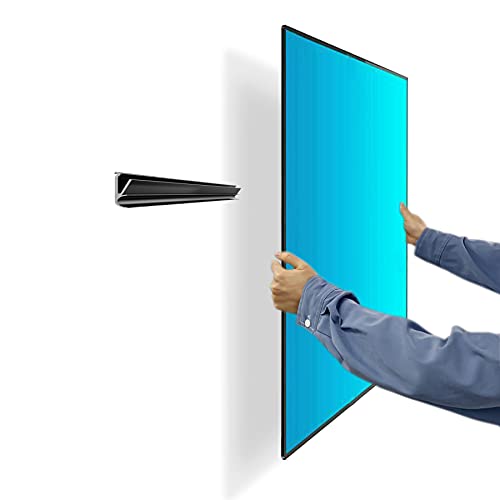 AUOACE Auoace No Stud TV Wall Mount, Studless Drywall TV Hanger…
View on Amazon ↗
 ECHOGEAR ECHOGEAR No Stud TV Wall Mount for Drywall, fits 32-77”…
View on Amazon ↗
 PERLEGEAR Perlegear No Drill TV Wall Mount for Most 24-65 Inch…
View on Amazon ↗
Listing names and images come from Amazon and are rechecked against the live listings; last checked Nov 8, 2026. No prices shown; the current price is on the listing.
Scope and limits. This guide covers the TV wall mount category as a whole, not any single model. It is written from general knowledge of how mounts work, so check the VESA range, weight limit, and wall type on the listing before you buy.