The Amazon Fire TV Stick 4K Select suits buyers who want 4K picture and Alexa powered search in the newest Fire TV interface. The Roku Streaming Stick HD fits TV owners who prefer a simple remote and a device powered by the TV alone. The Xiaomi TV Stick 4K targets viewers who want Dolby Vision, Atmos, and Wi-Fi 6 in a portable stick. The ONN Android TV 2K FHD is for those who want Chromecast built in and 2K resolution on a budget. The main tradeoff is between picture quality, interface, and portability.

Amazon Fire TV Stick 4K Select
Best for: Buyers who want 4K HDR and Alexa voice search
- Streams in 4K Ultra HD with HDR10+ for sharp, high contrast picture.
- The Fire TV interface has a modern design with personalized recommendations to reduce scrolling.
- Press and ask Alexa to search and launch shows across your apps.
Keep in mind: Cloud gaming requires an Xbox Game Pass subscription and a compatible controller, each sold separately.
Check price on Amazon ↗
Roku Streaming Stick HD
Best for: TV owners who want a simple remote and no extra power cord
- Compact design plugs into the back of the TV and does not block neighboring HDMI ports.
- Powers from the TV alone, so no wall outlet or extra cords are needed.
- One remote powers the TV, adjusts volume, and controls the Roku device.
Keep in mind: HD resolution only, so it is not the pick for 4K TVs.
Check price on Amazon ↗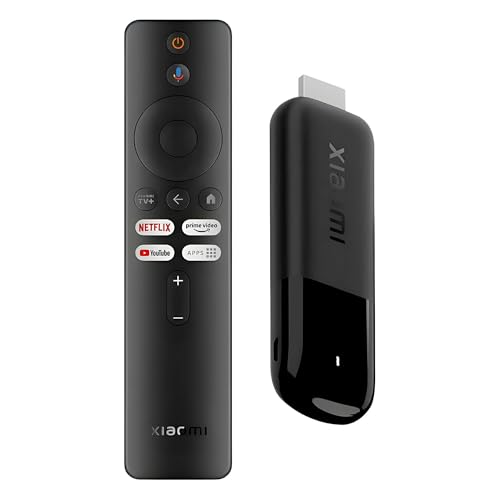
Xiaomi TV Stick 4K
Best for: Viewers who want Dolby Vision, Atmos, and Wi-Fi 6 on the go
- 4K decoding with Dolby Vision and HDR10+ for cinema level lighting and shadow detail.
- Dolby Atmos and DTS:X provide panoramic surround sound for a home theater feel.
- Dual band Wi-Fi 6 increases network bandwidth for smoother streaming.
Keep in mind: Google TV interface organizes content from apps and subscriptions, so you may need to sign in to several services.
Check price on Amazon ↗
ONN Android TV 2K FHD Streaming Stick
Best for: Android users who want Chromecast built in and 2K resolution
- Chromecast built in lets you cast photos, videos, and music from your phone, tablet, or PC to the TV.
- Press the mic button on the remote to use the built in virtual assistant.
- Supports thousands of apps on the Google Play Store.
Keep in mind: 2K resolution is lower than the 4K options in this shortlist.
Check price on Amazon ↗Product names and images come from the Amazon listings and are rechecked against them (last checked Nov 8, 2026). The highlights restate each listing's own bullet points as published on Nov 8, 2026. Prices change often, so we do not show them. These are affiliate links: as an Amazon Associate we earn from qualifying purchases, at no extra cost to you.
Resolution and Picture Quality
The Amazon Fire TV Stick 4K Select and the Xiaomi TV Stick 4K both stream in 4K Ultra HD, but they differ in HDR formats. Amazon lists HDR10+ support, which gives a wider color range on compatible TVs. Xiaomi adds Dolby Vision and HDR10+, so it may suit viewers who want the highest dynamic range from supported content.
The Roku Streaming Stick HD is limited to HD resolution. That is fine for smaller or older TVs, but it will not show 4K detail. The ONN Android TV 2K FHD sits between the two, offering 2K resolution that is sharper than HD but below 4K.
If your TV is 4K, the Amazon or Xiaomi sticks make more sense. If your TV is only HD, the Roku keeps things simple. The ONN is a middle option for buyers who want a step up from HD without paying for 4K.
| Product | Max Resolution | HDR Formats | Audio Formats | Wi-Fi |
|---|---|---|---|---|
| Amazon Fire TV Stick 4K Select | 4K Ultra HD | HDR10+ | Not listed | Not listed |
| Roku Streaming Stick HD | HD | Not listed | Not listed | Long range Wi-Fi |
| Xiaomi TV Stick 4K | 4K | Dolby Vision, HDR10+ | Dolby Atmos, DTS:X | Dual band Wi-Fi 6 |
| ONN Android TV 2K FHD | 2K FHD | Not listed | Not listed | WiFi |
Voice Control and Remote Design
The Amazon Fire TV Stick 4K Select has Alexa built in. You press and ask Alexa to search and launch shows across your apps. The listing also mentions Alexa+ for natural language searches, Amazon Photos, and smart home control. That is useful if you already use Alexa devices.
The Xiaomi TV Stick 4K has a Bluetooth voice remote with a Google Assistant button. You can get recommendations, answers, and control smart home devices. The remote is 360 degree, so it works from any angle.
The ONN Android TV 2K FHD has a built in virtual assistant. You press the mic button on the remote to get what you want. It also has Chromecast built in, so you can cast from your phone, tablet, or PC.
The Roku Streaming Stick HD has a voice remote that powers the TV, adjusts volume, and controls the Roku device. You can use your voice to search and play entertainment. The remote is uncluttered and does all you need.
- Amazon: Alexa voice search and smart home control.
- Xiaomi: Google Assistant via Bluetooth remote.
- ONN: Built in virtual assistant and Chromecast.
- Roku: One remote controls TV power, volume, and streaming.
Portability and Travel Use
The Roku Streaming Stick HD is designed for travel. It is compact, plugs into the back of the TV, and powers from the TV alone. That means no wall outlet or extra cords, so you can take it to a hotel and not log into someone else's device.
The Xiaomi TV Stick 4K is ultraslim, lightweight, and portable. The listing says you can plug it into a hotel TV or projector to enjoy your personalized profiles and streaming apps on the go.
The Amazon Fire TV Stick 4K Select does not mention travel specifically, but it is a stick design that plugs into HDMI and connects to Wi-Fi. The ONN Android TV 2K FHD includes a power adapter, so it needs a wall outlet, which may be less convenient for travel.
- Roku: TV powered, no outlet needed for travel.
- Xiaomi: Slim and portable for hotel TVs or projectors.
- Amazon: Stick design, but no travel claim in listing.
- ONN: Includes power adapter, so outlet required.
Content and App Ecosystem
The Amazon Fire TV Stick 4K Select lists access to Prime Video, Netflix, YouTube, Disney+, Apple TV+, HBO Max, Hulu, Peacock, Paramount+, and thousands more. It also mentions free, ad supported content and cloud gaming with Xbox Game Pass and Luna.
The Xiaomi TV Stick 4K uses Google TV, which organizes movies, stream apps, music, and shows from apps and subscriptions in one place. It also has a growing library of free live TV channels.
The ONN Android TV 2K FHD supports thousands of apps on the Google Play Store and has built in content including YouTube, Play Movies & TV, and more.
The Roku Streaming Stick HD has popular apps plus tons of free movies, shows, and live TV. It also includes free and live local news and sports.
- Amazon: Broad app list and cloud gaming option.
- Xiaomi: Google TV with free live TV channels.
- ONN: Google Play Store apps and built in content.
- Roku: Popular apps and free live local news and sports.
Who Should Skip These Picks
If you already have a smart TV that handles all your streaming apps and you do not need a separate voice remote or travel stick, none of these add much. A streaming stick is most useful for older TVs or for taking your content on the road.
Buyers who want a device with an Ethernet port for wired internet should look elsewhere. These sticks connect over Wi-Fi only. The listings do not mention Ethernet support.
If you need a specific app that is not listed, check compatibility before buying. The Amazon listing names many apps, but the others list fewer. For example, the ONN listing says thousands of apps on the Play Store, but that does not guarantee every app is available.
What to Confirm Before Buying
Check your TV's HDMI port location and space. The Roku listing says it will not block neighboring HDMI ports, but other sticks may be wider. If your ports are close together, measure first.
Confirm your Wi-Fi network speed and band. The Xiaomi stick supports dual band Wi-Fi 6, which is faster on newer routers. The Roku mentions long range Wi-Fi, but no specific band. If your router is far from the TV, that matters.
Look at the power source. The Roku powers from the TV alone, but the ONN includes a power adapter, so you need a wall outlet. The Amazon and Xiaomi listings do not specify power source, so check the product images or manual.
See the streaming stick selection guide for more on choosing a stick that fits your rental and moving habits.
Questions Before You Pick a Stick
Which streaming stick is best for a 4K TV?
The Amazon Fire TV Stick 4K Select and the Xiaomi TV Stick 4K both stream in 4K. The Xiaomi adds Dolby Vision and Atmos, while the Amazon has the newest Fire TV interface and Alexa. Pick based on which ecosystem you prefer.
Can I use a streaming stick in a hotel room?
Yes, the Roku Streaming Stick HD and the Xiaomi TV Stick 4K are both designed for travel. The Roku powers from the TV alone, so you do not need a wall outlet. The Xiaomi is slim and portable and works with hotel TVs or projectors.
Do I need a separate remote for my TV?
No, all four sticks include a remote. The Roku remote powers the TV and adjusts volume, so you can control everything with one remote. The Amazon and Xiaomi remotes have voice buttons for search and smart home control.
Which One Should You Get?
A buyer with an older HD TV who wants a clutter free setup should get the Roku Streaming Stick HD. It powers from the TV alone and uses one simple remote. A buyer with a 4K TV who wants the richest picture and sound should get the Xiaomi TV Stick 4K. Its Dolby Vision, HDR10+, and Atmos support make it the stronger choice for a home theater setup. If you are deep in the Amazon ecosystem and want Alexa, the Fire TV Stick 4K Select is the natural fit.
How to read this guide. The picks were chosen by comparing the stated features in each listing, including resolution, HDR support, voice control, and travel design, to cover a spread of buyer needs. Only listing text was used; no units were handled or tested in any way.