Connection type, color needs, and control method decide most smart bulb purchases. Wi-Fi bulbs need no hub but load your network; Zigbee or Bluetooth bulbs stay responsive with less router traffic. Renters and renters with pets often want warm dimming and simple schedules, while color lovers should prioritize brightness and color accuracy over novelty effects. The main tradeoff is easy setup against long term reliability.
Check the Connection Before the Color
The first thing to find on a listing is the wireless protocol. Wi-Fi bulbs connect straight to your router and work in most homes without extra hardware, but every bulb becomes another device on the network. In a small apartment with a basic router, three or four Wi-Fi bulbs are usually fine. In a home with cameras, laptops, and phones, a dozen Wi-Fi bulbs can make the network feel crowded.
Zigbee bulbs use a hub that plugs into your router and talks to the bulbs on a separate low power network. The hub costs money and takes a few minutes to set up, but response is fast even with twenty bulbs. Thread is newer and works through a border router such as a smart speaker, with similar reliability. Bluetooth bulbs need no hub but only respond when your phone is within about thirty feet, so they suit a single lamp more than a whole floor.
If the listing says 'works with Alexa' or 'works with Google Home', check whether that means direct Wi-Fi or through a hub. Some bulbs need the brand's own bridge even when they claim voice assistant support. Ask the seller which hub, if any, the bulb requires before you order.
Lumens Decide a Room, Not a Lamp
Smart bulbs are often dimmer than the incandescent bulbs they replace. A standard 60 watt equivalent is about 800 lumens, and many smart bulbs land between 600 and 800. For a ceiling light in a living room or kitchen, look for at least 800 lumens. For a bedside lamp or a hallway sconce, 400 to 600 lumens is enough and saves energy.
Color bulbs trade some brightness for the red, green, and blue LEDs inside. A color smart bulb that claims 800 lumens may only reach that in cool white; in deep red or blue it often drops below 200 lumens. If you plan to use colors as the main light, not just as an accent, compare the lumen rating for colors, not just the maximum white.
Check the color temperature range on the listing. White bulbs often go from 2700K warm to 6500K cool. If you want the bulb to feel like an old incandescent that gets warmer as it dims, look for 'warm dimming' or 'dim to warm' in the description. A bulb that only shifts between fixed whites will not match that behavior.
Renters and Pet Owners Need Different Controls
In a rental home, you cannot always replace wall switches or run new wiring. A smart bulb solves that because you screw it in and control it from an app, a voice speaker, or a small wireless button. Look for a bulb that remembers its last state after a power cut. If the bulb always turns on at full brightness after a flicker, it can wake you at night.
Pet owners often use smart bulbs for a light that stays on when they are away, or a sunset fade that calms a dog at bedtime. The useful feature is a schedule that runs on the bulb or the hub, not on your phone. If the schedule lives in an app on your phone and you leave the house, the light may not change. Ask the seller whether schedules run locally or need the phone nearby.
Elderly parents benefit from a bulb that pairs with a physical remote or a voice assistant they already use. A small dimmer button on the nightstand is easier than opening an app. If the bulb only works through a phone app, it may be the wrong pick for someone who does not keep a phone at hand.
For home automation beginners, the simplest path is often a Wi-Fi bulb from a brand with a clear app and no required hub. But that simplicity can fade as you add more bulbs and the phone becomes the only switch. A hub system has a steeper first hour but a calmer second month.
Which Features Are Real and Which Are Marketing
Color is the feature most buyers overrate. Sixteen million colors sounds impressive, but most people use warm white for dinner, cool white for work, and one or two accent colors for a party or a holiday. A bulb with poor white quality and great color is a worse daily light than a plain white bulb with smooth dimming.
Music sync, scene modes, and holiday palettes are marketing candy. They are fun for a week and then ignored. The features that matter every day are scheduling, dimming speed, minimum brightness, and how the bulb behaves after a power cut. Compare those in the listing instead of the number of color presets.
Energy monitoring is real but rarely useful on a single bulb. A smart bulb uses so little power that the savings from turning it off remotely are small. The bigger value is convenience and security, not the energy report.
If a listing claims 'works with all smart home systems', check the fine print. Some bulbs work with Amazon Alexa and Google Home but not Apple HomeKit, or need a separate bridge for HomeKit. Match the bulb to the system you already use, not the one you might buy later.
The Three Design Types and Where They Fit
Smart bulbs split into three main designs: white only, tunable white, and full color. White only bulbs are the cheapest and often the brightest per dollar. They suit closets, hallways, and outdoor fixtures where you want on and off from your phone but no mood lighting.
Tunable white bulbs adjust from warm to cool white. They are the right pick for a bedroom or a home office where the light should feel yellow at night and crisp in the morning. They cost a bit more than white only but keep a natural look.
Full color bulbs add red, green, and blue LEDs. They are best for a playroom, a media wall, or a porch during holidays. For a kitchen or a bathroom, the color range adds cost without improving the room.
The table below puts the three designs side by side for the choices that matter most.
| Bulb style | Brightness | Color range | Price tier | Suits |
|---|---|---|---|---|
| White only | Highest per watt | One warm or cool white | Budget | Hallways, outdoors, closets |
| Tunable white | High | Warm to cool white | Mid range | Bedrooms, offices, living rooms |
| Full color | Lower in colors | Full RGB plus whites | Premium | Playrooms, media walls, parties |
A fourth option, smart switches, is not a bulb at all. If you have many bulbs on one circuit, a smart switch can be cheaper and more reliable than replacing every bulb. But switches need wiring, which renters usually cannot touch. Bulbs stay the flexible choice for apartments and rentals.
Mistakes That Cost a Second Trip to the Store
The most common mistake is buying a color bulb for a room that only ever needs white. You pay for LEDs you will not use and often get a dimmer bulb. Decide the color need before you compare brightness, not after.
Another mistake is ignoring the bulb base. Most smart bulbs use an E26 screw base in the US, but some lamps and ceiling fans take candelabra E12 or GU10 bases. Measure the old bulb or check the lamp socket before ordering.
A third mistake is putting a smart bulb in a fixture controlled by a dimmer switch. Most smart bulbs are not designed for a dimmer, and the combination can make the bulb flicker or fail early. Put smart bulbs on a standard on/off switch and dim them from the app.
Finally, buyers forget to check whether the bulb works outdoors. A covered porch is fine for most bulbs, but an exposed fixture needs a damp or wet location rating. If the listing does not say, assume it is indoor only.
Long Term Costs Are Mostly the Hub
Smart bulbs use very little electricity, so the running cost is not the bulb. The long term cost is the hub, if the system needs one, and the fact that you may want more bulbs once the first one works. A cheap Wi-Fi bulb can become expensive when you buy ten of them and your router struggles.
Bulbs themselves last for years, often rated for 15,000 to 25,000 hours. The real consumable is the app or cloud service if the brand charges a subscription for advanced schedules or away mode. Most basic control is free, but check the fine print before you commit to a whole house.
If you move out of a rental, take the bulbs with you. They unscrew like any bulb and leave no damage, which is a real advantage over smart switches.
When a Smart Bulb Is the Wrong Tool
Skip smart bulbs entirely if you want to control a fixture with many bulbs, such as a chandelier or a row of recessed lights. A smart switch or a smart plug for a floor lamp is cheaper and more reliable. One switch controls the whole circuit; individual bulbs must each be paired and kept in sync.
Also skip them if your Wi-Fi is already weak in the room where you want the light. A smart bulb that cannot reach the router will drop off the network and need a reset. In that case, a Zigbee or Thread bulb with a hub placed near the router works better, or a simple mechanical timer does the job without any network.
If you only want a light to turn on at dusk and off at dawn, a dumb bulb in a smart plug or a photocell socket is simpler. The electronics department overview covers other smart home gear that may fit better.
Smart Bulb Questions Buyers Ask Before Ordering
Do smart bulbs work in rental homes?
Yes, smart bulbs are one of the best smart home upgrades for renters because they screw into existing sockets and need no wiring changes. You can remove them when you move. Check that the bulb works with the landlord's existing switch and that it does not require a hub you cannot place near the router.
Which smart bulb is best for a small apartment?
For a small apartment with one or two lamps, a Wi-Fi or Bluetooth bulb is usually enough. Wi-Fi gives voice control and remote access from anywhere; Bluetooth works only when you are nearby. Avoid a hub system unless you plan to add many bulbs or want faster response.
Is a smart bulb worth it for a pet owner?
Yes, if you want a light that turns on and off on a schedule while you are away, or a dim sunset fade for a pet's bedtime. Look for a bulb that runs schedules locally on the bulb or hub, not one that needs your phone in the house. A power cut memory feature also helps keep the light from flashing on at full brightness.
What should I look for when comparing smart bulbs?
Check the wireless protocol, brightness in lumens, color temperature range, and whether it needs a hub. Then check the bulb base size and whether the fixture has a dimmer switch. Match the bulb to the voice assistant or app you already use, and confirm the schedule runs locally if you plan to be away.
Can smart bulbs work with a dimmer switch?
Most smart bulbs are not designed for a physical dimmer switch. The dimmer reduces voltage to the bulb, which can cause flickering, buzzing, or early failure. Use a standard on/off switch and dim the bulb from the app or a smart remote. If you want wall dimming, buy a smart switch instead.
Which Smart Bulb Should You Start With?
A renter in a small apartment who wants one or two lamps on a schedule should start with a tunable white Wi-Fi bulb around 800 lumens with warm dimming and local schedules. It needs no hub, works with a phone or voice speaker, and covers the daily warm to cool range. For a pet owner who is away often and wants a light that never misses a schedule, a Zigbee or Thread bulb with a hub is the better pick, because it keeps running even when the phone leaves the house. If you want color for a media wall or holiday porch, buy one full color bulb for that fixture and keep the rest white.
Real smart light bulb listings, so you can check the points in this guide against actual products. These are affiliate links: as an Amazon Associate we earn from qualifying purchases, at no extra cost to you.
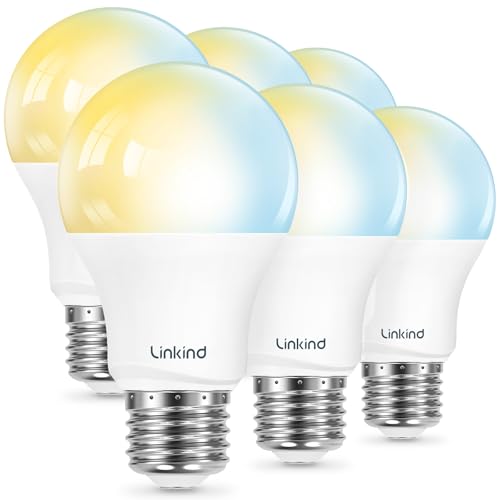 LINKIND Linkind Smart Light Bulbs, Works with Alexa & Google Home,…
View on Amazon ↗
 FEIT ELECTRIC Feit Electric Smart Light Bulbs, A19 RGBW Color Changing -…
View on Amazon ↗
 LEDVANCE SYLVANIA Wifi LED Smart Light Bulb, 60W Equivalent Full Color…
View on Amazon ↗
Listing names and images come from Amazon and are rechecked against the live listings; last checked Nov 8, 2026. No prices shown; the current price is on the listing.
About this guide. This guide draws on general knowledge of smart bulb categories and how their wireless and lighting features work. It does not examine individual models, read buyer reviews, or handle any units, so confirm each bulb's base size, lumen output, and hub requirements on the listing before you buy.