An RGB monitor light works when the beam stays off the screen and the brightness dims low enough for a dark room. Focus on beam angle, mounting depth, and dimming range. Buyers with thin or curved monitors should skip most clamp on models. The main tradeoff is desk glow versus screen glare.
Beam Angle Decides Glare Before Brightness Does
The most common mistake is judging a monitor light by its maximum brightness. A brighter light aimed badly only makes screen reflections worse. The beam angle matters more than output. A wide beam washes the top of the monitor in color, while a narrow or asymmetric beam pushes light forward and down onto the desk.
Look for listings that describe the light path, not just the lumens. An asymmetric lens design is a strong sign the light was made for monitors. A plain tube with LEDs on one side will almost always spill onto the screen unless you angle it far forward.
If you already own a monitor with a glossy panel, glare is more visible. Matte screens hide some spill, but a glossy screen will show every degree of a wide beam. For glossy panels, prioritize a narrow beam over extra brightness or color modes.
Mounting Depth and the Curved Monitor Problem
Most RGB monitor lights clamp onto the top edge of the monitor. The clamp depth must clear the monitor thickness, usually 10 to 25 mm. A clamp that is too shallow will not sit flat and may fall forward. Check the listed clamp range before buying.
Curved monitors create a second problem. The top edge curves away from the center, so a rigid bar sits unevenly or leaves gaps at the sides. Some lights have a flexible mount or a counterweight design that works better on curves. If your monitor curves more than a slight bow, look for a model that explicitly supports curved panels.
A light that hangs too far forward can also bounce off the top bezel. A counterweight mount often lets you slide the light back further than a spring clip. This small adjustment can move the beam off the screen entirely.
Dimming Range Matters More Than Color Count
Marketing pages push the number of RGB modes, but the dimming range changes how you actually use the light. At night, a light that cannot dim below 10 percent will feel harsh. A wide dimming range lets you keep a soft glow without lighting up the whole room.
Look for a control method you can reach without looking. Touch controls on the bar are common, but a remote or a dial on the cord is easier when the light sits above your eyeline. App control adds scheduling and color presets but can be slow for a quick brightness change.
Color accuracy matters less than you might think. Most RGB monitor lights are for atmosphere, not color critical work. A neutral white mode with a high CRI rating is useful if you also use the light for reading documents or building models, but the RGB side is decorative.
Desk Size and Monitor Height Change the Glow
A large monitor on a small desk creates a different light pool than a small monitor on a deep desk. The light bar sits above the screen, so the beam lands closer to the monitor on a shallow desk. On a deep desk, the light may not reach the front edge.
Monitor height also matters. A tall monitor or a monitor on a riser places the light higher, which spreads the beam wider. A lower monitor keeps the light closer to the desk, creating a tighter pool. If you use a monitor arm, check that the light does not interfere with the arm's movement.
For a small desk, a shorter bar with a narrow beam works better. For a wide desk, a longer bar covers more area but may need more brightness to reach the front. Measure the width of your monitor and the depth of your desk before comparing listings.
Who Should Skip an RGB Monitor Light
A monitor light is not for everyone. If your desk already has a good task lamp, an RGB bar adds little beyond color. Buyers who need accurate color work, like photo editing or print design, should use a dedicated high CRI desk lamp instead. The RGB light can shift the perceived color of the screen.
People with very thin or very thick monitors often struggle with mounting. A monitor under 5 mm thick may not give a clamp enough purchase. A monitor over 25 mm thick may not fit most clamps. In both cases, a free standing bias light behind the monitor is a safer choice.
If you share a room, the RGB glow can bother someone trying to sleep. A light that cannot turn off the RGB separately from the white mode is less flexible. Look for a model with independent white and RGB control, or skip the bar entirely and use a simple desk lamp.
- Skip it if you do color critical work and need neutral light
- Skip it if your monitor is under 5 mm or over 25 mm thick
- Skip it if you share a room and need the RGB off at night
- Skip it if you already have a good task lamp and only want the RGB effect
Small Desks and Beginner Streamers Need Different Setups
A beginner streamer often has a small desk with a webcam, a microphone arm, and a monitor. An RGB monitor light can add background color without taking desk space, but the clamp must not block the webcam. Some webcams sit on top of the monitor exactly where the light bar goes.
For a small desk, a shorter bar or a flexible gooseneck light works better than a long rigid bar. The gooseneck can angle the light away from the screen and toward the keyboard. A long bar on a narrow desk can overhang the edges and look awkward on camera.
Home recording setups often need a light that can switch to a neutral white for video calls. The RGB modes are for the background, but the white mode should be clean enough for your face. A light with a high CRI white mode and separate RGB control covers both uses.
Console capture setups rarely need a monitor light at all. The capture card and console sit away from the desk, and the monitor is often a TV. A bias light behind the TV is more useful than a bar on top of it. If you do use a monitor light for console gaming, check that the mount clears the TV's thicker bezel.
Reading the Listing Before You Buy
Start with the clamp range. The listing should state the minimum and maximum monitor thickness. If it does not, ask the seller. A missing clamp range is a red flag because it is the most common fit problem.
Check the beam description. Words like asymmetric, angled, or forward throw mean the light was designed to avoid the screen. A listing that only mentions RGB modes and brightness is often a generic light bar repurposed for monitors.
Look for the dimming method and the lowest brightness. A remote with preset levels is fine, but a smooth dial gives more control. If the listing does not mention a minimum brightness, assume it is bright. Ask the seller for the dimming range in percentage or lux.
Power source matters for cable management. USB-C is common, but some lights use a barrel plug or a proprietary connector. Check whether the cable exits the back or the side, because a side exit can interfere with a monitor arm.
| Design type | Beam control | Mounting fit | Best for |
|---|---|---|---|
| Basic clip on bar | Wide, often spills | Thin to medium flat monitors | Quick setup, casual gaming |
| Counterweight mount | Moderate, adjustable | Thicker or curved monitors | Desks with limited clamp space |
| Asymmetric lens bar | Narrow, screen safe | Flat monitors under 25 mm | Glossy screens, dark rooms |
| Gooseneck or clamp arm | Flexible, user aimed | Most monitors, needs desk edge | Streamers who reposition often |
A counterweight mount is the most forgiving design for fit, but it often has a wider beam. An asymmetric lens bar protects the screen best but is less flexible on curved monitors. Match the design to your monitor shape first, then to your lighting goals.
Long Term Costs and Care Are Minimal
RGB monitor lights have almost no consumables. The LEDs last for years, and the only long term cost is electricity, which is negligible. The main wear point is the clamp hinge, which can loosen over time. A counterweight mount avoids the spring that often fails on clip on designs.
Dust collects on the top of the bar and can dull the output. Wipe it with a dry microfiber cloth every few weeks. Avoid cleaning sprays, which can seep into the LED housing. The USB cable is the part most likely to fail first, so check that it is replaceable.
If the light has a remote, the battery in the remote will need replacing occasionally. Some remotes use a coin cell, which is cheap and easy to find. App controlled lights do not have this cost but depend on your phone and Wi-Fi.
RGB Monitor Light Questions, Answered
Is an RGB monitor light worth it for streaming?
For a streamer with a small desk, yes, if the light adds background color without taking desk space. The real value is atmosphere and a softer glow behind the keyboard. If your webcam already has a ring light and your room has other RGB, a monitor light adds little. Check that the bar does not block the webcam mount.
Which RGB monitor light is best for a curved monitor?
A counterweight mount or a flexible gooseneck design fits curved monitors better than a rigid clip on bar. The top edge of a curved monitor slopes, so a rigid bar leaves gaps. Look for a listing that explicitly states curved panel support and a clamp range that clears the monitor thickness at the center.
What is the difference between a monitor light and a bias light?
A monitor light sits on top of the monitor and shines down onto the desk. A bias light sits behind the monitor and shines onto the wall. Monitor lights reduce desk shadows and add task lighting. Bias lights reduce eye strain from a bright screen in a dark room. They serve different purposes and are often used together.
Should I buy an RGB monitor light if I wear blue light glasses?
Blue light glasses filter the screen, not the desk light. An RGB monitor light can still help by reducing the contrast between a bright screen and a dark desk. Choose a model with a warm white mode for evening use. The RGB modes are decorative and do not affect blue light exposure meaningfully.
How do I stop my monitor light from glaring on the screen?
Angle the light forward so the beam lands on the desk, not the panel. A light with an asymmetric lens is designed to do this automatically. If your light is a plain tube, slide it back on the mount or tilt it down more. For glossy screens, a narrow beam is essential, and you may need to lower the brightness.
The Right RGB Monitor Light for Your Desk
A streamer with a flat monitor under 25 mm thick and a small desk should pick an asymmetric lens bar with a wide dimming range and a remote. The narrow beam keeps the screen clean while the remote controls the glow without reaching up. If your monitor is curved, choose a counterweight mount with adjustable tilt instead, even if the beam is a little wider.
Real rgb monitor light listings, so you can check the points in this guide against actual products. These are affiliate links: as an Amazon Associate we earn from qualifying purchases, at no extra cost to you.
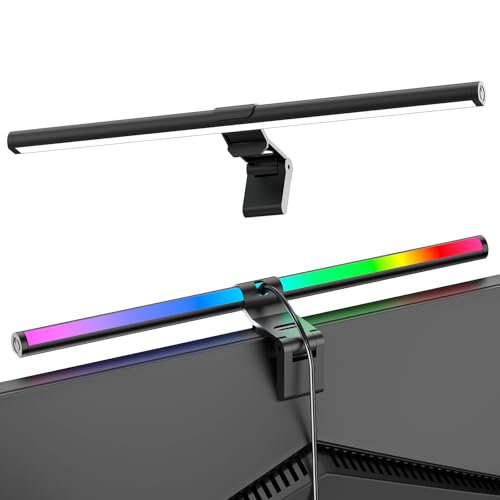 SAMPHON SAMPHON RGB Monitor Light Bar, Eye-Care Dual Light Reading Screen…
View on Amazon ↗
 QUNTIS Quntis Curved Monitor Light Bar 15 RGB Backlight for 34"+…
View on Amazon ↗
 LIEBEWH LiebeWH Monitor Light Bar 40cm, USBC RGB 3 Color Eye…
View on Amazon ↗
Listing names and images come from Amazon and are rechecked against the live listings; last checked Nov 8, 2026. No prices shown; the current price is on the listing.
About this guide. This guide covers the RGB monitor light category as a whole, not individual models. It is written from general knowledge of how these lights work and fit, so check the clamp range and beam angle on any listing before you buy.