Two choices decide most of the result: the panel finish you can actually see in your room, and whether the stand holds the monitor at the angle you need without sliding. A glossy finish looks punchy in dim light but turns into a mirror near a window. A stiff multi angle stand costs more but keeps the screen where you put it. Buyers who travel weekly need a lighter built in cover, while desk only users can accept more weight for better stability.
Finish Decides Whether You See Work or Your Own Face
Check the panel finish before any spec on the listing. Glossy panels reflect overhead lights and windows, so a bright room turns dark scenes into a mirror. Matte panels scatter that light, which keeps text readable but softens contrast slightly.
Ask what kind of light sits where you will use the monitor. A hotel desk lamp behind you makes glossy a bad idea. A dim corner with controlled light lets glossy show deeper blacks. This single choice changes more than resolution does for most office work.
The Stand Is the Part You Will Fight Every Day
A portable monitor lives or dies by its stand. Folio covers fold into one or two fixed angles and weigh almost nothing, but they slide on a train table. Kickstand arms offer more positions yet often loosen after weeks of opening and closing.
Look for a stand with rubber feet or a non slip lip, not a bare plastic edge. If the listing only shows the monitor floating in a render, ask the seller what angle range the stand locks into. A stand that cannot hold a 15 degree tilt makes the screen useless for a laptop user.
Desk only users should favor a sturdier bracket even if it adds half a pound. Travel users should check whether the stand folds flat against the back or sticks out and catches on a sleeve.
One Cable for Power and Video Is the Whole Point
USB C with DisplayPort Alt Mode lets a single cable carry power and picture from a laptop. Not every laptop USB C port supports Alt Mode, so compare the port on your machine before buying. A listing that says 'USB C' without naming Alt Mode may mean the port only charges the monitor.
Some monitors include a second USB C port for passthrough power, which lets you charge a phone while the monitor runs. If you need that, check the wattage rating on the port, not just the cable type. A weak passthrough port will drain the laptop battery faster.
HDMI inputs are useful for older laptops but add a second cable and often a separate power source. For travel, that second cable becomes the thing you forget in a hotel room.
| Stand type | Angle range | Weight feel | Slip risk | Suits |
|---|---|---|---|---|
| Folio cover | 1 or 2 fixed | Lightest | High on slick surfaces | Train or cafe use |
| Kickstand arm | Many but loose | Mid weight | Medium | Mixed desk and bag |
| Magnetic bracket | Continuous | Heaviest | Low with rubber feet | Permanent desk spot |
| Built in flip foot | 2 or 3 fixed | Light | Medium | Occasional travel |
A stand that folds out from the bottom edge takes up desk depth, which matters on a small hotel desk. A stand that uses the whole back panel spreads weight better but makes the monitor thicker in a bag.
Brightness Numbers Only Matter in a Bright Room
A 250 nit panel works in a dim room but washes out beside a sunny window. For a bright office or a train seat with glare, look for 400 nits or higher. Compare the nits rating to where you will actually sit, not to a showroom.
Contrast ratio matters more for video and design than for spreadsheets. Code and documents need even backlighting more than deep blacks, so a lower contrast matte panel can still read better than a glossy one with a higher number.
The Cable That Ships in the Box Decides Your First Hour
A monitor that ships with a cable too short for your desk setup forces an immediate extra purchase. Check the included cable length in the listing. A 3 foot cable cannot stretch from a laptop on a stand to a monitor at arm's length.
Also check whether the cable is USB C to USB C or USB C to USB A. Many laptops have only one USB C port, so a C to C cable means you cannot charge the laptop while the monitor runs. A C to A cable often cannot carry enough power for a bright panel.
If the listing does not state the cable length or connector type, ask the seller before you pay. This small detail causes more returns than panel quality.
A Cover That Doubles as a Stand Saves Bag Space
Some monitors come with a magnetic cover that protects the panel and folds into a stand. That design removes one accessory from your bag, which matters for travel. But a cover that only protects and does not stand means you must carry a separate kickstand.
Check whether the cover attaches with strong magnets or weak ones. A weak magnet lets the cover slide off inside a backpack and leaves the screen exposed to keys. A cover with a soft inner lining also reduces pressure marks on the panel.
Who Should Skip a Portable Monitor and Use a Tablet Instead
If you already carry a tablet, a portable monitor duplicates a screen you own. Many tablets work as a second display through a wireless or wired app, which saves weight and cost. A monitor only makes sense when you need a larger panel or a wired connection with no lag.
Graphic designers who need color accuracy should check whether the monitor lists a color gamut like sRGB or DCI P3. A cheap portable panel often covers less than full sRGB, which shifts skin tones and brand colors. If the listing omits gamut, treat color work as a gamble.
Someone who works only at one desk with a desktop PC should buy a fixed second monitor instead. A portable panel costs more per inch and has a weaker stand than a budget desk monitor of the same size.
Listing Checks That Catch the Usual Mistakes
Look for the phrase 'DisplayPort Alt Mode' in the USB C description, not just 'USB C'. Ask the seller for the exact stand angle range and whether the feet are rubber. Check the included cable length and connector type.
Ignore marketing terms like 'ultra slim' or 'eye care' unless the listing gives a number behind them. Eye care usually just means a blue light filter in the settings menu, which every panel has. Ultra slim says nothing about the stand or the cable.
One mistake buyers make is assuming all USB C ports work the same. Another is paying for a 4K panel at 15 inches, where text becomes tiny and scaling makes the extra pixels pointless. A 1080p or 1440p panel is often sharper for actual work at that size.
Portable Monitor Questions That Come Up Before You Pay
Is a portable USB C monitor worth it for travel?
Only if you work in more than one location each week and need a second screen for documents or code. A tablet already in your bag can often do the same job with less weight. The monitor earns its place when you need a wired connection with no lag or a larger panel than your tablet offers.
Which portable USB C monitor size works best for coding?
A 14 to 16 inch panel at 1080p or 1440p gives readable text without scaling problems. 4K at that size forces font scaling that wastes the extra resolution. Look for a matte finish to keep code readable under office lights, and a stand that holds a near vertical angle for long sessions.
What is the difference between USB C and USB C with DisplayPort Alt Mode?
USB C is only the connector shape. DisplayPort Alt Mode is a feature of the port that carries video over that connector. A monitor advertised as USB C without naming Alt Mode may only charge or transfer data. Check your laptop's port supports Alt Mode before buying.
Can a portable USB C monitor run on a phone?
Some phones with USB C Alt Mode output can drive a portable monitor, but the phone battery drains fast and many apps do not scale to a larger screen. Check whether your phone lists desktop mode support. In practice, a laptop is the more reliable power and video source.
How to compare two portable USB C monitors with similar specs?
Compare the stand first: angle range, rubber feet, and whether it folds flat. Then compare the included cable length and connector type. Finally, compare panel finish for the room where you will use it. These three differences show up every day, while resolution differences rarely do.
The Portable Monitor Pick for a Desk and a Train
Someone who splits time between a home desk and a train seat should pick a matte 1080p panel with a kickstand arm that has rubber feet and folds flat. That setup stays readable in a bright car and holds its angle on a tray table. A graphic designer who needs accurate color at a client's office should instead choose a glossy panel with a listed DCI P3 gamut and a magnetic bracket stand, accepting the extra weight for color confidence.
Real portable usb c monitor listings, so you can check the points in this guide against actual products. These are affiliate links: as an Amazon Associate we earn from qualifying purchases, at no extra cost to you.
 ANYUSE Anyuse 15.6" FHD IPS USB-C HDMI Portable Monitor | 1080P…
View on Amazon ↗
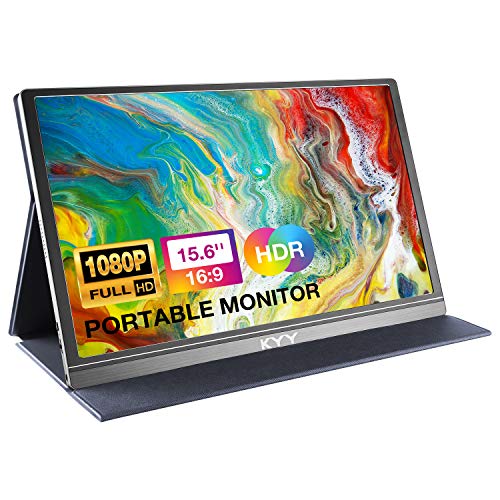 KYY KYY Portable Monitor 15.6" 1080P Computer Monitor Screen Extender w/Cover…
View on Amazon ↗
 INNOVIEW InnoView Portable Monitor, 15.6 Inch FHD 1080P HDMI USB C…
View on Amazon ↗
Listing names and images come from Amazon and are rechecked against the live listings; last checked Nov 8, 2026. No prices shown; the current price is on the listing.
What this guide is. This guide covers the portable USB C monitor category as a whole, not any individual model. It is written from general knowledge of panel types, stand designs, and cable standards; no product documents, owner reviews, or in person tests were used, so check any dimension on the listing before you buy.