Komorebi Notepad suits someone who wants a simple color coded memo with auto save and no account setup. TVSPACE Note Taking App fits buyers who need cloud backup, reminders, and rich formatting across devices. Digi Apps Notes Taking App works for widget fans who want a free, dark mode tool. Daily Notes is best for offline only users with a small app size. Rocketbook Fusion suits paper planners who want reusable pages and app scanning. The main trade off is digital convenience versus physical writing and scanning.
Komorebi Notepad
Best for: Quick memos with color coding and auto save
- Offers six note colors for visual sorting.
- Auto saves as you write, so no manual saving.
- Has undo and delete for easy edits.
Keep in mind: No cloud backup or cross device sync mentioned.
Check price on Amazon ↗
TVSPACE Note Taking App
Best for: Users who need reminders and cloud sync
- Cloud backup keeps notes safe and synced.
- Reminders and notifications help meet deadlines.
- Rich formatting includes bold, italics, and bullets.
Keep in mind: Offline access is listed, but sync may need a connection.
Check price on Amazon ↗
Digi Apps Notes Taking App
Best for: Home screen widgets and dark mode users
- Completely free with no listed premium tier.
- Adjustable text size for comfortable reading.
- Widgets put notes and lists on the home screen.
Keep in mind: No cloud backup or cross device sync mentioned.
Check price on Amazon ↗
Daily Notes
Best for: Offline only note takers with limited storage
- Fully offline, so no account or internet needed.
- App size is less than 6MB.
- Works on phone and tablet.
Keep in mind: No sync or backup, so notes stay on the device.
Check price on Amazon ↗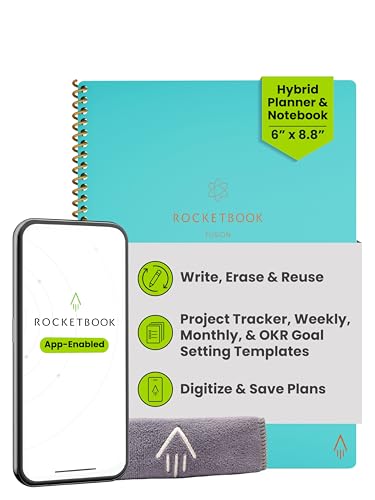
Rocketbook Fusion
Best for: Paper planners who want reusable pages and scanning
- Reusable pages wipe clean with a damp cloth.
- Rocketbook app scans and uploads to cloud services.
- Seven page templates include calendar and to do list.
Keep in mind: Requires a Pilot Frixion pen and manual scanning.
Check price on Amazon ↗Product names and images come from the Amazon listings and are rechecked against them (last checked Nov 8, 2026). The highlights restate each listing's own bullet points as published on Nov 8, 2026. Prices change often, so we do not show them. These are affiliate links: as an Amazon Associate we earn from qualifying purchases, at no extra cost to you.
What the Listings Actually State
Before you buy an app, check the listing for the features that matter most to you. Komorebi Notepad lists simplicity, auto save, undo, delete, sort, and six note colors. It does not mention syncing or backup, so your notes stay on the device unless you export them yourself.
TVSPACE Note Taking App lists quick note creation, organized categories, rich formatting, search and filter, cloud backup, reminders, offline access, and customization. That is a broad set, but the listing does not specify which cloud services or how sync conflicts are handled.
Digi Apps Notes Taking App lists free use, adjustable text size, auto save and backup, dark mode, and home screen widgets. The backup is mentioned but not detailed, so confirm whether it is local or cloud based before relying on it.
Daily Notes lists adding notes and lists, fast search, phone and tablet support, full offline use, and a size under 6MB. The small size and offline focus suggest a lightweight tool for basic notes, not a full featured digital notebook.
Rocketbook Fusion is a physical notebook with reusable pages, not a software app. Its listing states seven page templates, app scanning to cloud platforms, durable materials, and eco friendly reuse. The app is the companion for digitizing handwritten pages.
- Komorebi: color coded notes, auto save, no sync listed
- TVSPACE: cloud backup, reminders, rich formatting, offline access
- Digi Apps: free, widgets, dark mode, adjustable text size
- Daily Notes: offline, small size, phone and tablet
- Rocketbook Fusion: reusable pages, app scanning, seven templates
| Product | Cloud Backup | Offline Access | Reminders | Formatting | Widgets | Reusable Pages |
|---|---|---|---|---|---|---|
| Komorebi Notepad | Not listed | Not listed | Not listed | Not listed | Not listed | Not listed |
| TVSPACE Note Taking App | Listed | Listed | Listed | Listed | Not listed | Not listed |
| Digi Apps Notes Taking App | Not listed | Not listed | Not listed | Not listed | Listed | Not listed |
| Daily Notes | Not listed | Listed | Not listed | Not listed | Not listed | Not listed |
| Rocketbook Fusion | Listed via app | Not applicable | Not listed | Not listed | Not listed | Listed |
How the Shortlist Was Put Together
This shortlist uses only the listing data for each product. We looked at the stated features and picked a spread of designs: a simple color memo app, a cloud synced app with reminders, a widget based free app, an offline lightweight app, and a reusable paper notebook with app scanning.
No units were handled by us, and no in person testing was done. The comparison relies on what each seller wrote in the listing, so any feature not mentioned is treated as not listed.
The spread covers different note taking styles. Some buyers want digital only, some want paper plus scanning, and some need reminders or widgets. That range helps you see what each design offers before you buy.
Check the selection guide for a broader view on cross platform note apps: Do You Need a Cross Platform Note App for Your Busy Life?
Comparing the Picks on Stated Attributes
Cloud backup separates TVSPACE Note Taking App from the others. Its listing states cloud backup and offline access, so notes are available across devices. Komorebi, Digi Apps, and Daily Notes do not list cloud backup, which means notes stay on the device unless you move them yourself.
Reminders are only listed for TVSPACE Note Taking App. If you need deadline alerts or task notifications, that is the only pick here that states that feature. The other apps do not mention reminders in their listings.
Formatting options are listed only for TVSPACE Note Taking App, with bold, italics, and bullet points. The other apps do not list rich formatting, so they are likely plain text or simple notes.
Widgets are listed only for Digi Apps Notes Taking App. Its listing says you can add notes and lists to your home screen, which is useful for quick access. No other pick mentions widgets.
Reusable pages are unique to Rocketbook Fusion. It is a physical notebook, so it does not have offline access or reminders in the same way. The app scans and uploads to cloud services, which is a different workflow from typing notes.
- Cloud backup: TVSPACE only
- Reminders: TVSPACE only
- Rich formatting: TVSPACE only
- Widgets: Digi Apps only
- Reusable pages: Rocketbook Fusion only
- Offline access: TVSPACE and Daily Notes listed
Who Should Skip These Picks
Skip these picks if you need a note app with collaboration features like shared notebooks or real time editing. None of the listings mention multi user editing or shared workspaces.
Skip them if you want a full featured knowledge base with backlinks, databases, or markdown export. The listings do not state those advanced features.
Skip Rocketbook Fusion if you do not want to write by hand or scan pages. It is a paper notebook with an app, not a pure digital note app.
If you need a specific platform, like a web app or desktop client, none of these listings state desktop or web versions. They are mobile focused based on the listing text.
Questions to Ask Before You Pick
Which app is best for notes I can access from multiple devices?
TVSPACE Note Taking App lists cloud backup, which suggests your notes are stored online and can sync across devices. The other apps do not list cloud backup, so they may keep notes only on the device where you wrote them.
Can I use any of these apps without an internet connection?
Daily Notes lists fully offline use, and TVSPACE Note Taking App lists offline access. Komorebi and Digi Apps do not mention offline use, so check their listings before assuming they work without a connection.
What is the difference between a note app and the Rocketbook Fusion?
Rocketbook Fusion is a physical reusable notebook. You write on its pages with a special pen, then scan them with the Rocketbook app to store digitally. The other picks are software apps where you type notes directly on your phone or tablet.
Which Note Taking App Should You Get
For a busy professional who needs reminders and cloud backup, TVSPACE Note Taking App is the pick because it lists those features and rich formatting. For a student who wants a free, simple tool with home screen widgets, Digi Apps Notes Taking App fits because it is completely free and puts notes on the home screen. If you prefer writing by hand and want to reduce paper waste, Rocketbook Fusion offers reusable pages and app scanning. Choose based on whether you need syncing, widgets, or a paper workflow.
What this guide is. The picks were chosen by comparing the listing details for each product, focusing on stated features like cloud backup, offline access, widgets, and reusable pages. The shortlist covers a spread of designs from simple memos to a reusable notebook. Listing text only was used; no units were handled or tested.