Heat, stand design, and cable feel decide most MagSafe charger disappointments. A flat puck is cheapest and most packable. A weighted stand keeps your phone visible but adds bulk. If your phone lives in a case, buy a charger with a strong magnet array, not just a high wattage number.
Heat Is the Spec Nobody Puts on the Box
A MagSafe charger transfers power through induction. Some energy becomes heat. Too much heat makes the phone throttle charging speed to protect the battery. A charger with a metal back or vented stand often runs cooler than a sealed plastic puck.
Check the listing for the phrase 'temperature control' or a stated maximum surface temperature. Avoid chargers that only advertise 'fast charging' without any heat mention. A hot charger next to a warm phone on a bedside table is also unpleasant to touch in the morning.
Your phone case matters more than the charger here. A thick or nonMagSafe case adds an air gap, which makes the charger work harder and run hotter. A thin MagSafe labeled case keeps the magnets close and the heat lower.
Stand or Puck Changes How You Actually Use It
A flat puck disappears into a bag. It works on a nightstand, a desk edge, or a hotel outlet. Its weakness is the phone: the screen lies flat, so you cannot read notifications while it charges. On a smooth surface, a puck can slide when the phone vibrates.
A stand fixes visibility. The phone sits at an angle you can see from across the desk. Stands fall into two groups: foldable travel stands and weighted desk stands. Foldable stands pack small but wobble more. Weighted stands feel solid but stay on one desk.
For a nightstand, a flat puck is often enough because you are not looking at the phone. For a desk, a stand is the better daily habit. For travel, the puck wins every time. This choice comes before wattage.
The Cable and Wall Plug Are the First Things to Fail
Many MagSafe chargers ship with a short USB-C cable and no wall adapter. That forces you to buy a separate power brick. Check the listing for cable length, usually 3 to 6 feet, and for whether a plug is included. A 3 foot cable may not reach from a low outlet to a nightstand.
Cable feel is not cosmetic. A braided cable resists kinking and pet damage. A rubber cable is cheaper but can crack near the connector after months of bending. Look for a strain relief collar at the USB-C end.
The wall plug decides the real charging speed. A MagSafe charger needs a USB-C power adapter that can deliver enough wattage, typically 20 watts or more for full iPhone speed. A 5 watt phone charger will make even a good MagSafe charger crawl.
Wattage Claims Are Mostly Marketing
| Claimed wattage | What it actually does | When it matters | What to check instead |
|---|---|---|---|
| 7.5 W | Older iPhone speed, slower but cooler | Overnight charging or light use | MagSafe alignment magnets |
| 15 W | Full iPhone MagSafe speed | Quick top ups during the day | 20 W or higher USB-C adapter |
| 20 W or more | Usually Android or marketing peak, not iPhone | Rarely relevant for iPhone users | Phone's actual charging limit |
| "Fast charge" | No standard meaning | Ignore the phrase | Stated wattage and adapter |
An iPhone charges at up to 15 watts on MagSafe. A charger that advertises 25 watts will not charge an iPhone faster. The extra wattage only helps if you use a different phone that supports it. Compare the wattage your phone accepts, not the wattage on the box.
Buying Mistakes That Show Up After a Week
The most common mistake is buying a charger with weak magnets. A phone in a case can slide off a cheap puck overnight and wake up dead. Strong magnets are not a spec you can see. Check the listing for 'strong magnetic alignment' or a stated magnet strength, and check the return policy if the grip feels weak.
Another mistake is ignoring the phone case. A MagSafe charger works through a MagSafe compatible case. A case without built in magnets may charge but will not snap into place. If you use a thick wallet case or a metal plate for a car mount, MagSafe may not work at all.
Buying a multidevice stand for one phone is also common. A three in one charger for phone, watch, and earbuds costs more and takes more desk space. If you only charge a phone, a single stand or puck is better. Buy the multidevice stand only when you actually own all three devices.
Fit by Use Case, Not by Brand
Frequent travelers want the flattest, lightest puck with a long braided cable. A foldable stand adds a little bulk but gives a viewing angle on a hotel desk. Weighted stands stay home.
Desk setups reward a weighted stand. The phone stays visible for notifications, and the stand does not slide when you tap the screen. If you take video calls, a stand that holds the phone in portrait or landscape is useful.
Long flights are a special case. A MagSafe charger still needs a wall outlet or a power bank with enough output. On a plane, a USB A port often delivers too little power. A MagSafe charger is not a magic battery; it only works where there is a strong USB-C source.
Family households often need more than one charger. A shared nightstand may suit a multidevice stand for two phones, but MagSafe only charges one phone at a time per puck. Separate pucks are usually cheaper than one big stand.
iPhone users get the most from MagSafe because the magnets align automatically. Android phones with magnetic cases can also use MagSafe chargers, but charging speed may be slower. Check your phone's wireless charging limit before buying a high wattage charger.
Long Term Costs Hide in the Adapter
A MagSafe charger has no consumable parts. There is no filter, no battery, nothing to replace. The long term cost is the wall adapter. Many chargers ship without one, so you buy a separate USB-C power brick. A good 20 watt adapter costs about the same as a cheap charger itself.
Cables are the other long term item. A braided cable lasts longer than a rubber one, but any cable can fail at the connector. If the cable is not detachable, the whole charger becomes useless when the cable breaks. Prefer a charger with a detachable USB-C cable.
Heat also has a long term cost. A charger that runs hot every night can age the phone battery slightly faster. A cooler charger is not just more comfortable; it is gentler on the phone over two or three years.
How to Read a MagSafe Listing Before You Buy
First, look for the word 'MagSafe' in the title and the description, not just 'magnetic wireless charger.' True MagSafe chargers have a specific ring of magnets that aligns with the iPhone. Generic magnetic chargers may not align or may charge slower.
Second, check the cable. The listing should state the cable length and whether it is detachable. If the cable is built in, the charger dies with the cable. If the cable is detachable, you can replace it for a few dollars.
Third, check the adapter. The listing should state the included power adapter or the required wattage. If it does not, assume you need to buy one. Ask the seller what USB-C adapter they recommend for full speed.
- Does the listing say 'MagSafe' or just 'magnetic'?
- Is the cable detachable, and how long is it?
- Does the box include a wall adapter, or do you need to buy one?
- What is the maximum wattage, and does your phone accept it?
- Does the stand hold the phone in the orientation you want?
When to Skip MagSafe Entirely
If your phone does not support wireless charging, a MagSafe charger is useless. Check your phone's wireless charging spec before buying. A wired charger is faster and cheaper for phones without wireless charging.
If you need the fastest possible charge, a USB-C wired charger beats MagSafe. MagSafe is convenient but slower than a good wired charger. If you only charge overnight, the speed difference does not matter.
If you use a thick case, a wallet case, or a metal plate for a car mount, MagSafe may not work. The magnets need to sit close to the phone. A wired charger works through any case.
For a desk where you constantly pick up the phone, a MagSafe stand can be annoying. The phone snaps off with one hand, but you have to snap it back on. A simple wired stand or a charging dock may be easier.
MagSafe Charger Questions Buyers Actually Ask
What is the difference between MagSafe and Qi wireless charging?
MagSafe is Apple's version of Qi with a ring of magnets that snaps the charger to the back of the iPhone. Qi chargers work with any wireless charging phone but do not align automatically. A MagSafe charger also charges Qi devices, but the magnets only help with MagSafe compatible phones.
Does a MagSafe charger work through a phone case?
It works through a MagSafe compatible case, which has its own magnets. A thin nonmagnetic case may still charge, but the phone will not snap into place and may slide off. A thick case, wallet case, or case with a metal plate can block charging entirely. Check the case's MagSafe label.
Can I use a MagSafe charger with an Android phone?
Yes, if the Android phone supports Qi wireless charging. The magnets will not align unless the phone has a magnetic case. Charging speed may be lower than the phone's maximum wireless speed. Check the phone's wireless charging limit before buying a high wattage MagSafe charger.
How do I know if a MagSafe charger is getting too hot?
Warm is normal, but hot to the touch is not. If the charger is uncomfortable to hold after 20 minutes, it is running too hot. Heat slows charging speed and can shorten battery life over time. A charger with a metal back or vented stand usually runs cooler than a sealed plastic puck.
Which MagSafe charger is best for travel?
A flat magnetic puck is the best travel choice. It is small, light, and packs flat. Choose one with a braided detachable cable and a long cable length. A foldable stand adds a little bulk but gives a viewing angle on a hotel desk. Weighted stands stay home.
Which MagSafe Charger Fits Your Daily Spot
For a desk worker who glances at notifications all day, a weighted single phone stand with a braided detachable cable is the pick. It stays put and keeps the screen visible. For a frequent flyer who charges on hotel nightstands and airport lounges, a flat puck with a long cable is the better choice. If you own a phone, watch, and earbuds and want one clean bedside setup, a multidevice stand earns its space.
Real magsafe wireless charger listings, so you can check the points in this guide against actual products. These are affiliate links: as an Amazon Associate we earn from qualifying purchases, at no extra cost to you.
 ANKER Anker MagSafe Charger, MagGo Qi2 15W 360-Degree Wireless Charger Stand…
View on Amazon ↗
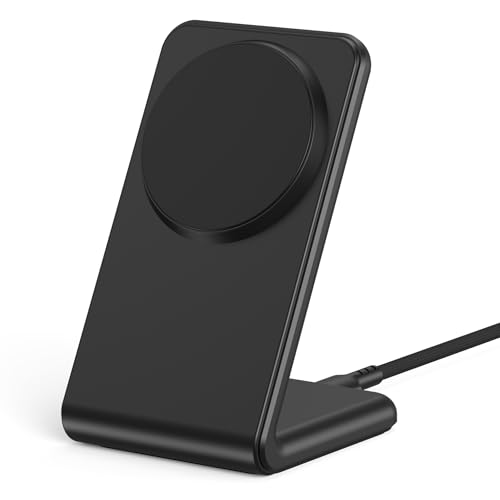 ENYNEO for MagSafe Charger - Magnetic Wireless Charger for iPhone 12-18,White…
View on Amazon ↗
 SMILE STATION MagSafe 25W Wireless Charger for Apple Magnetic Fast Charging Pad…
View on Amazon ↗
Listing names and images come from Amazon and are rechecked against the live listings; last checked Nov 8, 2026. No prices shown; the current price is on the listing.
Scope and limits. This guide covers the MagSafe wireless charger category as a whole, not individual models. It is written from general product knowledge, so check any dimension or cable length on the listing before you buy.