Two factors decide most laminating machine purchases: the pouch thickness you will actually use and how long you are willing to wait for warm up. Buyers who laminate a few school papers or recipe cards are fine with a budget thermal model. Anyone laminating business signage, menus, or items that get handled daily should pay more for a machine that handles thicker pouches and runs cooler. The main tradeoff is speed versus finish quality. Faster machines can leave waves, while slower ones give flatter results.
Pouch Thickness Decides the Whole Machine
Laminating pouches come in standard thicknesses, usually 3, 5, 7, and 10 mil. The number refers to the plastic film on each side, so a 5 mil pouch is 5 thousandths of an inch per side. Thicker pouches feel stiffer and resist bending. Thin 3 mil pouches are fine for bookmarks, flashcards, or temporary signs that will not be handled much.
A machine that only accepts 3 mil pouches cannot laminate a sturdy ID badge or a menu that gets wiped down daily. Check the maximum pouch thickness in the listing before you buy. Most home and small office machines top out at 5 mil. Commercial units handle 7 or 10 mil, but they cost more and take longer to warm up.
Match the pouch to the job, then match the machine to the pouch. A teacher laminating classroom posters once a week can use 5 mil and a mid range machine. A restaurant laminating menus that get cleaned after every shift needs 7 or 10 mil, which rules out most budget models.
Cold Versus Thermal: Two Different Machines
Thermal laminators use heat to melt adhesive inside the pouch. They produce a clear, hard finish and work with standard thermal pouches. Cold laminators use pressure sensitive adhesive, so there is no warm up time and no risk of heat damage. Cold lamination is common for photos, inkjet prints that might run, or heat sensitive documents.
The tradeoff is durability. Cold pouches are usually thinner and more flexible than thermal pouches. They can peel at the edges over time, especially on items that get folded or carried in a bag. Thermal lamination bonds more completely, but it can warp thin paper or curl at the corners if the machine runs too hot.
Many machines are thermal only. A few offer both settings, but a dual mode machine is not automatically better. The cold setting often produces a weaker seal than a dedicated cold laminator. If you only laminate standard paper documents, thermal is the simpler choice.
| Machine style | Pouch range | Warm up | Finish quality | Best for |
|---|---|---|---|---|
| Budget thermal | 3 to 5 mil | Short | Good on thin jobs | Occasional home or school use |
| Carrier free thermal | 3 to 7 mil | Medium | Very good, flat results | Daily office documents and signage |
| Cold laminator | 3 to 5 mil | None | Flexible, can peel | Heat sensitive photos and prints |
| Commercial thermal | 5 to 10 mil | Long | Excellent, very flat | Menus, ID badges, heavy handling |
Carrier free machines feed the pouch directly through the rollers. Machines that require a carrier sleeve hold the pouch inside a folded cardboard or plastic sheet. Carriers prevent adhesive from touching the rollers, but they add a step and wear out over time. A carrier free machine is easier to use once you learn to insert the pouch straight.
Warm Up Speed Changes How You Work
A budget thermal laminator often warms up in two to four minutes. A commercial unit can take eight to twelve minutes. That difference does not matter if you laminate one document a day. It matters a lot if you are laminating thirty table numbers before an event.
Faster warm up usually means a lower maximum temperature. That limits you to thinner pouches. If you need thick pouches, you accept a longer warm up. Some machines have a ready light that turns on before the rollers are fully heated, so the first sheet comes out cloudy. Let the machine sit for an extra minute after the light comes on if you see that problem.
Batch your work. Warm up the machine once, laminate everything, then turn it off. Turning the machine on and off between single sheets wastes time and can cause uneven heating.
Read the Listing for These Three Specs
A laminating machine listing can hide more than it shows. Check three things before you buy: maximum pouch thickness, warm up time, and whether the machine requires a carrier. If any of those is missing, ask the seller or choose a different model.
Maximum pouch thickness is the hard limit. A machine rated for 5 mil will jam or produce cloudy results with a 7 mil pouch. Warm up time tells you the real pace of the work. Carrier requirement changes the cost because carriers need replacing and the process takes longer.
Ignore marketing phrases like 'professional quality' or 'heavy duty' unless they are backed by the pouch thickness rating. A machine that calls itself heavy duty but only accepts 5 mil pouches is not heavy duty for a restaurant menu. Check the power rating too. A 120 watt machine heats slower than a 400 watt machine, which matters for thick pouches.
What Actually Matters Versus Marketing
Pouch thickness, warm up speed, and carrier design matter. Adjustable temperature matters only if you switch between thin and thick pouches often. A fixed temperature machine is fine if you always use the same pouch.
Marketing often highlights 'jam release' buttons or 'auto shut off.' Jam release is useful, but it does not prevent jams. Auto shut off saves electricity and reduces fire risk, but it means the machine cools down if you pause too long. Neither feature changes the final laminate quality.
Some listings advertise 'photo safe' settings. That usually means a lower temperature, which helps with inkjet prints but weakens the seal on standard paper. If you laminate photos regularly, a cold laminator or a machine with a true photo setting is the better tool.
Who Should Skip a Laminating Machine
A laminating machine is a single purpose tool. If you laminate fewer than ten items a year, self adhesive laminating sheets are cheaper and take up no desk space. They do not produce the same hard finish, but they are fine for a recipe card or a child's drawing.
Ecommerce sellers who need waterproof, tear proof labels should look at a different process. Lamination adds a plastic layer to paper, but it does not make the paper waterproof at the edges. For shipping labels that get rained on, a thermal label printer or synthetic label stock is the better choice.
Anyone laminating odd shapes, like luggage tags with metal grommets or thick cardstock, will fight the machine. Laminators work best on flat, thin paper. Thick or dimensional items can jam the rollers or leave air bubbles around the edges.
Care and Consumables You Will Keep Buying
The machine is a one time cost. Pouches are the recurring cost. A pack of 100 pouches lasts a light user months, but a school laminating weekly projects can go through a pack a month. Budget for pouches in the same thickness as your machine's maximum, because thin pouches on a thick rated machine are a waste of the machine.
Clean the rollers every few weeks. Adhesive residue builds up from the edges of pouches, especially on carrier free machines. Run a cleaning sheet through the machine while it is warm, or wipe the rollers with a soft cloth after they cool. Do not use abrasive cleaners, which can scratch the silicone rollers and leave marks on every future laminate.
Store pouches flat and sealed. Pouches exposed to humidity can stick together or develop cloudy spots when heated. Keep them in the original box or a zip top bag away from windows and vents.
Small Businesses, Home Offices, and Teachers Face Different Jobs
A home office laminates a few documents a week: a phone list, a calendar, a luggage tag. A budget thermal machine with 3 or 5 mil pouches handles that without taking up much space. Warm up speed is not critical because the jobs are single sheets.
A small business, like a salon or a cafe, laminates signage, price lists, and menus. Those get handled all day and wiped down often. A carrier free thermal machine that accepts 5 or 7 mil pouches is the right range. The extra stiffness keeps the sign flat in a window or on a counter.
Teachers laminate the most paper of any buyer. Classroom posters, name tags, and learning games get handled by many hands and stored in bins. A fast warm up machine is worth the money because teachers batch work before school or during planning periods. Pouch thickness of 5 mil is usually enough, but 7 mil survives a full school year.
Ecommerce sellers should think about what they are laminating. Product inserts and thank you cards are fine in a standard laminator. Shipping labels are not, because the plastic edges catch on sorting equipment. Family paperwork, like birth certificates or insurance cards, is laminated rarely but for keeps. A cold laminator avoids heat damage to old or fragile paper.
Laminating Machine Questions, Answered Straight
Is a laminating machine worth it for home use?
It depends on volume. If you laminate fewer than ten items a year, self adhesive sheets are cheaper and take up no space. If you laminate school projects, recipes, or paperwork monthly, a budget thermal machine pays for itself in convenience and gives a stiffer, clearer finish than adhesive sheets.
Which laminating machine is best for a small business?
Look for a carrier free thermal machine that accepts at least 5 mil pouches. Carrier free means faster feeding, and 5 mil gives enough stiffness for signs and menus that get handled daily. If your items get wiped down with cleaner, step up to a machine that handles 7 mil pouches.
What is the difference between 3 mil and 5 mil laminating pouches?
The number is the thickness of each plastic side in thousandths of an inch. A 3 mil pouch is thin and flexible, good for bookmarks or temporary signs. A 5 mil pouch is noticeably stiffer and resists bending, which works better for menus, ID badges, and classroom posters. A 5 mil pouch also needs a machine with enough heat output.
Can I laminate money or legal documents?
You can, but you should not laminate currency. Laminating money can make it unfit for circulation and some banks or vending machines may reject it. Legal documents like birth certificates are often better protected in a sleeve or a safe, because lamination is permanent and can damage fragile paper. If you do laminate a fragile document, use a cold setting or a cold laminator to avoid heat damage.
How do I compare two laminating machines?
Compare the same three specs: maximum pouch thickness, warm up time, and carrier requirement. Ignore marketing words like 'professional' or 'heavy duty' unless they come with a thickness rating. If one machine accepts 7 mil and the other only 5 mil, the 7 mil machine has a stronger heater and will produce flatter results on thick pouches.
Pick the Machine That Matches Your Toughest Pouch
Someone laminating school papers or a weekly menu should buy a carrier free thermal machine rated for 5 mil pouches. That combination handles most home and small business jobs without a carrier sleeve or a long warm up. If you laminate menus that get wiped down daily or signage that sits in a sunny window, step up to a machine rated for 7 mil pouches and accept the longer warm up. A teacher batch laminating class sets benefits from the faster warm up of a 5 mil machine, not a thicker pouch.
Real laminating machine listings, so you can check the points in this guide against actual products. These are affiliate links: as an Amazon Associate we earn from qualifying purchases, at no extra cost to you.
 MAXDONE MAXDONE Laminator Machine 9-Inch - 5-in-1 Thermal Laminator Kit |…
View on Amazon ↗
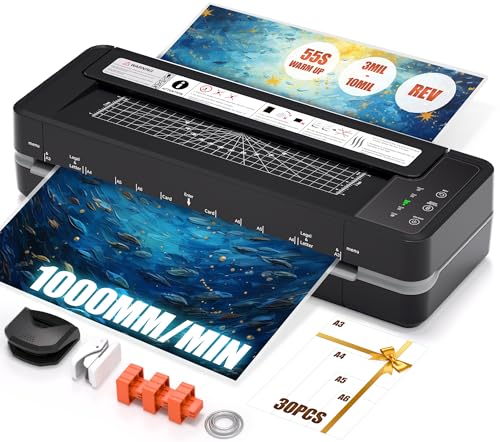 CHILINO Chilino 13inch Heavy-Duty 4-Roller 11x17 Laminator Machine, 1000mm/min | 3-10…
View on Amazon ↗
 BONSAII Bonsaii 9 Inch Laminator Machine with 50 Laminating Sheets, Jam-Free…
View on Amazon ↗
Listing names and images come from Amazon and are rechecked against the live listings; last checked Nov 8, 2026. No prices shown; the current price is on the listing.
How to read this guide. This guide covers laminating machines as a category, drawing on general knowledge of how thermal and cold lamination work. No individual models were handled or tested, and no owner reviews were read. Verify maximum pouch thickness and warm up time on the listing before you buy.