Power source and clip storage drive most decisions. Battery cameras install anywhere but need recharging and miss pre roll. Wired cameras stay on but limit placement. For renters and small apartments, a battery camera with local storage avoids monthly fees and wall damage. For a permanent home, wired plus cloud backup is worth the subscription.
Power Decides Where the Camera Can Live
A battery camera can sit on a shelf, stick to a wall, or hang from a gutter. No outlet is needed, so it works in rental units, garages, and porches where wiring is not allowed or practical. The tradeoff is attention: a battery lasts weeks or months depending on motion frequency, cold weather, and clip length. You will recharge or swap cells.
A wired camera never needs charging and can record continuously. It belongs on a wall near an outlet or with a long cable run to one. Installation is more permanent, and renters may not be allowed to drill. Outdoor wired models need weatherproof cable routing, which often means hiring an installer.
For most renters and apartment dwellers, a battery camera is the only realistic option. For homeowners who want 24/7 recording and no battery upkeep, wired is the better fit. Some battery models accept a small solar panel, which reduces charging trips but adds a panel to position in direct sun.
Storage Shapes the Monthly Cost
Cameras store clips on a microSD card inside the camera, on a base station, or in a cloud account. Local storage is free after the card purchase and keeps working with no internet. If the camera is stolen, the card goes with it. Cloud storage survives theft and lets you view clips from anywhere, but it usually costs a monthly or yearly subscription.
Some brands sell cameras with free cloud storage for a limited number of clips or days. Others require a paid plan for any clip beyond a live view. Check how long clips stay, how many cameras share one plan, and whether person or package detection is locked behind the subscription.
A camera that records only to local storage is a good fit for a low traffic area or a budget setup. A camera in a high risk spot, like a front door that sees daily packages, benefits from cloud backup so a thief cannot also take the evidence.
Indoor and Outdoor Builds Are Not the Same
An outdoor camera needs an IP rating, usually IP65 or IP66 for rain and dust, and a housing that survives direct sun and cold snaps. Indoor cameras are lighter, often cheaper, and can sit on a flat surface. A camera rated only for indoor use will fog, short, or crack outside within a season.
Check the operating temperature range on the listing. A camera rated for 32 to 104 degrees Fahrenheit may struggle in a Minnesota winter or an Arizona summer. Many outdoor models list a wider range, but extreme cold drains batteries faster and can make plastic brittle.
Renters should look for cameras that mount with adhesive strips or a clamp instead of screws. A shelf placed indoor camera aimed through a window is a common workaround, but night vision LEDs reflect off the glass, so the view is often useless after dark.
Which Features Matter and Which Are Noise
Resolution matters only up to a point. 1080p is enough to identify a face at a door; 2K or 4K helps when you need to zoom in on a license plate or a package label. Higher resolution uses more storage and battery, so a 4K battery camera may record shorter clips or recharge more often.
Night vision is essential. Look for infrared LEDs for black and white night views or a built in spotlight for color night vision. A spotlight also deters intruders but gives away the camera's location and can annoy neighbors.
Smart features like person detection, package detection, and activity zones reduce false alerts from cars, tree shadows, or pets. Some brands put these behind a subscription, so the camera's advertised intelligence may cost extra every month. Two way audio is useful for telling a courier where to leave a box, but the speaker is small and often tinny.
Marketing phrases like 'crystal clear 4K' or 'AI powered' tell you little. Compare the field of view, the power source, the storage plan, and the detection features listed as included, not as available with a plan.
Mistakes That Lead to a Camera You Stop Using
Buying a battery camera for a busy sidewalk or driveway is the most common error. Constant motion wakes the camera for every passerby, drains the battery in days, and buries real events in a flood of clips. For high traffic areas, a wired camera with continuous recording or a battery camera with a solar panel and activity zones is the better choice.
Ignoring the subscription before buying is another. A camera advertised at a low price may require a monthly plan for cloud clips, person detection, or even basic motion alerts. Read the plan details before you compare prices.
Mounting a camera out of reach without a plan for battery swaps or card retrieval creates a chore you will postpone. Place it where you can reach it with a step stool, or buy a camera with a removable battery pack and a spare battery.
Forgetting about Wi-Fi range is common for outdoor cameras on a garage or back fence. A camera that drops its connection stops sending alerts. Check the router distance, or plan for a Wi-Fi extender or a camera that records locally even when offline.
Reading a Listing Before You Pay
| What to check | Why it matters | Where to find it |
|---|---|---|
| Power type | Sets mounting limits and upkeep | Listing title or specs |
| Storage included | Cloud plan cost or card slot | Plan details section |
| IP rating | Outdoor survival in rain | Specs table |
| Field of view | How wide an area one camera covers | Specs or diagram |
| Detection included | Person or package alerts without a plan | Feature list |
Ask the seller what is not included: mounting hardware, a power adapter, a microSD card, or a free trial length. A camera that arrives without a power brick or a screw kit adds a trip to the hardware store.
Check the app requirements. Some cameras need a phone with a recent OS version or a hub device. If you use an older phone or want a camera for an elderly parent, confirm the app runs on their device before ordering.
Who Should Skip a Security Camera
People who rent and move every year may prefer a camera with no screws and no subscription, but even that adds a device to pack and an app to manage. If the main worry is package theft, a lockable parcel box or a doorbell camera may be a simpler answer. See other smart home gear guides for alternatives.
Elderly parents often need a camera more than they want one. A camera in a living room can feel like surveillance and strain trust. A better option may be a medical alert system or a simple motion sensor that alerts you without video.
Home automation beginners may find a camera with a hub, a separate storage unit, and a complex app overwhelming. A single camera with direct to phone Wi-Fi and local storage is the gentler starting point.
Long Term Costs Beyond the Camera
A cloud subscription is the biggest ongoing cost. One camera often starts around the price of a streaming service per month, and multiple cameras can double or triple that. Some brands offer a yearly plan that cuts the monthly rate by a fifth or more.
Battery cameras consume batteries or need a spare pack. Rechargeable lithium ion cells lose capacity after a few hundred cycles, so a battery that lasted two months may last six weeks after a year. Budget for a replacement pack every two to three years if the camera is in a busy spot.
Local storage cards wear out. A microSD card in a continuously recording camera can fail after a year or two of heavy writes. Buy a high endurance card rated for video recording, and replace it when the app reports write errors or the camera stops saving clips.
Mounting hardware for outdoor cameras adds cost if you need a long cable, a junction box, or a solar panel. These extras often cost as much as the camera itself on a budget model.
Camera Questions People Search Before Buying
Is a home security camera worth it without a subscription?
Yes, for basic recording. A camera with a microSD card or a base station records clips for free, and you can view them in the app. You give up remote clip access from outside your Wi-Fi and lose footage if the camera is stolen. For a low risk area or a budget, local only is a reasonable choice.
Which home security camera works for a rental apartment?
A battery camera with adhesive mounting or a shelf stand works best. You avoid drilling and can take it when you move. Pick one with local storage to skip monthly fees, and check that the app works on your phone. An indoor camera aimed at the entry door covers most apartment risks without needing outdoor weatherproofing.
What is the difference between a security camera and a doorbell camera?
A security camera watches a wide area and often records continuously or on motion. A doorbell camera watches a narrow entry zone and is built for two way talk with visitors. Doorbell cameras need wired power or a rechargeable battery and usually require a subscription for useful features. Security cameras are easier to place on a shelf or a back yard.
Can a home security camera work without Wi-Fi?
Most consumer cameras need Wi-Fi for setup and live viewing, but some record to a local card and keep working when the internet drops. A few cellular cameras use a data plan instead of Wi-Fi, which helps for a cabin or a construction site. Check the listing for 'offline recording' or 'cellular' before you buy.
How do I compare two home security cameras?
Compare power source, storage type and plan cost, IP rating for outdoor use, field of view, and which smart detections are included without extra fees. Resolution is less important than these. Then check the operating temperature range and the app's minimum phone OS. A camera that matches your mounting spot and your tolerance for monthly fees beats a higher resolution model that does not.
Which Camera Setup Fits Your Door
For a renter or small apartment dweller who wants to see the front door, a battery powered indoor camera with local storage and adhesive mounting is the cleanest pick. It avoids fees, holes in the wall, and a dead battery every week in a low traffic spot. For a homeowner with a busy driveway, a wired outdoor camera with cloud backup and continuous recording is the right upgrade: higher upfront cost, but no missed clips and no charging runs.
Real home security camera listings, so you can check the points in this guide against actual products. These are affiliate links: as an Amazon Associate we earn from qualifying purchases, at no extra cost to you.
 VIVIDEYE 4MP Security Cameras Wireless Outdoor, No Subscription 128GB Local Storage,…
View on Amazon ↗
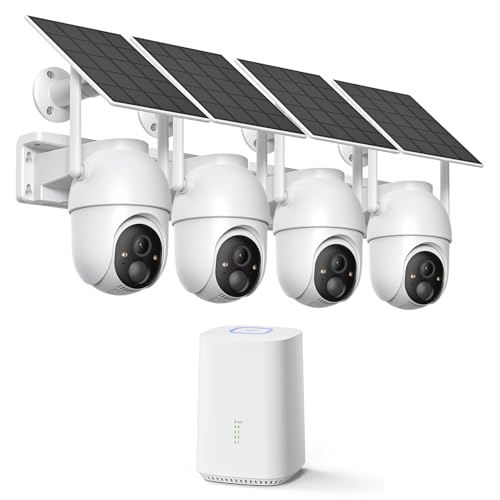 ELYSOO ELYSOO 2K/4MP Home Security Camera System, 2.4G & 5GHz Wi-Fi…
View on Amazon ↗
 HITELLARCAM 2026 Upgraded 2K Security Cameras Wireless Outdoor, Free Cloud Storage,…
View on Amazon ↗
Listing names and images come from Amazon and are rechecked against the live listings; last checked Nov 8, 2026. No prices shown; the current price is on the listing.
Scope and limits. This guide covers the product type, not individual models, and is written from general knowledge of how security cameras work. No product documents, reviews, or tests were used; verify any stated dimension or rating on the listing before buying.