Focus on three things: how many inputs you need, the highest video signal your TV and devices share, and whether you want automatic or manual switching. Buyers with a few 1080p sources do fine with a basic switch, while 4K HDR and gaming setups need more bandwidth and feature support. The main tradeoff is simplicity against future proofing.
Count Your Sources Before Anything Else
An HDMI switch adds inputs to a TV, monitor, or projector that has too few HDMI ports. List every device you want connected at the same time: a streaming stick, game console, cable box, laptop, or disc player.
If your display has three HDMI ports and you own four sources, you need at least a four input switch, or you can leave one device unplugged and swap cables. A switch with one or two spare inputs is usually smarter than an exact fit, because adding a device later means replacing the whole unit.
Small apartments often hide a switch behind a wall mounted TV, so a compact body and a short cable matter. Rental properties benefit from a switch that does not require drilling or permanent mounting.
Match the Signal, Not Just the Connector
Every HDMI port looks the same, but the signal it can carry varies. A switch rated for 1080p will not pass a 4K HDR signal cleanly, and a 4K 30Hz switch may choke on 4K 60Hz content from a game console.
Check the maximum resolution, refresh rate, and color format your TV and sources share. If your TV is 4K 60Hz with HDR, the switch needs to support that exact combination, including HDCP 2.2 or higher for copy protected content.
Gaming rooms add another layer: variable refresh rate, ALLM, and high frame rate signals require an HDMI 2.1 rated switch. A switch that lacks these features can still work, but you lose the smooth motion and low latency a gaming display is built for.
Outdoor movie nights usually run a projector and a single streaming stick, so a basic 1080p or 4K 30Hz switch is plenty. The projector, not the switch, is the limiting factor in most backyard setups.
How the Switch Decides Which Input to Show
Manual switches have a button on the box or a small remote. You press it to change inputs. This is reliable, cheap, and predictable, but it means getting up or finding the remote every time you change devices.
Automatic switches detect a newly powered on device and jump to that input. This works well when you turn on a game console and want it on screen immediately. It can also interrupt when a sleeping device sends a wake signal, so check whether the auto switching can be disabled.
Some switches include a remote, while others rely on a button only. A remote is useful if the switch is hidden behind a TV or in a cabinet. Seniors often prefer a simple remote with large, clearly labeled buttons over a tiny box mounted out of reach.
Compare the Design Types Before You Commit
Three common designs cover most buyers. A compact manual switch is a small box with a button and a short built in cable. It is cheap, easy to hide, and fine for a desk or a secondary TV.
A powered switch with a remote adds an external power adapter and a small infrared remote. It handles more inputs and longer cable runs, and it is the usual choice for a living room setup with a cabinet.
A high bandwidth switch aimed at gaming or 8K setups includes features like HDMI 2.1, variable refresh rate, and a sturdier power supply. It costs more and runs warmer, but it is the only type that preserves the full signal from a modern console or PC.
| Design | Port count | Signal support | Switching | Suits |
|---|---|---|---|---|
| Compact manual | 3 to 5 | 1080p or 4K 30Hz | Button | Desk, secondary TV |
| Powered with remote | 3 to 5 | 4K 60Hz HDR | Remote or auto | Living room, cabinet |
| HDMI 2.1 gaming | 2 to 4 | 4K 120Hz, 8K | Auto or remote | Gaming room, PC |
The table shows the rough split: more signal support usually means more power draw and a higher price. Match the design to the room, not to the most impressive spec sheet.
Read the Listing for the Fine Print
An HDMI switch listing often buries the details that decide whether it works. Look for the exact resolution and refresh rate in the title or specifications, not just a photo of a 4K TV.
Check the HDCP version. A switch without HDCP 2.2 or 2.3 will show a black screen or error on protected content from streaming apps and Blu ray players.
Confirm whether the switch needs external power. Many 1080p switches draw power from the HDMI ports, but 4K HDR and multi input models usually include a USB or wall adapter. If the listing does not mention a power source, ask the seller before buying.
Look at the cable length and connector orientation. A short built in cable works for a TV stand but not for a wall mounted display where the ports face the wall.
Mistakes That Send a Switch Back
Buying for the wrong resolution is the most common error. A switch rated for 4K 30Hz will not pass 4K 60Hz from a streaming box or console, even though both are called 4K.
Ignoring HDCP is close behind. The switch may pass a test pattern but fail on Netflix or a Blu ray because the copy protection handshake fails.
Another mistake is buying too few ports. A five input switch costs a little more than a three input, but replacing it later costs more than the difference.
Finally, some buyers expect a switch to split one signal to multiple TVs. An HDMI switch is not an HDMI splitter. A switch chooses one source for one display; a splitter sends one source to several displays at once.
Skip the Switch If Your TV Already Handles It
If your TV has enough HDMI ports for every device you own, you do not need a switch. Adding one introduces another point of failure and another remote or button to manage.
A soundbar or AV receiver with multiple HDMI inputs can also serve the same role. If you already route everything through a receiver, a switch is redundant.
Seniors who struggle with input selection may be better served by a universal remote that changes the TV input directly, rather than adding a separate switch box with its own button.
Long Term Costs Are Mostly About Cables
An HDMI switch has no consumable parts, but the cables around it can add up. You need one cable from each source to the switch and one from the switch to the display.
Cheap cables often work at 1080p but fail at 4K 60Hz or with HDR. Buying certified high speed or ultra high speed cables is a one time cost that prevents intermittent black screens.
Power adapters occasionally fail, especially on budget switches that run warm. A switch with a standard USB power input is easier to replace than one with a proprietary barrel connector.
HDMI Switch Questions Worth Asking Before You Buy
What is the difference between an HDMI switch and an HDMI splitter?
A switch takes multiple sources and sends one of them to a single display. A splitter takes one source and sends the same signal to multiple displays. If you want to choose between a game console, a streaming stick, and a laptop on one TV, you need a switch. If you want the same image on a TV and a projector at the same time, you need a splitter.
Does an HDMI switch reduce picture quality?
A switch that matches your signal should pass the video without visible loss, because HDMI carries a digital signal. Problems appear when the switch is rated for a lower resolution, refresh rate, or HDCP version than your source and display. A 4K HDR signal through a 1080p switch will either fail or be downgraded, which looks worse.
Can I use an HDMI switch with a soundbar?
Yes, but the order matters. Connect your sources to the switch, then run the switch output to the soundbar if the soundbar has an HDMI input and output, or to the TV if the TV passes audio to the soundbar. Check that the switch supports ARC or eARC if you rely on the TV to send audio back to the soundbar.
Is an HDMI switch worth it for only two devices?
If your TV has only one free HDMI port and you have two devices, a two or three input switch is a cheap way to avoid swapping cables. It is worth it for convenience, but do not pay for 4K 120Hz or 8K support unless your devices actually output those signals.
Which HDMI switch works for gaming?
For a current generation console or gaming PC, look for a switch that supports HDMI 2.1, 4K at 120Hz, variable refresh rate, and HDCP 2.3. A 4K 60Hz switch will work but loses the high frame rate and smooth motion that a gaming display is designed to show.
Which HDMI Switch to Pick for Your Setup
A buyer with a 4K TV, a streaming stick, and a game console should get a powered switch with four inputs, 4K 60Hz HDR support, HDCP 2.2 or higher, and a remote. That covers the most common living room setup without paying for unused 8K features. If you run a gaming PC or a current generation console on a 120Hz display, step up to an HDMI 2.1 switch with variable refresh rate support, even though it costs more, because the lower tier switch will silently drop the frame rate your display is built for.
Real hdmi switch listings, so you can check the points in this guide against actual products. These are affiliate links: as an Amazon Associate we earn from qualifying purchases, at no extra cost to you.
 ANKER Anker HDMI Switch, 4 in 1 Out 4K@60Hz HDMI Switcher…
View on Amazon ↗
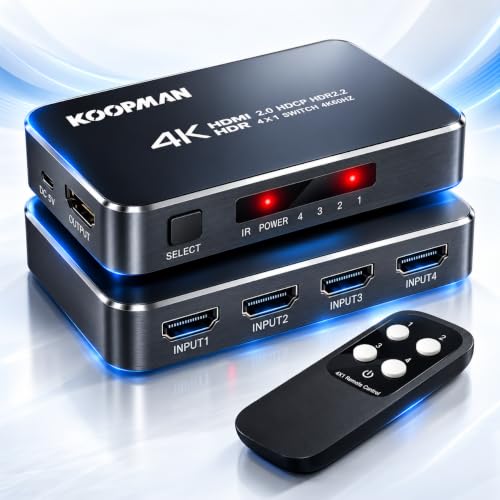 KOOPMAN TECH 4K HDR HDMI Switch, Koopman 4 Ports 4K 60Hz HDMI…
View on Amazon ↗
 PVBCTCSID USB3.0 HDMI KVM Switch 4 Computers EDID 4K@60Hz 4 Port…
View on Amazon ↗
Listing names and images come from Amazon and are rechecked against the live listings; last checked Nov 8, 2026. No prices shown; the current price is on the listing.
About this guide. Use this guide as a checklist to hold against any HDMI switch listing you open. It is written from general knowledge of how these devices work, not from testing individual models, so verify the exact resolution, refresh rate, and HDCP version on the product page before you buy.