A gimbal stabilizer only helps if its payload covers your camera and lens, its axes match your movement, and its setup speed fits your shoot. Mirrorless and phone shooters get smooth results from lighter, cheaper units. Cinema rigs need heavier payloads and more setup time. The main tradeoff is portability against smoothness and control.
Payload Capacity Decides the Whole Category
Check the total weight of your camera body, lens, battery, and any microphone or monitor you mount. A gimbal motor that works near its limit overheats, drifts, or shuts down. Leave at least 20 percent headroom between your rig weight and the gimbal's stated payload.
A phone gimbal often handles 200 to 300 grams. A mirrorless gimbal typically covers 1 to 3 kilograms. A cinema gimbal may carry 4.5 kilograms or more. Match the class to your gear, not to a future camera you might buy.
Lens length matters as much as weight. A long zoom shifts the center of gravity forward, so a gimbal rated for your total weight may still struggle to balance the lens. Check the listing for a maximum lens length or a note about front heavy setups.
Axes and Follow Modes Change What You Can Film
A 2 axis gimbal smooths tilt and roll but leaves pan shake. A 3 axis gimbal adds pan stabilization, which matters for walking shots or following a subject. Most buyers should look for 3 axes unless they only shoot locked off interviews.
Follow modes set how the gimbal reacts to your movement. Pan follow keeps the camera level while you turn left and right. Lock mode holds the camera direction fixed no matter how you move. Some gimbals add a sport mode for fast pans or a POV mode that responds to all three axes.
Check whether you can switch modes from a button or app. Wedding shooters often need to move from a locked aisle shot to a pan follow reception shot in seconds.
Setup Speed Is the Hidden Cost
A gimbal that takes ten minutes to balance gets left in the bag. Look for tool free adjustments, marked positions, and a quick release plate that stays on your camera. Some gimbals remember balance positions for a specific lens, so you can remount without rebalancing.
Calibration matters too. Most gimbals auto calibrate when powered on, but some need a stationary surface and a few seconds. Check the listing for how long calibration takes and whether it happens automatically.
If you shoot run and gun, a gimbal with a foldable design and a storage lock for each axis speeds up setup. Studio shooters can tolerate slower setup for finer control.
Design Types Trade Portability for Smoothness
| Design type | Payload range | Setup effort | Best use | Portability |
|---|---|---|---|---|
| Phone gimbal | Under 300 g | Seconds | Hiking, street, vlogging | Fits in a jacket pocket |
| Single handle mirrorless | 1 to 3 kg | 2 to 5 minutes | Weddings, travel, events | Folds into a small bag |
| Dual handle cinema | 3 to 6 kg | 10 to 20 minutes | Studio, film sets, long lenses | Needs a dedicated case |
| Underslung vest rig | 6 kg and up | 30 minutes plus | All day shoots, heavy cinema cameras | Vehicle or crew required |
Phone gimbals are the most portable but cannot carry a mirrorless camera. Single handle mirrorless gimbals balance portability and control for most hybrid shooters. Dual handle and vest rigs deliver the smoothest results but demand time, space, and often a second person.
For air travel, a single handle mirrorless gimbal that folds flat and fits under a seat beats any cinema rig. For a studio shoot with a heavy camera, a dual handle gimbal gives you the control you need without fighting the motors.
Battery Life and Charging Shape a Shoot Day
Most gimbals use internal lithium ion batteries that last 8 to 14 hours in normal use. Cold weather, heavy payloads, and continuous motor work drain them faster. Check whether the battery is removable or built in. A removable battery lets you carry spares for a long wedding day.
Charging via USB-C is common, but some gimbals need a proprietary charger. If you travel, a gimbal that charges from a power bank matches the rest of your kit. Check the listing for pass through charging, which lets you power the gimbal while it runs.
Some gimbals can charge the camera through a port on the mounting plate. That feature helps on long shoots but drains the gimbal battery faster.
Controls and App Features You Will Actually Use
A joystick, a record button, and a mode button cover most shooting. Extra features like time lapse, motion lapse, panorama, and object tracking live in the companion app. Check that the app works with your phone's operating system before buying.
Wireless control from a phone or a separate remote helps for solo shoots. You can frame, start recording, and adjust settings from a distance. Some gimbals support a foot pedal or a follow focus motor for cinema work.
Ignore marketing terms like 'AI stabilization' or 'infinite smoothness.' The physical design, motor torque, and balance quality determine the result. A gimbal with weak motors cannot be fixed by software.
Mistakes That Turn a Gimbal Into a Paperweight
Buying for a future camera is one. A gimbal sized for a cinema rig is heavy and slow for a mirrorless camera. Buy for the gear you shoot now.
Ignoring the balance procedure is another. A gimbal that is not balanced on all three axes drains the battery and produces jittery footage. Follow the manufacturer's order: tilt, then roll, then pan.
Mounting accessories without rechecking payload is common. A microphone, monitor, or external battery can push the gimbal over its limit. Weigh the full rig, not just the camera body.
Long Term Costs and Care
Gimbals have few consumables. Batteries degrade after a few years, and a removable battery is cheaper to replace than a built in one. Some gimbals need a firmware update from the app to fix bugs or add features.
Keep the gimbal in its case or a padded bag. Dust and sand get into the motor bearings and cause grinding. If you shoot at the beach, wipe the gimbal down with a dry cloth after each use.
Check the warranty and whether the brand offers repair service in your country. A gimbal is a precision device, and a broken motor often costs more to fix than the unit is worth.
When to Skip a Gimbal and Use Another Tool
A gimbal cannot replace a tripod for locked off shots, long exposures, or interviews. If your work is mostly static, a tripod or a camera support setup costs less and sets up faster.
For run and gun documentary work where you need to switch lenses or cameras constantly, a gimbal slows you down. A shoulder rig or a camera strap with good stabilization may fit better.
If you shoot mostly photos, a gimbal adds weight and time without improving your stills. Put the money toward a faster lens or a better camera body instead.
Gimbal Stabilizer Questions Buyers Ask Before Paying
What is a gimbal stabilizer?
A gimbal stabilizer is a motorized mount that holds a camera or phone and counteracts your hand movements. It uses brushless motors on two or three axes to keep the camera level and steady while you walk, pan, or tilt. You balance the camera on the gimbal first, then the motors smooth out the motion.
Which gimbal stabilizer is best for a mirrorless camera?
Look for a single handle gimbal rated for at least 1.5 times your camera and lens weight. Three axes, a tool free quick release plate, and a foldable design matter more than brand name. Check that the gimbal supports your specific lens length, especially if you use a 70 to 200 millimeter zoom.
Should I buy a gimbal stabilizer for my phone?
If you shoot video while walking, hiking, or vlogging, a phone gimbal smooths out the shake that phone stabilization cannot remove. It costs less and weighs less than a camera gimbal. If you only take photos or shoot from a tripod, a phone gimbal adds little.
Is a gimbal stabilizer worth it for wedding photography?
For wedding video, yes. A gimbal lets you walk down the aisle, circle the couple during the first dance, and capture reception movement without shaky footage. For wedding photography only, a gimbal is not worth the setup time. A photographer who shoots both photo and video benefits from a mirrorless gimbal.
How to choose a gimbal stabilizer for air travel?
Pick a gimbal that folds flat and fits in a carry on bag. Check the folded dimensions and weight against your airline's limits. A single handle mirrorless gimbal with a built in battery and USB-C charging is the most travel friendly. Avoid dual handle or vest rigs unless you check a dedicated case.
Which Gimbal Stabilizer to Pick for Your Shoot
A solo shooter with a mirrorless camera who films weddings, hikes, and street scenes should get a single handle 3 axis gimbal rated for double their camera weight, with a quick release plate and foldable design. It balances control and portability for most hybrid work. A studio shooter with a cinema camera and long lens should instead buy a dual handle gimbal with a higher payload, even though setup takes longer.
Real gimbal stabilizer listings, so you can check the points in this guide against actual products. These are affiliate links: as an Amazon Associate we earn from qualifying purchases, at no extra cost to you.
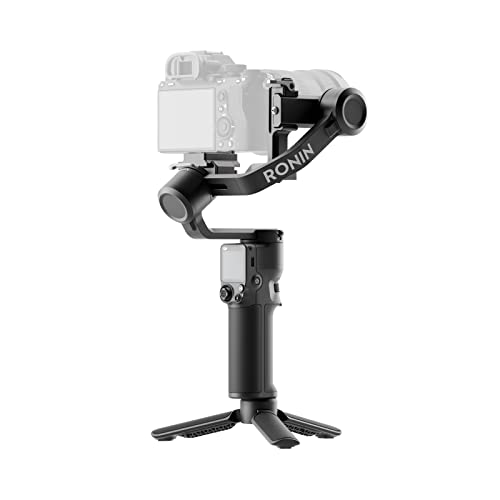 DJI DJI RS 3 Mini, Camera Gimbal Stabilizer, Canon/Sony/Nikon/Fujifilm | 2…
View on Amazon ↗
 FEIYUTECH FeiyuTech SCORP Mini-3-Pro Gimbal Stabilizer for Camera Mirrorless/Compact/Action Cameras,Smartphone,18m AI…
View on Amazon ↗
 ZHIYUN Zhiyun Weebill 3S Combo 3-Axis Gimbal Stabilizer for DSLR and…
View on Amazon ↗
Listing names and images come from Amazon and are rechecked against the live listings; last checked Nov 8, 2026. No prices shown; the current price is on the listing.
Scope and limits. Use this guide as a checklist to hold against any gimbal stabilizer listing. It describes the product category from general knowledge, not a verdict on any specific model, so confirm the payload, folded size, and battery details on the listing before you buy.