Focus on transmission stability, battery life, and how the mic mounts to clothing. Solo creators who move need a reliable 2.4 GHz or UHF system with a long battery. Those in dense Wi-Fi areas should check for frequency hopping and a backup recording. The tradeoff is between tiny size and robust signal strength.
Transmission Type Sets the Shoot
Wireless lavalier microphones use either 2.4 GHz digital or UHF analog or digital bands. 2.4 GHz systems are small, cheap, and easy to pair, but they share the air with Wi-Fi routers, Bluetooth devices, and phones. In a crowded apartment, office, or convention hall, a 2.4 GHz mic can drop out or produce digital artifacts.
UHF systems use dedicated frequencies that travel farther and pass through walls better. They cost more and often need a license in some regions, but they hold a signal when many devices are nearby. Check whether the listing states a frequency range and whether the receiver has a scan function to find a clean channel.
Some modern systems use adaptive frequency hopping on 2.4 GHz. This reduces dropouts by switching channels automatically. It is not as robust as UHF in a dense environment, but it is far better than a fixed 2.4 GHz channel.
| Transmission | Interference risk | Range | Typical use |
|---|---|---|---|
| Fixed 2.4 GHz | High near routers | 30 to 50 ft | Quiet home office |
| Adaptive 2.4 GHz | Moderate | 50 to 80 ft | Moving creator, few devices |
| UHF digital | Low | 100 to 300 ft | Events, crowded spaces |
| UHF analog | Very low | Up to 300 ft | Pro sets with receiver tuning |
For live streaming or online teaching from a fixed desk, a fixed 2.4 GHz system is often enough. For walking around a busy studio or outdoor market, adaptive 2.4 GHz or UHF is safer.
Battery Life and Power Habits
Wireless lavalier transmitters and receivers run on built in lithium ion batteries, AA or AAA cells, or a charging case. Built in batteries are convenient but cannot be swapped mid shoot. AA powered packs let you carry spares and keep recording.
Check the claimed runtime and how long a full charge takes. A transmitter that lasts five hours may die before a long teaching session. A charging case that tops up the mics between takes adds real world runtime.
Some transmitters have a low battery warning on the receiver display or a companion app. Without one, the first sign of a dead battery is silence on the recording.
Mounting and Clothing Choices
Most lavalier mics come with a spring clip, a magnetic back, or both. A clip grips a collar or lapel but can pull thin fabric. A magnet holds through a shirt without leaving a mark but may slip on smooth synthetic material.
Wind noise is a bigger problem than many buyers expect. A foam or furry windscreen helps outdoors or when the speaker moves fast. Check whether the listing includes a windscreen or whether you must buy one separately.
The microphone capsule itself can be omnidirectional or cardioid. Omnidirectional picks up sound from all around and is forgiving of head turns. Cardioid rejects some room noise but must point at the mouth, which is harder to maintain while walking.
Reading a Listing for What Is Missing
A listing may say 'wireless' but hide that the receiver needs a specific app to work. Check whether the receiver plugs directly into a camera, phone, or computer via USB-C, Lightning, or 3.5 mm jack. Some systems work only with a phone and cannot feed a camera.
Ask the seller about latency. A delay above 20 milliseconds can make lips look out of sync in a video. For live streaming, latency matters even more because the audio must match the video in real time.
Look for a stated signal to noise ratio and maximum sound pressure level. A low signal to noise ratio means hiss in quiet rooms. A low max SPL means distortion when the speaker gets loud or laughs close to the mic.
Solo Creators Versus Two Person Shoots
Single transmitter systems suit YouTube creators, online teachers, and home office calls. One mic, one receiver, one audio track. They are simple and cheap.
Dual channel systems record two transmitters onto one receiver, often as separate left and right tracks. This helps interviews, podcasts, or two person live streams. Check that the receiver can split the channels in post or monitor both at once.
Some dual systems allow one transmitter to act as a receiver, but that is rare. Most need a dedicated receiver that plugs into the camera or phone.
Backup Recording Prevents Silent Takes
A few transmitters have a built in recorder that saves audio to internal storage. If the wireless link drops, the audio is still on the transmitter. This matters for one take events like a live demo or an interview that cannot be repeated.
Check the storage capacity and whether files transfer over USB or only through an app. A transmitter with no screen and no status light may be recording silently, which is good for backup but hard to verify on set.
For short form video where each take is under a minute, a backup recorder may be unnecessary. For long lectures or walking tours, it can save an entire session.
Who Should Skip a Wireless Lavalier
If you record only at a desk and never move, a USB or XLR wired microphone gives better sound for less money. A wired lavalier into a phone or camera also avoids all interference and battery issues.
If you need to mic several people at once and have a budget, a multi channel UHF system with bodypack transmitters is more reliable than daisy chaining consumer 2.4 GHz kits.
For music or sound effects, a lavalier is the wrong tool. A small diaphragm condenser or shotgun mic captures more detail and a wider frequency range.
Long Term Costs and Care
Windscreens and clips wear out. A replacement foam windscreen is cheap, but a proprietary magnetic mount may cost more than expected. Check that spares are sold separately.
Built in batteries degrade after a few hundred cycles. A system with user replaceable batteries or a charging case that can be replaced extends the life of the kit.
Store transmitters away from heat and charge them to about half before long storage. Keep the contacts clean because sweat and dust can cause a poor connection in the charging case.
Wireless Lavalier Questions Before You Buy
Is a wireless lavalier microphone worth it for YouTube?
Yes, if you move while talking or film outdoors where a wired mic would tangle or restrict you. For a fixed desk setup, a wired USB mic or a wired lavalier gives better sound per dollar. A wireless lavalier pays off when the cable would show in the shot or limit your movement.
Which wireless lavalier microphone works with an iPhone?
Check the receiver connector. Many systems use a Lightning adapter or a USB-C receiver that works with an iPhone 15 or later. Some older systems need an extra Lightning to 3.5 mm adapter. Confirm in the listing that the receiver is certified for the iPhone model you own.
What is the difference between 2.4 GHz and UHF wireless mics?
2.4 GHz is a shared band used by Wi-Fi and Bluetooth, so it is prone to interference in busy spaces but cheap and small. UHF uses dedicated frequencies with longer range and better wall penetration, at a higher price and often a larger receiver. Choose UHF for events or crowded rooms.
Can I use two wireless lavalier mics with one camera?
Only if the receiver is a dual channel model that accepts two transmitters. The receiver then outputs two separate audio tracks or a mixed track. A single channel receiver cannot record two mics at once. Check the listing for 'dual channel' or 'two transmitter' support.
How do I stop wind noise on a wireless lavalier microphone?
Use the included foam or furry windscreen, and position the mic under clothing or behind a lapel. Point the capsule away from the wind direction. In strong wind, a furry cover works better than foam. Check that the windscreen fits the mic capsule diameter.
Which Wireless Lavalier Fits Your Recording Space
A solo creator who films short videos at home or in a quiet office gets the most from a small adaptive 2.4 GHz clip on system with a charging case. It pairs fast, hides under a collar, and runs long enough for a full day of takes. For a creator who records in busy streets, convention halls, or dense apartment buildings, a UHF digital system with a bodypack recorder is the safer pick, because the local audio file survives even if the wireless link drops.
Real wireless lavalier microphone listings, so you can check the points in this guide against actual products. These are affiliate links: as an Amazon Associate we earn from qualifying purchases, at no extra cost to you.
 MOMAN Moman C2 Wireless Lavalier Microphone, 2.4GHz Wireless Lapel Microphone System…
View on Amazon ↗
 MINI MIC PRO Mini Mic Pro (Latest Model – #1 Microphone for iPhone…
View on Amazon ↗
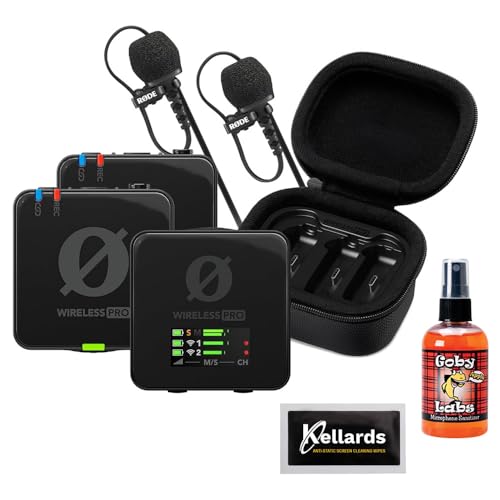 RODE Rode Wireless PRO 2-Person Clip-On Wireless Microphone System/Recorder with Lavaliers…
View on Amazon ↗
Listing names and images come from Amazon and are rechecked against the live listings; last checked Nov 8, 2026. No prices shown; the current price is on the listing.
How to read this guide. This guide explains the category from general knowledge of how wireless lavalier microphones work. It does not evaluate any individual model, so confirm the connector type, battery runtime, and frequency band on the product page before buying.