The adapter you need depends on your Fire TV model and where you stream. For most hotel rooms and vacation rentals, a simple USB Ethernet adapter works if the Fire TV has a free USB port and nearby power. For a wall mounted home theater, look for an adapter with a stable chipset and enough cable length. The main tradeoff is between plug and play convenience and long term connection stability.
Match the Adapter to Your Fire TV Model
Fire TV devices split into two groups. Streaming sticks like the Fire TV Stick Lite and Fire TV Stick 4K draw power from a micro USB or USB-C port. Cube and older box models often have a full size USB port you can use for Ethernet. Check your device before you shop.
A stick without a data capable USB port needs an OTG cable or a hub that passes power through to the stick while adding an Ethernet port. The adapter must support the same USB version as your Fire TV, otherwise the device may not recognize it at all.
Wall mounted TVs add a physical constraint. The Ethernet adapter hangs off the back of the stick, so measure the space behind the TV. A rigid adapter can push the stick against the wall and loosen the HDMI connection. A short extension cable often solves this.
Chipset Decides Whether the Connection Holds
Not all USB Ethernet chips work with Fire OS. Two chipsets appear most often in adapters that people report working: AX88179 and RTL8153. Fire OS includes drivers for these, so the adapter shows up without extra software. Check the listing for the chipset name.
A cheap adapter with an unknown chipset may work for a few minutes, then drop the connection when you stream 4K video. The chipset also affects heat. Adapters that run hot can throttle and cause buffering even on a fast hotel connection.
If the listing does not name a chipset, ask the seller before buying. A vague answer is a sign the adapter may not hold a stable link on your Fire TV.
| Design | Power path | Setup effort | Stability | Suits |
|---|---|---|---|---|
| Basic USB adapter | Fire TV port only | Low | Moderate | Newer sticks with USB port |
| OTG cable adapter | External power plus data | Medium | Good | Older Fire TV sticks |
| Powered USB hub | Wall adapter to hub | Medium | High | Wall mounted or power hungry setups |
| Dedicated Fire TV hub | Wall adapter built in | Low | High | Home theaters and rentals |
The table shows the tradeoff clearly: the easiest adapters are not always the most stable, and the most stable ones add a cable or a power brick to your setup.
Power Delivery Is the Hidden Failure Point
A wired Ethernet adapter draws a small amount of power from the Fire TV. If the Fire TV is already running near its power limit, adding an adapter can cause the device to reboot or drop Wi-Fi. This shows up most often in hotel rooms where the TV's USB port provides weak power.
Look for an adapter that includes its own power input or pairs with a powered USB hub. The original Fire TV power adapter is usually enough, but a third party adapter rated below the Fire TV's requirement can cause problems. Compare the power output on the adapter you plan to use.
For elderly users or anyone who wants a set and forget setup, a powered solution removes the most common cause of mystery disconnects. The extra wall plug is worth the reliability.
Hotel Rooms and Vacation Rentals Need a Different Setup
Hotel Wi-Fi often requires a browser login, which a Fire TV cannot complete on its own. A wired Ethernet connection bypasses that login screen in many hotels, but not all. Some hotels still require a splash page even on Ethernet. Call ahead or check recent guest photos of the room's network ports.
Vacation rentals have the opposite problem: the Wi-Fi may be fine, but the Ethernet port is behind a desk or in another room. For these, a long Ethernet cable matters more than the adapter itself. Look for an adapter with a short pigtail cable so the stiff Ethernet cable does not pull on the Fire TV's USB port.
If you travel with a Fire TV stick, carry an OTG cable and a compact USB Ethernet adapter. The pair fits in a small pouch and covers most hotel and rental situations without taking up much luggage space.
Elderly Users and Set Top Box Simplicity
For an elderly user, the goal is fewer things that can go wrong. A dedicated Fire TV Ethernet hub with its own power supply is the easiest to explain: plug the stick into the hub, the hub into power and Ethernet, done. The fewer separate cables, the better.
Avoid adapters that require changing settings on the Fire TV. Some adapters need the user to turn off Wi-Fi manually or set a static IP. A plug and play adapter removes those steps. Check the listing for phrases like 'no driver needed' or 'works automatically with Fire TV'.
The remote is another part of the setup. A wired connection does not change the remote, but a hub that blocks the stick's IR receiver can cause missed button presses. Place the hub where the stick's front still faces the seating area.
Home Theaters Reward a Stable, Hidden Install
A home theater with a wall mounted TV has no tolerance for buffering. A wired connection removes Wi-Fi interference from nearby speakers, subwoofers, and other electronics. The adapter itself should be hidden behind the TV, which means its size and cable orientation matter.
Choose an adapter with a right angle USB connector or a short flexible cable. This lets the Fire TV stick sit flat against the TV instead of sticking straight out. A straight connector can press against the wall and bend the HDMI port over time.
If your AV receiver sits in a cabinet below the TV, you can place the adapter there and run a longer HDMI cable to the TV. But Fire TV sticks are designed to hang directly from the TV, so a short HDMI extension cable is often the cleaner solution.
See our Amazon devices department overview for more context on how streaming accessories fit together.
Features That Matter and Features That Are Marketing
The features that matter are the chipset, the power path, and the physical shape. A braided cable is nice but does not improve the connection. A metal housing helps with heat but adds weight that can pull on the HDMI port. Focus on the connection first.
Marketing phrases like 'gigabit speed' are mostly irrelevant for a Fire TV. A 4K stream uses well under 100 Mbps, so a 10/100 adapter is enough. What matters is that the adapter negotiates a stable link with the hotel or home router, not its top speed.
A 'plug and play' claim is only true if the chipset is supported. Check the listing for the chipset name, and if it is missing, treat the claim with skepticism. The same goes for 'works with all Fire TV models' which is rarely true across sticks and boxes.
Read the Listing Before You Buy
Start with the title and bullet points. Look for the words 'Fire TV' and the chipset name. If neither appears, the adapter is likely a generic USB Ethernet adapter that may or may not work. A listing that names the exact Fire TV models is more trustworthy.
Check the photos for the connector type. A micro USB connector will not fit a newer USB-C Fire TV stick without another adapter. Look at the cable length and whether the USB connector is straight or angled. A photo showing the adapter plugged into a Fire TV stick is a good sign.
Ask the seller two questions before buying: does this adapter include its own power input, and which chipset does it use? If the seller cannot answer the chipset question, choose a different listing. Also confirm the return policy in case the adapter is not recognized by your specific Fire TV model.
For a deeper look at how device accessories can fail in unexpected ways, see the Echo Dot battery base mistake that applies similar logic to a different Amazon device.
When to Skip a Wired Adapter
If your Fire TV sits within a few feet of a strong router and you only stream standard definition video, a wired adapter is probably unnecessary. The extra cable and power plug add clutter for little benefit. Wi-Fi on modern Fire TV sticks is good enough for most casual use.
If you move the Fire TV between rooms or travel with it, a wired adapter adds setup time at each new location. In a hotel room with no Ethernet port, the adapter is dead weight. Check the room's connectivity before packing it.
An alternative is a Fire TV model with built in Ethernet, if you have not bought the stick yet. Some Fire TV Cube models include an Ethernet port, which removes the adapter entirely. The tradeoff is size and price, but for a permanent home theater install it is the cleanest option.
Fire TV Ethernet Adapter Questions, Answered
Is a Fire TV Ethernet adapter worth it?
For a stationary Fire TV used for 4K streaming in a home theater, yes. A wired connection removes Wi-Fi interference and buffering. For a Fire TV that travels or sits near the router, the adapter adds cables and setup time without much benefit. Match the adapter to your viewing habits.
What is the best chipset for a Fire TV Ethernet adapter?
Two chipsets are widely supported by Fire OS: AX88179 and RTL8153. Adapters using either one usually work without installing drivers. A listing that does not name a chipset may still work, but the risk of drops and unrecognized hardware is higher. Check the listing or ask the seller.
How do I connect Ethernet to a Fire TV Stick?
Most Fire TV sticks lack a full size USB port, so you need an OTG cable or a powered hub. The OTG cable splits the stick's power input into a power port and a USB data port. Plug the Ethernet adapter into the data port and the original power adapter into the power port.
Can I use a Fire TV Ethernet adapter in a hotel room?
Sometimes. A wired connection can bypass a hotel's Wi-Fi login page, but some hotels require a browser login even on Ethernet. If the room has an Ethernet port, plug in and test. If the port is active, the Fire TV usually connects without further steps. Call ahead if you are unsure.
Which Fire TV models support USB Ethernet adapters?
Fire TV sticks with a micro USB or USB-C power port work with an OTG cable and a compatible USB Ethernet adapter. Fire TV Cube models and some older boxes have a full size USB port. Check your device's port type and whether the adapter matches the USB version.
Which Fire TV Ethernet Adapter Fits Your Setup
For a home theater with a wall mounted Fire TV stick, choose a dedicated Fire TV Ethernet hub with its own power supply and a known AX88179 or RTL8153 chipset. The powered design prevents reboots and the angled connector keeps the stick flat against the TV. For a traveler who moves between hotel rooms and vacation rentals, a compact OTG cable plus a basic USB Ethernet adapter is the better pick: it fits in a pouch and covers most wired situations without extra power bricks.
Real fire tv ethernet adapter listings, so you can check the points in this guide against actual products. These are affiliate links: as an Amazon Associate we earn from qualifying purchases, at no extra cost to you.
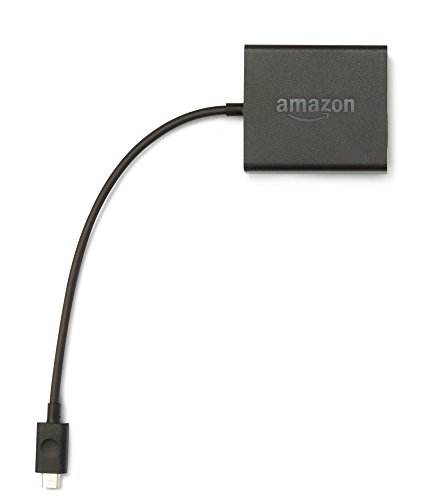 AMAZON Micro-USB Ethernet Adapter for Amazon Fire TV Devices
View on Amazon ↗
 AIBILANGOSE Ethernet Adapter for Fire TV Stick, Micro USB to Ethernet…
View on Amazon ↗
 UGREEN UGREEN Ethernet Adapter for Fire TV Stick, Micro USB to…
View on Amazon ↗
Listing names and images come from Amazon and are rechecked against the live listings; last checked Nov 8, 2026. No prices shown; the current price is on the listing.
About this guide. This guide covers the Fire TV Ethernet adapter category in general, based on knowledge of how Fire TV devices and USB networking work. It does not evaluate individual adapter models, and no reviews or product documents were consulted. Verify the connector type, chipset, and cable length on the product listing before buying.