Three checks separate a stand that stays put from one that frustrates: the joint stiffness, the base footprint, and the clamp or cradle fit. A fixed joint holds a viewing angle but limits sharing. A flexible joint invites adjustment but can sag over time. Buyers who move a tablet between rooms need a light stand with a wide base, while a kitchen counter or toddler setup rewards a heavy, low stand.
Start With the Joint, Not the Price
The place where the stand bends or locks does more than any other part. A ball joint with a firm thumbscrew holds an angle even when a child taps the screen. A friction hinge that feels stiff in the hand can loosen after a few weeks of daily use, especially in a warm kitchen.
Look for a joint that tightens with a visible mechanism, such as a screw collar or a locking lever, rather than a smooth hinge that relies on internal friction alone. Compare the listed weight of the tablet the stand supports. Fire tablets range from light seven inch models to heavier ten inch models, and a joint rated below that weight will drift.
A fixed angle stand avoids this problem entirely. It costs less and never sags, but it forces one viewing height. That matters less for a recipe on a counter and more for a shared family movie where viewers sit at different heights.
The Base Decides Where the Stand Can Live
A stand that holds the tablet steady on a desk can tip on a bed or a couch cushion. The base footprint, not the tablet size, decides that. A circular base with a diameter under five inches often tips when a toddler pulls the tablet toward them. A rectangular or weighted base spreads the load and resists that pull.
For kitchen counters, check the base material. A silicone or rubber pad underneath prevents the stand from sliding on a wet counter. A hard plastic base without a pad will skate across smooth tile. If the stand will sit near a stove or sink, a base that wipes clean matters more than a polished finish.
Floor stands follow the same rule but add height. A floor stand with a narrow pole and a small base can tip if a pet bumps it. A wider base or a pole that can be filled with sand or water adds stability without making the stand hard to move when empty.
| Stand shape | Joint behavior | Base footprint | Best room | Main risk |
|---|---|---|---|---|
| Weighted floor stand | Fixed or limited tilt | Large, often weighted | Living room, playroom | Heavy to move between rooms |
| Clamp on arm | Adjustable with a locking knob | Clamps to a table edge | Kitchen, desk | Clamp damages thin or soft edges |
| Foldable tabletop | Limited tilt, often two positions | Compact, folds flat | Travel, school backpack | Narrow base tips on soft surfaces |
| Gooseneck | Bends freely, no lock | Small clamp or round base | Bed, reading chair | Sags under heavier tablets |
The Clamp Should Grip Without Pressing Buttons
A Fire tablet has buttons and ports along its edges, and a clamp that covers them turns a stand into a nuisance. Check whether the clamp arms are padded and where they land on the tablet. A clamp that covers the power button or the volume rocker forces you to remove the tablet to adjust it.
The clamp opening should match the tablet's thickness, including a case. Many Fire tablet owners keep a kid proof case on the device, and a stand that only fits a bare tablet becomes useless. Compare the listed maximum opening width to the tablet with its case on. A spring loaded clamp holds more securely than a slide fit, but it can require two hands to open.
A cradle style stand that the tablet rests in rather than clamps into avoids the button problem. It allows quick removal, which matters for a shared family tablet that moves from a stand to a lap. The tradeoff is that a cradle offers less grip if the stand is bumped, so it suits a stable surface more than a bed or a car seat.
Home Schooling and Toddlers Need Different Heights
A stand for a school lesson holds the tablet at eye level so a child does not hunch over a screen. A tabletop stand that raises the tablet only three or four inches works for a seated child at a desk. A floor stand that brings the tablet to standing height works for a child who moves between a desk and a floor mat.
Toddlers introduce a different force: downward and sideways pulling. A stand for a toddler should have a low center of gravity and a clamp that resists removal. A heavy floor stand with a fixed angle often survives better than a light gooseneck that a toddler can bend into a new shape.
Shared family use changes the priority again. A stand that one person adjusts and then locks works well, but a stand that requires a tool to adjust will be left in one position. A quick release clamp or a ball joint with a large knob lets different family members set their own angle without frustration.
Long Flights and Kitchen Counters Favor Different Designs
A stand that works on a tray table must fold small and weigh little. A foldable tabletop stand with a wide enough base to balance on a narrow tray works better than a floor stand, which cannot fit in a carry on. Check the folded thickness and whether the hinge locks in the open position so the tablet does not collapse mid flight.
A kitchen counter stand faces steam, spills, and frequent cleaning. A stand with a smooth, sealed surface wipes clean faster than one with fabric or open joints. A clamp on arm keeps the tablet off the counter entirely, which frees space for a cutting board and keeps the tablet away from splashes.
If the same stand must serve both a flight and a kitchen, look for a foldable model with a rubber base and a water resistant coating. It will not match a dedicated floor stand for stability, but it covers both routines without forcing a second purchase.
Mistakes That Turn a Stand Into a Paperweight
The most common mistake is buying for the tablet alone and forgetting the case. A stand that fits a bare Fire tablet often cannot hold the same tablet in a thick childproof case. Measure the tablet with its case on, or look for a clamp with a stated opening range that exceeds the cased thickness.
Another mistake is trusting a gooseneck for a heavy ten inch tablet. The arm may hold the tablet in place for a week, then slowly droop until the screen points at the floor. If the stand does not state a maximum tablet weight, treat a gooseneck as suitable only for the smaller seven or eight inch models.
Ignoring the surface is a third mistake. A stand with a small, hard base will slide on a glass table or a glossy counter. A nonslip pad solves this, but some budget stands omit it. Check the listing for a mention of a silicone or rubber base, or plan to add a separate pad.
When a Stand Is the Wrong Buy
A stand adds a fixed place for a tablet, which is useful for a kitchen, a desk, or a shared family movie. It is less useful for someone who reads in bed with the tablet held in one hand, or who carries the tablet around the house and sets it down wherever they stop.
A simple folio case with a built in kickstand covers many of the same uses in a smaller package. It props the tablet at one or two angles, folds flat for travel, and protects the screen. If the tablet never needs to stand at a specific height or resist a toddler's pull, a case may be the better purchase.
For a child who drops the tablet often, a stand does not replace a protective case. The stand holds the tablet, but the case absorbs the impact when the tablet falls. Buy the case first, then choose a stand that fits the cased tablet.
Fire Tablet Stand Questions Worth Asking Before You Buy
How do I know if a Fire tablet stand will fit my tablet with a case on?
Check the listing for the maximum clamp opening or cradle width, and measure your tablet with the case installed. Many stands state a range such as 0.5 to 1 inch. If the listing only gives a tablet model, assume it fits a bare tablet and look for a stand with a stated opening range wider than your cased tablet.
Which Fire tablet stand is best for a toddler?
A low, heavy floor stand with a fixed or limited tilt angle resists a toddler's pulling better than a light gooseneck. Look for a wide base and a clamp that requires adult strength to open. Avoid stands with small parts that can be pulled off, and check that the clamp does not cover the tablet's buttons.
What is the difference between a gooseneck and a clamp on arm stand?
A gooseneck bends freely along its entire length and holds its shape by friction, but it sags under heavier tablets. A clamp on arm uses rigid segments with locking joints, so it holds a set angle more firmly but cannot curve around obstacles. For a ten inch Fire tablet, a clamp on arm is the safer choice.
Can I use a Fire tablet stand on a plane tray table?
Yes, if the stand folds flat and has a base small enough to fit the tray. A foldable tabletop stand with a locking hinge works well. A floor stand or a large clamp on arm will not fit in a carry on or on a narrow tray. Check the folded dimensions against your bag.
Is a Fire tablet stand worth it if I already have a case with a kickstand?
A stand is worth it if you need a specific height or a stable position that a kickstand cannot hold. A kickstand props the tablet at one or two low angles, while a stand can raise the screen to eye level or hold it over a bed. If the kickstand already meets your viewing angle, a separate stand adds little.
Which Fire Tablet Stand Fits Your Routine
A family that watches shows together and has a toddler in the room should pick a weighted floor stand with a fixed or limited tilt. It resists bumps, keeps the screen at a shared height, and does not sag. A frequent traveler who props a tablet on a tray table should instead buy a foldable tabletop stand with a locking hinge and a rubber base. That second pick fits a carry on and a narrow tray, where a floor stand is useless.
Real fire tablet stand listings, so you can check the points in this guide against actual products. These are affiliate links: as an Amazon Associate we earn from qualifying purchases, at no extra cost to you.
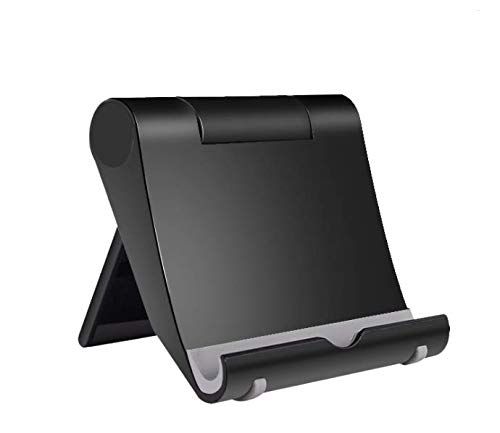 ACCESSONICO 2 Pack Adjustable Tablet Stand - Compatible with Fire HD…
View on Amazon ↗
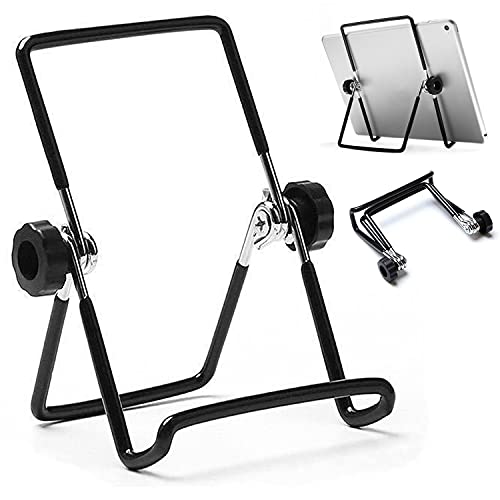 VOVIGGOL VOVIGGOL Adjustable Tablet Stand Holder, Non-Slip Foldable Holder Cradle Fit…
View on Amazon ↗
Listing names and images come from Amazon and are rechecked against the live listings; last checked Nov 8, 2026. No prices shown; the current price is on the listing.
About this guide. This guide covers the Fire tablet stand category as a whole, not individual models. It is written from general knowledge of how stands are built and used, without reading product reviews or handling any units, so verify the clamp opening and base dimensions on the listing before you buy.