Grip comes first, then height. Pick a concave or domed top based on how your thumb rests, and choose tall caps only if you need finer aim in shooters. The main tradeoff is comfort versus precision: softer, taller caps improve control but can make fast direction changes feel slower. Kids and travel setups usually do better with low profile, grippy caps.
Match the Cap Shape to Your Thumb
Concave caps have a dished center that cups the pad of your thumb. That cup keeps your thumb from drifting toward the stick edge during long sessions. Domed caps curve outward and let your thumb roll across the surface more freely. If your thumb rests flat on the stick, a concave cap often feels more locked in. If you pivot from the side of your thumb, a dome may feel more natural.
Thumb size matters here. Larger thumbs may hang over the edge of a small concave cap and feel cramped. Smaller thumbs can sit inside a deep concave cap and lose contact with the rim. Compare the cap diameter against the stick face on your controller before buying. A cap that is too wide can catch on the controller shell when the stick is pushed fully forward.
Height Changes Aim More Than Comfort
Tall caps, often called extended or raised caps, add 5 to 10 millimeters above the stock stick. That extra height gives your thumb a longer lever arm, which makes small movements at the stick translate into smaller movements on screen. For first person shooters and sniping, this can mean the difference between a clean headshot and a wide miss. The tradeoff is that you have to move your thumb farther to reach the stick edges, so quick turns and fighting game inputs can feel slower.
Low profile caps add almost no height. They keep the stick travel short and the response snappy, which suits platformers, racing games, and party games where you change direction constantly. If you already feel accurate with the stock sticks, a tall cap may introduce more problems than it solves. Start with a low profile cap unless you specifically want finer aim.
- Tall caps help shooters and sniping; they slow down fast direction changes.
- Low caps preserve stock feel and work for platformers, racers, and party games.
- Extra height also changes how far your thumb reaches, which can strain smaller hands.
Surface Texture Is the Hidden Sweat Fix
Rubber and silicone caps add friction, but not all textures behave the same. A smooth rubber cap can feel sticky when dry and slippery when sweaty. A cap with a raised dot pattern, concentric rings, or a crosshatch pattern gives sweat somewhere to go and keeps your thumb planted. Some caps use a softer compound that compresses slightly under pressure, which adds grip without changing the stick feel.
Texture also affects how the cap wears over time. Aggressive ribbing can feel sharp during the first few sessions and then smooth out. A very soft compound may tear if you press hard with a thumbnail. Check the listing for the material hardness if it is given, and expect to replace heavily textured caps more often than smooth ones.
Fit Is the First Thing to Verify
Most caps are sold as universal, but universal does not mean perfect. Xbox, PlayStation, and Switch Pro controllers have different stick diameters and shapes. A cap that fits snugly on one may spin or pop off on another. Third party controllers and handhelds vary even more. The cap listing should name the controller families it fits. If it does not, ask the seller before buying.
Check whether the cap slides over the existing stick or replaces the stick top entirely. Slip on caps are the most common and the easiest to remove. Replacement tops require opening the controller, which voids warranties and demands more skill. For most buyers, slip on caps are the safer choice. Verify the cap height and diameter in the listing, and compare those numbers to your controller's stick face.
| Cap style | Best grip feel | Aim precision | Fast input feel | Watch out for |
|---|---|---|---|---|
| Low profile concave | Cupped, locked in | Stock level | Excellent | May feel small for large thumbs |
| Low profile domed | Rolling, free | Stock level | Very good | Less edge grip when tilted |
| Tall concave | Cupped and raised | High | Reduced | Thumb reach increases |
| Tall domed | Smooth and raised | Highest | Lowest | Can slow direction changes |
Kids and Travel Change the Priorities
Kids have smaller thumbs and shorter reach. A tall cap can force them to stretch across the stick, which leads to hand fatigue and sloppy inputs. Low profile caps with a soft, grippy texture are usually the better fit. They keep the stick close to the controller face and reduce slipping when a child grips hard or plays excitedly.
For travel, think about how the caps pack. Tall caps stick out and can snag on a case or get knocked off in a bag. Low profile caps sit closer to the sticks and are less likely to catch. If you carry a controller in a backpack without a hard case, remove the caps before packing or accept that you may need to replace them more often.
Shared Controllers and Tournament Nights
A cap set used by multiple people wears faster and picks up oils from different hands. Choose a material that is easy to wipe down, and avoid very soft compounds that hold indentations. If someone in the household uses lotion or eats while gaming, the caps will collect that residue. A quick wipe with a damp cloth after each session keeps the texture grippy.
At a tournament, you want a cap that stays put during intense play. A loose cap is worse than no cap, because it can rotate under your thumb and throw off your aim. Test the fit before the event. If the cap spins with light pressure, it will not survive a finals match. Bring a spare set, because caps are small and easy to lose between stations.
Skip the Caps If the Stock Sticks Already Work
Caps are a fix for a specific problem: slipping thumbs, short reach, or uncomfortable stick tops. If your stock sticks feel good and you never think about them, adding caps may make things worse. The extra layer changes the stick height and surface, which forces your muscle memory to adapt. That adaptation period can last days or weeks.
An alternative is a full controller grip or a different controller shape. Some players prefer a wider stick top rather than a taller one. Others find that adjusting the in game sensitivity settings gives more precise aim than any physical cap. Try lowering the stick sensitivity before buying caps if your only complaint is overshooting targets.
Thumbstick Cap Questions, Answered
Do thumbstick caps fit all controllers?
No. Most caps are marketed as universal, but Xbox, PlayStation, and Switch Pro controllers have different stick shapes. A cap that fits one may be loose or too tight on another. Check the listing for your controller model, and verify the cap diameter against your stick face. Third party controllers vary the most, so ask the seller if the cap fits your specific model.
Are tall thumbstick caps worth it?
Tall caps help if you play shooters and want finer aim. The extra height gives your thumb more leverage for small, precise adjustments. They are less useful for platformers, fighting games, and racing games where you need fast direction changes. If you already feel accurate with stock sticks, tall caps may slow you down and strain your thumb reach.
How do I stop my thumbstick caps from slipping?
First, clean the stock stick and the inside of the cap with a damp cloth. Oils and dust reduce friction. If the cap still spins, the fit is wrong for your controller or the cap has stretched. Choose a cap with a snug inner diameter and a textured rim. A cap that slips during play is worse than no cap, because it changes your aim unpredictably.
What is the best thumbstick cap for sweaty hands?
Look for a cap with a raised texture: dots, rings, or crosshatching. Those patterns give sweat a place to go and keep your thumb planted. A very smooth rubber cap can become slippery when wet. Silicone caps with a soft, grippy compound also help. Avoid glossy finishes, which tend to feel slicker under moisture.
Can kids use thumbstick caps?
Yes, but choose low profile caps with a soft texture. Kids have smaller thumbs and shorter reach, so tall caps force them to stretch and can cause hand fatigue. Low caps keep the stick close to the controller and are easier for small hands to control. A grippy surface also helps when a child presses hard or plays excitedly.
Which Thumbstick Cap Should You Get?
A player who grinds shooters every night and wants tighter aim should start with a tall concave cap. The dished top locks the thumb in place, and the extra height gives real precision gains. For a kid, a travel bag, or a shared living room controller, switch to a low profile cap with a dot or ring texture. That setup keeps inputs fast, packs flat, and survives excited hands.
Real controller thumbstick caps listings, so you can check the points in this guide against actual products. These are affiliate links: as an Amazon Associate we earn from qualifying purchases, at no extra cost to you.
 MATOSAN MatoSan Joystick Replacement Grip Caps for PS5/PS4/Xbox Series/8BitDo Controller, Anti-Slip…
View on Amazon ↗
 CCFREELIFE 24 PCS Premium Silicone Thumb Grips for PS4/PS5/Xbox Controller, Rainbow…
View on Amazon ↗
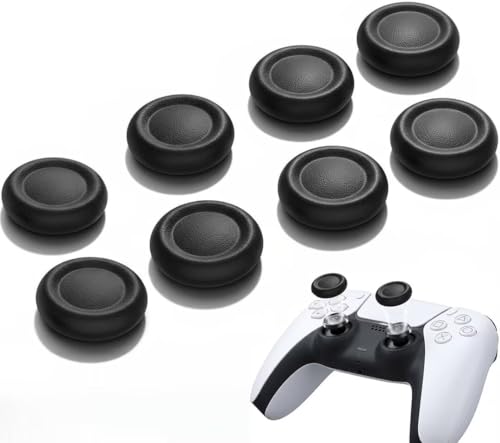 FERKURN Ferkurn Replacement Thumb Grips Cap Compatible with PS5/4 Controller Edge…
View on Amazon ↗
Listing names and images come from Amazon and are rechecked against the live listings; last checked Nov 8, 2026. No prices shown; the current price is on the listing.
Scope and limits. This guide covers controller thumbstick caps as a product type, drawing on general knowledge of how stick shapes and materials affect grip and aim. No individual cap models were handled or reviewed, so verify the cap diameter, height, and controller compatibility on the product listing before you buy.