Start with compatibility: the clip must fit both your controller model and your phone case. Then weigh a rigid fixed clamp against an adjustable arm. Fixed clamps hold steadier during frantic inputs, but adjustable arms let you angle the screen to reduce neck strain. The main tradeoff is grip security versus flexibility and portability.
Controller fit comes before everything
A clip that does not match your controller is useless. Check the listing for the exact controller models it supports. Xbox, PlayStation, and third party pads have different shapes and button layouts. A clip designed for an Xbox controller may block the shoulder buttons on a PlayStation pad.
Look at how the clip attaches. Some clips snap onto the controller body. Others wrap around the top edge or grip the sides. Snug fit matters because a loose clip shifts during fast inputs. Weight distribution changes too: a phone mounted too far forward can tip the whole controller in your hands.
Check whether the clip covers any ports or buttons. Many controllers have a headphone jack or charging port on the bottom edge. A clip that wraps around the bottom can block those. Some clips leave the port open, which matters if you use a wired headset or charge while playing.
Phone case fit is the quiet dealbreaker
Most buyers forget to check case clearance. A clip with a shallow jaw may not open wide enough for a rugged case. That forces you to remove the case every time you want to play, which gets old fast. Compare the clip's maximum jaw opening against your phone's thickness with the case on.
Rubber pads make a real difference. Clips with bare plastic jaws can scratch a phone or case. Soft silicone or rubber inserts grip better and protect the finish. They also reduce the chance of the phone slipping out when you tilt the controller.
Phone width matters less than you might think. Clips use springs or screws to adjust width, so most handle phones from compact to phablet size. The depth of the jaw is the more common limit. Measure your phone with its case and compare that number to the clip's listed maximum opening.
Hinge stiffness separates stable from saggy
Adjustable clips rely on hinges or ball joints to hold the phone at an angle. Stiff hinges keep the screen where you set it. Weak hinges sag after a few minutes, especially with a heavy phone. You cannot test stiffness from a photo, so check the listing for the hinge type and the clip's weight capacity.
Metal hinges generally hold position better than plastic ones. Plastic joints wear down faster and can develop a floppy feel. A clip with a locking mechanism or a screw to tighten the joint offers more long term stability than a simple friction hinge.
Consider how you actually play. If you sit upright at a desk, you may only need a slight tilt. If you recline on a couch, you need a wider range of angles. A clip with multiple joints gives more options, but each joint is a potential point of sag.
Design types and where they work best
| Design type | Adjustment | Stability | Best for |
|---|---|---|---|
| Fixed clamp | None, angle is preset | Very high | Desk play, competitive games |
| Short adjustable arm | One or two joints | High | Couch play with light phones |
| Long adjustable arm | Multiple joints, wide range | Moderate | Reclined play, neck comfort |
| Gooseneck arm | Full 360 degree positioning | Low | Watching content, light use |
A fixed clamp is the simplest design and the most secure. It holds the phone directly above or in front of the controller with no moving parts. The tradeoff is comfort: you cannot change the angle to reduce glare or neck strain.
Short adjustable arms add one or two joints. They balance stability and flexibility well for most couch players. Long arms and goosenecks offer the most positioning freedom but introduce more leverage. A heavy phone at the end of a long arm magnifies every small movement of your hands.
Weight and balance change the feel in your hands
A phone adds real weight to a controller. The clip's own weight matters too. A heavy metal clip can make the whole setup feel front heavy. A light plastic clip may feel flimsy but keeps the balance closer to the controller.
The phone's position relative to the controller changes the center of gravity. A clip that holds the phone directly above the controller keeps the weight centered. A clip that extends the phone far forward makes the controller want to tip away from you. Over a long session, that extra strain lands on your wrists and forearms.
Think about how you hold the controller. If you rest it on your lap or a desk, a front heavy setup matters less. If you hold the controller up in front of you, every gram of forward weight adds fatigue. Players with smaller hands or weaker wrists should favor lighter clips and shorter arms.
Couch players need a different setup than desk players
Desk players sit upright with the controller in front of them. A fixed or short arm clip works well because the screen is already near eye level. You do not need much angle adjustment, so a rigid clip is the better tradeoff.
Couch players recline and often hold the controller lower. That puts the phone screen below eye level, which strains the neck over time. An adjustable arm helps raise the screen or tilt it toward your face. The tradeoff is that a longer arm is less stable during intense inputs.
Small bedrooms rarely change the clip choice directly, but they do change how you sit. If you play from a bed or a cramped chair, you may need more angle adjustment than a desk player. A compact clip that folds flat is easier to store in a small space.
Long sessions expose weak points
A clip that feels fine for 20 minutes may become uncomfortable after two hours. The main issues are sag, heat, and pressure points. A hinge that sags slowly forces you to adjust the phone every few minutes. A clip that grips the controller too tightly can dig into your fingers.
Phone heat is a real concern during long gaming sessions. The phone generates heat while streaming or running a companion app. A clip that covers the phone's back panel traps heat. Look for a clip with an open back or ventilation cutouts if you play for hours at a time.
The clip's grip on the controller should not require constant tightening. Some clips use a screw clamp that can loosen over time. A spring loaded clip holds tension automatically but may lose spring strength after months of use. Check the listing for the clamp mechanism and whether it is user serviceable.
Common mistakes that lead to returns
The biggest mistake is buying a clip before checking controller compatibility. A clip marketed as universal may not fit every controller shape. Look for a compatibility list in the listing. If the seller does not list your controller, do not assume it will fit.
Another mistake is ignoring the phone case. Buyers often assume the clip will open wide enough for any case. A rugged case with a thick lip can exceed the jaw's maximum opening. Then you are stuck removing the case or returning the clip.
Overbuying adjustability is common too. A gooseneck arm sounds versatile, but it is the least stable design. If you mainly play at a desk, a fixed clamp is cheaper and more reliable. Think about where you actually play, not where you imagine you might play someday.
Who should skip a phone clip entirely
A phone clip is a compromise. It turns your phone into a small secondary screen while you play on a console or PC. If you only want to play mobile games, a dedicated mobile controller or a phone grip is a better fit. A clip adds weight and bulk to a controller you are not using for the game itself.
If you use a very large phone or a tablet, most clips will not hold it securely. The jaw depth and width limits rule out many devices. In that case, a tablet stand or a separate monitor is more practical.
Players who use a controller with a built in screen, like some handheld PC gaming devices, do not need a clip at all. The screen is already attached. A clip would only add weight and block the controls.
Phone Clip Questions Buyers Ask Before Hitting Add to Cart
How do I know if a phone clip will fit my controller?
Check the listing for a compatibility list. It should name specific controller models. Compare the clip's attachment method to your controller's shape. A clip that wraps around the top edge may block shoulder buttons on some pads. If the listing only says universal, look for photos showing the clip on a controller similar to yours.
Can I use a phone clip with a thick phone case?
Only if the clip's jaw opens wide enough. Most clips list a maximum opening depth, often between 10 and 15 millimeters. Measure your phone with the case on. A rugged case can add 3 to 5 millimeters. If your measurement exceeds the clip's limit, you will need to remove the case every time.
Which is better for couch gaming, a fixed clamp or an adjustable arm?
An adjustable arm is usually better for couch gaming because you can tilt the screen toward your face while reclining. A fixed clamp holds the phone in one position, which can strain your neck if you hold the controller low. The tradeoff is stability: an adjustable arm with multiple joints may sag under a heavy phone.
Does a phone clip damage the controller or phone?
A well made clip should not damage either device. Rubber or silicone pads on the jaws protect the surfaces. A clip with bare plastic jaws can scratch a phone case or controller shell. A clip that grips too tightly can leave marks on soft touch controller finishes. Check the listing for padded contact points.
Is a phone clip worth it for long gaming sessions?
It depends on how you use it. A clip is worth it if you want a second screen for chat, maps, or streaming while playing on a console or PC. It is less useful for long mobile gaming sessions because the added weight and heat can become uncomfortable. Choose a clip with good balance and ventilation if you plan to use it for hours.
Which Phone Clip Setup Should You Actually Get?
A player who games at a desk with a standard size phone and a slim case gets the most from a fixed clamp. It stays put and costs less than adjustable designs. That same clip is wrong for a couch player who reclines and uses a heavy phone in a rugged case. A short adjustable arm with padded jaws and a stiff hinge serves that setup better.
Real controller phone clip listings, so you can check the points in this guide against actual products. These are affiliate links: as an Amazon Associate we earn from qualifying purchases, at no extra cost to you.
 GADPIPARTY Gadpiparty Game Controller Phone Clip Adjustable Controller Phone Mount for…
View on Amazon ↗
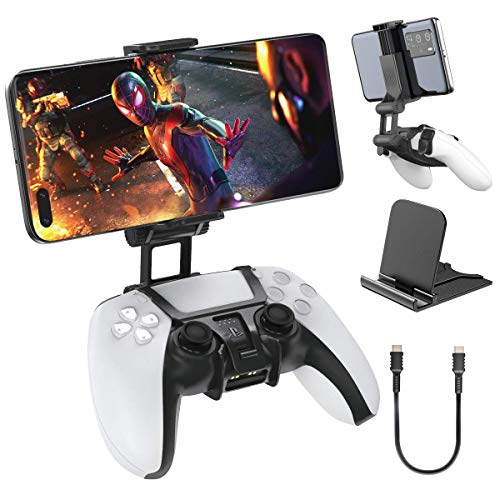 OIVO OIVO PS5 Controller Phone Mount Clip, Mobile Gaming Clip Cell…
View on Amazon ↗
 ICESPRING ICESPRING Phone Clip Holder Mount for PlayStation 5 PS5 Controller…
View on Amazon ↗
Listing names and images come from Amazon and are rechecked against the live listings; last checked Nov 8, 2026. No prices shown; the current price is on the listing.
Scope and limits. Use this guide as a checklist to hold against any listing you open. It is written from general knowledge of how controller phone clips work, not from testing individual models, so verify the jaw depth and controller fit on the product page before you order.