The decision comes down to how you buy games and how much you keep installed. Disc based players with small libraries can often manage the built in drive. Digital buyers who rotate large titles need an external drive for archive duty or an internal upgrade for active play. The main tradeoff is convenience versus speed, and choosing wrong means either wasted money or constant deletions.
Start With How You Buy Games
Digital storefronts make it easy to own dozens of titles. A single large release can occupy 50 to 150 gigabytes, and updates add more over time. If you buy digitally and keep many games installed, the built in drive will fill faster than you expect.
Disc based players have a different pattern. The disc still installs game data, but you can delete a finished game knowing the disc lets you reinstall without downloading. That makes a smaller drive more workable for someone who plays one or two games at a time.
Casual and family gaming often involves a handful of evergreen titles. Those libraries may never outgrow the console. Check your current storage usage before deciding you need an upgrade.
The Three Ways to Add Space
External hard drives connect over USB and provide the cheapest gigabytes. They work well for archiving games you are not actively playing. The downside is speed: loading from a spinning drive is slower, and some newer games require faster storage to run properly.
External solid state drives use the same USB connection but with flash memory. They load games noticeably faster than hard drives and remain portable. They cost more per gigabyte but strike a balance for players who want a simple plug in solution.
Internal expansion cards slide into a dedicated slot and perform at the same speed as the built in storage. They are the only option for playing the most demanding games without compromise. Expect to pay a premium for that matched performance.
| Design | Connection | Speed feel | Best for | Main limit |
|---|---|---|---|---|
| External hard drive | USB | Slowest | Archiving old games | Some new games refuse to run |
| External SSD | USB | Moderate | Portable, quick transfers | Still below internal speed |
| Internal expansion card | Dedicated slot | Matches internal | Active play, demanding titles | Highest price per gigabyte |
Match the design to the job. If you want to play directly from the added storage, an internal card or a fast external SSD is the safer route. If you just want to avoid redownloading, a hard drive is enough.
Capacity You Actually Need
Look at your installed library and multiply the average game size by the number of titles you want ready to play. A 1 terabyte drive often holds between eight and twenty large games, depending on the generation and updates.
Resist the urge to buy the biggest drive available. Storage prices fall over time, and a drive that is far larger than your current library may sit half empty for years. A mid sized drive that covers your next twelve months is usually the better purchase.
For family gaming with several profiles, consider who plays what. Kids' games tend to be smaller, but they accumulate quickly. A shared console can fill up from many small downloads even when no single title is huge.
Speed Is a Spec, Not a Slogan
USB ports have different versions. A drive labeled as USB 3.2 Gen 2 will move data faster than one at USB 3.2 Gen 1, assuming the console port supports it. Check the console's port version before paying for a faster drive.
Internal expansion cards are tied to the console's architecture. They deliver consistent read and write speeds because they use the same interface as the built in storage. That consistency matters for open world games that stream assets constantly.
Marketing terms like gaming drive or console ready rarely change the underlying hardware. Compare the read and write speeds in the listing, not the adjectives.
Heat and Placement Mistakes
A common mistake is tucking an external drive behind the console where heat builds up. Drives throttle under sustained heat, which slows transfers and can shorten the drive's life. Place the drive where air can move around it.
Internal expansion cards sit inside the console's airflow path. They are designed for that environment, but a clogged console vent will still raise temperatures. Keep the console's intake and exhaust clear.
Do not stack another device on top of an external drive. The plastic enclosure traps heat, and the drive has no fan of its own. A little open space around the unit prevents most thermal issues.
Read the Listing Before You Pay
Check the connection type first. A drive that uses USB-C may require an adapter for older consoles. Confirm the included cable length and whether the drive draws power from the console or needs a separate power supply.
Look for the declared read and write speeds. If a listing does not state them, that is a signal to ask the seller. A drive marketed only by capacity and color is hiding the spec that matters most for gaming.
For internal expansion cards, confirm the exact model compatibility. Console generations have different slot designs, and a card made for one console will not fit another. Verify the capacity and speed rating on the manufacturer's page, not just the marketplace title.
When to Skip the Upgrade
If you play one live service game most nights, you do not need more storage. Delete the occasional old title and keep the money for a game instead.
Players who finish games and rarely return to them can manage a small drive by uninstalling after the credits. That habit costs nothing and keeps the library tidy.
Cloud gaming subscribers may not need local storage at all. If the games stream from a server, your console only needs space for the app itself. Check how you actually play before buying hardware.
Long Term Costs and Care
External drives have a limited lifespan. Hard drives contain moving parts that wear out, and flash memory cells degrade after many write cycles. Expect to replace a heavily used drive after several years.
Keep the drive on a stable surface. Knocks and drops are the quickest way to kill a spinning drive. For a portable drive that travels to a friend's house, an SSD is more tolerant of bumps.
Safely eject the drive through the console's menu before unplugging it. Yanking the cable mid transfer can corrupt game files and force a full redownload.
Console Storage Questions Before You Buy
Can I play games directly from an external hard drive?
Yes for most older and mid range titles, but some newer games require the faster internal or expansion card storage. Check the game's listing for a storage speed requirement. Even when a game runs, load times will be longer than from internal storage.
Is internal expansion better than an external SSD?
For active play, yes. An internal expansion card matches the built in drive speed and avoids USB bottlenecks. An external SSD is better if you want to move the drive between consoles or keep it portable, but it will not load demanding games as quickly.
How much storage do I need for casual gaming?
Start with your current library size plus room for two or three future games. Many casual players fit comfortably in 1 terabyte. If you only play a few small titles, the built in drive may already be enough and an upgrade is unnecessary.
Does console storage expansion void my warranty?
Using an officially supported expansion slot or a USB drive does not void the console warranty. Opening the console to replace an internal drive may, depending on the manufacturer's terms. Check the console's warranty policy before any internal modification.
Which is better for family gaming, a hard drive or an SSD?
A hard drive offers more capacity for the money, which suits a shared console with many smaller games. An SSD loads games faster, which matters if multiple people switch between titles often. Match the drive to how impatient your household is.
A Storage Pick That Matches How You Play
A digital buyer with a growing library should get an external SSD first. It balances plug in simplicity with fast enough loading for most games and avoids the premium of an internal card. A disc based player who finishes games and deletes them can skip the upgrade entirely and put that money toward the next title. For someone who plays demanding new releases daily, only an internal expansion card will keep load times where they should be.
Real console storage expansion listings, so you can check the points in this guide against actual products. These are affiliate links: as an Amazon Associate we earn from qualifying purchases, at no extra cost to you.
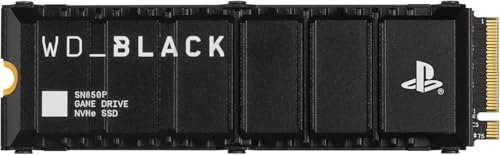
Listing names and images come from Amazon and are rechecked against the live listings; last checked Nov 8, 2026. No prices shown; the current price is on the listing.
About this guide. This guide draws on general knowledge of console hardware and storage standards, not on any specific product documents or reviews. It cannot tell you whether a particular listing matches its advertised speed or compatibility, so verify those details on the seller's page before buying.