Younger kids who want a screen free start fit the Learning Resources Code & Go Robot Mouse Activity Set. Builders who like a project before coding should look at the Teach Tech Mech 5 or the Apitor STEM Coding Robot Toy. The Wonder Workshop Dash Robot starts coding right away without assembly, while the Sphero Mini adds app based games. The Makeblock mBot balances building with Scratch and Arduino coding. The main tradeoff is between a ready to code toy and a kit that teaches through assembly.
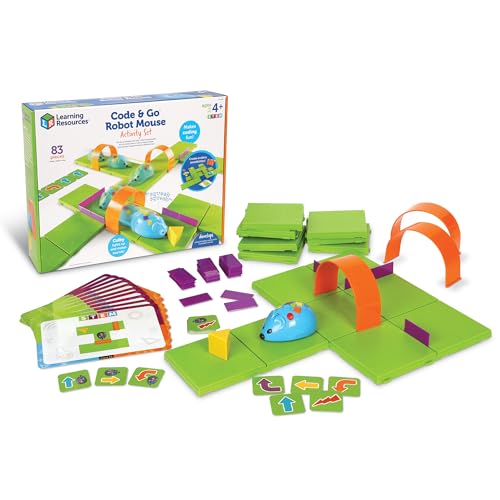
Learning Resources Code & Go Robot Mouse
Best for: Ages 4 and up who need a screen free first coding experience
- Uses simple buttons and coding cards to teach sequencing without a screen.
- Includes maze grids, walls, tunnels, and activity cards for repeatable challenges.
- Designed for ages 4+, with trial and error learning to build confidence.
Keep in mind: Requires 3 AAA batteries, which are not included.
Check price on Amazon ↗
Wonder Workshop Dash Robot
Best for: Kids 6 to 11 who want immediate play with voice commands and apps
- No assembly required, so kids can start coding right out of the box.
- Responds to voice commands and can sing, dance, and navigate obstacles.
- Works with five apps for iOS, Android, and Fire OS, including Blockly and Wonder.
Keep in mind: Does not contain a camera, which may limit some vision based activities.
Check price on Amazon ↗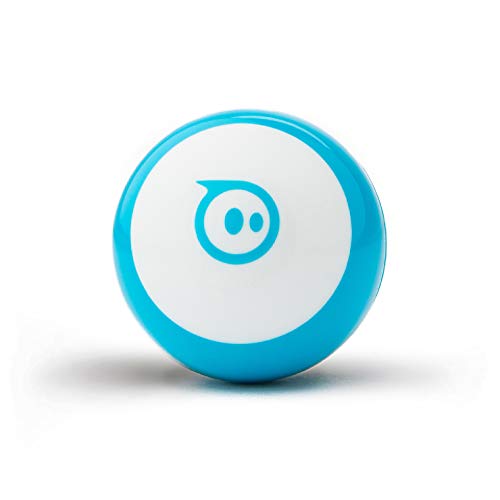
Sphero Mini Robot Ball
Best for: Ages 8+ who like app games and a palm sized robot
- Small size with a gyroscope, accelerometer, and LED lights for programmable movement.
- Code by drawing, drag and drop blocks, or JavaScript in the Sphero Edu app.
- Comes with cones and bowling pins for obstacle course play and app based games.
Keep in mind: Offers about 1 hour of play time per charge.
Check price on Amazon ↗
Makeblock mBot Robot Kit
Best for: Ages 8 to 12 ready to build a robot and learn Scratch and Arduino
- Builds in about 15 minutes with clear instructions, then works as a remote control car.
- Includes line follow and obstacle avoidance functions for in person coding projects.
- Compatible with 100+ electronic modules and 500+ parts, including LEGO pieces.
Keep in mind: Needs 4 AA batteries and a CR2025 battery for the remote, neither included.
Check price on Amazon ↗
Apitor STEM Coding Robot Building Kit
Best for: Kids 7 to 12 who want multiple models from one 480 piece kit
- Builds 6 different models with 480 snap together blocks, no tools needed.
- Icon based app teaches loops, variables, and problem solving for each model.
- Robot moves in all directions and does 360 degree stunts with LED lights.
Keep in mind: Requires 3 AA batteries, which are not included.
Check price on Amazon ↗
Teach Tech Mech 5 Coding Robot
Best for: Ages 10+ who want a mechanical coding challenge without a screen
- Snap coding buttons onto a mechanical wheel to program actions like throw and draw.
- Designed as an entry level mission based robot for learning mechanical engineering.
- Expect multiple hours of build time with detailed step by step assembly instructions.
Keep in mind: Not a preassembled toy; assembly takes time and careful attention.
Check price on Amazon ↗Product names and images come from the Amazon listings and are rechecked against them (last checked Nov 8, 2026). The highlights restate each listing's own bullet points as published on Nov 8, 2026. Prices change often, so we do not show them. These are affiliate links: as an Amazon Associate we earn from qualifying purchases, at no extra cost to you.
What to Check Before Buying
Start with the age range each listing states. The Learning Resources set lists ages 4+, while the Teach Tech Mech 5 is for ages 10+. A toy aimed at older kids may frustrate a younger child, and a toy for younger kids may bore an older one.
Next, look at how the robot is coded. Some use physical buttons and cards, like the Learning Resources mouse. Others use a phone or tablet app with blocks or text, like the Sphero Mini and Dash. Decide whether you want screen free play or app based coding.
Assembly matters too. The Wonder Workshop Dash works right out of the box, but the Apitor kit and Teach Tech Mech 5 are building projects first. Check the listing for build time and the number of pieces.
Finally, note the power source and what is included. Several listings mention batteries not included. The Dash includes a USB charging cable, but the Sphero Mini offers about one hour of play per charge. These details affect how soon the toy is ready to use.
Stated Specs Side by Side
The table below pulls only the attributes each listing actually states. Where a listing does not mention a feature, the cell says Not listed. This makes it easy to see which picks match your child's age, coding style, and building preference.
Age range is the first filter. The Learning Resources mouse is the only one for age 4. Dash and Sphero Mini start at 6 and 8, while the building kits target 7 to 12 or 8 to 12. The Teach Tech Mech 5 is for 10 and up.
Coding method separates the toys. Physical buttons and cards, mechanical wheels, and app based block or text coding are all represented. Assembly time ranges from none for Dash to multiple hours for the Mech 5.
Power source is also stated for most. The Dash has a rechargeable battery with up to 5 hours of play, while others need AA or AAA batteries that are not included. Check the listing before you buy to avoid surprises.
| Product | Stated Age Range | Coding Method | Assembly | Power Source |
|---|---|---|---|---|
| Learning Resources Code & Go Robot Mouse | 4+ | Physical buttons and coding cards | Not listed | 3 AAA batteries (not included) |
| Wonder Workshop Dash Robot | 6 to 11 | Apps with Blockly, Wonder, and voice commands | No assembly required | USB charging cable, up to 5 hours play |
| Sphero Mini Robot Ball | 8+ | Draw, drag and drop blocks, or JavaScript in app | Not listed | About 1 hour play time, charging method not stated |
| Makeblock mBot Robot Kit | 8 to 12 | Scratch and Arduino via software | About 15 minutes | 4 AA batteries and CR2025 for remote (not included) |
| Apitor STEM Coding Robot Building Kit | 7 to 12 | Icon based app with block coding | Snap together, no tools | 3 AA batteries (not included) |
| Teach Tech Mech 5 Coding Robot | 10+ | Mechanical coding wheel with snap on buttons | Multiple hours, detailed instructions | Not listed |
How This Shortlist Was Put Together
The picks were chosen from real Amazon listing data only. We looked at the features each seller states: age range, coding method, assembly, included parts, and power source. No product was handled or used.
We aimed for a spread of designs and sizes. The list includes a screen free mouse, a voice activated robot, a palm sized ball, a quick build kit, a multimodel block kit, and a mechanical coding robot. That covers different learning styles and spaces.
Because we rely on listing text alone, some details are missing. For example, the Teach Tech Mech 5 does not state its power source. If a spec is important to you, check the listing or ask the seller before buying.
Who Should Skip These Picks
If you want a coding robot that works with a specific curriculum or classroom management system, none of these listings mention that. The Learning Resources set mentions classroom STEM centers, but not a particular software platform.
If you need a robot that can be expanded with many sensors or complex mechanical parts, the Makeblock mBot states compatibility with add on packs, but the others do not. The Dash and Sphero Mini are more closed systems.
If your child is under 4 or over 12, most of these toys are outside the stated age range. The Teach Tech Mech 5 is for 10+, but older teens may want a more advanced kit. Check the selection guide on coding robot toys for more options.
If you prefer a toy that does not require a phone or tablet at all, only the Learning Resources mouse and Teach Tech Mech 5 are screen free. The others rely on apps for coding and control. Decide what fits your household rules.
Questions Parents Ask Before Choosing
What is the difference between a screen free coding toy and an app based one?
Screen free toys like the Learning Resources mouse use physical buttons, cards, or mechanical parts to program actions. App based toys like the Dash or Sphero Mini use a phone or tablet to write code or control the robot. Screen free toys may be better for younger kids or limited screen time, while app based toys often offer more coding depth.
Should I buy a preassembled robot or a building kit?
Preassembled robots like the Dash start working immediately, which suits kids who want to code right away. Building kits like the Apitor or Teach Tech Mech 5 add a construction phase that teaches mechanical skills but takes time. Consider your child's patience and interest in building before choosing.
How do I know which coding language or platform is right for my child?
Look at the coding method each listing states. Younger kids may do well with icon based or block coding, like the Apitor app or the Learning Resources cards. Older kids can try Scratch and Arduino with the mBot, or JavaScript with the Sphero Mini. Match the complexity to your child's experience.
Which Coding Robot Fits Your Child
For a 5 year old who has never coded, the Learning Resources Code & Go Robot Mouse is the clear pick because it uses buttons and cards with no screen and is built for ages 4+. For a 10 year old who loves building and wants a mechanical challenge, the Teach Tech Mech 5 offers a multihour assembly and a coding wheel that programs actions without an app. These two cover the youngest and most in person learners, while the Dash and mBot fill the middle ground.
What this guide is. The picks were chosen by comparing the stated features in each listing: age range, coding method, assembly, included parts, and power source. We did not handle or use any unit. Some listings do not state every spec, so those cells are marked Not listed in the table.