The coding style and age fit decide most of it. Screen free bots suit prereaders and shared classrooms; app based kits give deeper coding for ages 7 and up. Buildable sets add engineering but demand patience. Durability and replacement part costs matter as much as the initial price, especially for group use.
Coding Style Sets the Learning Path
Three coding styles dominate this product type. Screen free bots use buttons, tiles, or cards placed in sequence. A child presses Go and watches the robot follow commands. This works for ages 4 to 7 and for classrooms where you cannot hand every child a tablet.
App based kits pair a physical robot with a tablet or phone. Kids drag blocks or write simple code to control movement, lights, and sounds. The screen adds a layer of feedback and lets lessons grow from sequencing to loops and variables. Expect to manage device pairing and battery charging.
Buildable sets add a construction phase before coding begins. Kids assemble the robot from pieces, which teaches mechanics but takes time and can frustrate younger builders. Once built, these often use the same app based coding as nonbuildable kits. Check whether the set can be rebuilt into different forms or stays one design.
Age Fit Is the Fastest Filter
Age recommendations on a listing are a starting point, not a guarantee. A robot labeled for ages 5 and up may still require reading cards or following multistep instructions. Compare the skill needed for the coding style against the child's actual reading and fine motor skills.
For prereaders, screen free bots with large buttons or picture cards work best. For ages 7 to 10, app based block coding holds attention and teaches real logic. For ages 10 and up, look for text based coding options or robots that support Python or JavaScript. A robot that is too young gets ignored after a week; one that is too advanced gets abandoned in frustration.
Classroom use shifts the age question. A mixed age class needs a robot that the youngest can start without help and the oldest can push further. Homeschool families can choose a tighter age fit because one adult supervises and can adapt lessons.
Durability Decides Whether It Survives
These toys fall off tables, roll under couches, and get shared by many hands. A robot with exposed wires, thin plastic joints, or small detachable parts will fail quickly in a classroom or a sibling household. Check the listing for materials: thicker plastic, rubberized edges, and sealed joints hold up better.
For classroom use, look for robots that can be wiped clean and have no fabric parts. For home use, consider whether the robot will be used on hard floors or carpet. Wheels and treads wear differently. Some designs have replaceable shells or bumpers, which extends life without replacing the whole unit.
Battery type matters for long term cost. Built in rechargeable batteries avoid repeated purchases but eventually wear out. Replaceable AA or AAA batteries are cheap now but add up over a year of heavy use. Check whether the battery compartment is child proof or easy to open, depending on your need.
Replacement Parts and Consumables Add Up
A coding robot is not a one time purchase. Many use consumable accessories: activity cards, maze tiles, or sticker packs. Some require a subscription to unlock more lessons in the app. Compare the ongoing cost before choosing a budget priced robot, because a cheap robot with a required subscription can cost more over a year.
Replacement parts matter for buildable sets. Small plastic pins and connectors get lost. Check whether the maker sells spare part packs and whether the price is reasonable. For screen free bots, the most common loss is the command cards or tiles. Some brands let you print replacements from a website, which saves money.
App support is a hidden long term cost. An app that stops receiving updates can make a robot useless after a phone OS update. Check the app's last update date and whether the maker has a track record of supporting older products. This is especially important for classroom purchases that need to last several school years.
Classroom Use Needs Different Checks
A classroom robot must survive group use and fit into a lesson period. Screen free bots work well because they need no device pairing and can be passed between students. App based kits require one device per robot or a rotation schedule, which adds setup time.
Volume pricing and storage are practical concerns. Some robots come in classroom packs with a storage case and extra activity cards. Check whether the robots can be charged or stored in a single container. Cords and chargers for ten robots create clutter; look for designs that charge on a dock or share one cable type.
Noise level matters in a classroom. A robot with loud sounds or a motor that whines will disrupt other groups. Compare the volume ratings if listed, or look for a mute option. For homeschool families, noise is less of an issue, but a robot that beeps constantly will still wear on a parent's patience.
Screen Free or App Based: The Main Tradeoff
Screen free bots trade coding depth for simplicity. A child can start within minutes, and there is no screen time added to the day. But the coding logic stays at sequencing and basic loops. A curious 9 year old will outgrow it in a few months.
App based kits trade setup and screen time for richer lessons. The child learns real programming concepts like variables, conditionals, and debugging. The tradeoff is managing a device, keeping it charged, and accepting more screen time. For a family already limiting screens, this is a real cost.
Buildable sets sit in the middle for coding but add the most setup and cleanup. They work best for a child who enjoys LEGO style building and has patience for a 30 minute assembly before coding starts. For a rainy day, a buildable set can fill an afternoon; for a quick 15 minute activity, a screen free bot is better.
| Design type | Coding depth | Setup effort | Best age | Suits |
|---|---|---|---|---|
| Screen free | Basic sequencing | Minimal | 4 to 7 | Classrooms, quick play |
| App based | Loops, variables | Device pairing | 7 to 12 | Homeschool, solo learning |
| Buildable | Same as app based | Assembly first | 8 to 12 | Rainy days, STEM projects |
| Text based | Python, JavaScript | Device and software | 10 and up | Aspiring programmers |
Use this table as a starting filter. A screen free bot for a 10 year old who already reads will feel like a toy, not a tool. An app based kit for a 5 year old who cannot read will require constant adult help. Match the design type to the child's current skill, not the age printed on the box.
Reading a Listing Before You Buy
Start with the box contents. Does the robot come with activity cards, a charging cable, or a starter maze? A listing that shows only the robot may mean you need to buy accessories separately. Check the images for close ups of the parts, not just lifestyle shots of a smiling child.
Ask the seller about app compatibility before buying an app based kit. Which operating systems does the app support? Does it work offline after download? Some apps require an account and an internet connection for every session, which fails in a classroom with weak Wi-Fi.
For buildable sets, ask how many pieces are in the box and whether the instructions are printed or app only. A set with app only instructions is useless if the tablet battery dies mid build. Also check whether the set can be combined with other sets from the same maker or is a closed system.
Battery details are often buried. A listing that says 'batteries required' without specifying the type or count is a red flag. Check whether the robot uses a common battery size you already have rechargeables for. A robot that uses a rare coin cell battery will be annoying to keep powered.
Mistakes That Lead to a Shelf Robot
The biggest mistake is buying for the age you hope the child is, not the age they are. A robot labeled for ages 8 and up given to a 6 year old leads to frustration and a parent doing all the coding. Check the child's reading level and attention span first.
Another mistake is ignoring the setup time. A buildable set that takes 45 minutes to assemble will not get used on a school night. If the child has short bursts of free time, choose a screen free or app based robot that starts in under five minutes.
Overlooking the ongoing costs is common. A budget priced robot with a required app subscription or expensive replacement cards can cost more than a premium robot over a year. Add up the consumables before comparing initial prices.
Finally, buying a robot that needs a phone or tablet when the household limits screen time creates conflict. A screen free bot may teach less coding but gets used more often. Match the screen policy to the design type, not just the child's interest in robots.
Coding Robot Questions Buyers Ask First
Is a coding robot toy worth it for a 5 year old?
Yes, if you choose a screen free design with large buttons or picture cards. A 5 year old can learn sequencing and cause and effect without reading. Skip app based kits at this age, because the child cannot read instructions or manage a device. Check that the robot has no small detachable parts that could be a choking hazard.
Which coding robot toy works best in a classroom?
Screen free robots work best for most classrooms because they need no device pairing and can be passed between students. Look for durable plastic, a mute option, and the ability to wipe clean. Classroom packs with a storage case and extra activity cards save setup time. If the class has one device per student, app based kits can work but add management overhead.
What is the difference between screen free and app based coding robots?
Screen free robots use physical buttons, tiles, or cards to build a sequence of commands. The robot executes the sequence when you press Go. App based robots pair with a tablet or phone, where kids drag code blocks or type commands. App based kits teach deeper concepts like loops and variables but require a device and add screen time.
Should I buy a buildable coding robot or a prebuilt one?
Buy a buildable set if the child enjoys LEGO style construction and has patience for assembly before coding. Buildable sets add engineering value and work well for rainy day projects. Buy a prebuilt robot if the child wants to start coding immediately or gets frustrated with multistep assembly. Prebuilt designs also have fewer small parts to lose.
How do I compare coding robot toys for long term cost?
Add up consumables and replacements. Screen free bots may need new command cards or tiles. App based kits may require a subscription for advanced lessons. Buildable sets lose small connectors. Check whether the maker sells spare parts and whether the app still receives updates. A cheap robot with expensive consumables can cost more than a premium robot over a year.
Which Coding Robot Fits Your Child
For a child aged 5 to 7 who is new to coding, a screen free robot with large buttons and no required reading is the safest start. It works on a rainy day, in a classroom, and for short attention spans. Choose an app based kit instead if the child is 8 or older, already reads well, and wants to learn real programming concepts like loops and variables. Cooperative board games for family game night make a good offline companion for the same age range.
Real coding robot toy listings, so you can check the points in this guide against actual products. These are affiliate links: as an Amazon Associate we earn from qualifying purchases, at no extra cost to you.
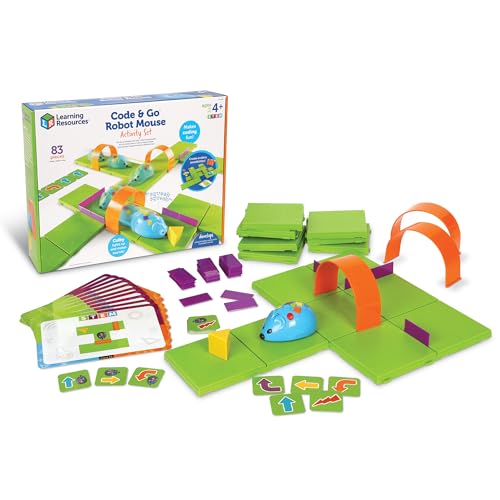 LEARNING RESOURCES Learning Resources Code & Go Robot Mouse Activity Set |…
View on Amazon ↗
 MATATASTUDIO MatataStudio Coding Robot Set for Kids 4+, Screen-Free STEM Programming…
View on Amazon ↗
 THAMES & KOSMOS Thames & Kosmos My Robotic Pet: Coding Chameleon | Robotics…
View on Amazon ↗
Listing names and images come from Amazon and are rechecked against the live listings; last checked Nov 8, 2026. No prices shown; the current price is on the listing.
Scope and limits. This guide explains how to compare coding robot toys by design type, age fit, and long term costs. It is written from general knowledge about the category and does not describe or evaluate any individual model, so check the listing for the exact box contents and dimensions before you buy.