For long gaming sessions, prioritize fit, lens tint, and whether you need prescription support. Small bedrooms and couch players benefit from lightweight frames that stay comfortable for hours. PC beginners should look for low distortion lenses and a mild tint. The main tradeoff is between stronger blue light reduction and color accuracy for games.
Fit Decides Whether You Actually Wear Them
Start with frame width and nose bridge shape. Gaming sessions often run two to four hours, so pressure behind the ears or on the nose becomes obvious quickly. Check the frame measurements on the listing against a pair of glasses you already find comfortable.
Weight matters more for couch players and people who recline. A heavy frame slides forward when you lean back. Look for lightweight materials and rubberized temple tips that grip without squeezing.
Small bedrooms and desk gaming setups often mean you sit close to a monitor. A slightly wider lens gives more downward coverage without forcing you to tilt your head. If you use a headset, check that the temple arms are thin enough to sit under the ear cups without creating a pressure point.
Lens Tint Is a Tradeoff, Not a Feature
Blue light blocking strength comes mostly from the lens tint. Clear lenses block a small portion of blue light, typically in the 10 to 20 percent range for the narrow band that affects sleep. Light yellow and amber tints block more, and deep orange tints block the most.
The tradeoff is color accuracy. Games rely on color cues for health bars, loot rarity, and enemy visibility. A strong amber tint makes whites look yellow and can flatten contrast in dark scenes. If you play competitive shooters or visually rich RPGs, a light tint is usually the safer choice.
For late night sessions where sleep quality is the main concern, a stronger tint helps more. But you may want a separate pair for daytime play, since the color shift feels more intrusive in bright rooms.
Prescription Needs Change the Whole Purchase
If you already wear corrective lenses, nonprescription blue light glasses will make your vision worse. You have two realistic paths: order a pair with your prescription built in, or use clip on blue light filters over your existing glasses.
Clip on filters are cheaper and let you keep your current frame, but they add weight and can introduce reflections between the two lenses. Prescription blue light glasses cost more and take longer to arrive, but they are far more comfortable for daily use.
PC beginners who do not yet know their prescription should get an eye exam first. Straining to see through the wrong lens correction causes more headaches than blue light ever will.
- Nonprescription pairs are for people with 20/20 vision only.
- Clip on filters work but add glare and weight.
- Prescription pairs cost more and take longer to ship.
What a Listing Should Tell You That Most Do Not
Look for the percentage of blue light blocked in the 400 to 450 nanometer range, not just a vague claim. If the listing does not give a number, ask the seller. Reputable brands usually publish a transmission chart or at least a stated block rate.
Check whether the lenses have an antireflective coating. This matters because gaming monitors and overhead lights create glare, and an uncoated lens reflects that glare straight back into your eyes.
Ask whether the frame is returnable if the fit is wrong. Many budget pairs cannot be adjusted by an optician, so if the nose pads are molded into the frame and the width is off, you are stuck with them.
The Mistake That Sends These Glasses to a Drawer
Buying the strongest tint available without testing how it changes your game is the most common failure. A deep orange pair may sound like more protection, but if it makes your favorite game look muddy, you will stop wearing them within a week.
Another mistake is ignoring frame width. Online listings often show a stylish photo but hide the actual lens and bridge measurements. A frame that is too narrow pinches your temples; one that is too wide slides down your nose every time you look down at a keyboard or controller.
Finally, do not assume that more expensive means more effective. The blue light blocking comes from the lens material and tint, not from a brand name or a fancy case. Compare the stated block rate and lens coatings instead of the price tier.
Which Features Are Real and Which Are Marketing
Real features: antireflective coating, stated blue light block percentage, lightweight frame materials, adjustable nose pads, and a warranty that covers lens scratches.
Marketing noise: terms like "gamer tuned spectrum" or "HD clarity" without a number. Also ignore claims that the glasses eliminate eye strain entirely. Blue light contributes to digital eye strain, but so do screen brightness, viewing distance, and blink rate.
One genuinely useful feature for long sessions is a slight magnification in the lower part of the lens, sometimes called a reading boost. This reduces the effort of focusing on a close screen, especially for players over 40. But it is not a substitute for a proper prescription.
Care and Long Term Costs
Lens coatings scratch more easily than the frame. Clean the lenses with a microfiber cloth and lens spray, not your shirt or a paper towel. A scratched antireflective coating creates distracting halos around bright lights.
Budget pairs often need replacing every one to two years as the coating wears. Mid range and premium pairs last longer, but the real long term cost is usually a second pair if you want a clear lens for daytime and a tinted lens for night.
Storage matters. Leaving the glasses on a desk or couch leads to scratches and bent temple arms. A hard case costs little and keeps the frame aligned, which matters for consistent fit.
Design Types Compared
The main design split is between clear, lightly tinted, amber, and deep orange lenses. Each sits at a different point on the color accuracy versus blue light blocking spectrum.
Frame design splits into full rim, semirimless, and rimless. Full rim frames are sturdier and hide thick lenses better. Rimless frames are lighter but more fragile and harder to adjust. For gaming, full rim is usually the safer choice unless weight is your top concern.
| Lens type | Blue block | Color shift | Best for |
|---|---|---|---|
| Clear | Low | None | Daytime competitive play |
| Light yellow | Moderate | Slight warming | Mixed use and streaming |
| Amber | High | Noticeable | Late night sessions |
| Deep orange | Very high | Strong | Sleep focused use only |
The table shows why one pair rarely covers every situation. A clear lens is great for color critical games but does little for sleep. A deep orange lens helps sleep but makes daytime play feel dim and flat.
Couch, Desk, and Small Room Setups Change the Fit
Couch players sit farther from the screen and often recline. This means the glasses need to stay put when your head tilts back, so look for curved temple arms and a snug but not tight fit. A heavier frame is more likely to slide.
Desk players sit close to the monitor and often wear a headset. Thin temple arms that fit under ear cups are a practical requirement. If the arms are too thick, the headset presses the frame into your skull and creates a headache within an hour.
Small bedrooms often have a TV or monitor off to one side rather than directly ahead. A wider lens gives you clearer peripheral vision, so you do not have to turn your whole head to see the minimap. Check the lens height as well; a short lens cuts off the top of the screen when you glance up.
Blue Light Gaming Glasses Questions Worth Asking
Is blue light from gaming monitors actually harmful?
Current evidence does not show that blue light from screens causes permanent eye damage. The more established effect is on sleep, because blue light suppresses melatonin. If you play late at night, reducing blue light exposure can help you fall asleep more easily. For daytime eye strain, brightness and viewing distance matter as much as blue light.
Which lens tint should I choose for gaming?
A light yellow tint is the safest starting point for most players. It blocks a meaningful amount of blue light while keeping game colors recognizable. Clear lenses are best if you play color critical or competitive games during the day. Amber or deep orange tints are better for late night sessions where sleep is the main goal.
Can I wear blue light gaming glasses over my prescription glasses?
You can, using clip on filters or oversized fitover frames. Clip ons are lighter and cheaper but add reflections between the two lenses. Fitover frames are bulkier but more stable. The most comfortable solution is a pair with your prescription built in, though it costs more and takes longer to receive.
Do blue light gaming glasses reduce eye strain?
They can reduce one contributor to eye strain, but not all of it. Screen brightness, glare, viewing distance, and how often you blink all play a role. Glasses with an antireflective coating help with glare, and a mild tint can make bright screens feel less harsh. But they are not a cure for poor monitor setup or long sessions without breaks.
How do I know if a pair will fit before I buy?
Compare the frame measurements to a pair you already own. The key numbers are lens width, bridge width, and temple length. If the listing does not show them, ask the seller. Also check whether the frame has adjustable nose pads, which make fit more forgiving. A return policy that covers fit issues is worth looking for.
The Pair That Fits Most Gaming Setups
A player who games at a desk for two to four hours a day should start with a light yellow tint and a lightweight full rim frame with antireflective coating. This balances blue light reduction with color accuracy and fits under most headsets. A couch player who leans back and plays late into the night should instead pick a slightly heavier frame with curved temple arms and an amber tint, accepting the color shift for better sleep support. For someone who already wears prescription glasses, skip the nonprescription pairs entirely and order the same tint with your correction built in.
Real blue light gaming glasses listings, so you can check the points in this guide against actual products. These are affiliate links: as an Amazon Associate we earn from qualifying purchases, at no extra cost to you.
 TIJN TIJN Gaming Glasses Blue Light Blocking Glasses for Women Men…
View on Amazon ↗
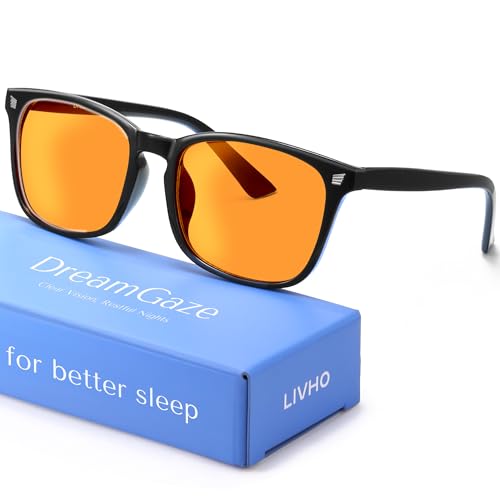 LIVHO livho High Tech Blue Light Blocking Gaming Glasses | Computer…
View on Amazon ↗
 GAMMA RAY OPTICS Gamma Ray Computer Blue Light Blocking Gaming Glasses w/Amber Tint…
View on Amazon ↗
Listing names and images come from Amazon and are rechecked against the live listings; last checked Nov 8, 2026. No prices shown; the current price is on the listing.
How to read this guide. This guide covers blue light gaming glasses as a category, not any individual model. It is written from general knowledge of lens tints, frame materials, and how gaming setups affect fit. Check the lens dimensions and block percentage on any listing before you buy.