The Focusrite Scarlett Solo suits a single XLR mic with Air mode for clarity. The M AUDIO M Track Solo covers podcast and streaming with combo and line inputs. Piyone and MOTU M2 offer two preamps for duets or stereo, while Synido and JOLGOO add switchable monitoring modes and portable builds. The main tradeoff is input count and resolution against monitoring flexibility and size.

Focusrite Scarlett Solo USB-C Audio Interface
Best for: Solo vocalists and guitarists who want Air mode clarity
- One XLR mic preamp and one Hi Z instrument input cover a single voice and guitar.
- Air mode adds extra clarity to acoustic instruments when recording.
- Includes Pro Tools Intro+, Ableton Live Lite, Cubase LE, and Hitmaker Expansion software.
Keep in mind: Only one mic preamp, so a second XLR mic needs another interface.
Check price on Amazon ↗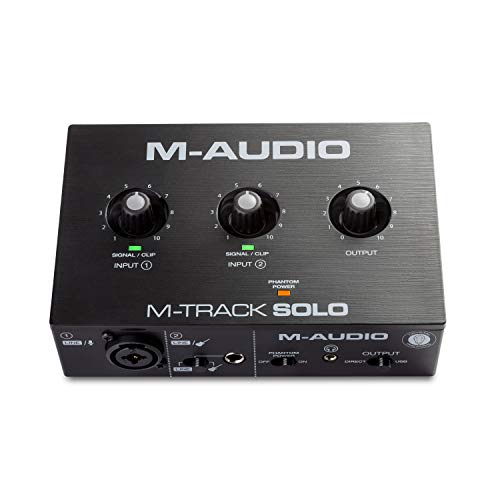
M AUDIO M Track Solo USB Audio Interface
Best for: Podcasters and streamers who need a combo XLR and line input
- One combo XLR/Line input with phantom power plus one Line/Instrument input.
- USB/Direct switch gives zero latency monitoring for fuss free tracking.
- Includes MPC Beats software with Akai Professional production tools.
Keep in mind: 48kHz audio resolution is lower than 192kHz on other picks.
Check price on Amazon ↗
Piyone 2x2 USB-C Audio Interface
Best for: Laptop creators who want two combo inputs and one cable setup
- Two combo jacks accept XLR or TRS, with Hi Z for guitar and 48V phantom power.
- Class compliant USB-C runs on bus power with no driver install.
- Direct Monitor and 3.5mm headphone jack support zero latency tracking with standard headsets.
Keep in mind: LED rings on gain knobs may be bright in dark rooms.
Check price on Amazon ↗
MOTU M2 USB-C Audio Interface
Best for: Mac, Windows, or iOS users who want two preamps and hardware monitoring
- Two preamps and 2 in/2 out USB-C connection handle a mic and instrument together.
- Supports 24 bit/192kHz recording on macOS, Windows, and iOS.
- Hardware monitoring is built in for direct listening without computer delay.
Keep in mind: Listing gives no software bundle details beyond 6+GB of free content.
Check price on Amazon ↗
Synido USB-C Audio Interface
Best for: Mobile phone or computer users who need three monitoring modes
- XLR/6.35mm jacks switch between Line In and Hi Z, with 48V phantom power.
- Stereo, Mix, and USB monitoring modes cover recording, live broadcast, and post edit.
- Weighs 300g and includes a 3.5mm to 6.35mm adapter and USB-C to USB A cable.
Keep in mind: 24 bit/48kHz sampling is lower than 192kHz on other picks.
Check price on Amazon ↗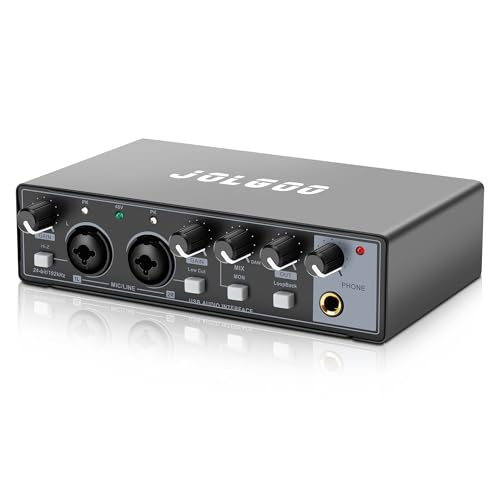
JOLGOO 2x2 USB Audio Interface
Best for: Musicians and podcasters who want dual inputs and rugged portability
- Two XLR/Line combo inputs with independent gain control and LED peak indicators.
- Direct Monitor switch gives zero latency monitoring and USB powered operation.
- Metal housing shields interference, and USB-C and USB A cables are included.
Keep in mind: No iOS/Android cable is listed, though it claims those devices work.
Check price on Amazon ↗Product names and images come from the Amazon listings and are rechecked against them (last checked Nov 8, 2026). The highlights restate each listing's own bullet points as published on Nov 8, 2026. Prices change often, so we do not show them. These are affiliate links: as an Amazon Associate we earn from qualifying purchases, at no extra cost to you.
Inputs and Channels
The Focusrite Scarlett Solo and M AUDIO M Track Solo each accept one XLR microphone and one instrument or line source. That suits a single voice with guitar, bass, or a line level device. If you plan to record two condenser mics at once, those two picks will not work.
Piyone, MOTU M2, Synido, and JOLGOO all list two combo inputs. Piyone and JOLGOO state XLR/TRS combo jacks with Hi Z switching, so a guitar can plug straight in. Synido also lists XLR/6.35mm jacks with Line In/Hi Z switching. MOTU M2 simply says two preamps and 2 in/2 out, so check the connector type on the listing if you need a specific plug.
For a solo podcast or voiceover, one mic input is enough. For a singer who also plays guitar, a two input interface lets you record both at once without swapping cables. Count your sources before you choose.
- One XLR mic input: Focusrite Scarlett Solo, M AUDIO M Track Solo
- Two combo inputs: Piyone, Synido, JOLGOO; MOTU M2 lists two preamps
- Hi Z or instrument switching: Focusrite, Piyone, Synido, JOLGOO; M AUDIO lists Line/Instrument input
Resolution and Sound Quality
Four interfaces list 24 bit/192kHz: Focusrite Scarlett Solo, Piyone, MOTU M2, and JOLGOO. M AUDIO M Track Solo lists 48kHz audio resolution. Synido lists 24 bit/48kHz. Higher sample rates can capture more detail, but 48kHz is standard for podcast and streaming.
Focusrite adds Air mode for extra clarity on acoustic instruments, and its listing mentions high headroom instrument inputs to avoid clipping. M AUDIO mentions its transparent Crystal Preamp for condenser mics. Piyone and JOLGOO both state high performance converters and low noise recordings.
If you mainly record speech or live stream, 48kHz is fine. If you want to record acoustic guitar or vocals for music production, a 192kHz interface gives more headroom for editing. But the difference may not be audible without high end mics and monitors.
- 24 bit/192kHz: Focusrite Scarlett Solo, Piyone, MOTU M2, JOLGOO
- 24 bit/48kHz: Synido
- 48kHz: M AUDIO M Track Solo
Monitoring and Connectivity
Every listing mentions some form of direct or zero latency monitoring. Focusrite has two low noise balanced outputs and a headphone output. M AUDIO has a 1/8 inch headphone output, stereo RCA outputs, and a USB/Direct switch. Piyone has Direct Monitor and a 3.5mm headphone jack.
Synido stands out with three monitoring modes: Stereo, Mix, and USB. Stereo mode gives original input on left and right channels, Mix mode blends input and computer audio for live broadcast, and USB mode monitors computer audio only for post editing. JOLGOO has a Direct Monitor switch, dedicated headphone monitoring, and stereo line outs.
Check what output jacks your headphones or monitors use. The M AUDIO uses 1/8 inch, Piyone and Synido use 3.5mm, and others may need adapters. Also confirm the USB connector: Focusrite, Piyone, and MOTU use USB-C, while M AUDIO, Synido, and JOLGOO include USB-C to USB A cables or adapters.
- Three monitoring modes: Synido only
- USB/Direct zero latency switch: M AUDIO
- Direct Monitor switch: Piyone, JOLGOO
- Hardware monitoring: MOTU M2
Software and Extras
Focusrite Scarlett Solo includes Pro Tools Intro+, Ableton Live Lite, Cubase LE, and Hitmaker Expansion. M AUDIO M Track Solo includes MPC Beats software with Akai Professional tools. MOTU M2 lists 6+GB of free content for macOS, Windows, and iOS.
Piyone, Synido, and JOLGOO do not list bundled DAW software. Piyone is class compliant and driver free. JOLGOO says it works with Audacity, Ableton, and Pro Tools but does not include them. Synido recommends downloading a third party ASIO driver for best DAW compatibility.
If you do not own recording software, the Focusrite bundle is the most complete. If you already use a DAW, a driver free class compliant interface like Piyone or JOLGOO saves setup time. Check the listing for any software that is trial versus full version.
- Bundled DAW software: Focusrite (Pro Tools Intro+, Ableton Live Lite, Cubase LE), M AUDIO (MPC Beats), MOTU (6+GB free content)
- No bundled software listed: Piyone, Synido, JOLGOO
- Driver free or class compliant: Piyone, JOLGOO
Size, Portability, and Build
Synido is the only listing with exact dimensions and weight: 300g and 14 x 11.5 x 4.5 cm. It is compact and portable. Piyone mentions a portable XLR audio interface with USB-C bus power and no external power supply. JOLGOO says compact enough for desktop or mobile rig and has a metal housing.
Focusrite and M AUDIO do not list weight or dimensions, but both are small desktop units. MOTU M2 does not list size or weight. If you travel often, the Synido or JOLGOO with USB power and included cables may be easier to pack.
Metal housings appear on JOLGOO and likely on Focusrite and MOTU, but only JOLGOO states it. Piyone has LED light rings on gain knobs, which could be a style plus or a distraction. Consider where you will use the interface: a bright LED may bother you in a dark room.
- Listed weight and size: Synido (300g, 14 x 11.5 x 4.5 cm)
- Metal housing stated: JOLGOO
- Bus powered USB-C: Piyone, JOLGOO; Focusrite and MOTU use USB-C but do not state power details
Who Should Skip These Picks
If you need four or more microphone inputs for a full band or drum kit, none of these interfaces will work. They all top out at two inputs. Look for a rackmount or desktop interface with four or more preamps.
If you use ADAT or S/PDIF to expand channels, these listings do not mention digital I/O. Check the selection guide linked at What Separates an Audio Interface That Lasts From One That Hums for durability and noise checks before you buy.
If you need MIDI I/O for hardware synths, none of these listings state MIDI ports. Some larger interfaces include MIDI, but these six do not. Confirm that on the listing if you need it.
If you record on an iPad or iPhone, only Focusrite and MOTU list iOS compatibility. Piyone says Mac and PC only, while Synido and JOLGOO mention mobile phones but do not specify iOS or Android. Check the listing for your exact device.
What to Confirm Before Buying
Check the cable type and included accessories. Some listings include USB-C to USB A cables or adapters, others do not. If your computer has only USB A ports, you may need an adapter for a USB-C interface.
Confirm phantom power if you use condenser mics. All six list 48V phantom power, but the switch location and whether it applies to both inputs varies. For two condenser mics, make sure both channels get phantom power.
Look at the monitoring outputs. If you use studio monitors with balanced TRS or XLR cables, check the jacks. The M AUDIO has RCA outputs, which are unbalanced. Others may have 1/4 inch or 3.5mm outputs.
Read the software license terms. Some bundles include trial versions or require registration. If you already own a DAW, a driver free interface may be simpler. If you are new, the Focusrite bundle gives you several full or intro versions to start.
| Interface | Inputs | Max Resolution | Phantom Power | Monitoring | Bundled Software |
|---|---|---|---|---|---|
| Focusrite Scarlett Solo | 1 XLR, 1 Hi Z | 24 bit/192kHz | Yes | 2 balanced outputs, headphone | Pro Tools Intro+, Ableton Live Lite, Cubase LE, Hitmaker Expansion |
| M AUDIO M Track Solo | 1 combo XLR/Line, 1 Line/Instrument | 48kHz | Yes | 1/8 inch headphone, RCA, USB/Direct | MPC Beats |
| Piyone 2x2 | 2 XLR/TRS combo | 24 bit/192kHz | Yes | Direct Monitor, 3.5mm headphone | Not listed |
| MOTU M2 | 2 preamps (2 in/2 out) | 24 bit/192kHz | Not listed | Hardware monitoring | 6+GB free content |
| Synido | 2 XLR/6.35mm | 24 bit/48kHz | Yes | 3 modes: Stereo, Mix, USB | Not listed |
| JOLGOO 2x2 | 2 XLR/Line combo | 24 bit/192kHz | Yes | Direct Monitor, headphone, line outs | Not listed |
Questions to Ask Before You Pick
Do I need two inputs, or is one enough?
If you only record one microphone at a time, a single input like the Focusrite Scarlett Solo or M AUDIO M Track Solo works. If you want to record a vocal and guitar simultaneously, or two mics for an interview, choose a two input interface like Piyone, MOTU M2, Synido, or JOLGOO.
Is 48kHz good enough, or do I need 192kHz?
For podcasting, streaming, and voiceover, 48kHz is standard and sounds clear. For music production where you may pitch or stretch audio, 192kHz gives more resolution. The audible difference is small, so prioritize input count and monitoring over sample rate unless you do detailed editing.
Can I use these with an iPad or iPhone?
Focusrite Scarlett Solo lists macOS, Windows, and iPadOS compatibility. MOTU M2 lists macOS, Windows, and iOS. The other listings mention PC, Mac, or mobile but do not state iOS specifically. Check the listing for your exact device before buying.
Which One Should You Get?
A singer songwriter who records one vocal and one guitar at a time gets the Focusrite Scarlett Solo for its Air mode clarity, high headroom instrument input, and full software bundle. A podcaster who wants to switch between a mic and a line level source, like a mixer or phone, should take the M AUDIO M Track Solo for its combo XLR/Line input and USB/Direct zero latency switch. If you need two condenser mics for interviews or duets, the Piyone 2x2 gives two combo jacks, 24 bit/192kHz, and a driver free USB-C setup in a compact body.
About this guide. The picks were chosen by comparing the listing details for inputs, resolution, phantom power, monitoring, and bundled software, and by covering a spread of designs from single input to two input and from 48kHz to 192kHz. The comparison uses listing text only and does not handle or connect any units, so no audio performance was measured or heard.