Focus on input count, preamp quality, and driver stability. Guitarists and singers often need one or two good inputs, while podcasters may want four. A cheap interface can record fine, but noisy preamps or flaky drivers ruin sessions. The main tradeoff is clean sound and low latency against desk space and price.
Count Inputs Before You Count Features
An audio interface is a box that turns microphone and instrument signals into audio your computer can record. The number of inputs decides what you can capture at the same time. A solo singer with one condenser microphone needs only one input with phantom power. A guitarist recording a live amp plus a room microphone needs two. A podcast with two hosts and occasional guests often needs four.
Check the back panel and the listing photos, not just the headline number. Some interfaces advertise four inputs but only two have microphone preamps; the other two are line level for keyboards or drum machines. If you plan to record drums with multiple microphones, look for eight mic inputs or a unit that can expand over ADAT.
Phantom power is usually switched in groups of four or all channels at once. That is fine for most condenser microphones, but ribbon microphones can be damaged by phantom power, so a per channel switch is safer if you mix microphone types on one session.
Preamps Set the Noise Floor
The preamp boosts the tiny signal from a microphone to a level the converter can read. Cheap preamps add hiss when you turn the gain up for a quiet source like a spoken voice or a fingerpicked acoustic guitar. Compare the equivalent input noise figure in the listing if it is given; lower is cleaner, but most manufacturers do not publish it. Instead, look for a gain range of at least 50 dB and a low cut filter to remove rumble.
Dynamic microphones like the Shure SM7B need a lot of gain. Some interfaces run out of clean gain around 45 dB, which forces you to add an inline booster. If you record quiet sources with dynamic mics, check the maximum gain figure and any mention of low noise at high gain settings.
Instrument inputs matter for guitar and bass. A high impedance input, often marked Hi Z, keeps the pickups from sounding dull. If the interface has a combo jack, the instrument input usually engages only when you plug in a quarter inch cable, but check the front panel controls.
Drivers Decide Whether You Keep the Interface
Driver software is the invisible link between the interface and your recording program. A stable driver means no pops, clicks, or sudden disconnects. A bad driver makes even an expensive interface unusable. On Windows, look for a dedicated ASIO driver from the maker, not a generic one. On macOS, most interfaces use the built in Core Audio driver, so stability is more consistent across brands.
Buffer size controls latency, the delay between playing a note and hearing it in your headphones. A lower buffer size gives less delay but demands more from your computer. A good driver lets you run a 64 or 128 sample buffer on a midrange laptop without crackling. If the listing does not mention driver updates or compatibility with your operating system, ask the seller before buying.
Round trip latency is the total time for a signal to go in, through the computer, and back out. For recording while monitoring through software effects, anything under 10 milliseconds feels immediate. Many interfaces offer direct monitoring, which routes the input straight to your headphones without going through the computer, so latency disappears. Check for a direct monitoring switch or knob if you record vocals or guitar with effects in your software.
Design Types Split on Power and Portability
Most budget interfaces are bus powered, meaning they draw power from the USB or Thunderbolt cable. These are portable and simple but have limited power for preamps and headphone amps. A desktop interface with a wall power supply can run hotter preamps and drive high impedance headphones louder. If you record in different rooms or travel to a friend's studio, bus power is convenient. If the interface stays on a desk, AC power gives more headroom.
Connection type matters for compatibility and speed. USB-C is common on new computers, but many interfaces still use USB A cables. Thunderbolt offers lower latency and more bandwidth, but only works on computers with a Thunderbolt port. Check the cable included in the box; some bus powered interfaces need a specific cable to avoid power issues.
A small dongle style interface with one input and a headphone jack can be enough for a laptop singer songwriter. It is cheap and disappears into a bag. But the preamp and headphone amp are often noisier and weaker than a desktop unit. If you plan to record every week, the extra money for a proper desktop interface pays off in fewer retakes.
| Design type | Power source | Typical inputs | Noise floor | Suits |
|---|---|---|---|---|
| Tiny dongle | Bus powered | 1 to 2 | Higher hiss | Travel, quick demos |
| Portable desktop | Bus powered | 2 to 4 | Moderate | Bedroom producers, podcasters |
| Full desktop | AC power | 4 to 8+ | Lowest | Multimic sessions, drum recording |
The table shows a general pattern: more power and space allow cleaner preamps and more inputs. A portable desktop unit is the sweet spot for most home recorders.
Read the Listing for What It Does Not Say
Many listings lead with software bundles, loop libraries, or a free DAW. Those are nice extras but they do not tell you if the interface sounds clean or works with your computer. Scroll past the bundle graphics and look for the actual specifications: sample rate, bit depth, gain range, and driver compatibility.
Check the sample rate and bit depth. Most interfaces record at 24 bit/96 kHz or higher. That is enough for any home recording. A higher number like 192 kHz is not a reason to pay more unless you do sound design that slows down audio drastically. The quality of the preamp matters more than the sample rate.
Look at the headphone output power. If you record loud drums or play bass through headphones, a weak headphone amp makes it hard to hear yourself. The listing may state output power in milliwatts; a higher number drives headphones louder without distortion. If it is not listed, ask the seller.
Confirm what is in the box. Some interfaces ship without a USB cable or with only a short one. Some include a software license code that expires if you do not register it. If you need a specific cable length or an iOS adapter, check before you order.
Skip the Interface You Do Not Need
If you only record one microphone or one instrument at a time, a large interface is wasted desk space and money. A small two input unit covers guitar, vocals, and podcasting for one or two people. Buy more inputs only when you have a concrete plan to use them, like recording a full drum kit or a band live.
Some buyers do not need an interface at all. A USB microphone has a built in converter and plugs straight into the computer, which works for solo podcasting or video calls. But a USB microphone cannot record two sources at once and cannot connect a guitar or studio monitor speakers. If you plan to expand later, an interface gives you room to grow.
If you already have a mixer with USB output, it may already work as an interface. Check whether the mixer sends individual tracks to the computer or only a stereo mix. For multitrack recording, a dedicated audio interface is usually simpler and cleaner.
The Habit That Ruins Recordings
Gain staging is turning up the preamp enough to capture a healthy signal without clipping. Many beginners set the gain too low, then boost the volume in software and hear hiss. Others set it too high and the loud parts distort. A simple rule: aim for peaks around -12 to -6 dB on the meter while recording. Leave headroom for the loudest note.
Leaving phantom power on when you plug in a microphone can damage some ribbon mics. Turn phantom power off before connecting or disconnecting any microphone, then turn it on only for condenser mics that need it.
Unplugging a bus powered interface while the recording software is running can crash the driver or corrupt a take. Always close your recording program before disconnecting the interface, or use the software's disconnect command if it has one.
Audio Interface Questions Worth Asking Before You Buy
How many inputs do I need for guitar and vocals?
Two inputs cover a guitarist who sings at the same time: one for a microphone and one for the guitar pickup or a second microphone. If you record guitar and vocals separately, one input is enough. Add more inputs only if you plan to record multiple people or a drum kit at once.
Is a cheap audio interface good enough for podcasting?
For a single host with a dynamic microphone, a budget interface with one clean preamp is usually fine. The key is enough gain for the microphone. Some dynamic mics need 55 to 60 dB of gain, which cheap interfaces may not deliver without noise. Check the gain range before buying.
What is the difference between a USB microphone and an audio interface?
A USB microphone has the converter built in, so it plugs directly into the computer. An interface lets you connect standard XLR microphones, instrument cables, and studio monitors, and it can record multiple sources at once. An interface is more flexible if you plan to upgrade microphones or add a second input.
Do I need a Thunderbolt audio interface?
Thunderbolt offers lower latency and more stable performance, but it only works on computers with Thunderbolt ports. For most home recording, a USB-C or USB A interface is fast enough and costs less. Choose Thunderbolt only if you record many tracks at once with software monitoring or your computer has limited USB ports.
How do I compare audio interface preamps?
Look at the maximum gain and the equivalent input noise if the listing provides it. Higher gain with less noise is better for quiet sources. Also check for a low cut filter and phantom power. If the numbers are not listed, compare the price and the power source: AC powered interfaces often have cleaner preamps than tiny bus powered ones.
Which Audio Interface Should You Get
A guitarist who records vocals at a desk gets the most value from a two input bus powered desktop interface with dedicated instrument inputs and a direct monitoring switch. It records cleanly, fits on a small desk, and costs less than a multiinput unit. If you record a full drum kit or a band live, skip the two input box and buy an eight input interface with ADAT expansion, even though it costs more and takes up more space.
Real audio interface listings, so you can check the points in this guide against actual products. These are affiliate links: as an Amazon Associate we earn from qualifying purchases, at no extra cost to you.
 FOCUSRITE Focusrite Scarlett 2i2 4th Gen USB-C Audio Interface | 2…
View on Amazon ↗
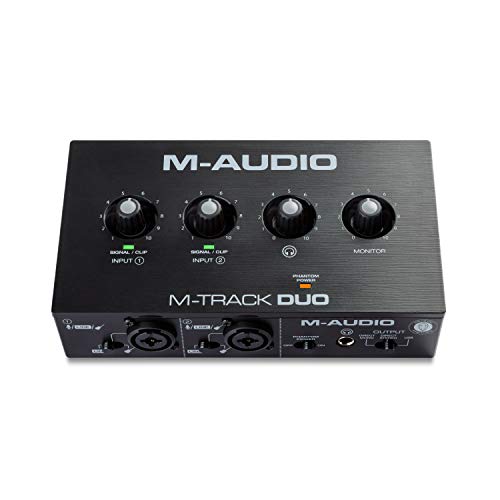 M AUDIO M-AUDIO M-Track Duo USB Audio Interface | Dual XLR, Line…
View on Amazon ↗
 UNIVERSAL AUDIO Universal Audio Volt 2 Gen 2 USB Audio Interface
View on Amazon ↗
Listing names and images come from Amazon and are rechecked against the live listings; last checked Nov 8, 2026. No prices shown; the current price is on the listing.
What this guide is. This guide explains what to look for across the audio interface category, from input count to driver stability. It does not evaluate individual models, and no product documents, reviews, or tests were used, so check any dimension on the listing before you order.