Battery habits and control style decide more than screen size or brand. Pick a tiny clip player for runs and pockets, or a larger touchscreen model for desktop and bedside use. The main tradeoff is between compact battery endurance and a screen big enough for easy browsing. Match the interface to where you will actually use it.
Where You Play Decides the Form
Clip players are the smallest type. They weigh almost nothing, attach to a collar or waistband, and run for days on a charge. Their screens show only a line or two, so you browse by button memory rather than by cover art. That suits runs, walks, and pockets.
Pocket players sit in the middle. They have a screen large enough for album lists and cover art, but they still fit in a jacket or bag. Battery life usually lands around a day or two of continuous playback, so they need a charging habit.
Desktop streamers are the largest type. They have touchscreens sized for browsing a full library from a desk or bedside table. Many run on wall power and act as a dedicated offline source, which removes battery anxiety but kills portability.
Battery Habits Matter More Than Specs
A clip player often lasts several days between charges. A touchscreen pocket player may need charging every day or two, and a desktop streamer may not run on battery at all. Think about how often you want to plug in.
Check the listing for continuous playback time, not standby time. Standby numbers look impressive but do not reflect real listening. Also check how long a full charge takes, because a slow charge can be more annoying than a short battery.
Some players charge over USB-C, which is convenient if you already carry that cable. Others use proprietary connectors, which means carrying a dedicated cable. Older models may still use micro USB. Verify the port before buying.
| Form | Battery habit | Control style | Best for |
|---|---|---|---|
| Clip player | Days per charge | Physical buttons | Runs, pockets, hands free |
| Pocket player | 1 to 2 days | Touchscreen or hybrid | Commutes, desk, bedside |
| Desktop streamer | Wall powered | Large touchscreen | Fixed listening spot |
Buttons Beat Touchscreens in a Pocket
Physical buttons let you skip tracks without looking, which matters when the player is in a pocket or clipped to a shirt. Touchscreens need eyes and a free hand, so they work better on a desk or table.
Some pocket players use a hybrid: a small touchscreen plus a few hardware buttons for play, pause, and volume. That gives you quick control while keeping a larger display for browsing.
If you plan to use the player while running or walking, prioritize a tactile click. A smooth touch surface can be hard to operate with sweaty fingers or through a jacket.
Storage Setup Shapes Your Library
Built in storage is simple but fixed. If you buy a player with 16 gigabytes and later want more, you cannot upgrade it. Expansion card slots let you add capacity, but you must buy the card separately and manage files across two locations.
Clip players often have modest built in storage, sometimes 8 or 16 gigabytes, which holds a few thousand compressed tracks. Pocket players may offer 32 gigabytes or more built in, and some add an expansion slot.
Check the file formats the player supports. A player that handles FLAC gives you lossless quality but uses more space per track. A player limited to MP3 and AAC is fine for compressed libraries but cannot play high resolution files.
File Management Is the Hidden Chore
Most offline players need you to load files from a computer. Some mount as a simple USB drive where you drag folders over. Others require companion software that scans and syncs a library, which adds a step every time you add music.
Ask whether the player reads tags or folder names. If it ignores tags and sorts only by file name, a messy folder structure becomes your navigation system. If you have a large library, tag support matters more.
Some players support playlists created on the device, while others only play playlists made on a computer. If you rely on playlists, verify how they transfer before buying.
Features Worth Paying For, and Ones to Skip
A good clip mechanism is worth paying for. A cheap clip can snap off or fail to hold onto thick fabric. A headphone jack is still standard on most players, but some newer models omit it in favor of Bluetooth only, which limits your wired headphone options.
Bluetooth is useful for wireless earbuds, but it drains battery faster than wired playback. If you mostly listen at home with wired headphones, a Bluetooth only player may be overkill.
Skip marketing around equalizer presets unless you actually adjust sound. Most presets just boost bass or treble in ways that are easy to replicate with a basic tone control. Also skip claims about app ecosystems unless you plan to stream from the device, because most offline players do not need an app.
Water resistance matters for runners, but the rating varies. A splash resistant player can handle light rain, while a fully waterproof one can survive a drop in a puddle. Check the IP rating and do not assume all clip players are water resistant.
Mistakes That Lead to a Dusty Player
Buying the largest screen when you only listen while running is a common error. A big touchscreen is useless if you never look at it, and it shortens battery life.
Ignoring the charging port is another. A proprietary cable that is easy to lose can turn a good player into a paperweight on a trip. USB-C is more future proof.
Assuming every player handles album art is a third mistake. Some clip players show only text, which is fine for buttons but disappointing if you expect cover flow. Check the screen resolution and interface style before committing.
Forgetting to check the maximum card size on expansion slots can also backfire. Some players cap cards at 32 gigabytes even if larger cards exist. Verify the listed limit.
A Checklist to Hold Against Any Listing
Before you buy, run through these checks on the product page. First, confirm the battery life in continuous playback hours, not standby. Second, identify the charging port and whether a cable is included.
Third, check the storage: built in amount and whether an expansion slot exists, plus the maximum card size. Fourth, verify the supported file formats, especially if you have FLAC or high resolution files.
Fifth, look for the control layout. A photo of the buttons or a description of the touchscreen tells you how you will skip tracks. Sixth, ask the seller about playlist transfer and whether the player reads tags or folder names.
Seventh, confirm the clip or case design if you plan to wear it. A flimsy clip is a dealbreaker for runners. Eighth, check the IP rating if you exercise outdoors. Finally, compare the weight and dimensions against where you will carry it.
Music Player Questions Before You Buy
How long does a clip music player battery last?
Most clip players run for several days of continuous playback on a single charge, often 20 to 50 hours depending on volume and Bluetooth use. Check the listing for continuous playback time rather than standby time, which is much longer but not realistic for listening.
Can I use a music player without a computer?
Most offline players require a computer to load files, either by dragging folders over USB or through companion software. A few players support direct downloads from a phone or tablet, but that is rare. Verify the transfer method before buying if you do not own a computer.
What is the difference between a clip player and a pocket player?
A clip player is very small, clips to clothing, uses physical buttons, and lasts for days on a charge. A pocket player has a larger screen for browsing albums, often a touchscreen, and needs charging every day or two. Choose based on whether you need to look at the screen while using it.
Is a desktop music player worth it?
A desktop streamer makes sense if you have a fixed listening spot like a desk or bedside table and want a large touchscreen for browsing a big library. It usually runs on wall power, so you never worry about battery. It is not portable, so skip it if you want to listen on the move.
Which file formats should a music player support?
MP3 and AAC cover most compressed libraries. If you have FLAC or other lossless files, check that the player lists those formats. Some players also support WAV and OGG. A player that only handles MP3 cannot play high resolution files, so match the format list to your actual library.
Which Music Player Fits Your Listening Spot
A commuter who listens with wired earbuds and hates daily charging should get a clip player with physical buttons and USB-C. It lasts for days and clips to a jacket or bag without demanding attention. A home listener who keeps a player on a nightstand and wants to browse a large library by cover art should instead choose a desktop streamer with a touchscreen and wall power. That second setup gives up portability for a screen you can actually use.
Real music player listings, so you can check the points in this guide against actual products. These are affiliate links: as an Amazon Associate we earn from qualifying purchases, at no extra cost to you.
 AGPTEK AGPTEK 64GB USB C MP3 Player with Bluetooth, A59 Music…
View on Amazon ↗
 RUIZU RUIZU 64GB Clip MP3 Player with Bluetooth 5.3, USB-C ,…
View on Amazon ↗
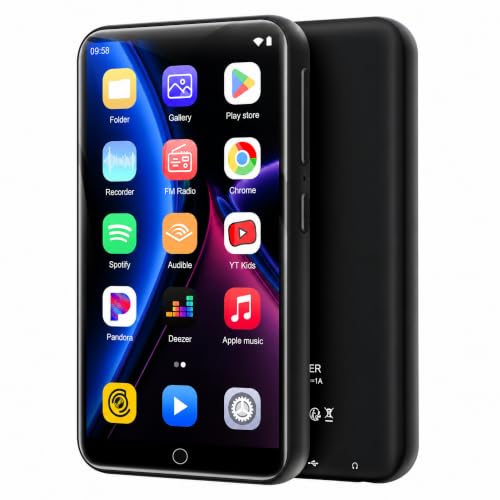 ZAQE MP3 Player with Bluetooth & WiFi, Android 10 Music Player…
View on Amazon ↗
Listing names and images come from Amazon and are rechecked against the live listings; last checked Nov 8, 2026. No prices shown; the current price is on the listing.
How to read this guide. Use this guide as a checklist to hold against any product listing, not as a verdict on a specific model. It is written from general category knowledge, not from individual product documents or tests, so verify dimensions, battery claims, and file support on the seller's page before you commit.