For most workshop and maintenance work, match the optical resolution to your target size and get a model with adjustable emissivity. A 12:1 distance to spot ratio and a 0.10 to 1.00 emissivity range cover most metal, painted, and matte surfaces. The main tradeoff is between a wide fixed emissivity for quick checks and an adjustable one for accurate readings on reflective metal.
The spot size ratio decides what you actually measure
Every infrared thermometer reads an area, not a point. The distance to spot ratio, written as 8:1 or 12:1, tells you that circle's diameter at a given distance. A 12:1 model held 12 inches from a surface reads a 1 inch circle.
If your target is smaller than that circle, the sensor averages in whatever sits behind it: a hot motor housing behind a small bearing, a cold wall behind a pipe. Check the ratio in the listing and calculate the spot size at your usual working distance.
Machinists measuring a small end mill or a bolt head need a higher ratio, often 20:1 or 30:1. A field technician walking past rows of electrical panels can work with 8:1, because the panels are large and the distance is short.
| Typical ratio | Spot at 12 inches | Best for | Weakness |
|---|---|---|---|
| 8:1 | 1.5 inch circle | Large panels, tanks, quick walkarounds | Reads background behind small parts |
| 12:1 | 1 inch circle | Motors, pipes, general maintenance | Still too wide for bolts or narrow fittings |
| 20:1 | 0.6 inch circle | Small components, tight machine areas | Harder to aim without a dual laser |
| 30:1 | 0.4 inch circle | Precision fabrication, small targets at distance | More expensive, sensitive to hand shake |
A dual laser design helps by showing the actual spot diameter, not just a center dot. Compare the listing's stated ratio with the spot diagram, because some sellers show a small center dot for a wide measurement circle.
Emissivity is the setting that separates good readings from wrong ones
Emissivity is how well a surface emits infrared energy. Painted surfaces, wood, and rubber sit near 0.95, the fixed setting on many budget models. Bare aluminum, stainless steel, and copper sit far lower, often 0.10 to 0.40.
A fixed 0.95 thermometer pointed at shiny stainless reads a temperature far below reality, sometimes by hundreds of degrees. The fix is either an adjustable emissivity setting or a piece of matte tape or paint on the surface.
For a machine shop with mixed metals, adjustable emissivity is not optional. For a maintenance tech who checks painted motor housings and electrical panels, a fixed 0.95 model is faster and gives consistent readings.
Check the listing for the emissivity range. A range of 0.10 to 1.00 means the thermometer can be set for bare metal. A range of 0.85 to 1.00 is only slightly better than fixed and still misreads most shiny metal.
Temperature range must match your hottest and coldest work
A kitchen style thermometer tops out around 400 or 500 degrees Fahrenheit. A machine shop checking a bearing after a run, a brake rotor, or a steam line needs far more headroom, often up to 1,000 degrees or more.
Cold storage checks go the other direction. A thermometer that reads down to -40 degrees covers most freezers and outdoor winter work. Check both ends of the range against your actual processes, not just the headline maximum.
Response time matters less than the range for most buyers. A reading that takes one second instead of half a second is fine for a walkaround, but a range that clips at the top gives you no reading at all on your hottest part.
Fixed versus adjustable emissivity changes how you work
A fixed emissivity thermometer is a point and shoot tool. You pull the trigger, read the number, and move on. It works on painted surfaces, anodized aluminum, rubber, wood, and most matte materials.
An adjustable emissivity thermometer adds a step. You set the number to match your surface, either from a chart or by comparing against a contact probe. Skip that step and the reading on bare metal is wrong.
For a shop with one dominant surface, like powder coated parts, fixed 0.95 is enough. For a shop that measures raw steel, aluminum, copper, and painted surfaces in the same day, adjustable is the only way to trust the number.
Some models offer preset emissivity values for common materials. This is a middle ground: faster than typing a number, but still limited by the presets included.
Laser count and display features are less important than they look
A single laser marks the center of the measurement area, not its edge. A dual laser shows the actual spot diameter, which helps when you must know exactly what the sensor sees.
Backlit displays, min and max capture, and data hold are useful on a dark factory floor or when you cannot see the screen while aiming. These features add cost but do not change the accuracy of the reading itself.
Bluetooth or USB data logging matters only if you must document readings for a maintenance log or a quality check. For most walkaround uses, a written note or a photo of the screen is enough.
Ignore claims about speed to read or color coded alarms as accuracy features. They are conveniences. The number on the screen is only as good as the spot size and emissivity setting behind it.
A contact probe or thermal camera may serve you better
An infrared thermometer struggles with shiny metal, small targets, and surfaces behind glass or plastic. A contact thermocouple probe reads the same surface directly and ignores emissivity entirely.
A thermal camera shows a whole area at once, which helps when you hunt for a hot breaker, a failing bearing, or an air leak. It costs far more and has lower temperature accuracy on a single point.
If your work is mostly small, shiny, or enclosed parts, skip the infrared thermometer and buy a contact probe. If you need a quick scan of large, painted, or matte surfaces, the infrared thermometer is the faster tool.
Field technicians who open an electrical panel and scan for a hot connection are the ideal user. Precision fabricators measuring a small polished part are not, unless they pair the infrared unit with matte tape or a high ratio and adjustable emissivity.
How to read a listing before you buy
Look for the distance to spot ratio in the specifications, not just in the product title. A listing that says 'laser thermometer' without a ratio tells you nothing about what it measures.
Check the emissivity range. If the listing says only 'adjustable' without the range, ask the seller for the low end. A range that starts at 0.85 cannot read bare aluminum correctly.
Verify the temperature range in both directions. A listing that highlights only the maximum may hide a minimum that does not cover your cold storage or outdoor winter checks.
Ask for the spot size at your working distance if the ratio is unclear. A 12:1 model at 24 inches reads a 2 inch circle, which may swallow the fitting you aimed at.
Care and long term costs stay simple
These thermometers need almost no consumables. The main ongoing cost is a battery, usually a 9 volt or two AAA cells. Check the listing for the battery type and whether it is included.
Keep the lens clean. Dust, oil mist, or fingerprints on the sensor window scatter infrared energy and shift the reading. A soft cloth and occasional lens cleaner are enough.
Calibration drifts slowly over years, especially after drops. If your readings start to disagree with a known reference, like boiling water or a contact probe, the unit may need professional calibration or replacement.
Store the thermometer in a case or pouch, not loose in a tool bag where the lens can scratch. A scratched lens reads low and cannot be fixed at home.
Infrared Thermometer Questions That Come Up Before You Buy
Is an infrared thermometer accurate on shiny metal?
Only if the emissivity setting matches the metal. Bare aluminum, stainless steel, and copper have low emissivity, often 0.10 to 0.40. A fixed 0.95 model reads these surfaces far too low. Use an adjustable emissivity setting, or apply matte tape or paint to the surface and measure that instead.
What is a good distance to spot ratio for machine shop work?
For small parts like bolts, end mills, or bearing housings, look for 20:1 or higher. At 12 inches, a 20:1 model reads a 0.6 inch circle. A 12:1 model reads a 1 inch circle, which often includes background surfaces and skews the reading. Calculate the spot size at your usual distance.
Which infrared thermometer is best for electrical panels?
A fixed 0.95 emissivity model with a 12:1 ratio works well for scanning breakers, connections, and bus bars. Panels are large and close, so the spot size is forgiving. Painted and plastic surfaces read correctly at 0.95. A dual laser helps you see exactly where the sensor is aimed.
Should I buy an infrared thermometer or a thermal camera?
Buy an infrared thermometer for spot checks on a single target: a motor, a bearing, a pipe. Buy a thermal camera when you need to scan a whole panel, wall, or machine for hot spots. The camera shows gradients across an area; the thermometer gives one number with better single point accuracy.
How do I know if my infrared thermometer is reading correctly?
Compare it against a known reference. Boiling water reads near 212 degrees Fahrenheit at sea level if you point at the water surface with emissivity set to 0.95. An ice bath reads near 32 degrees. For metal, compare against a contact probe on the same surface at the same time.
The Infrared Thermometer to Pick for Your Shop or Field Kit
A maintenance tech who checks motors, panels, and painted surfaces all day should buy a 12:1 model with adjustable emissivity from 0.10 to 1.00 and a dual laser. That covers large targets and shiny metal without slowing the walkaround. A machinist measuring small, polished parts needs a 30:1 ratio and a short wavelength sensor, or a contact probe instead.
Real infrared thermometer listings, so you can check the points in this guide against actual products. These are affiliate links: as an Amazon Associate we earn from qualifying purchases, at no extra cost to you.
 TEMPPRO TempPro TempScan Infrared Thermometer Gun for Pizza Oven Griddle HVAC…
View on Amazon ↗
 ETEKCITY Etekcity Infrared Thermometer Laser Temperature Gun 774 | Cooking, Pizza…
View on Amazon ↗
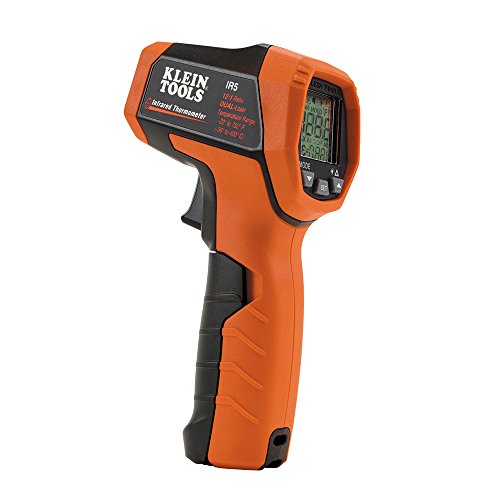 KLEIN TOOLS Klein Tools IR5 Infrared Thermometer with Dual Targeting Laser, 12:1…
View on Amazon ↗
Listing names and images come from Amazon and are rechecked against the live listings; last checked Nov 8, 2026. No prices shown; the current price is on the listing.
How to read this guide. This guide covers the category of infrared thermometers, not individual models. It is written from general knowledge of how these devices work; no product documents, reviews, or tests were used, and any dimension should be verified on the listing.