Disc support and connection ports decide most of the experience. A player with 4K upscaling and Ethernet suits a home theater, while a compact unit with Wi-Fi fits a bedroom TV. The main tradeoff is between disc durability and streaming convenience, so check the ports and apps before you commit.
Read the Ports Before the Feature List
HDMI is nonnegotiable, but the version matters. Look for HDMI 1.4 or later for 1080p, and HDMI 2.0 for 4K upscaling. A coaxial or optical audio output lets you connect an older receiver that lacks HDMI.
A USB port turns the player into a media hub for photos and downloaded files. Ethernet beats Wi-Fi for stable 4K streaming, so choose a player with a wired port if your router is nearby.
Check the region code before you buy. North American players are region A for Blu-ray and region 1 for DVD. A region locked player cannot read discs from Europe or Asia.
Disc Formats Set the Ceiling
Every Blu-ray player reads DVDs and CDs, but not every player reads 4K Ultra HD Blu-ray discs. If your TV is 4K and you want the sharpest image from physical discs, you need a player that explicitly supports Ultra HD Blu-ray.
A standard Blu-ray player still upscales DVDs to 1080p or 4K, but the result depends on the player's processor. Compare the upscaling chip mentioned in the listing, not the marketing phrase on the box.
For most collections, a standard Blu-ray player is enough. Reserve Ultra HD support for a large TV and a growing library of 4K discs.
- DVD: lowest resolution, widest compatibility, upscales to look acceptable
- Blu-ray: 1080p, most common for movies and TV box sets
- 4K Ultra HD Blu-ray: highest disc quality, requires a 4K TV and HDMI 2.0
Smart Features Are Secondary, Not a Dealbreaker
Built in apps for Netflix or Prime Video are convenient, but a streaming stick often does the same job better. If you already own a stick or a smart TV, ignore the app list on the Blu-ray player.
Players with app support need regular firmware updates. A discontinued model may lose access to streaming services even though disc playback still works.
The disc drive is the part that lasts. Prioritize a quiet drive and a responsive remote over a long list of apps.
Upscaling and Picture Processing
Upscaling converts a DVD's 480p signal to match your TV's resolution. Good upscaling reduces jagged edges and softness, but it cannot add detail that was never on the disc.
4K upscaling on a standard Blu-ray player is useful for a 4K TV. The result is usually cleaner than letting the TV do the upscaling, because the player processes the signal before it reaches the screen.
Look for a player that lists a dedicated video processor, not just '4K upscaling'. The processor name gives you a way to compare models without seeing them side by side.
Setup and Long Term Costs
A Blu-ray player needs a stable surface and good airflow. Stacking it under a hot receiver shortens the disc drive's life.
Replacement remotes are cheap, but a broken disc drive is not worth repairing. Treat the player as a replaceable component, not a long term investment.
There are no consumables, but firmware updates require an internet connection. A player with a USB port can update from a downloaded file if you prefer to stay offline.
Who Should Skip a Blu-ray Player
If you stream everything and own fewer than twenty discs, a streaming stick is smaller, cheaper, and faster. A Blu-ray player only makes sense when you regularly watch physical media.
For a second room TV, a used DVD player or a streaming stick may be enough. Reserve a Blu-ray player for the main viewing area where picture quality matters.
If you travel often, a portable Blu-ray drive for a laptop is more useful than a set top player.
Common Mistakes That Lead to Returns
Buying a player without checking the region code is the fastest way to a return. Region A discs only work in region A players, and the listing may not state this clearly.
Assuming every player has Wi-Fi is another frequent error. Some budget models are disc only, with no network connection at all.
Overpaying for 4K Ultra HD support when the TV is only 1080p wastes money. The player will downscale the 4K signal anyway.
Ignoring the audio outputs strands older sound systems. A player without optical or coaxial audio cannot connect to a receiver that predates HDMI.
How the Design Types Compare
Basic disc players keep the price low but skip smart features. Streaming ready models add Wi-Fi and common apps. 4K upscaling models improve picture quality on newer TVs. Full smart hubs try to replace your streaming stick.
Use this table to match the design to your setup. The tradeoff graphic above shows the same types on a spectrum from disc durability to streaming convenience.
| Design type | Disc support | Streaming apps | Best for |
|---|---|---|---|
| Basic disc player | DVD, Blu-ray | None | Large existing disc collection, no smart TV |
| Streaming ready | DVD, Blu-ray | Common apps | One device for discs and occasional streaming |
| 4K upscaling | DVD, Blu-ray | Varies | 4K TV with many DVDs to improve |
| Full smart hub | DVD, Blu-ray, often 4K | Extensive | Replacing a streaming stick and disc player at once |
A full smart hub often costs more than a basic player plus a separate streaming stick. Compare the combined price before deciding.
Questions to Ask the Seller on Renewed Listings
On a renewed listing, ask whether the remote and power cable are included. Some listings ship the player only, which adds cost and frustration.
Ask about the disc drive's condition. A refurbished player with a worn drive may skip or freeze on scratched discs.
Confirm the firmware version and whether the player has been reset to factory settings. An old firmware can block streaming apps until updated.
Blu-ray Player Questions Worth Asking Before You Buy
Can a Blu-ray player play DVDs and CDs?
Yes, every Blu-ray player reads standard DVDs and audio CDs. The player automatically detects the disc type. Some models also read recordable discs like BD R and DVD R, but check the listing if you burn your own media.
What is the difference between upscaling and native 4K?
Native 4K means the disc itself contains a 4K signal, which requires an Ultra HD Blu-ray player. Upscaling means the player converts a lower resolution DVD or standard Blu-ray to match a 4K TV. Upscaling improves sharpness but cannot add detail that was never recorded.
Do I need internet access to use a Blu-ray player?
No, disc playback works without any internet connection. Internet is only needed for streaming apps, firmware updates, and some bonus features on certain discs. A basic disc only player will work fine fully offline.
Are Blu-ray players region locked?
Yes, most players are locked to a region. North America uses region A for Blu-ray and region 1 for DVD. A region locked player cannot read discs from another region unless the listing specifically states it is region free.
Which connection is best for a Blu-ray player, HDMI or component?
HDMI is the only connection that carries both high definition video and audio in one cable. Component cables are an older analog option that supports 1080p but no 4K. For any modern TV, use HDMI.
The Blu-ray Player That Fits Most Living Rooms
A disc collector with a 4K TV and a stack of DVDs gets the most from a 4K upscaling player with Ethernet. It improves old discs and streams reliably. But if you only own a handful of Blu-rays and already have a smart TV, a basic disc player saves money and does the same core job. For that setup, skip the smart features entirely.
Real blu ray player listings, so you can check the points in this guide against actual products. These are affiliate links: as an Amazon Associate we earn from qualifying purchases, at no extra cost to you.
 SONY Sony UBP-X700U 4K Ultra HD Home Theater Blu-ray DVD Player…
View on Amazon ↗
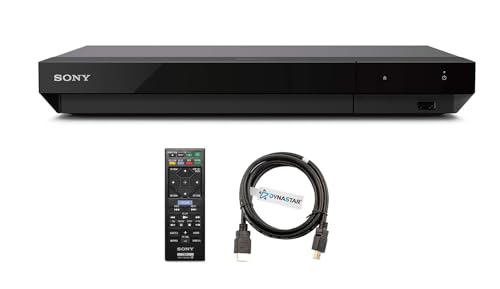 DYNASTAR Region Free 4k UHD Blu-ray Player Compatible with Sony UBP-X700U…
View on Amazon ↗
 KROVATAR Krovatar 4K UHD Blu-ray Disc Player with Bluetooth Function |…
View on Amazon ↗
Listing names and images come from Amazon and are rechecked against the live listings; last checked Nov 8, 2026. No prices shown; the current price is on the listing.
How to read this guide. This guide covers the Blu-ray player category as a whole and does not evaluate individual models. It is written from general knowledge of how these players work, so verify any dimension or port on the product listing before buying.